ArcGIS Image Dedicated is a managed SaaS solution designed to manage, serve, process, and analyze imagery and raster data directly from Azure or AWS cloud storage. Esri oversees the dedicated servers, computing infrastructure, and software, ensuring scalability.
ArcGIS Image Dedicated is updated quarterly, with new features and improvements released every three months. The June 2025 release also introduces enhancements and features to improve functionality, which are detailed in the following sections. For the latest updates, visit the Esri Community page dedicated to ArcGIS Image Dedicated.
Dynamic and Tiled Imagery
- ArcGIS Server 11.5 support: New Dynamic and Tiled Imagery Servers can be created using ArcGIS Server version 11.5. Existing Dynamic and Tiled Imagery Servers can be easily upgraded to version 11.5. We recommend upgrading to benefit from access to the latest performance enhancements, imagery service improvements, and security updates, ensuring your deployment stays current, efficient, and supported. To upgrade to version 11.5, submit an upgrade request. Click on … for the server that needs an upgrade. From the drop-down list, click Upgrade Server Version. Fill out the Upgrade Server Request form as prompted and click ‘Upgrade Server’. The ArcGIS Image Dedicated team will set up a server using a defined DNS name and notify you via email. Within the 7-day trial period, you should test and confirm if the DNS swap should be performed or place a hold due to an identified issue. After the DNS swap, the old server will be deleted.
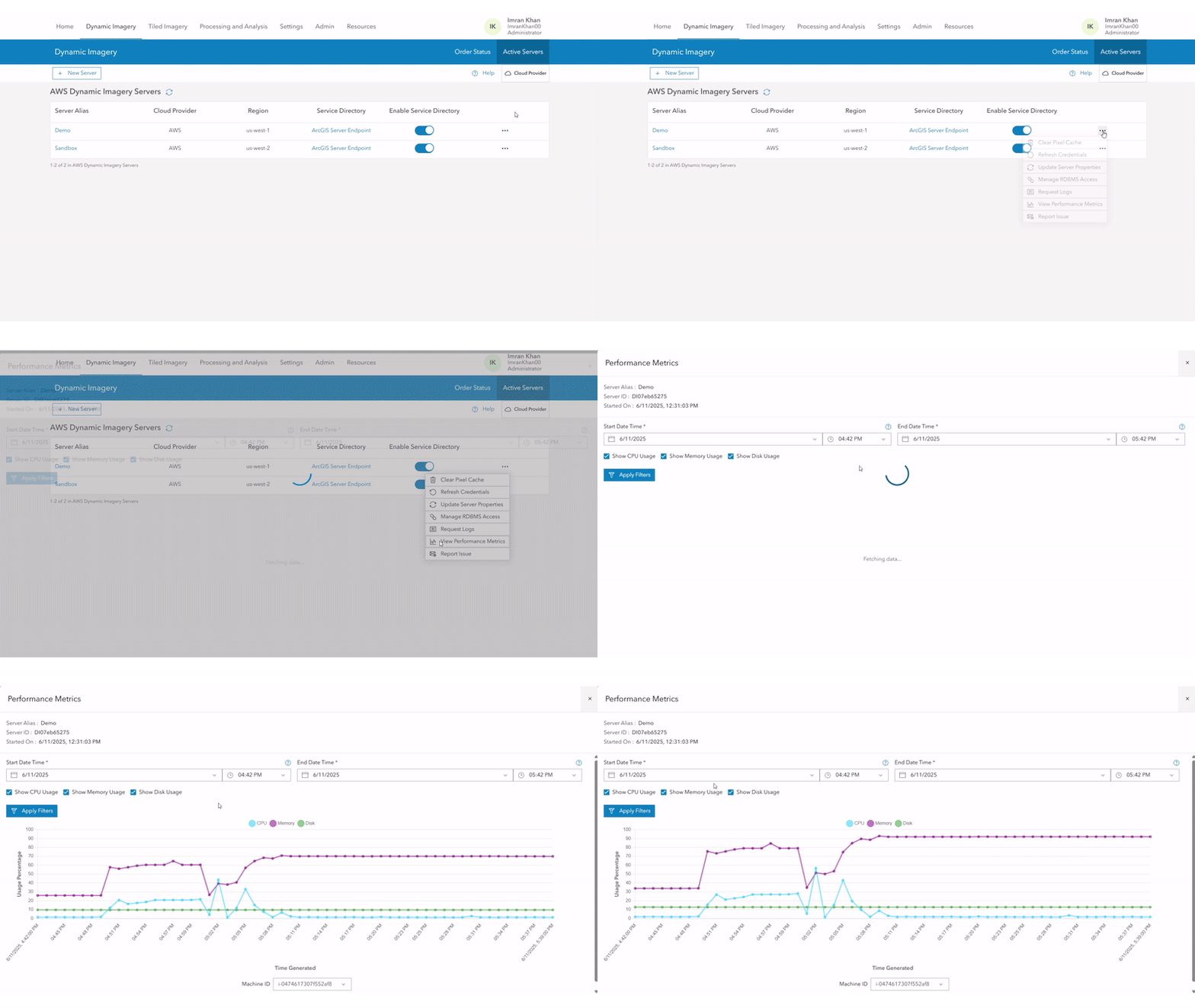
- Real-Time Performance Metrics for Imagery Servers: The Imagery Server Performance Metrics feature (available in ArcGIS Server version 11.5 onwards) provides real-time insights into the resource usage of each machine powering your imagery services within an Auto Scaling Group. It offers detailed, per-instance graphs for average CPU, Memory, and Disk utilization, updated every minute through a lightweight monitoring agent. This feature is designed to help you monitor imagery server workloads, balance workloads, optimize performance, and proactively maintain seamless service delivery. You can benefit from:
-
- Real-Time Monitoring: View up-to-the-minute resource usage data for each instance.
- Customizable Filters: Filter metrics by resource type and select custom time ranges.
- Historical Data: Access up to 7 days of past performance metrics.
- Performance Optimization: Identify peak usage periods and make data-driven decisions about scaling and resource allocation.
- Managed RDBMS support for Dynamic Imagery Server: The Managed RDBMS offering eliminates the need for you to provision and maintain database infrastructure. You are provided a fully managed RDBMS (PostgreSQL) database server and a pre-configured enterprise geodatabase (.sde) connection file, allowing effortless integration with Pro Machine for mosaic dataset creation and direct publishing to a Dynamic Imagery Server. The key benefits are
- Enterprise-grade reliability on supported cloud platforms (AWS and Azure).
- Fully managed PostgreSQL RDBMS with no user-side setup or maintenance required.
- Simplified publishing workflow using. sde connection files and Pro machine.
- Support for publishing the Reference Mosaic Datasets.
- Support for regular (for example, daily) updating of Mosaic datasets.
- Improved performance in handling large mosaic datasets without manual file transfers.
Pro Machine Enhancements
- ArcGIS Pro 3.5 Support: ArcGIS Pro 3.5 is now the default version, with continued support for versions 3.1 and later, ensuring you have access to the latest features and enhancements of ArcGIS Pro. Staying aligned with the latest supported versions ensures your tools work seamlessly together, also giving you better performance, access to the recent features, and critical security updates.
- Upgraded CPU instances in AWS: Starting with ArcGIS Pro 3.5, CPU instances have been upgraded from m5d to m6id in AWS, providing improved performance, storage capacity, and efficiency. m6id is the default choice. Upgrading to newer CPUs enhances your experience even further, delivering faster processing, lower latency, and more cost-effective performance, especially when handling complex geospatial tasks.
- Fallback instance support: Ensures seamless deployment and availability across regions, even when the preferred instance types are not supported.
- G6 Instance: If the G6 instance type is not available in a region, the system will automatically fall back to using a G4dn instance.
- M6id Instance: If the M6id instance type is not available in a region, the system will automatically fall back to using an M5d instance.
Processing and Analysis
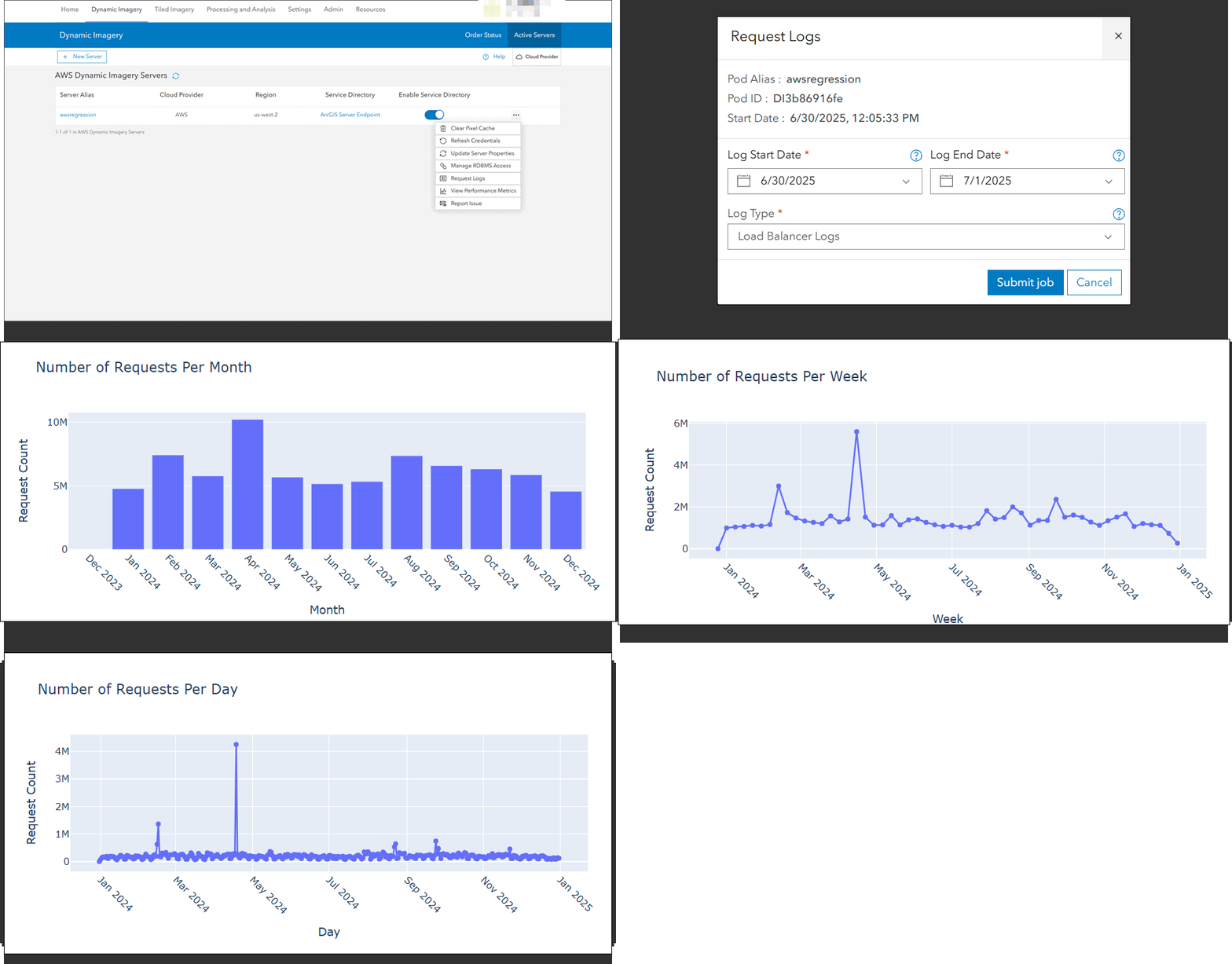
- Log Management Geoprocessing Endpoints for Enhanced Analysis: Two Log Management Geoprocessing Endpoints, namely ArcGIS Server Logs (Beta) and Load Balancer Logs (Beta), are now available. You can submit jobs to process ArcGIS Server Logs (Beta) and Load Balancer Logs (Beta). These tasks analyze specified log files within a defined time range and generate output in Parquet file format for further analysis. You can then run Python notebooks on the Parquet file to extract key insights, such as service requests, service methods, request types, elapsed time, and number of users. These endpoints offer a scalable and automated solution for analyzing large volumes of operational logs. They enable the detection of trends, identification of performance bottlenecks, and recognition of anomalies—ultimately enhancing service reliability and operational efficiency.
Improved User Experience
- Automatic refresh: The app now automatically refreshes after 3 minutes of inactivity to maintain up-to-date information. This guarantees that users always view the most up-to-date state of the environment, minimizing confusion caused by outdated or stale information.
- Upgrade to recent versions of ArcGIS Pro: With the launch of ArcGIS Pro 3.5, older versions such as ArcGIS Pro 2.9 and 3.0 are no longer available in the app for creating Pro machines. This ensures the use of the latest enhancements, optimizations, and functionalities offered in the recent versions. This fosters consistency, enhances performance, and strengthens security by encouraging users to leverage the latest features and improvements available in ArcGIS Pro.
- RDBMS Management interface: This interface enables you to create, configure and monitor RDBMS settings based on specific requirements. It simplifies database management by reducing the need for manual setup.
Want to learn more?
Get started by familiarizing yourself with the resources outlined below.
Article Discussion: