Esri’s Community Maps Program adopts user data worldwide to improve and update our vector basemaps. One way users can contribute to Community Maps is with the Community Maps (CM) Editor app. Our Editor App gives users the option to create details such as sports fields, landscaping, buildings, points of interest, and more to enhance your basemap. As of today, editors have improved thousands of basemap locations around the world. Who are the editors you might ask? Me, you, a student, a professor, a city or county GIS worker, a business… anyone can edit in the app. It is openly accessible as long as you have an ArcGIS Online account! In the app, commonly enhanced areas of interest include university campuses, schools and parks, major league stadiums, and hospitals…but what about an entire city?
The City of Round Rock, Texas, located just under 30-minutes from Austin, is an Editor App powerhouse. City IT employees, and interns, were early adopters of the application when it first went live in 2019, and continue to use the app today. With the app, Round Rock has added detail to hundreds of locations across their city, transforming their basemap into a rich resource that is used by departments city-wide.
Let’s explore how Round Rock is putting their basemap to work!
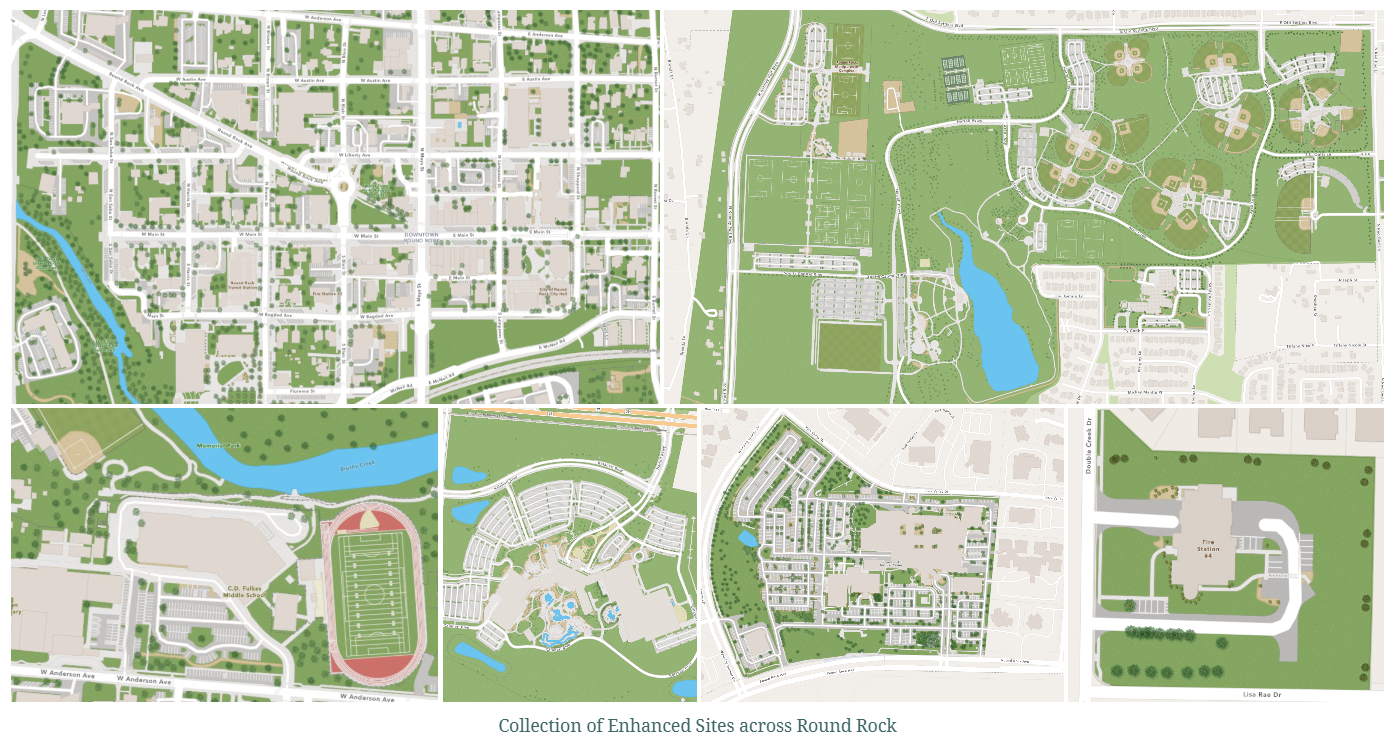
Why Use the CM Editor?
Keeping the basemap up to date with real-world changes is easy in the app. Editors improve their basemap at their own pace, with the option to use their community’s imagery. This flexible approach creates more detailed and valuable maps without requiring a city-wide update.
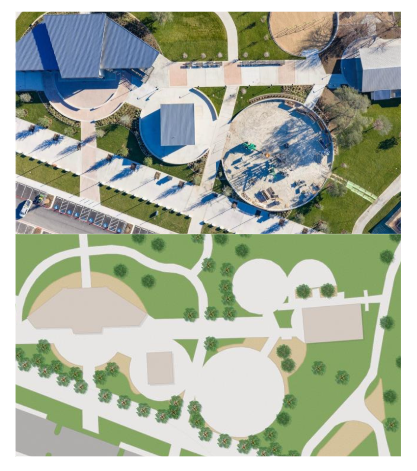
Joanne Land Playground in Old Settler’s park is a great example of speedy updates. When the park reopened in April 2026 after renovation, Round Rock didn’t have to wait long to see it reflected on the map. Within a month, the playground had been fully digitized in the Community Maps Editor and published to Esri’s vector basemaps. Once published, the enhanced basemap was immediately available in Round Rock’s Park Amenity Explorer, showcasing playground areas, walking paths, buildings, and landscaping.
Find more Round Rock transformations here!
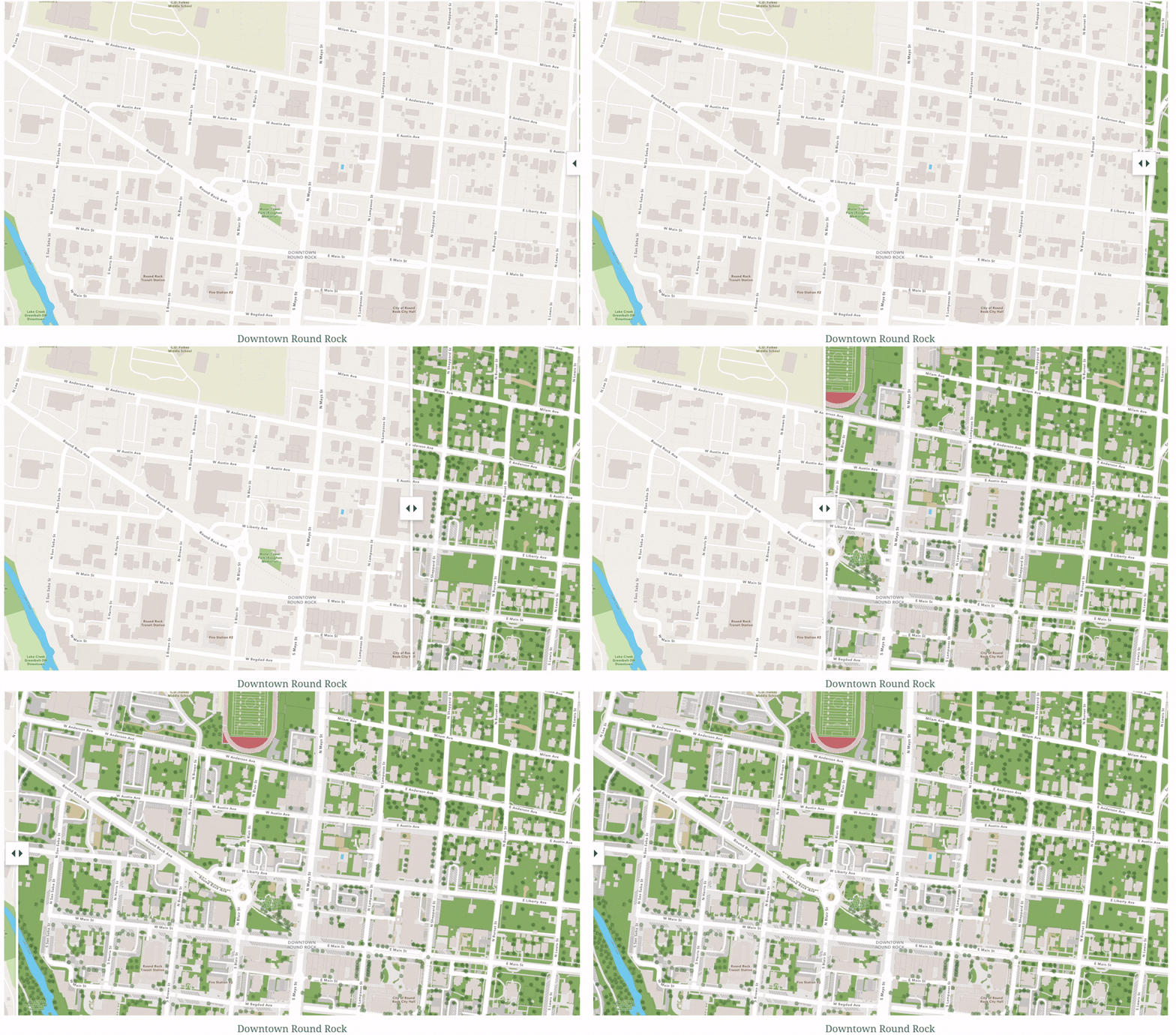
Consistent contributions to Esri’s Community Maps Program have helped create a feature-rich basemap experience for both our citizens and staff. Coupled with the power of the Vector Tile Style Editor, we’re able to tailor the basemap to fit each web map and app’s specific needs.
What Does a City Do with All of That Detail?
The more detailed basemaps are, the more valuable and versatile they become. Enhancements to Esri’s basemaps empower Round Rock to:
- Make informed decisions – City employees rely on CityView for critical decision making. The application is also available to the public!
- Improve public services – Round Rock has tailored their basemap with extreme detail. Using Esri’s Vector Tile Style Editor they can emphasize details they want to highlight in a basemap. Such as in their Downtown Parking App where users can check the available number of parking spots in each lot in downtown Round Rock in real time!
- Understand and support the communities they serve – City workers, and residents, can use this Floodplain Inquiry app to identify properties that exist in known flood zones. Benefiting city risk management and reduction for residents.
Highly detailed basemaps have endless uses! Explore how Round Rock is putting their basemap to work with the CityView app, and follow this storymap experience for more examples!
CityView
Click on the layers tab in the app to explore a plethora of essential city information! Web apps such as these improve public services and provide essential information for departments throughout the city.
Interested in enhancing your community’s basemap using the Community Maps Editor? Get started by joining our AGOL group, and following our learn path. Reach out to CommunityMaps@esri.com to request a demo!
Related Resources
Community Maps Editor Group Page
Community Maps Editor Tutorial Series


Article Discussion: