ArcGIS Solutions helps you make the most of your GIS by providing purpose-driven, industry-specific configurations of ArcGIS.
Natural disasters and other domestic emergencies are growing more frequent and severe, threatening communities across the nation. When these events occur, rapid mobilization of personnel and equipment to stabilize communities, restore services, and ensure public safety is vital. The National Guard plays a critical role in these efforts, but the unpredictable and sometimes last-minute nature of these deployments adds strain to forces already facing complex challenges. To succeed, forces must quickly organize operations, track resources, and maintain clear communication in environments where every second counts and conditions can change in an instant.
Limited access to technology and small technical staffs compound these challenges, making it difficult to coordinate responses rapidly and maintain adequate situational awareness during operations. Without easily adoptable tools that can quickly deliver answers, leadership risks delays in decision-making and gaps in response readiness.
Esri’s Civil Support solution can help National Guard units overcome these challenges by providing a streamlined approach to managing military domestic operations. It enables them to coordinate taskings, personnel, and resources effectively, ensuring rapid response and informed decision-making when it matters most.
Enhance operational planning and coordination
Your organization can use the solution’s tailored apps to map out operational elements and track response preparedness.
Get the operational layout
When the state Emergency Management Authority issues a request for emergency help, National Guard leaders must quickly assign and task units. Understanding unit disposition and location is critical to these decisions. You or your operations staff can use the Civil Support Home and Operations Manager app to locate unit headquarters and document important information, such as each unit’s steady-state command, activation date, and unit point of contact.
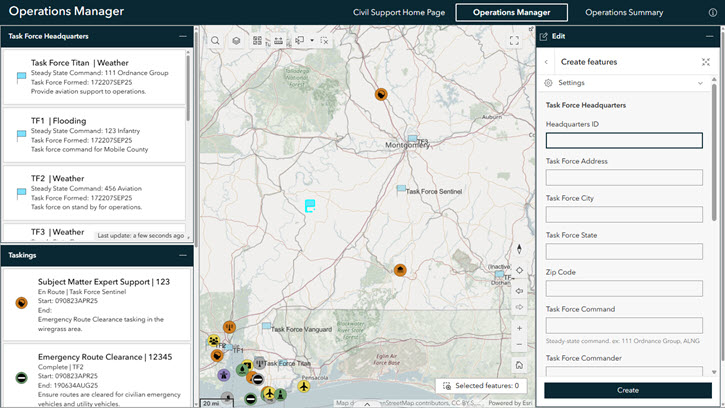
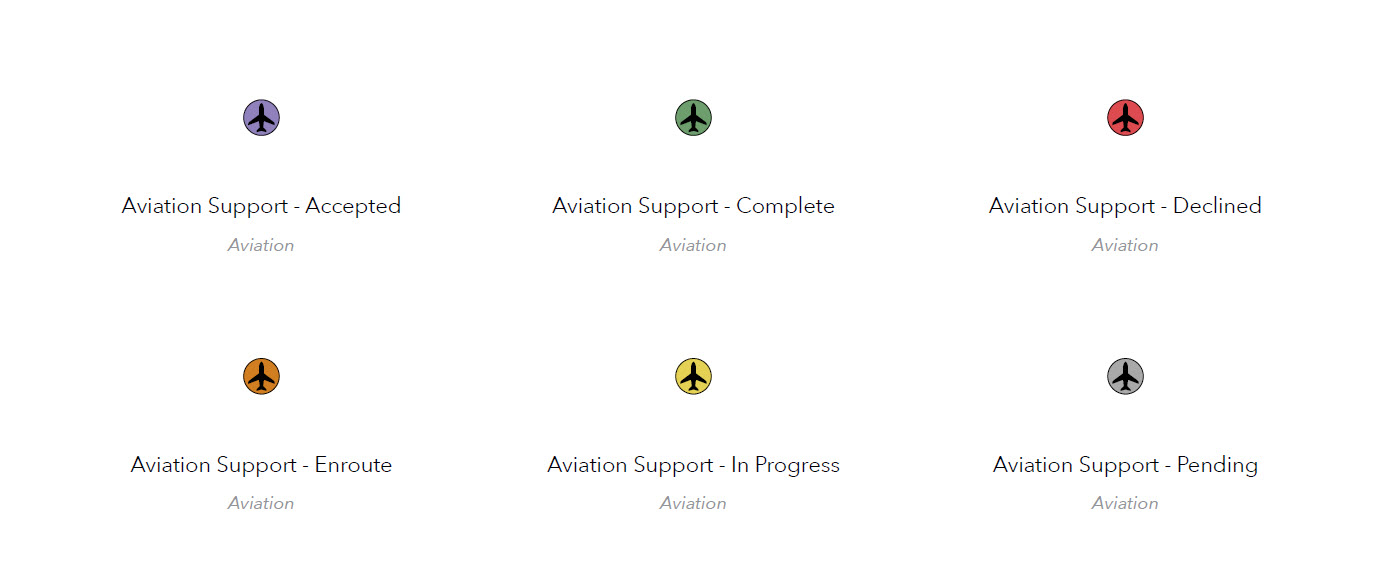
After you document task forces, you’ll use the same workflow to submit taskings and assign them to the units. Then, after you’ve assigned a tasking to a task force headquarters, you’ll complete information like the tasking type, its status, and start date. The Taskings layer symbology is built to convey the tasking type and status at a glance—the icon in the center represents what kind of tasking is at the given location, and the surrounding circle’s color signifies what stage the tasking is in. No need to click around or scroll to try and find the most crucial information; it’s right on the map. It’s also important to note that updating and deactivating task forces and taskings are done using the same workflow, so there’s no guesswork when the time comes and the operational landscape changes instantly.
Ensure operational readiness
Leadership must understand each unit’s personnel and equipment availability to ensure that each unit can meet its operational needs during a domestic operation. The solution supports this critical endeavor with two apps: Personnel Manager and Logistics Manager.
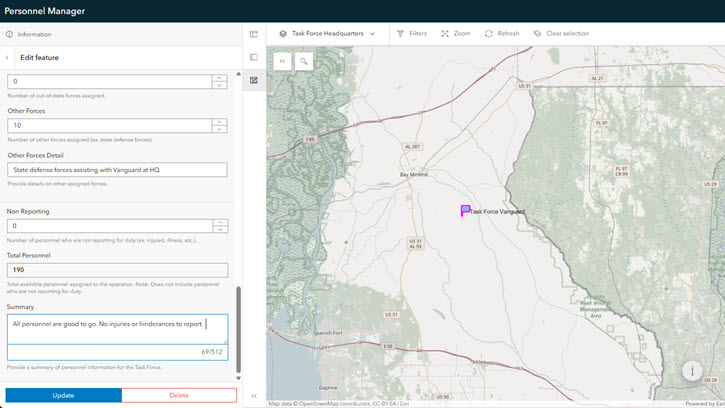
With the Personnel Manager app, your administrative staff can easily submit personnel counts by category: guardsmen, active duty, other supplementary forces, and any personnel who cannot report. Similarly, your logistics staff can use the Logistics Manager app to submit equipment counts for vehicles, aircraft, and generators. This information empowers your organization to respond rapidly and effectively to operational demands, optimizing available resources.
Gain and maintain situational awareness
During domestic operations, leaders rely on situational awareness to make informed, timely decisions. Civil Support helps your organization summarize operations and monitor response efforts, enabling your team to maintain accountability, make informed decisions, and ensure units achieve their objectives.
Deliver contextual understanding
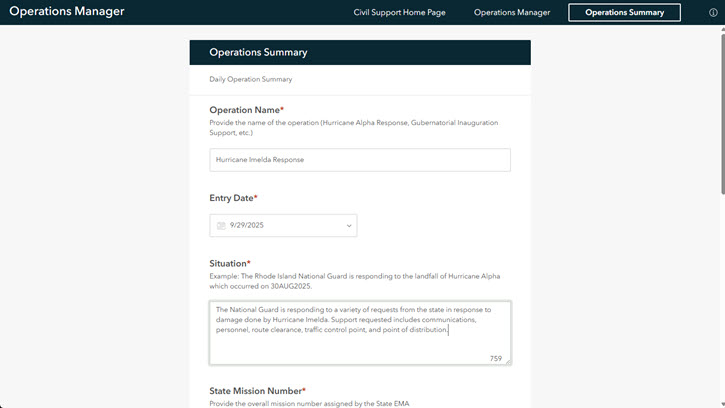
Numbers are important, but they don’t necessarily tell the whole story. The Operations Summary survey form helps put numbers in context, allowing operational staff to submit qualitative operational information and provide background on other data. By writing a summary and other details—such as a last 24-hour review and next 24-hour plan—your staff can quickly communicate response status and emerging requirements to leadership in an easily understood format.
Monitor response activities
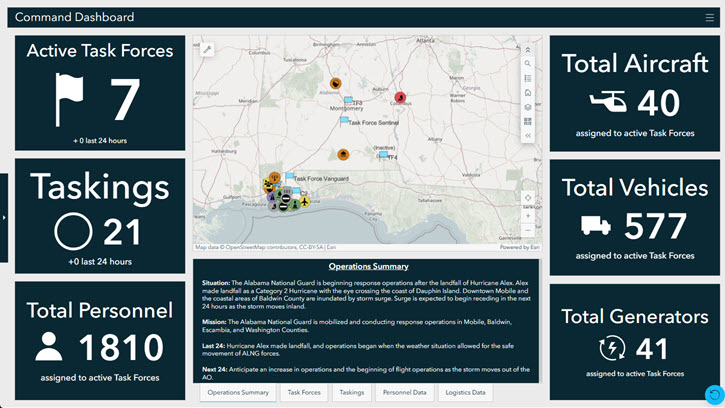
Command leadership can use Civil Support Command Dashboard to instantly access the latest operational data, enabling them to respond decisively in dynamic situations. With this centralized dashboard, you can view real-time updates on task forces and taskings, read operational summaries, and interrogate the data when you need a more in-depth understanding.
No two National Guard operations look the same, and states often struggle to prepare for an activation. The Civil Support solution can help your organization coordinate critical components of a domestic operation with its collection of easy-to-use apps. This holistic approach ensures the National Guard is prepared for whatever comes their way, whenever it may happen.
Learn more
For more information about the Civil Support solution, check out the following resources:
- Learn how to deploy, configure, and use the solution.
- View a demo video.
- Discover related solutions: Emergency Management Operation, Incident Awareness and Assessment.
- Learn more about ArcGIS Solutions.

Article Discussion: