ArcGIS Solutions helps you make the most of your GIS by providing purpose-driven, industry-specific configurations of ArcGIS.
Natural gas utilities face increasing pressure to ensure public safety, reduce emissions, and meet evolving regulatory requirements. Detecting and documenting gas leaks is a critical part of this responsibility, although traditional leak survey workflows often make the process more challenging than it should be. Paper forms, manual data entry, and disconnected tools slow teams down and make it difficult to maintain complete and accurate inspection records. When it’s time to demonstrate compliance, this fragmented information can be challenging to retrieve, delaying audits and increasing operational risk.
The Gas Leak Survey solution from Esri simplifies this entire process. By bringing together mapcentric tools, automated data capture, and streamlined reporting, the solution connects office and field staff in one integrated workflow. The result is greater efficiency, real-time visibility, and a more reliable path to regulatory compliance.
This article is the first in a multipart series designed to help you get the most out of the Gas Leak Survey solution. Throughout this series, we’ll walk you through configuration, customization, and best practices—making it easier for you to understand, adopt, and optimize this powerful solution. These articles will dive deeper into each of the following topics, helping you streamline your gas leak survey operations and ensure regulatory compliance:
Topic 1: Introduction to the Gas Leak Survey solution (this article)
Topic 2: Configuring location sharing
Topic 3: Modifying the schema to meet your needs
Topic 4: Form calculations and compliance data management
Whether you’re just getting started or looking to enhance your existing workflows, these articles will provide practical insights to support your success.
Enhanced field efficiency
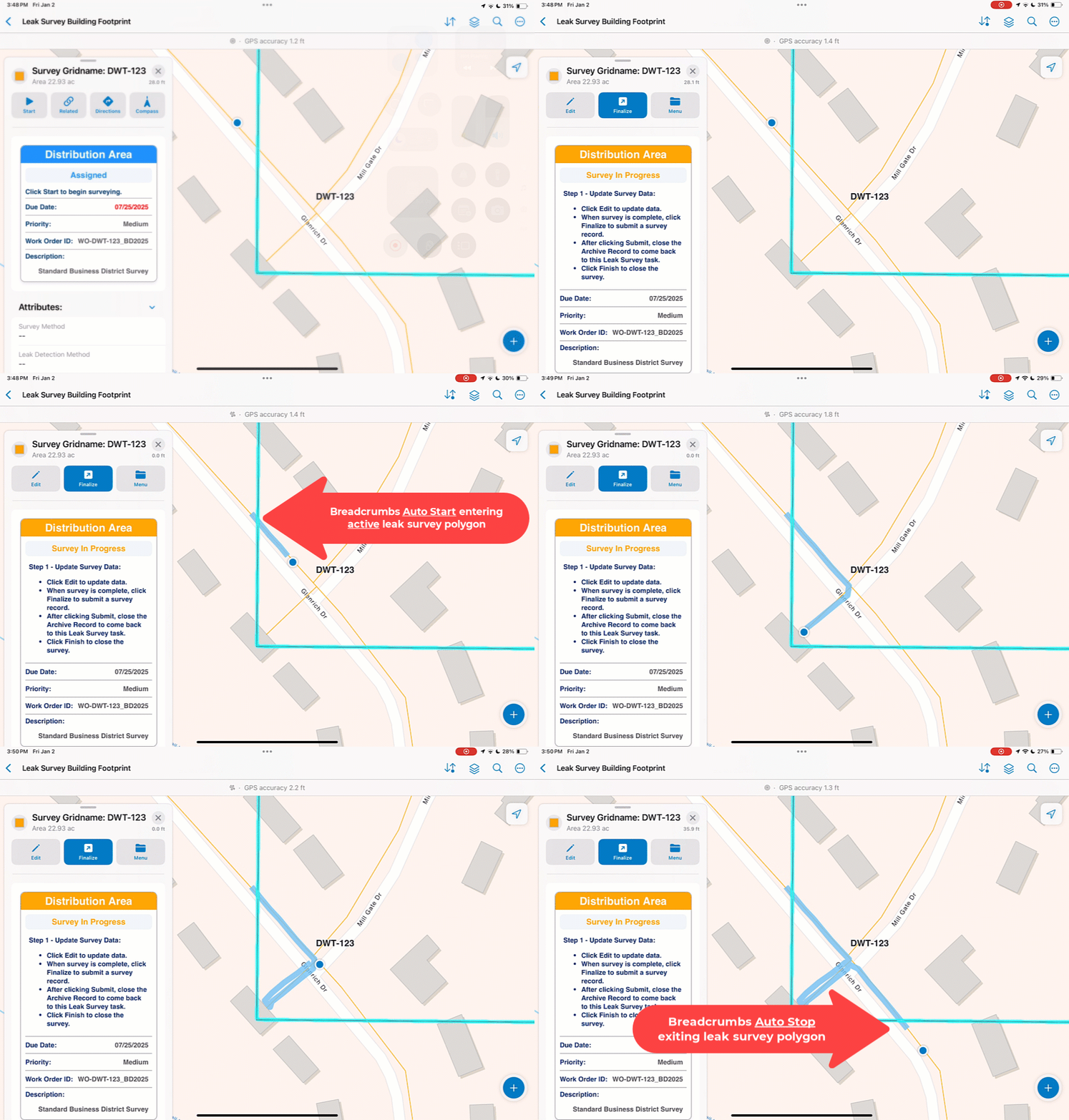
The Gas Leak Survey solution includes an ArcGIS Field Maps configuration designed to make leak surveys intuitive for field crews. With a clean, mapcentric workflow, staff can quickly receive their assigned survey areas, organize their tasks, and begin work without switching between apps or tools.
Here’s what surveyors can do with ArcGIS Field Maps:
- Receive and filter survey tasks based on location or priority—or take control by self-assigning tasks when they are not preassigned.
- Record completed surveys and capture where field crews left off with partially completed surveys.
- Capture additional field observations, such as leaks or other key details, directly from the map.
- View supporting data—like the pipe network—while navigating the map.
- Automatically capture GPS breadcrumbs when location sharing is enabled, ensuring survey coverage is documented without extra effort.
- Work seamlessly in disconnected or offline environments so inspections can continue anywhere.
Field crews can conduct leak surveys and collect breadcrumbs confidently, even without connectivity. Location sharing can start and stop automatically, helping teams maintain complete coverage with minimal manual interaction.
Real-time operational insight
While field staff collect data, supervisors stay fully informed through the Leak Survey Manager app. This Experience Builder app provides managers with an at-a-glance view of ongoing inspections and makes task assignment and monitoring simple and straightforward.
Here’s what supervisors can do with the Leak Survey Manager app:
- Assign survey areas to specific field staff or allow flexibility to self-assign tasks as needed.
- Monitor inspection progress in real time through interactive dashboards.
- Quickly identify potential compliance issues before they become problems.
- Review historical survey records for any grid or district.
- Generate printable reports with a couple clicks.
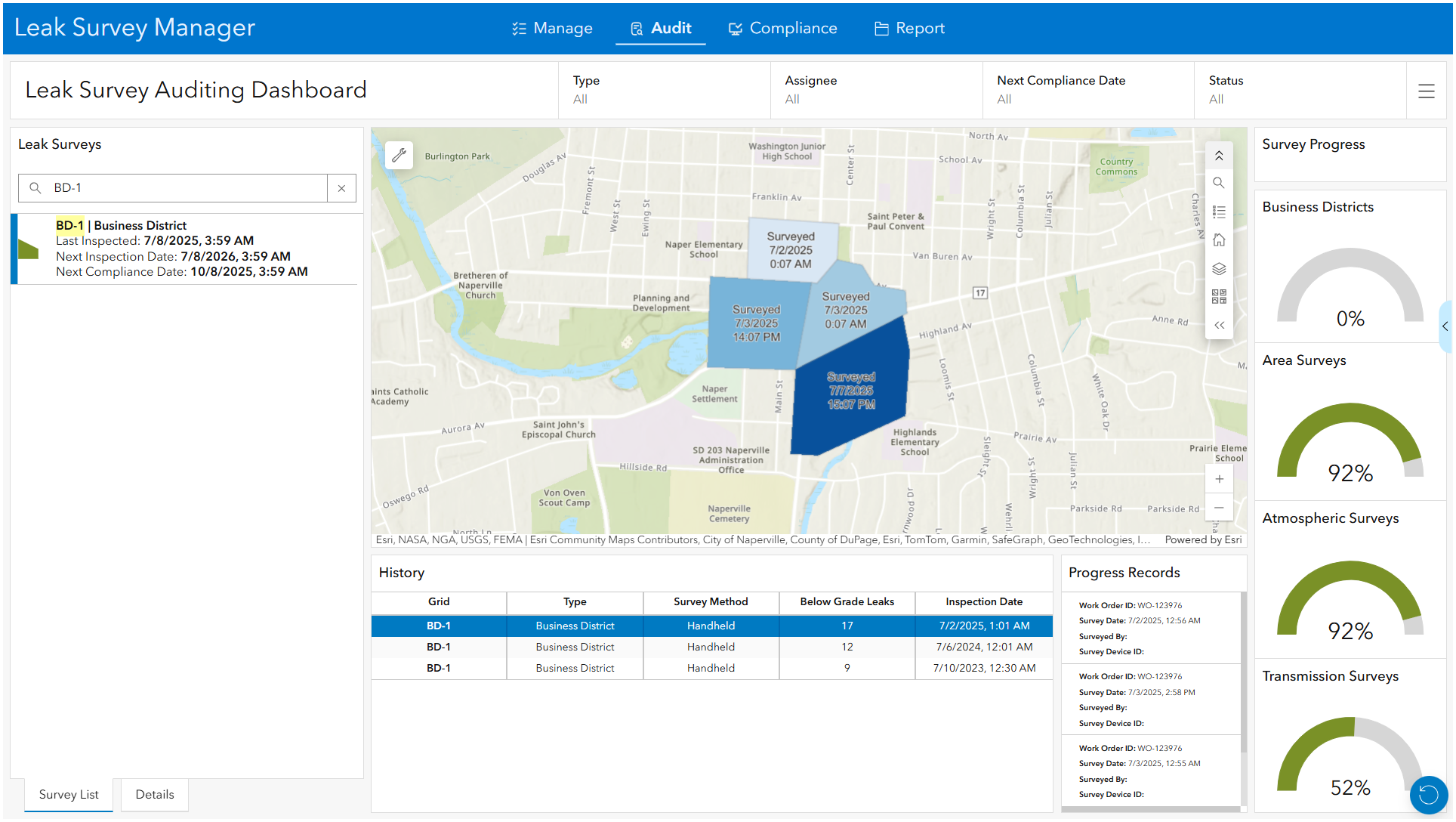
The Leak Survey Auditing Dashboard provides deeper insight into past surveys, highlighting compliance dates, missed inspections, and overall progress. Managers can instantly spot upcoming deadlines or areas at risk of falling out of compliance, enabling proactive scheduling and resource allocation.
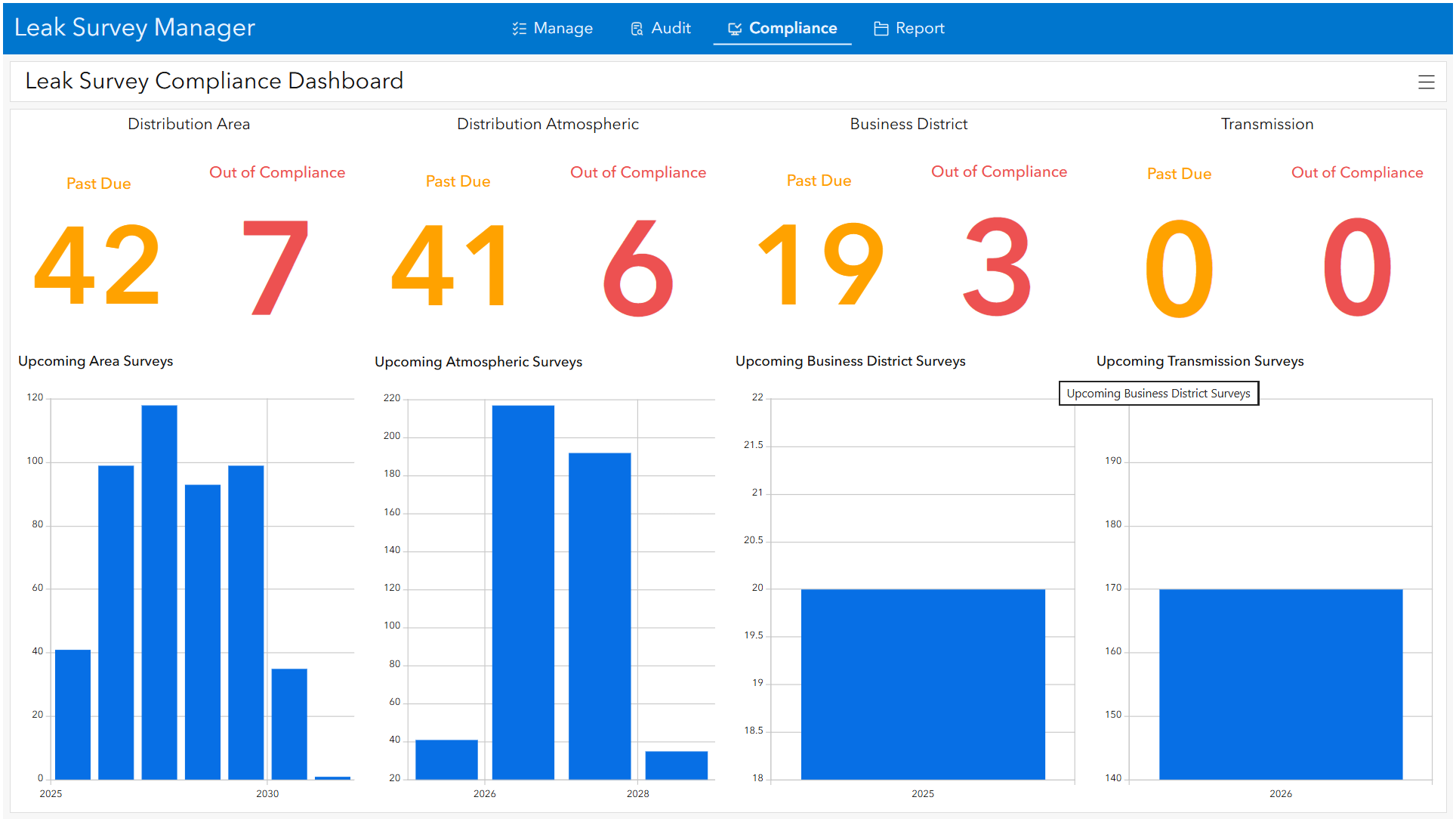
The Leak Survey Compliance Dashboard offers a clear snapshot of organizational compliance metrics, allowing teams to maintain confidence that they are meeting safety and regulatory expectations.
Streamlined compliance reporting
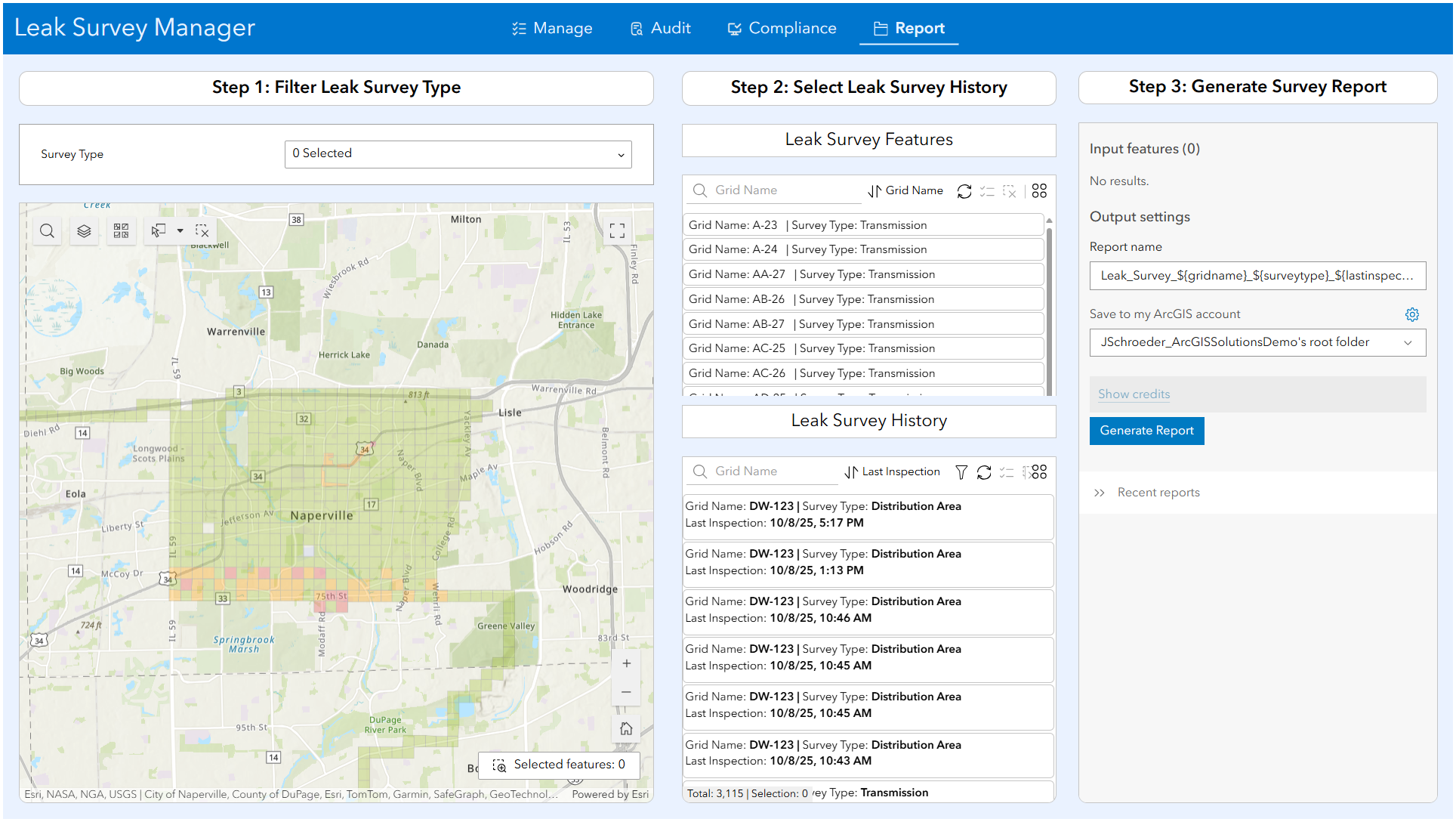
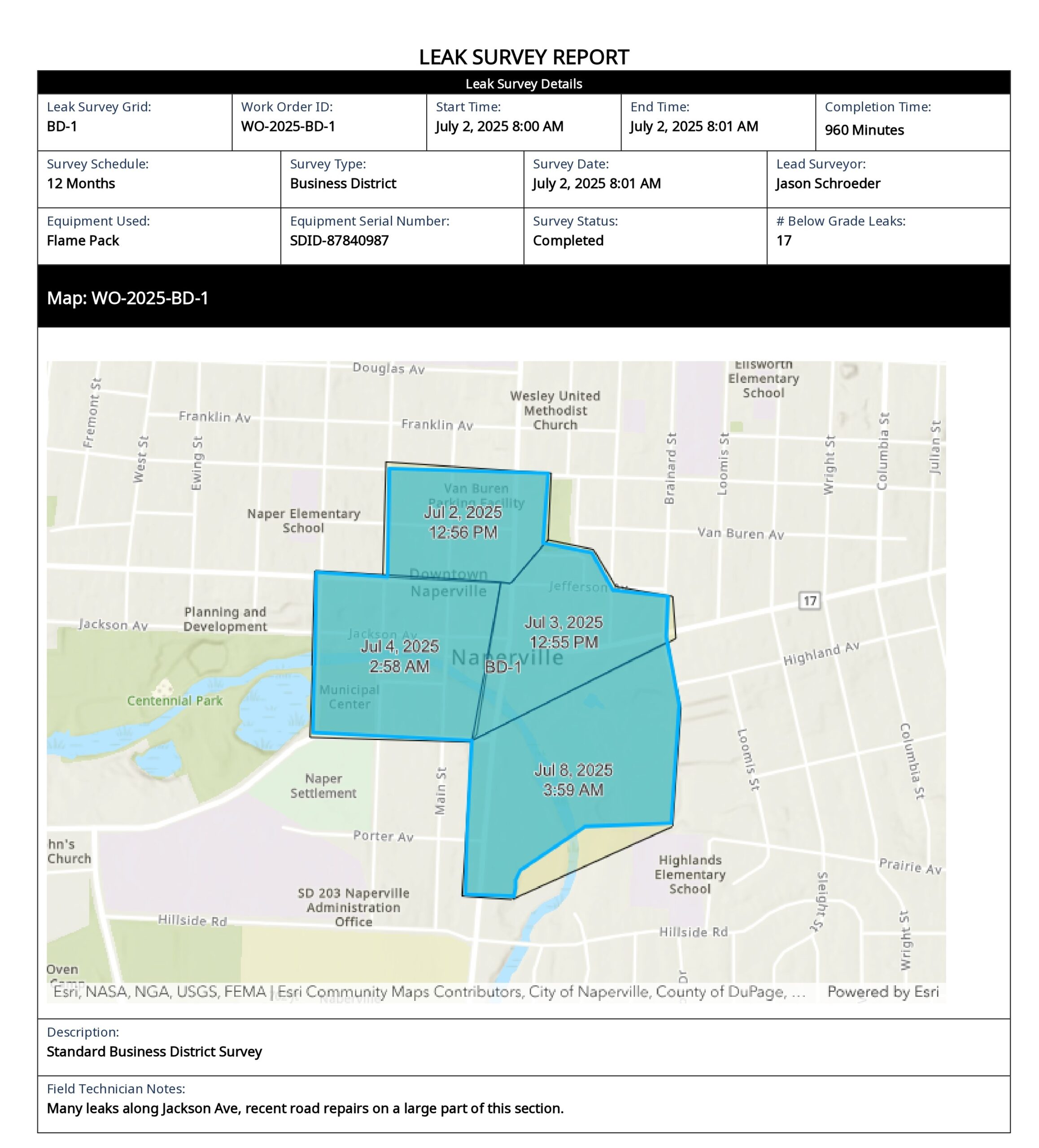
Turning survey data into auditable inspection records is simple with the Leak Survey Manager app. Compliance teams can quickly select one or more inspection records and generate reports using a guided three-step workflow. With all relevant information automatically organized, the burden of manual formatting and compilation is eliminated.
Reports can be exported to Word or PDF, making it easy to provide documentation to regulators, internal auditors, or other stakeholders. This streamlined process reduces administrative workload and ensures the organization can demonstrate compliance at any time.
Connected workflows
Built on ArcGIS Online, the Gas Leak Survey solution centralizes data and automates information sharing across teams. By reducing reliance on manual processes and minimizing data silos, the solution creates a seamless end-to-end workflow. Field crews, supervisors, and compliance teams all work from the same accurate, up-to-date information, improving operational efficiency and reducing the risk of errors.
Getting started
To get started with the Gas Leak Survey solution, open the Solutions app to deploy it to your ArcGIS Online organization, and then configure the solution to meet your organization’s specific needs. Before fully implementing the solution, consider running a pilot survey to validate workflows, confirm offline capabilities, and train staff.
Learn more
For more information about the Gas Leak Survey solution, check out the following resources:
- Learn how to deploy, configure, and use the solution.
- View a demo video.
- Learn more about ArcGIS Solutions.


Commenting is not enabled for this article.