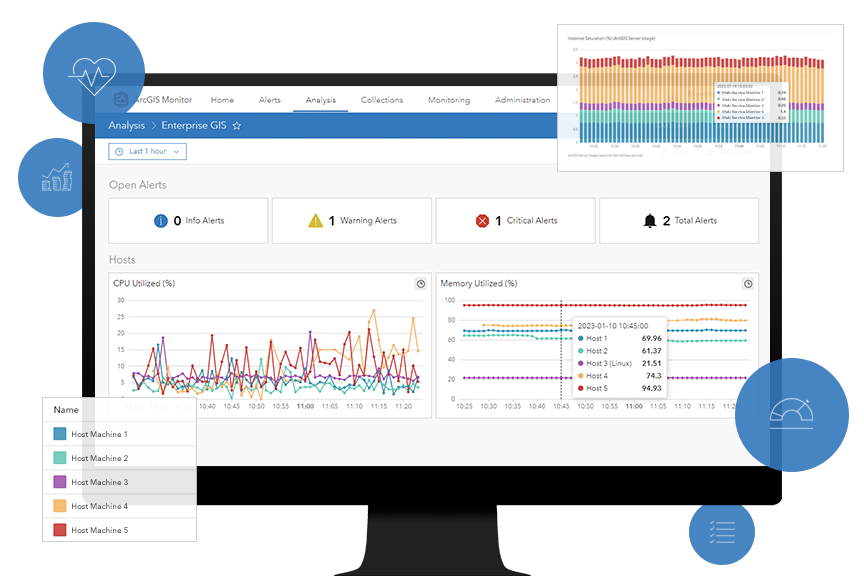
Our latest Parcel Management System test study provides a concrete example of how an ArcGIS system’s observability – across virtual machines, services, and workflows – enables teams to tune performance, right‑size infrastructure, and make informed architectural decisions before problems appear in production.
In this blog, you’ll learn:
- Why observability must be designed into ArcGIS systems from the start
- What we monitor in our test studies to get insightful results
- How to evaluate test results and translate them into actionable improvements
And if you’re looking to really dive in, check out the full test study here!
Observability by design
Observability is often treated as something you “add later” to help troubleshoot issues in production. However in practice, observability should be factored in at the design phase. Ultimately, it determines to what extent you will be able to tune, scale, prevent issues, and troubleshoot problems for your systems.
In this test study, we intentionally built observability into the system at the start, so we could monitor different aspects of the systems as workflows were executed under increasing load. We aimed not just to confirm that workflows were completed successfully, but to understand how each tier of the system behaved as demand increased. This was especially true of the user experience at the client tier, which can be a challenge to monitor.
Learn more about observability in the ArcGIS Architecture Center!
Cross-system monitoring
To perform successful system validation and deliver meaningful results, we needed to be able to monitor the system’s behavior and capture telemetry.
We used ArcGIS Monitor and enterprise IT monitoring tools like Windows Performance Monitor to monitor the system’s performance and capture telemetry on its behavior under certain conditions, like:
1. Machine-level metrics
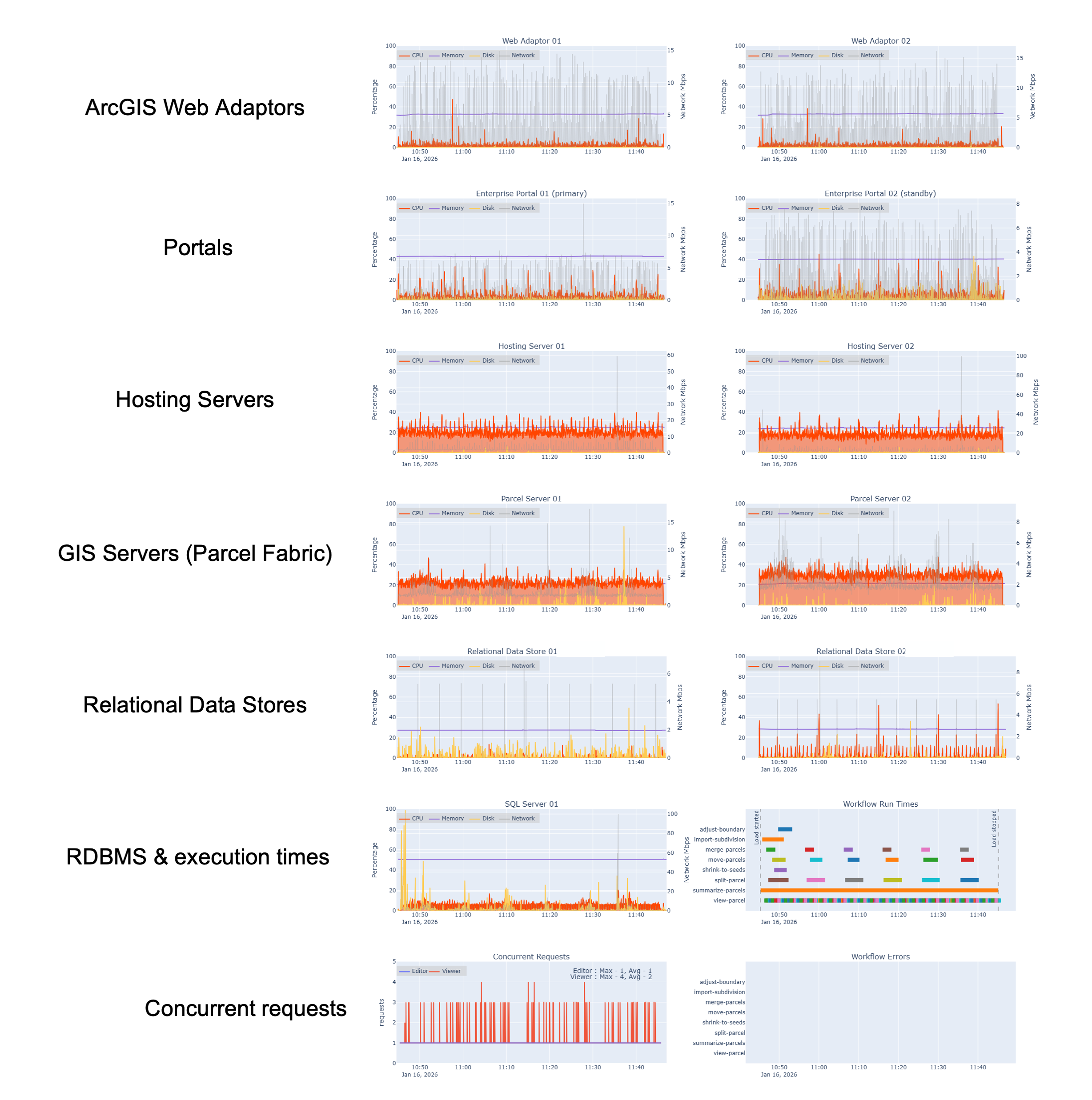
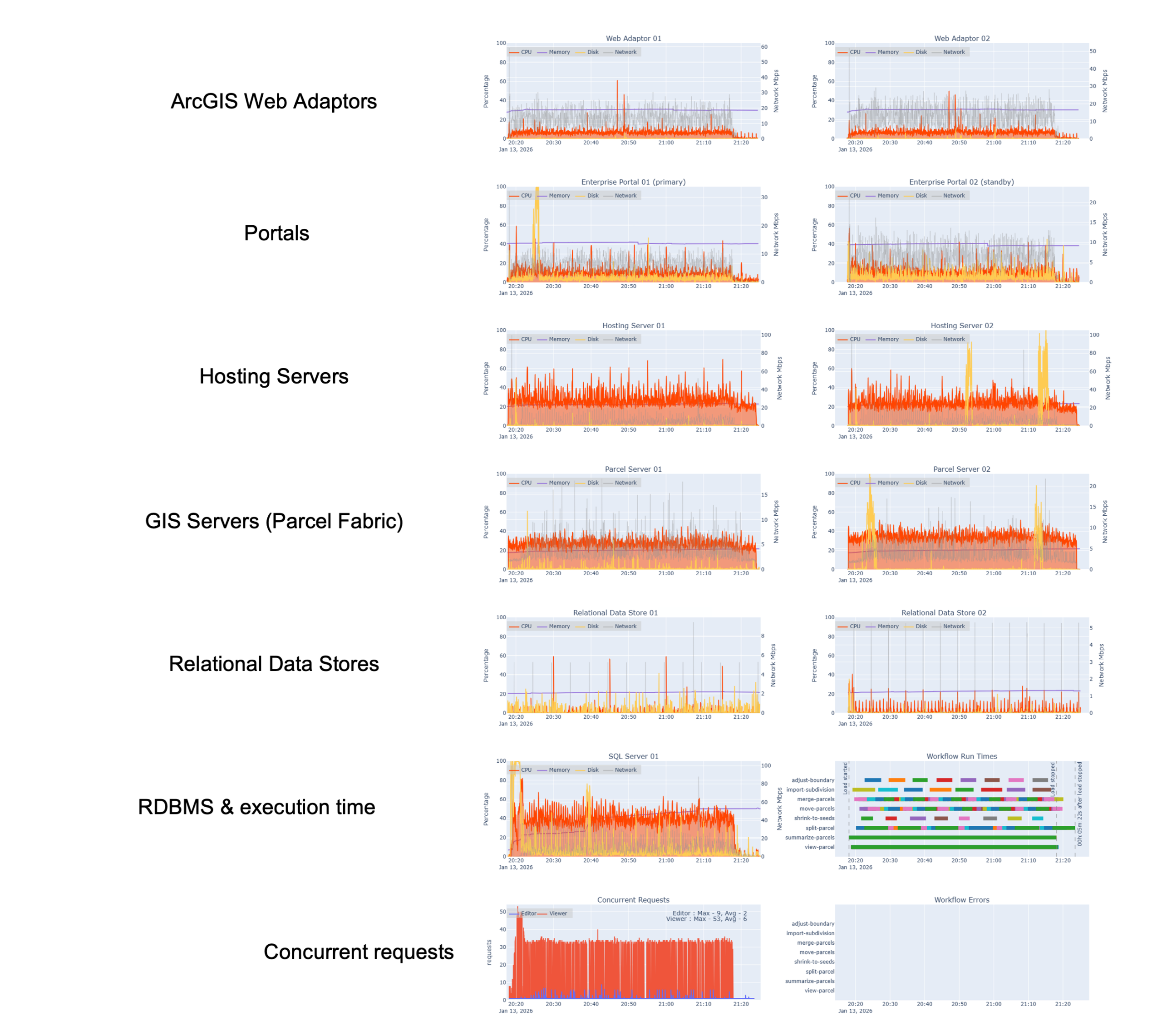
At the infrastructure layer, we monitored system resources on each virtual machine hosting ArcGIS Enterprise components and our enterprise geodatabase, like:
- CPU utilization
- Memory usage
- Disk I/O
- Network activity
This level of visibility establishes a baseline understanding of whether our virtual machines are:
- right-sized
- over-utilized and at risk of contention, or
- under-utilized and potentially overprovisioned
In the graphic below, you can see these machine-level metrics across each tier of the system:
2. Services and ArcSOC utilization
At the services tier, we monitored:
- ArcSOC usage on both the hosting server site and the GIS (parcel) server site using Soccer (ArcSOC Scanner)
- service instance patterns under load
This layer of observability is critical for understanding whether:
- service instances are well-configured
- resources are evenly distributed
- bottlenecks are emeging at the service level rather than the infrastructure level
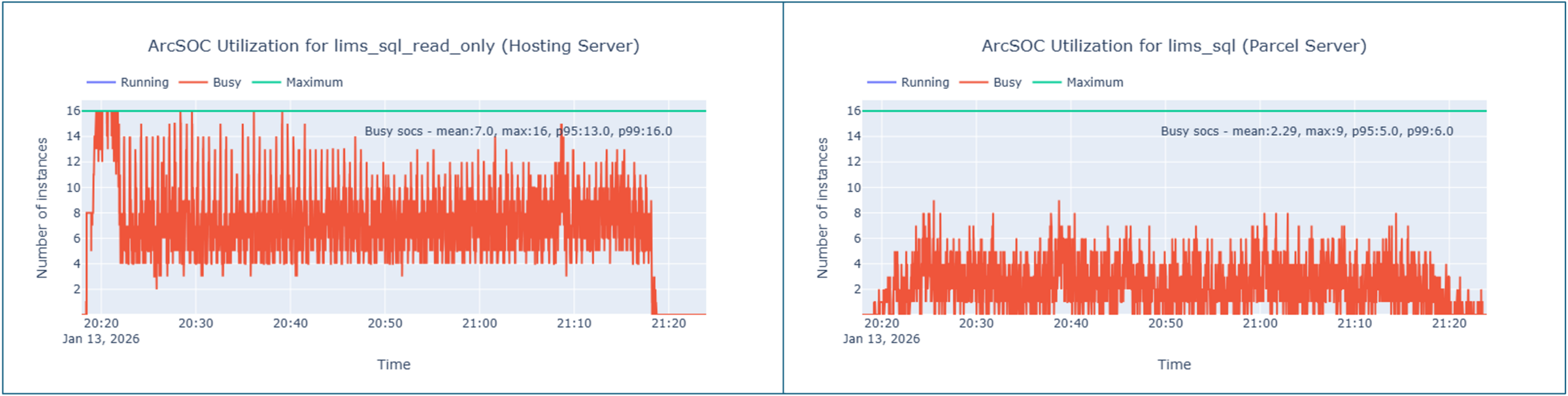
In the graphic below, you can see our service instance utilization metrics- in particular, how often ArcSOCs were busy across the test duration for both our hosting server (left) and parcel server (right).
3. Workflow execution and completion times
While often skipped, you should monitor workflow execution and user experience. If you think about it, the ultimate reason we monitor all the other aspects of the system is to verify our users can complete their work in a timely fashion. Not to mention, we want them to enjoy their experience using GIS capabilities!
In this test study, workflows were executed according to a pacing model that simulates how work is performed in a real parcel management organization- measured in operations per hour rather than number of users.
By monitoring workflow completion times alongside system metrics, we were able to correlate:
- infrastructure behavior
- service utilization
- workflow execution times
against a baseline to make an overall assessment of whether the users are having a responsive experience and able to do their work efficiently.
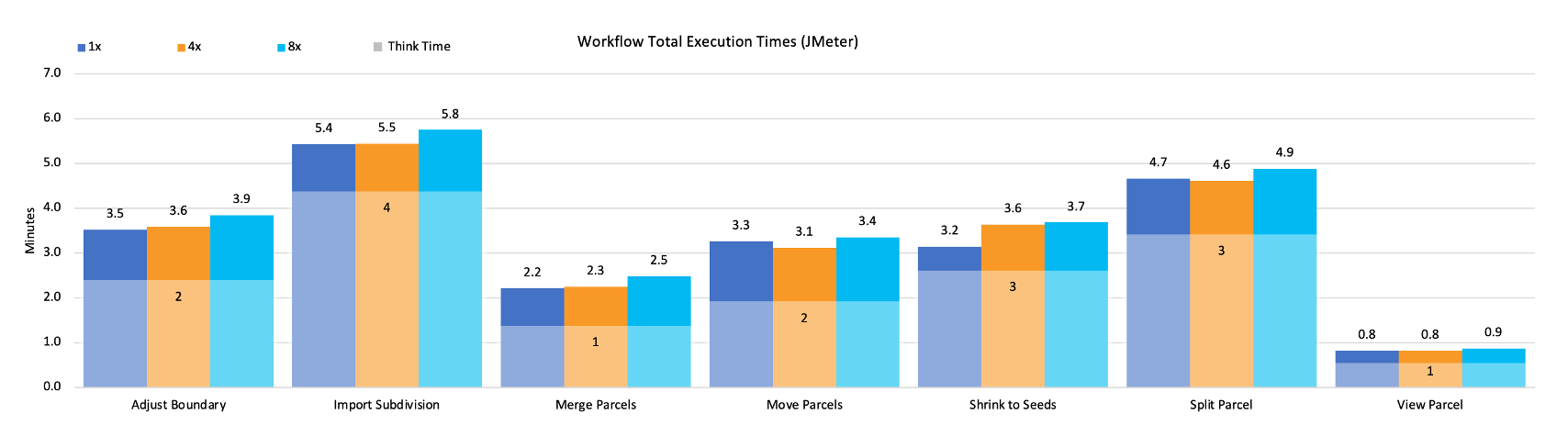
In the chart below, you can see a summarization of our workflow execution time across all of our tested workflows at different load scenarios (design load, 4x, and 8x design load). If workflow times increase as the load increases, this would tell us that the increased requests are likely straining the system and creating longer service wait times than expected. In this case, there is a negligeable change in workflow times as the load increases.
Evaluating the results: what our telemetry revealed
For all of the effort spent designing for observability to pay off, you have to be ready to act on what the system tells you. With telemetry in place across all tiers, we focused on three questions while reviewing the telemetry data:
- Where did system behavior diverge from our expectations?
- Have we distributed resources optimally?
- Which system components will start to strain under load first?
Opportunities for cost optimization
Because system performance remained stable while some resources were underutilized, the results indicate opportunities to scale down infrastructure without negatively impacting performance or user experience.
This is a critical point: observability is an investment not only to support operational activities like troubleshooting, but it also enables cost‑conscious architecture decisions. By understanding which components are under pressure and which are not, teams can right‑size their systems with confidence.
Identifying system bottlenecks
While the system’s telemetry data helps us identify where system components might be over-sized, it also helps us identify the system bottleneck. Every system has a bottleneck, even if it isn’t impacting the system’s performance (yet).
From our test results, we can see that our database is our bottleneck as we reached 8x the design load. In the graphic below, you will notice that it is the system component that is showing the highest utilization, and therefore would likely be the first to reach its performance threshold.
In a real-world scenario, this is helpful to know because it let’s us:
- be more proactive in either reallocating system resources, or
- know to monitor the database utilization more closely in case the system starts to reach that threshold
Reconfiguring services for better alignment
Monitoring and telemetry capture at the services level helps identify where there might be opportunities to reconfigure ArcSOC distribution to better align with actual workflow demand. This is helpful to identify when a service instance reconfiguration might be warranted to distribute resources more optimally. Adjusting how service instances are allocated (rather than simply adding more infrastructure) can improve efficiency and resiliency while keeping costs in check.
For example, at 8x our design load, our test results show our read-only services on the hosting server (left) start to reach maximum utilization (16 active ArcSOCs), whereas our parcel server continues to show moderate ArcSOC utilization (roughly 8-10 active ArcSOCs out of the configured 16). Having this visibilitiy gives us the information we need to re-configure the distribution of service instances to provide us more buffer before users would experience longer service wait times.
Closing thoughts
In addition to providing a guide for implementing a Parcel Management System, this test study also demonstrates how observability enables intentional decision‑making for ArcGIS systems.
By monitoring:
- Machine‑level resources
- Service‑level behavior
- Workflow‑level outcomes
teams gain the insight needed to:
- Right‑size infrastructure
- Optimize costs
- Reconfigure services
- Validate design assumptions
- Reduce risk before production deployment
Just as importantly, these practices apply beyond testing environments like ours. In production, ongoing observability supports day‑to‑day operations, safer upgrades, faster troubleshooting, and informed long‑term system evolution.
Rather than reacting to issues after they surface, you can be well-equipped to anticipate constraints, understand system behavior, and make confident decisions as systems grow and change.
Do you have ideas for how we can improve our resources in the future? Please share your thoughts with us!
➡️ You can also find our full catalog of test studies and blogs here
➡️ If you have questions or want to keep the conversation going, consider joining our LinkedIn group





Article Discussion: