We’re excited to announce that Esri will be at Microsoft Fabric Community Conference 2026, bringing the full power of spatial analytics and intelligent mapping to the Microsoft Fabric community. As organizations embrace Microsoft Fabric to unify data to power large–scale analytics and contextualize data to enable agentic AI workflows, one question is becoming increasingly important: How can you bring the power of location intelligence into your data workflows? Discover the answer with a complete suite of ArcGIS integrations that bring spatial analytics, mapping, and location intelligence directly into your Microsoft Fabric environment, helping you uncover hidden patterns, optimize operations, and transform data to drive business transformation in the era of AI.
Visit Esri at FABCON: Booth and sessions
Stop by Esri Booth # 119 for live demonstrations of ArcGIS for Microsoft Fabric in action. Experts will show you how mapping and spatial analysis can transform your analytics workflows and provide personalized guidance tailored to your specific needs and challenges.
Mark your calendar for Where Data Meets Opportunity: Drive Business Value with Location Insights, a featured session with Sean McGinnis on Thursday, March 19, 2026, at 1:00 PM – 1:20 p.m. in the Expo Innovation Theater. Discover how location intelligence can unlock new business value and drive smarter decision-making across your organization.
What Is ArcGIS for Microsoft Fabric?
ArcGIS for Microsoft Fabric integrates mapping and spatial analytics directly into the Microsoft Fabric environment, allowing you to integrate asset locations and surrounding conditions into analytic workflows. This integration helps you uncover new strategic sites or markets, optimize operations, and monitor and mitigate risks—all without moving data between systems or learning complex new tools.
ArcGIS for Microsoft Fabric comprises three powerful integrations that can be used independently or combined to integrate, transform, enrich, and analyze location data at any scale, and then visualize, explore, and share location insights through interactive maps and BI reports.
Discover these integrations in action through our a live demonstration using Houston 311 service request data
1. GeoAnalytics Spark-native library inside Fabric’s data science and data engineering workloads
Now generally available, ArcGIS GeoAnalytics for Microsoft Fabric is a Spark-native library packed with geospatial analytics tools to help you discover where things are occurring, how they relate, and which actions to pursue. It integrates directly into Fabric’s data science and data engineering workloads, running on top of data in OneLake allowing you to seamlessly work with business data, operational data, geospatial data, and many other data types in one place, accelerating data integration and transformation to enrichment and analysis— from inside Microsoft Fabric.
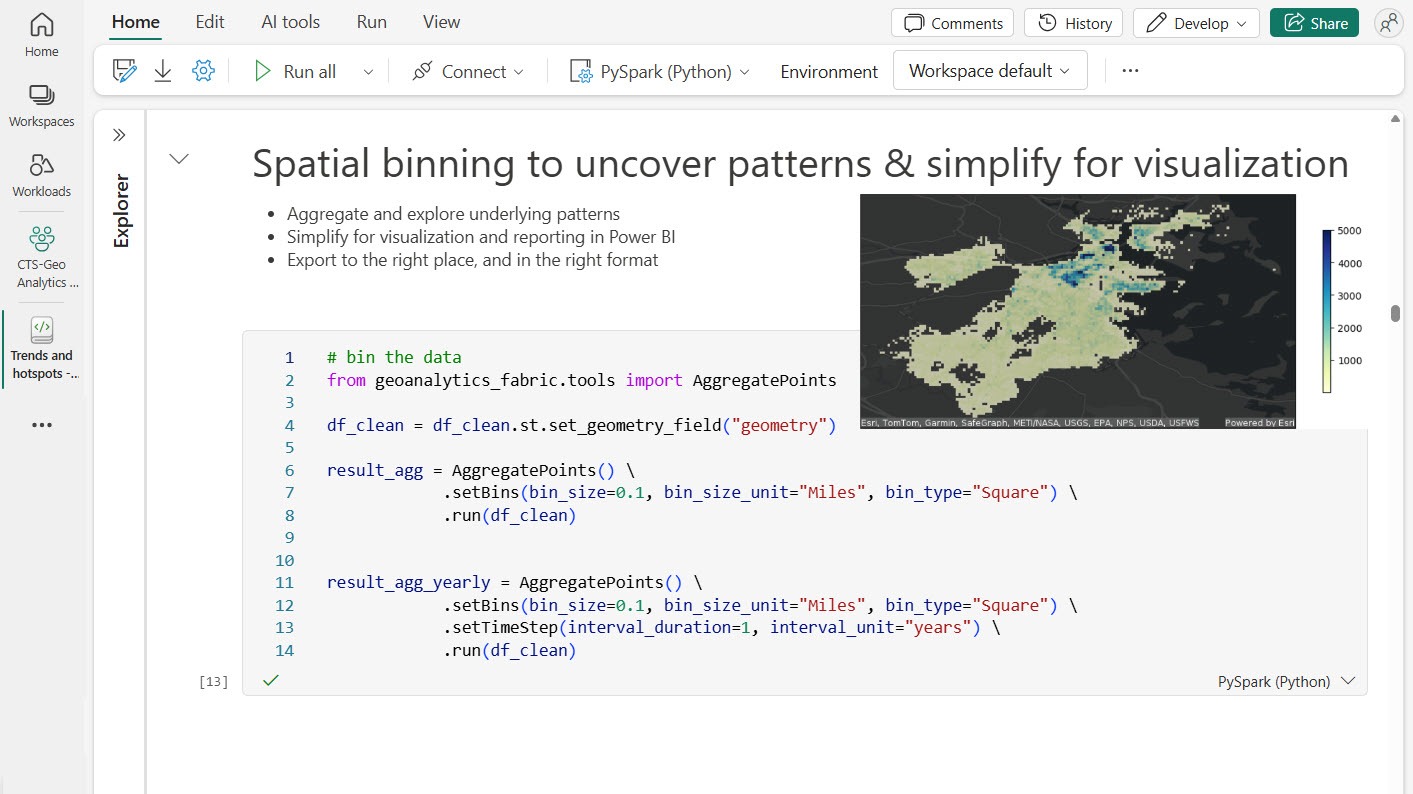
With GeoAnalytics for Fabric, you can do the following:
- Integrate, transform, and enrich geospatial data at any scale
- Run advanced spatial and spatiotemporal analysis
- Use automatic spatial indexing and joins
- Read from and write to common geospatial sources (feature layers, shapefiles, and more)
To explore further, check out the Marketplace listing to purchase and get started with ArcGIS GeoAnalytics for Microsoft Fabric.
2. ArcGIS Maps for Fabric workload in the Fabric Workload Hub
Now in public preview, ArcGIS Maps for Microsoft Fabric allows you to reveal patterns, relationships, and trends in data that are not visible in tables or charts. It provides an adaptive, intelligent mapping workload within Microsoft Fabric so you can create maps and enrich OneLake data with geographic context directly inside Fabric.
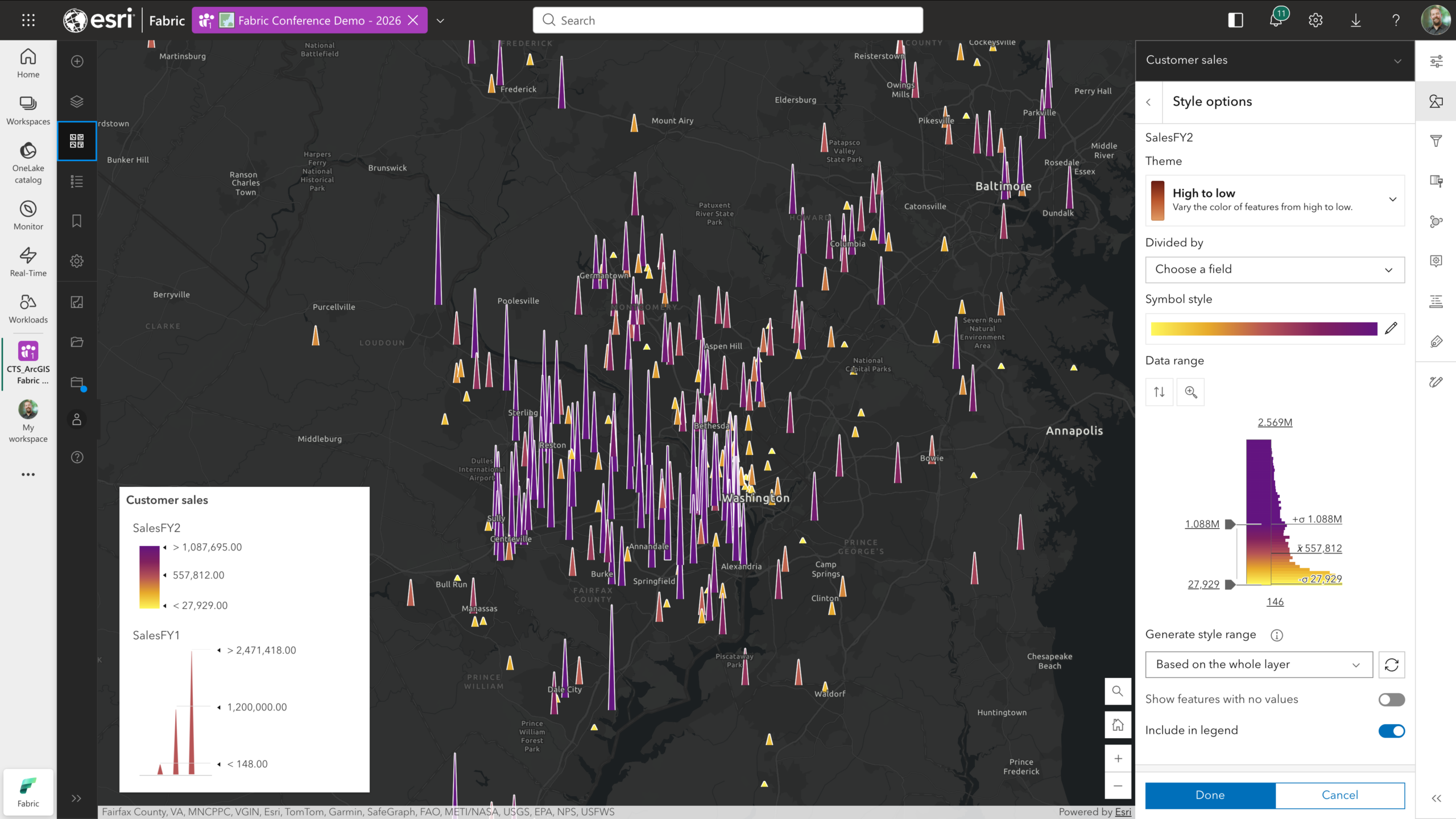
With ArcGIS Maps for Microsoft Fabric, you can do the following:
- Create interactive, insightful maps directly in Fabric
- Choose from rich basemaps and adjust symbology in real time
- Integrate business data from OneLake with rich ArcGIS context
- Share maps as Fabric artifacts with controlled access
To get started with ArcGIS Maps for Microsoft Fabric, visit the Fabric Workload Hub and add it to your tenant, or if you’re already signed in to your Fabric account, use this direct link for quick access. For detailed instructions, check out our Quick Start guide.
3. Mapping visualization in Power BI
ArcGIS for Power BI is a custom data visualization tool that unlocks location insights in your business data that traditional BI charts and tables can’t surface. It enriches your BI reports and dashboards with mapping capabilities, demographic data, and spatial analysis tools—all integrated into Power BI.
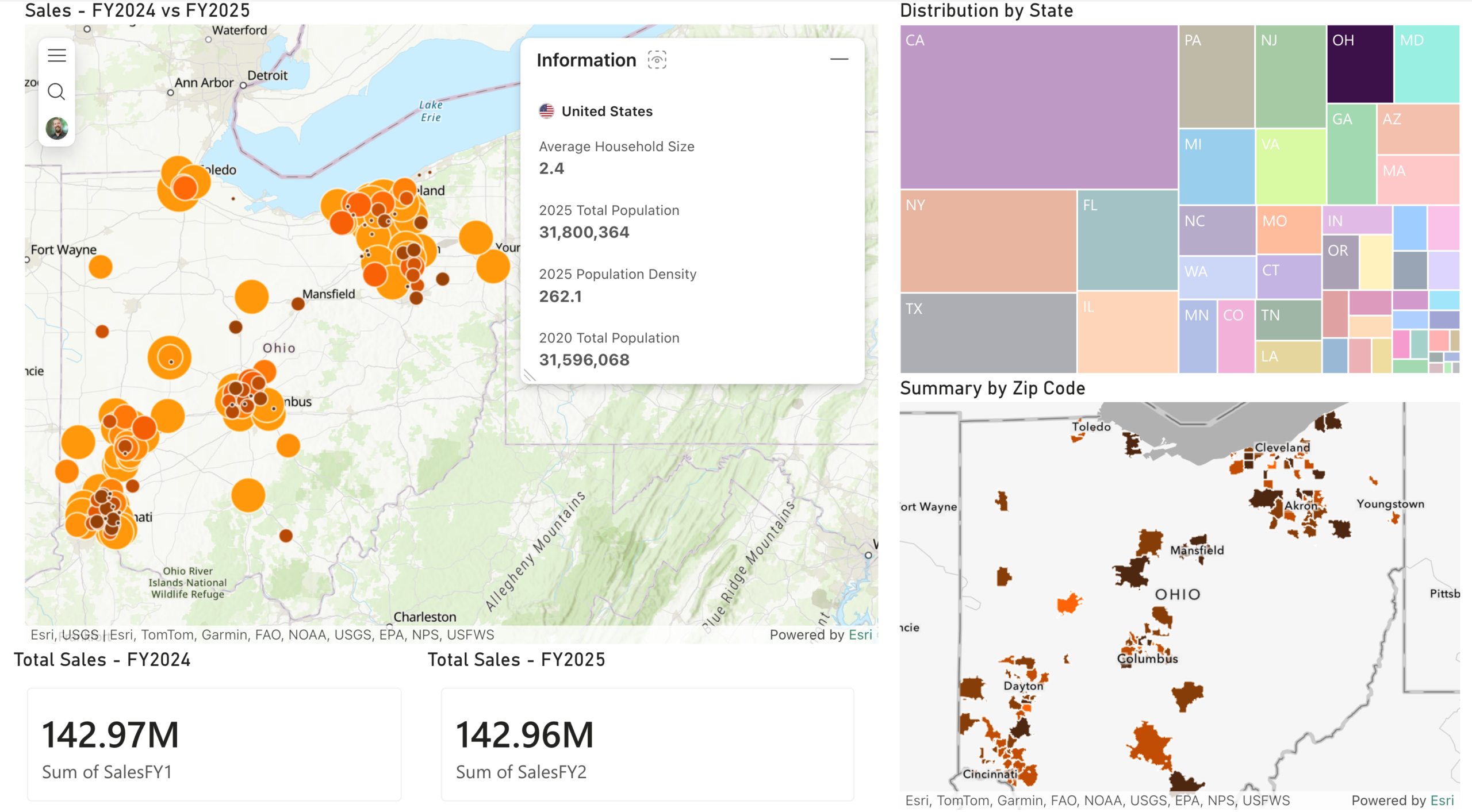
With ArcGIS for Power BI, you can do the following:
- Display location insights on the maps alongside charts, tables, and other report visuals
- Join Fabric‑hosted data with Living Atlas and authoritative ArcGIS layers
- Help business users analyze relationships, clusters, and geographic trends
- Enable secure, governed sharing of location insights with BI reports and dashboards
ArcGIS for Power BI is ready to use with no installation required. Explore the getting started documentation to begin mapping your business data today.
Additional Resources
Whether you’re new to spatial analytics or looking to scale existing capabilities, explore everything ArcGIS for Microsoft Fabric has to offer through our comprehensive resources. Visit the Esri Community for ArcGIS for Fabric to connect with other users and experts. Explore the ArcGIS for Microsoft Fabric web page for an overview of products, including their benefits and capabilities. And follow the ArcGIS blog for the latest updates, best practices, and customer success stories.


Article Discussion: