Use the top retailers search option to browse and select from a curated list of the top 50 retailers in the United States based on sales volume. In future releases, this list will be expanded to include more retailers and potentially other industry categories.
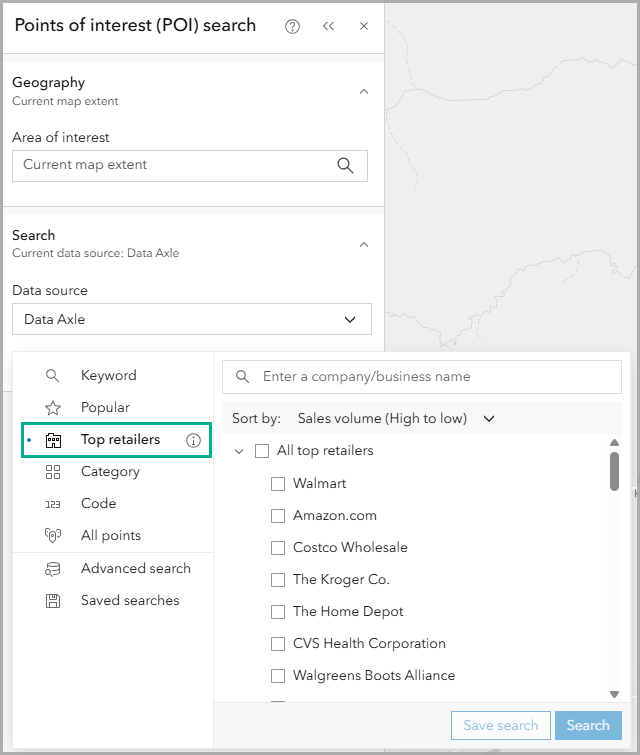
What are top retailers?
Top retailers are the largest companies in the country by sales volume. This includes online retailers, which is why you’ll see Amazon.com listed even though it doesn’t have as many physical retail locations as others in this list. Brick and mortar Amazon-owned stores are included, such as Whole Foods and Amazon Fresh.
Since top retailers include regional subsidiaries and brands, we’ve streamlined the process to find national and regional brands under their parent companies. For example, you can get results for Food 4 Less (a Kroger company) and Marshall’s (part of TJX Companies).
Overall, top retailers are more than just big businesses. They are known as dominate the national and local markets. These retailers are often anchors in shopping centers and malls, major consumer destinations, and account for a large proportion of retail sales in a market.
Understand parent companies and subsidiaries
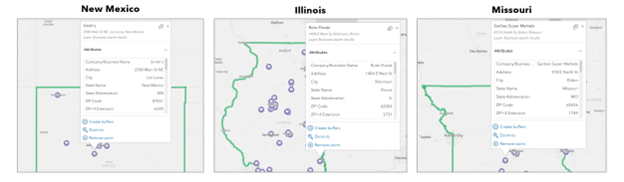
National chains are parent companies with region-specific subsidiary chains, or children companies. For example, search by the top retailer The Kroger Co. In different parts of the country, your POI results map each location, even if it has a different regional name. For New Mexico, there’s Smith’s, Illinois has Ruler Foods, and Missouri has Gerbes Super Markets. You can use this information to understand what the dominant chains are in different geographic contexts without having to search for each regional branch.
However, you may also find that certain top retailers don’t compete in your area of interest, which may be an opportunity for other brands and tenants. You can search for all top retailers and then apply a filter for the specific industries you are interested in.
For example, map all top retailers in New Hampshire and add a filter to only show points with the primary industry description Grocers-Retail.
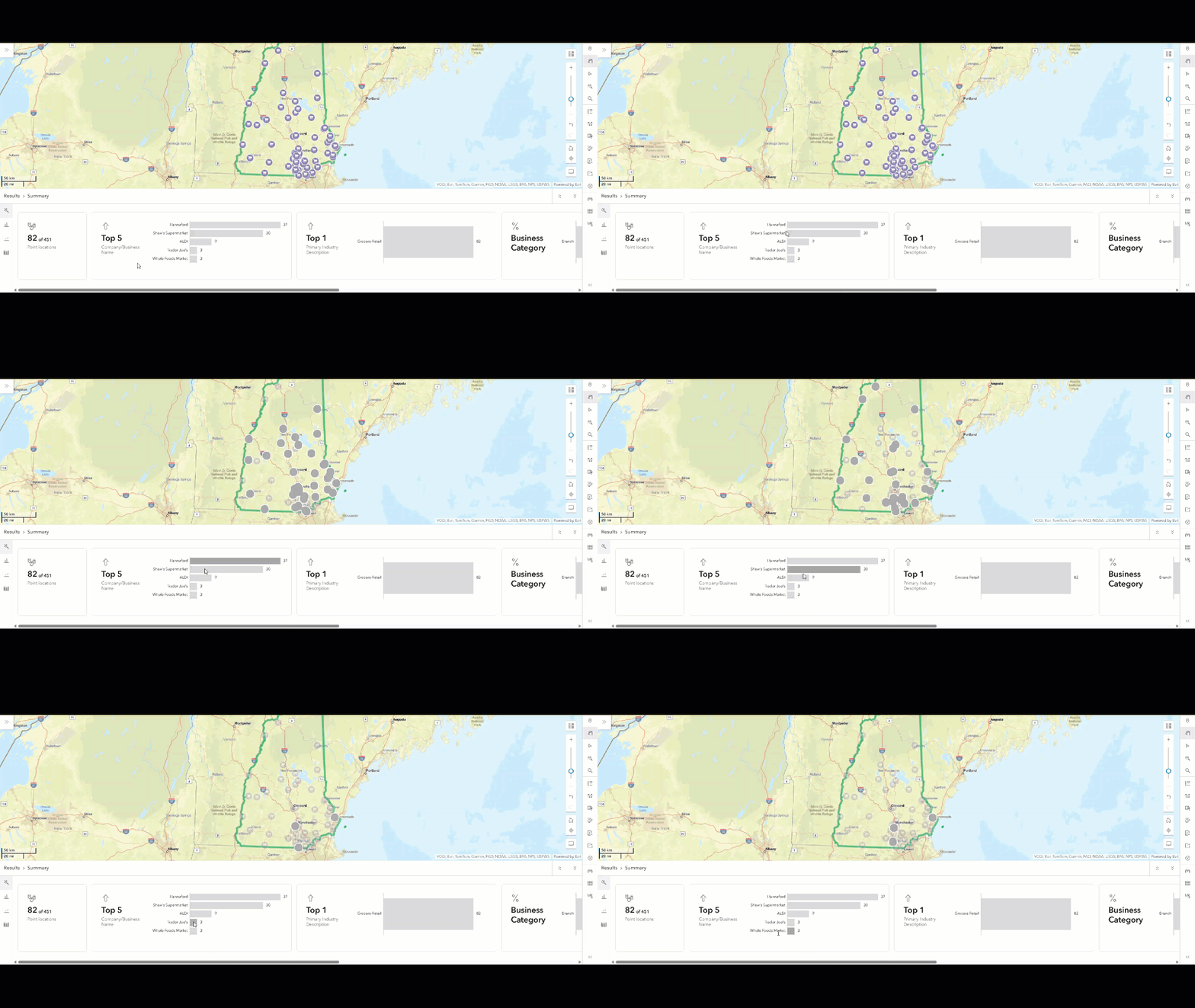
While there aren’t any Kroger results in New Hampshire, there are several other top grocery store retailers, like Hannaford, Shaw’s Supermarket, Trader Joe’s, and Whole Foods. Searching by top retailers gives you insight into where brands operate.
Explore more detailed market insight
Every point on the map represents a physical business location, which shows how brands are aggregated or may be present in the most visited locations in a town or city. Typically, these retailers shape real estate development not just as major businesses in the area , occupying the largest stores and signing long leases, but also in attracting other retailers, restaurants, and service providers to be near them. Many other businesses like to be near a top retailer because they drive visitation and spending. Consumers will cross-shop to other locations while visiting these anchors, consume food in nearby fast food or sit-down restaurants as well as visit specialized retailers like book or shoe stores. Visitation and foot traffic help make these co-tenanted businesses more visible, successful, and viable.
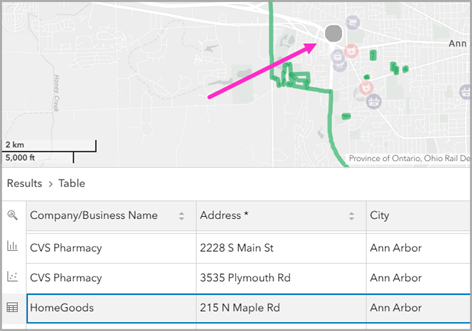
For example, if we map all the top retailers in Ann Arbor, Michigan, there are results for 7-Eleven, CVS Pharmacy, HomeGoods, and more.
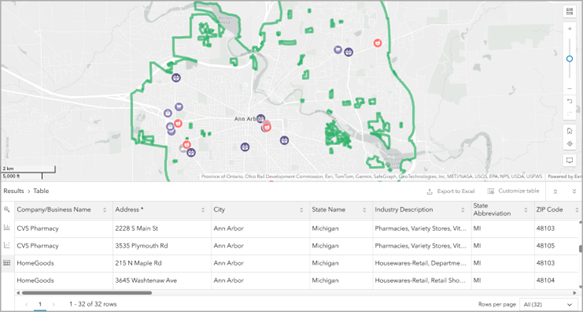
Typically, HomeGoods locations are within strip malls or shopping plazas, not standalone buildings, while 7-Eleven convenience stores tend to be on main arterial roads or in neighborhoods.
By using the Table option in the Results pane, you can see the HomeGoods store at 215 N Maple Road, and clicking the location will highlight it on the map.
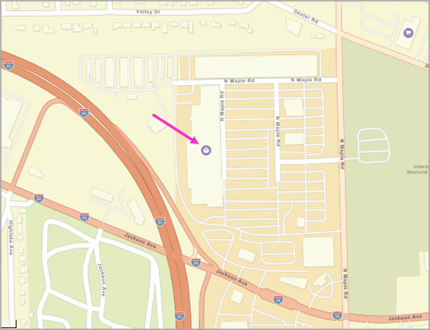
Zooming into this location and changing the basemap to Streets, you get more local context, showing the site to be in a strip mall located near a freeway offramp.
Use top retailers for additional analysis
You can use the understanding of key locations as a starting point to perform other analyses including site selection, business cannibalization, competitive analysis, and creating marketing presentations. Your top retailer selections can be combined with heat maps of independent stores, overlaid on other POIs, married with a smart map search layer of spending patterns.
Top retailers streamline searching
Of course, you could perform a similar name search without using the top retailers search option. For example, you could search using an advanced search condition to only show businesses with the name Target located in Montana. But the results are less focused because many businesses can contain the word “Target” and it’s challenging to predefine the best search based on category or NAICS code options.
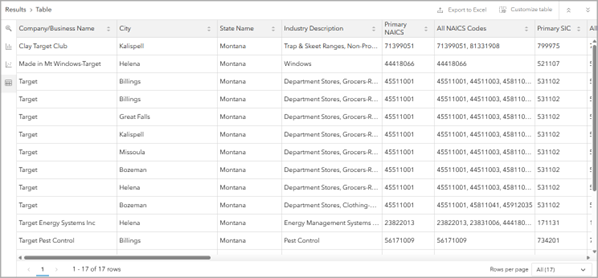
There are results for pest control, energy management systems, department stores, and more. If you were only interested in the top retailer Target, you’d have your work cut out for you to filter the search or add more search conditions. With top retailers as the search option, it’s easy!
In conclusion
Hopefully you’ll find ways to use the new top retailer search option in your own analysis and site investigation workflows. This capability will continue to be developed and enhanced, alongside other POI analysis tools and capabilities, to provide you with even better experiences.
Let us know what other industries you are interested in by sharing your ideas in the comments section below or posting on Esri Community.
This article uses Places data from Data Axle and basemaps provided by Esri.
This article uses ArcGIS Business Analyst Web App. You can perform a points of interest (POI) search using top retailers as the search option using Standard and Advanced licenses.



Article Discussion: