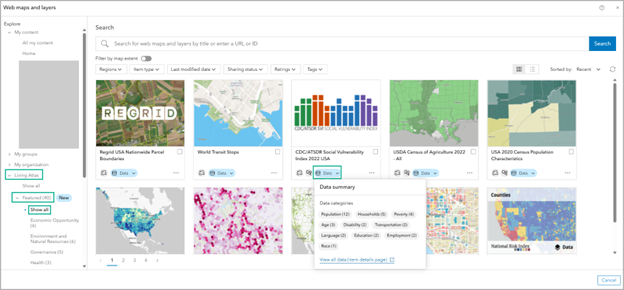
New in the October 2025 release: you can scan variable summaries for featured Living Atlas items right inside Business Analyst, so you know you’re adding the right data before it hits your map.
What is ArcGIS Living Atlas?
ArcGIS Living Atlas is a curated collection of authoritative web maps and layers created by GIS and industry experts. It’s designed to work seamlessly across ArcGIS apps, including Business Analyst.
How can you access ArcGIS Living Atlas content in Business Analyst Web App?
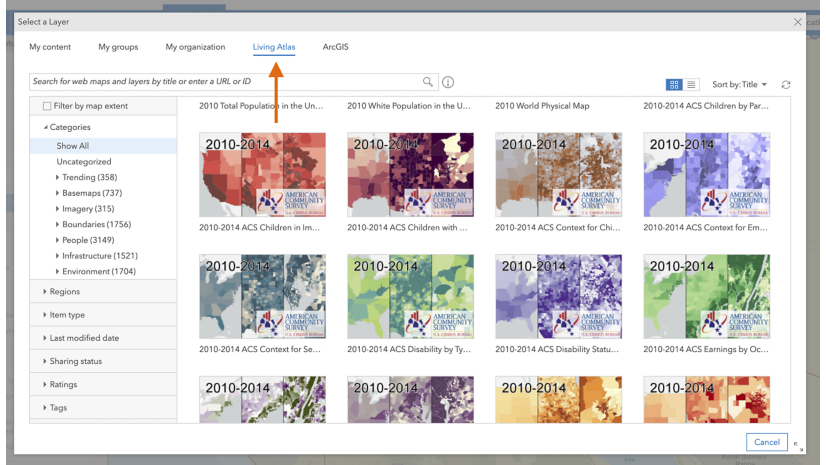
You can browse ArcGIS Living Atlas content in Business Analyst Web App using the add web maps and layers workflow. On the Maps tab, click Add data → Web maps and layers.
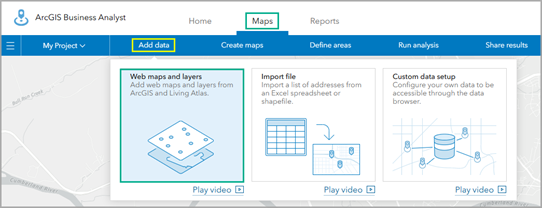
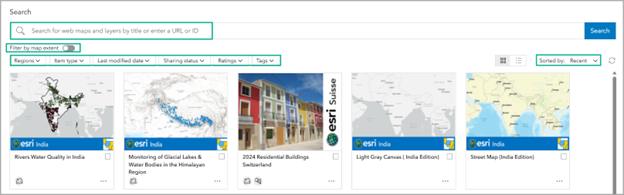
In the Living Atlas section, start with Show all to browse everything, then use Sort by, search, filters (Region, Item type, Last modified, Sharing, Ratings, Tags), or Filter by map extent to narrow results.
Featured Living Atlas content
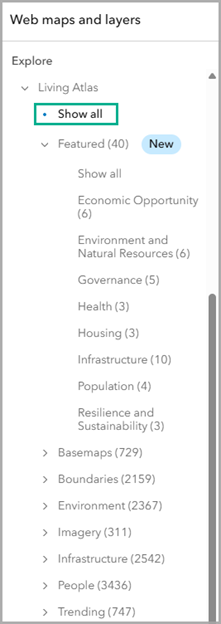
Featured content is a curated set of the most-requested Living Atlas web maps and feature layers for Business Analyst. Many items are available on standard census geographies (state down to block group) and updates follow each source’s cadence.
In the Web maps and layers gallery, we’ve created a Featured category under the Living Atlas section to surface these items. That Featured category is organized into eight subcategories—Economic Opportunity, Environment and Natural Resources, Governance, Health, Housing, Infrastructure, Population, and Resilience and Sustainability—so you can quickly browse by theme. To see all the curated featured content, click Show all.
On each item card, the new Data button opens a quick summary showing which categories and how many variables are available.
Example: Open the Data summary on the CDC/ATSDR Social Vulnerability Index 2022 (USA) map to review categories and variable counts before adding it to your project.
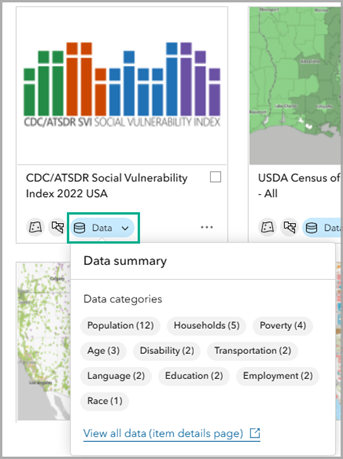
On the data summary, click View all data to open the item’s details page. For the CDC/ATSDR Social Vulnerability Index 2022 (USA) layer, the details page includes access to the underlying data table hosted by ArcGIS Online.

To add the web map to your project, you can do either of the following:
- Hover over the item and click Add to map.
- Click the Options button for the item and click Open details pane. The pane shows a summarized version of the item’s metadata. Scroll to the bottom and click Add to map.
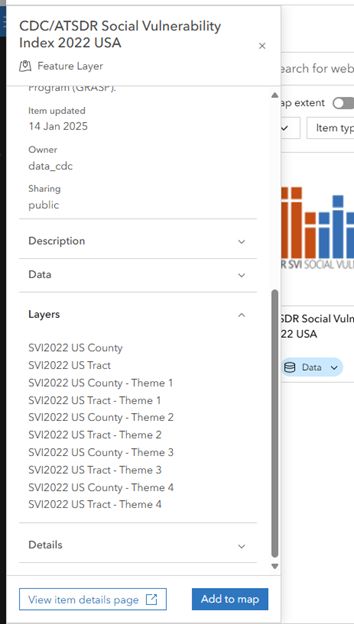
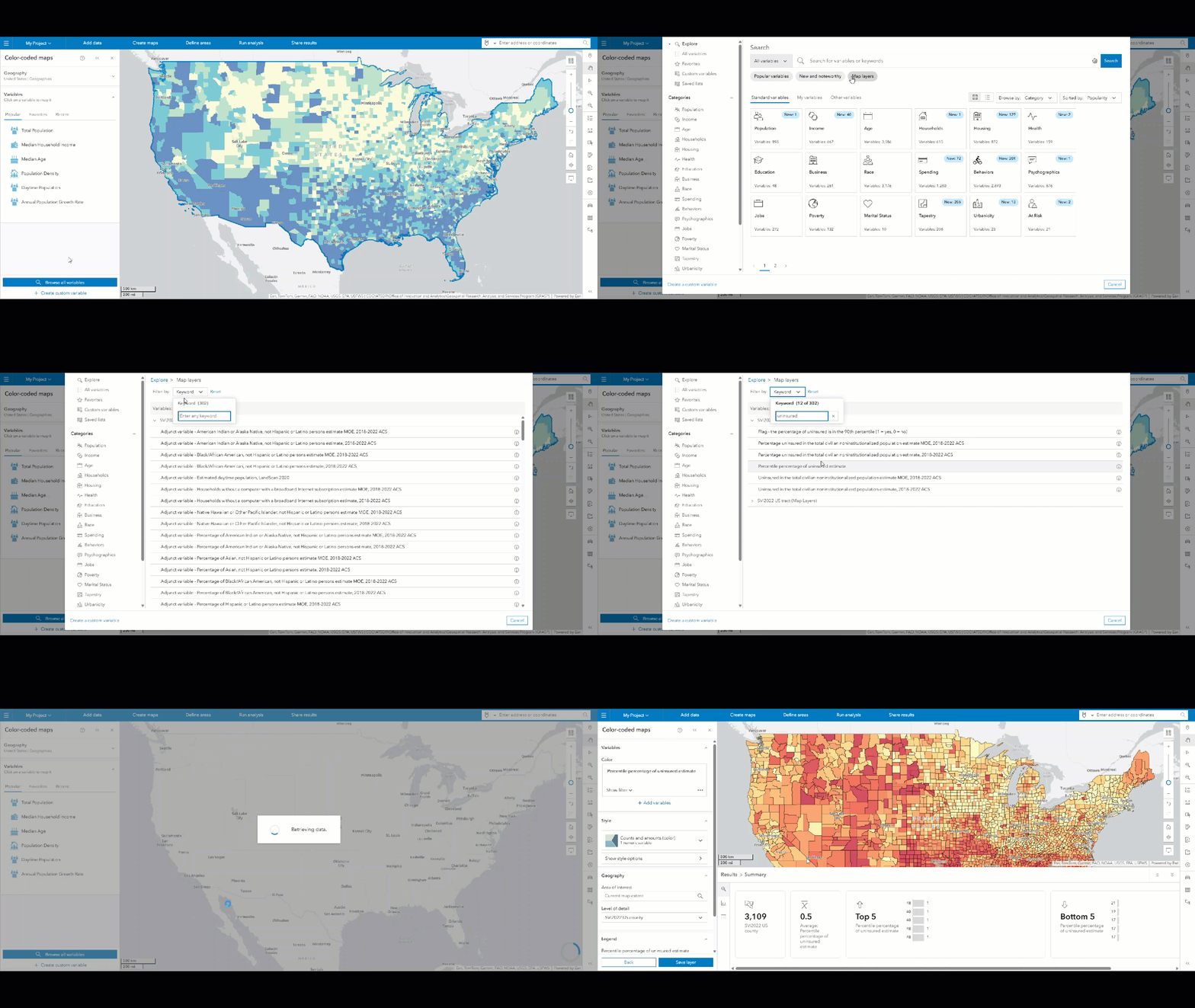
Once added, you can use the layer in Business Analyst Web App. The layer’s variables are available in the data browser for you to use in workflows like smart map search and color-coded maps. For a quick look at this data in action, you can create a color–coded map using the Percent uninsured (percentile) variable. This instantly highlights where uninsured rates are highest, which is useful for prioritizing outreach or funding.
In conclusion
For Business Analyst users, the new Featured Living Atlas content in the Web maps and layers gallery makes it easier to find trusted, analysis-ready layers and add them to your maps. Browse by theme, then use the Data summary to explore data categories and variable counts before mapping. Try it now: Maps → Add data → Web maps and layers → Living Atlas → Featured.
If you have feedback, comment below or post on Esri Community.
Data attribution
This blog gives data accreditation to:
- The Centers for Disease Control (CDC) created the CDC/ATSDR Social Vulnerability Index 2022 USA web map featured in Living Atlas
- Esri provides the basemaps.
Licensing
This article uses ArcGIS Business Analyst Web App. You can add web maps and layers using Standard and Advanced licenses.



Article Discussion: