
We’re constantly searching:
🔎 The best Korean BBQ spot in Los Angeles to satisfy those late-night food cravings
🔎 A complete address to successfully fulfill a customer order from an online store
🔎 Income or expenditure information by area to make real estate investments
The list is endless…
Location search is a huge part of our daily lives. Without adequate location information, making well-thought-out decisions becomes challenging. Through powerful location-based capabilities, Esri empowers developers building innovative solutions. With multiple search capabilities, end-users of these solutions and applications can better navigate their way around the world.
ArcGIS provides developers and their organizations with great flexibility to integrate search into their solutions.
There’s more than one way to search!
Let’s explore all the ways ArcGIS users can integrate search capabilities to ultimately ensure end consumers and businesses have access to the location information they need.
Place and Details
Los Angeles is known for having some of the best Korean BBQ spots in the country, but with countless restaurants to choose from, narrowing down options can be challenging. The ability to effectively search for points of interest and access rich place information provides application users with a greater frame of reference. With place attributes such as addresses and websites, consumers can search and then compare multiple locations of interest within a specific category, in this case, restaurants.
The ArcGIS Places service is the location service that makes it easy for developers to integrate POI search and place details into their solutions. However, supporting POI search and the display of place details are only the starting point for the Places service.
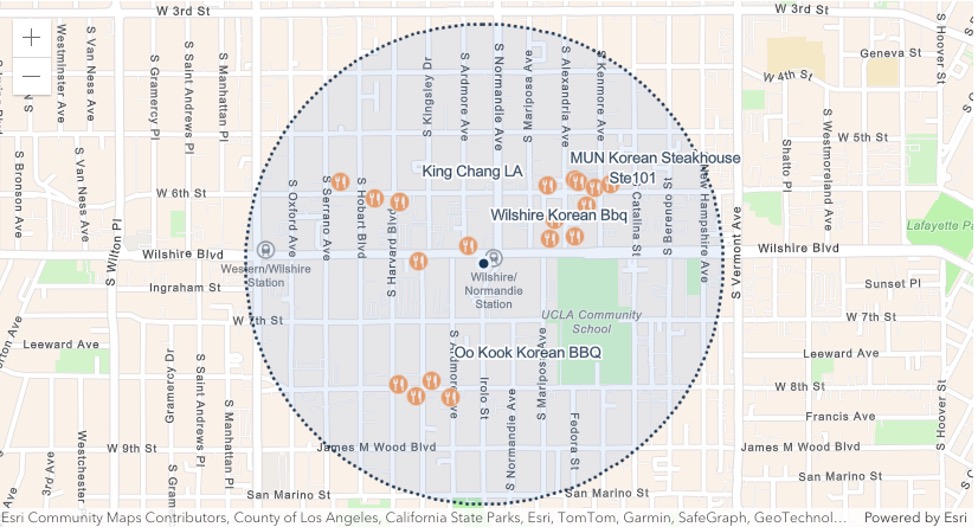
Developers building with the Places service can also take advantage of its Nearby Search and Bounding Box Search features. Nearby Search allows end users to see results for all Korean BBQ spots within a 2-mile radius from their workplace in Downtown Los Angeles. Bounding Box Search enables users to find places within a specific extent, for example, all Korean BBQ spots within the Koreatown neighborhood of Los Angeles.
The Places service provides access to Points of Interest across more than 1200 categories. Developers looking to build richer and more detailed location-based maps can rely on the service to provide end users with powerful location information for making informed decisions about where to eat.
Learn more about how to use the ArcGIS Places service
Geocoding
Ordinarily, 2202 Bristol, California would not be sufficient to fulfill a delivery.
If a customer fails to correctly enter their city name, street name or zip code, it could lead to significant delivery delays or potentially unfulfilled orders.
Geocoding helps organizations circumvent problems associated with incorrect address inputs. The ArcGIS Geocoding service helps developers find complete addresses and match them to incorrect or incomplete address inputs provided by users of applications or business systems.
There are several operations of the ArcGIS Geocoding service that support address search.
The first operation, geocoding converts address text into coordinates, enabling application users to find exact locations. When geocoding an address with a spelling mistake, the service will return a properly formatted address, ensuring that a logistics company can deliver to the right address.
Let’s look at an example below:
The Geocoding service also supports search for addresses for businesses, administrative locations, and geographic features, helping developers find and display locations across multiple categories.
The Reverse Geocoding operation converts coordinates into addresses, allowing developers to find an address for a specific location when a request is made to the Geocoding service.
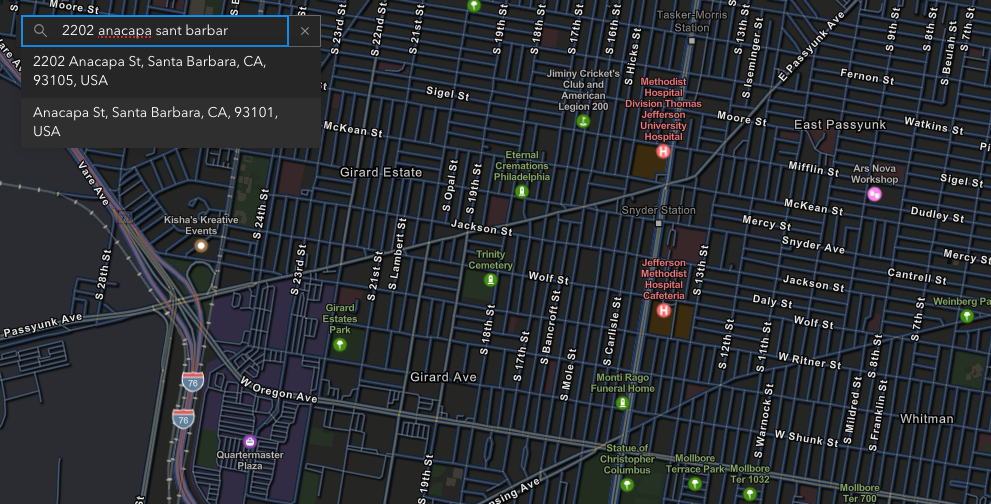
Another operation of the ArcGIS Geocoding service, known as Autosuggest, provides suggestions for input addresses. This operation helps reduce friction and errors during human data entry in interactive applications, analyzing partial input and returning complete, verified location suggestions in real time.
For example, turning 2202 anacapa sant barbar into:
2202 Anacapa St, Santa Barbara, CA, 93105 USA
This helps speed up the checkout or form completion process, ultimately improving user experience of applications and solutions.
Learn more about address autocomplete
Lastly, the ArcGIS Geocoding service supports Batch Geocoding, an operation that helps developers find locations for a list of addresses. By uploading a CSV containing multiple addresses, the service can return results with matched addresses in one operation, making it fast and easy to geocode millions of addresses.
The operations of the Geocoding service both independently and collectively contribute to more accurate address finding for almost any location around the world, improving efficiency for industries that rely on address information for analysis and decision-making.
Learn more about how to get started with building an app that integrates geocoding and address search.
Data Enrichment
Investors and commercial real-estate builders consider several factors before selecting a property. One of such factors is consumer spending of individuals within a given location. Understanding the demographics of residents near a potential mall can inform how investors think about their return on investment. As a developer building solutions for such industries, you need access to demographic data that provides rich context about a location, enabling users make forecasts while also considering historical trends. The process of finding demographic data for any location is called GeoEnrichment.
The ArcGIS GeoEnrichment service is what developers use to perform data enrichment. They can search for global and local data across thousands of variables, including current-year, historical, and forecasted datasets using the Analysis Variable Finder. For example, a developer building for a commercial real estate or financial investment organization can leverage the Analysis Variable Finder to search for the current year median household income or the median net worth of residents in Chicago’s West Loop.
The GeoEnrichment service queries data for any area, such as a block group or even a drive-time (for example, 10-minutes from Chicago’s West Loop), and returns statistically accurate results. The service can be integrated with other business systems to provide deeper analysis of a business’s target audience. For instance, a luxury fashion brand working with a commercial real-estate builder may use the demographic data the GeoEnrichment service provides to estimate the average consumer spend on men’s Suits in 2025 within a particular polygon, such as a 10-minute drivetime from the proposed store location. They can then determine if the spend figures closely align with their target market’s buying potential.
This level of deep insight could help both organizations confirm the viability of their development plans, when creating a mall of luxury stores and services. The market insights the service provides is invaluable, often contributing to successful site selection and favorable business outcomes.
Learn more about building an app that leverages the power of global and local data search through the GeoEnrichment service.
ArcGIS Location Services (Places, Geocoding, and GeoEnrichment) are being used across various industries to improve processes and enhance user experience. These services are accessible through ArcGIS Location Platform, with some available to get started for free.
As demonstrated above, the search capabilities these services provide help optimize logistics and delivery by validating addresses, reducing errors, and speeding up address entry. Additionally, they help in finding locations such as stores and warehouses that may be beneficial to business operations, as well as nearby places that provide everyday consumers with enjoyable experiences. With these search services, organizations can better assess risk associated with locations in industries like insurance, finance, and real estate through enriched databases of addresses and demographic data that tell a more vivid story about different locations.
Watch the video below to learn more about the use cases of search for ArcGIS Location Platform users and explore additional service demos.
Discover more capabilities of ArcGIS Location Services by exploring the Mapping and Location Services guide.
Subscribe to the Esri Developer Newsletter to discover more developer offerings and updates.





Article Discussion: