Linear referencing is a geographic approach for storing and describing the location of physical features in terms of measurements from a fixed point along a road, pipeline, or railroad. For example, the location of a yield sign along a highway can be described as “50 feet past mile marker 100”.
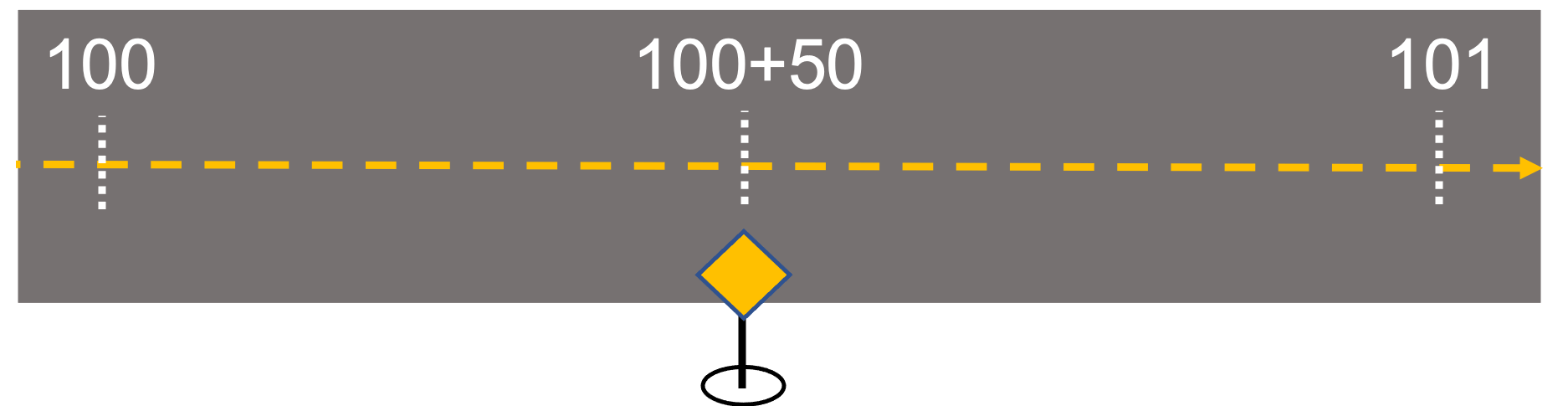
This method of describing location is commonly used in the engineering, construction, and management of infrastructure tied to linear features, and with newly added support for linear referencing in ArcGIS Field Maps, mobile workers can locate and even capture measurements when inspecting assets along roads, railways, or pipelines.
Find Measure
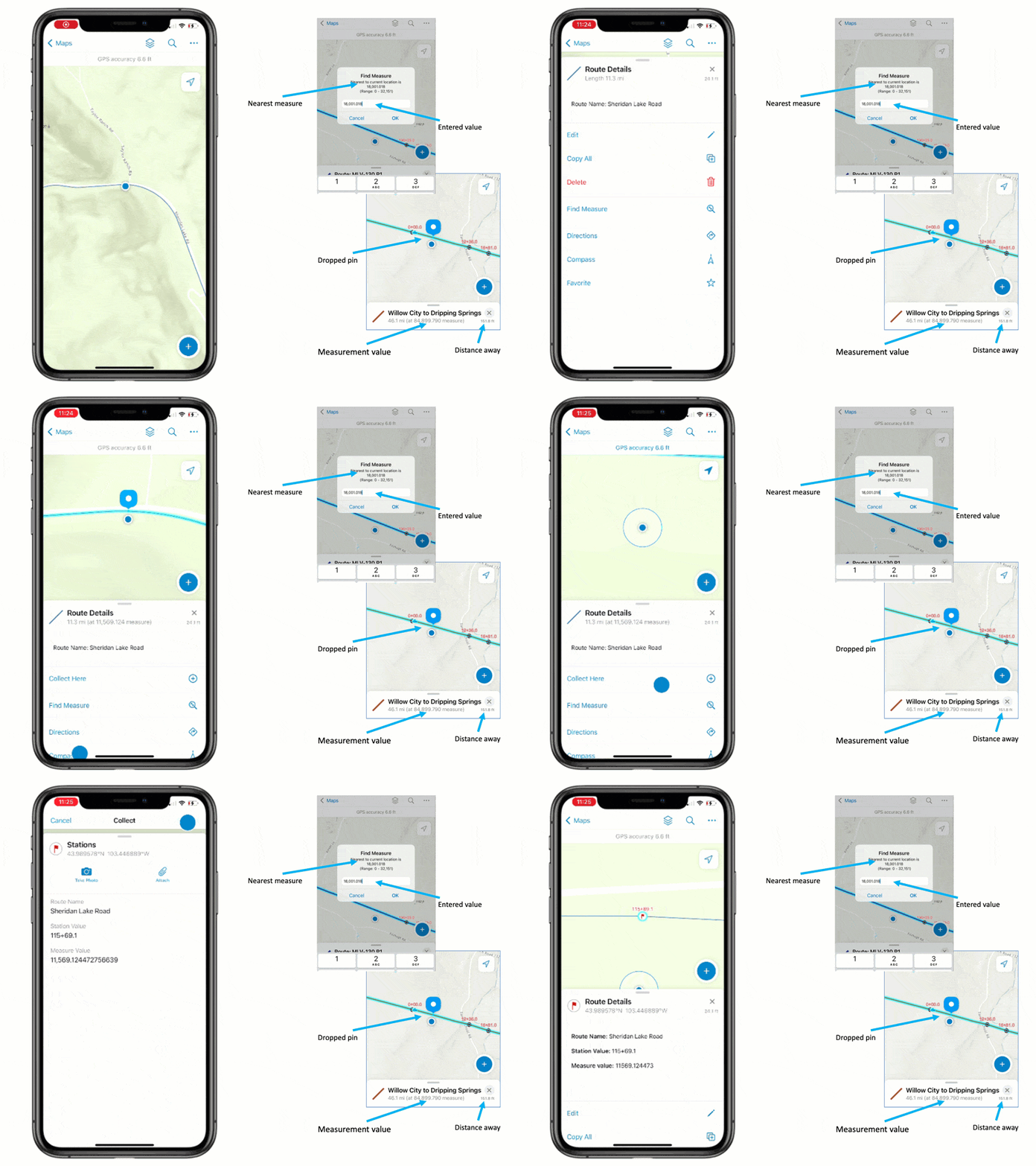
Field Maps includes a Find Measure feature action that supports the discovery of measurement values (m-values) along a selected linear feature.
After selecting a measured linear feature, the Find Measure  action appears. Tapping it will discover and present the closest m-value perpendicular to the mobile worker’s current location. A search dialog will appear and simply tapping OK will place a pin at the interpolated, measured location. However, you can type an alternate measurement if you want to search for a location further away from you.
The pin’s location can be used with the Compass  or Directions
  tool for navigation, or the pin’s location can be used with Collect Here to capture a new feature. New features will store the measurement value if the layer is m-aware.
More Information
- The Find Measure action can be used with any measured line feature. The measured line does not need to participate in ArcGIS Roads and Highways or ArcGIS Pipeline Referencing, but features managed by those products will also work with this action.
- Measurement values are stored as numeric values (doubles) in the m-value component of a linear geometry. M-values do not have a well defined unit of measure but are often calibrated in US survey foot or meters.
- Field Maps presents interpolated measurements the same way they are stored (unit-less numeric values). They are presented in the subtitle of the panel where details of the selected feature are shown. For display purposes only, measurement values are rounded to 3 decimal places.
- Searching for measurement values will use all decimal values entered in the Find Measure dialog. If the line feature geometry includes z-values, elevation will be used to interpolate the nearest perpendicular measure to your current location.
- It is possible to label measurement values and even store measurement values using stationing notation using Arcade expressions. Copy and paste code from this GitHub repository to label features using stationing notation and you can apply the same expression to store the station value as an attribute of a point feature.
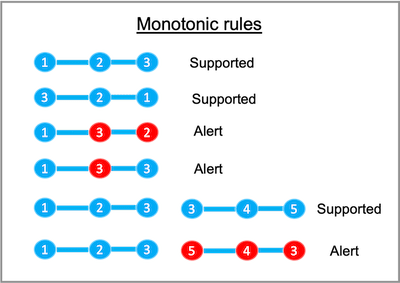
To find measurement values within a feature, they must adhere to these monotonic rules:
- All measurement values must be ascending or descending in value.
- Measure values need to be strictly ascending or descending within a part but duplicate m-values can exist at ends of parts.
- Invalid routes will display an alert message and details will be added into the Field Maps troubleshooting log.
What’s Next
The Find Measure feature action introduces support for linear referencing capabilities in Field Maps. Several enhancements including support for stationing notation, m-value editing of linear features, and much more are under consideration.
However, we want to grow the linear referencing capabilities from your feedback. Please let us know what you’d like to see next by submitting your ideas to Esri Community, contact us through your account manager, or email ArcGISFieldMaps@esri.com.

Great review of the Linear Referencing capabilities, Jeff. ESRI Tech Support has indicated in the past that the Roads and Highways Extension was required, so thanks for that clarification.
One thing that was not clear to me was how a typical linear (road centerline) shapefile becomes “m-aware” and thereby triggers the LR functionality in Field Maps. At some point, stationing values have to be assigned to the centerline geometry, I would think.
Are true curves in the road centerline geometry supported in the LR functionality?
We look forward to the additional functionality you mention like the stationing notation, and adding the station values and measurement values to points being set to the database tables.
Last, roadway geometry that utilizes station values will typically also carry a value called in many areas as the “offset” value, being expressed as a distance in Feet or Meters perpendicular to the centerline ( your “measurement value” shown in the article screenshots?) but with a label of L or R for Left or Right of the centerline, while facing up station. A point with an offset value of “0” would fall exactly on the centerline, while a point that fell 10.0′ left of the centerline would have an offset value of 10.0’L. The full station/offset notation might be for example, 125+45 10.0L Perhaps not all areas use the “offset” terminology, but that component with the L/R designation is important to the proper labeling of linear referenced features.
Thanks again for your helpful article.
Hi Michael
Yes you do need to calibrate your m-aware features and ArcGIS Pro provides functionality that you can use to assign stationing values to the centerline geometry.Please see this doc topic to get started:
https://pro.arcgis.com/en/pro-app/latest/help/data/linear-referencing/introduction-to-routes-and-route-feature-classes.htm
True curves geometries are supported with ArcGIS Server feature services only. Hosted feature services in ArcGIS Online densify curves to straightline segments. So at this time, our interpolation is not considering curves and will be between vertices (important to make sure the densification is sufficient for your needs). Once circular arcs are supported in ArcGIS Online we will look at supporting them with our interpolation.
We are looking to progressively add functionality and stationing support is bubbling up to the top of our list. We very much want to drive future development based on customer feedback so appreciate any/all you can provide. Submitting ideas to Esri community is a great approach and so is communicating needs to your account manager.
I have heard about the offset need from another engineering firm as well. We will see what we can do with the Arcade expression language today and moving forward bring needed capabilities into the system as a whole!
Thanks again for all your feedback 🙂