Service areas are more than geometry
Service area maps highlight some of the most important spatial decisions in public policy and planning. Which hospital an ambulance is dispatched to, which school a child is assigned to, which distribution center serves a region’s inventory needs—getting these zones right is crucial. They shape how resources reach people. With standard Voronoi diagrams, you can create these boundaries. Standard Voronoi diagrams partition space by assigning each location to its nearest point. They are fast, deterministic, and a reasonable starting point. But the embedded assumption is that all points are equal. In reality, that may not be the case.
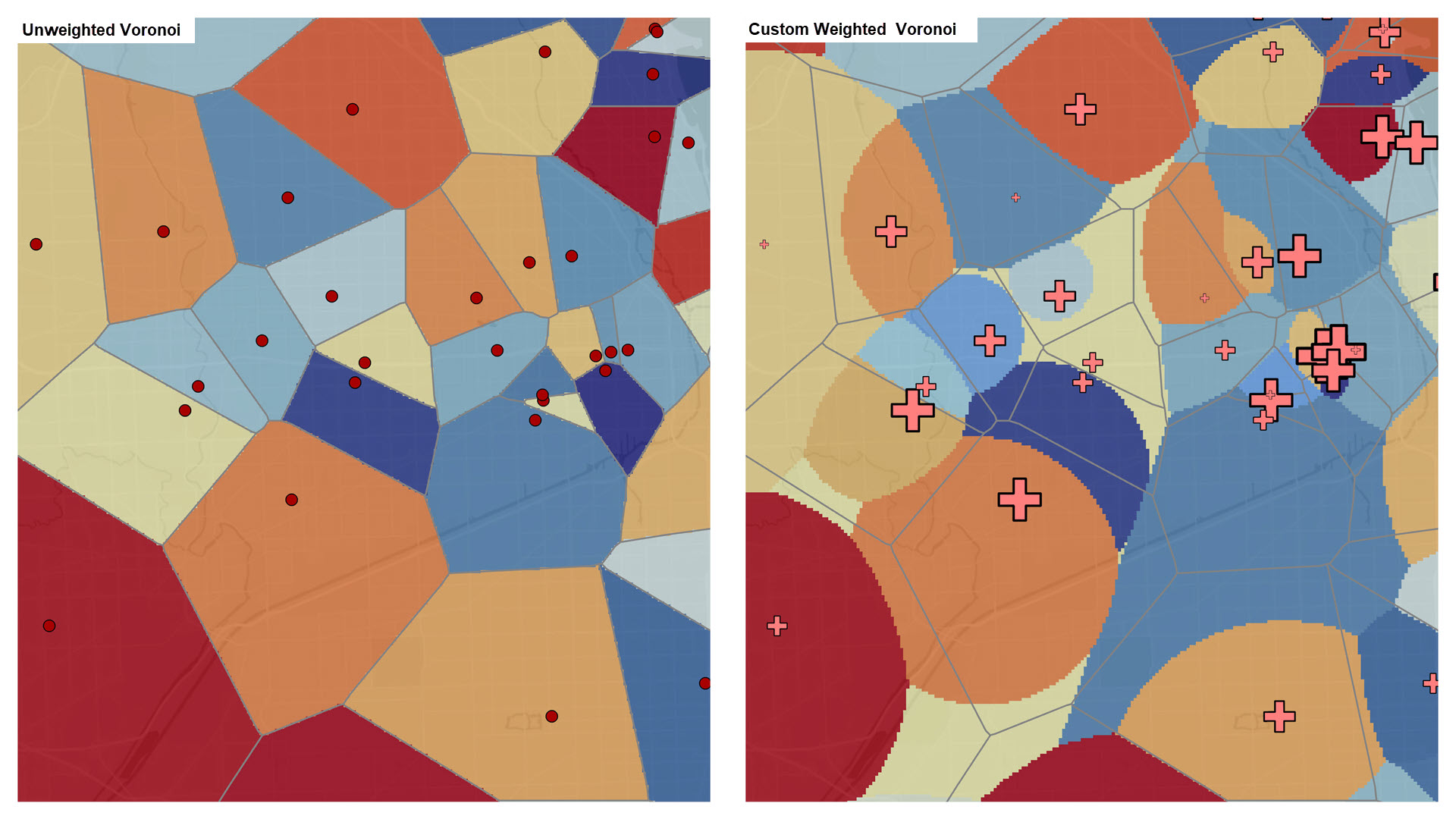
In the following example from Cook County, Illinois, there are 60 licensed hospital facilities serving over 5.1 million people. A community clinic on the south side of Chicago has 60 licensed beds. A Level I trauma center 11 kilometers north has 894 beds. On a standard Voronoi diagram, both facilities have roughly equal territory. A service area model that treats them as such is leaving meaningful information out of the geometry. However, that information is exactly what planners, analysts, and decision-makers need.
Create representative zones
Standard Voronoi diagrams only factor in the location of each facility. The attributes associated with the feature class have no influence on the zone geometry. The boundary falls at the geographic midpoint regardless of what the data says about each side of it. The Generate Weighted Voronoi tool works by incorporating the attributes. These attributes should shape where the zone boundary sits. A regional medical center with 894 licensed beds should draw its boundary further from a neighboring clinic than a straight midpoint would place it. The zone should reflect the data.
Five Voronoi types for different analytical needs
The tool supports five zone Voronoi types in computing the service area, available as options on the tool’s Voronoi Type drop-down menu:
- Unweighted is the option for a standard Voronoi diagram, in which every point is treated equally. This is useful as a baseline to show what equal treatment of unequal points produce and for comparison.
- Additive Weighted shifts boundaries proportionally to the difference in weights. A higher weight point has low effective distance from any location, so it claims more territory. The result scales linearly with weight, making it straightforward to explain in a public or regulatory process.
- Multiplicative Weighted places the boundary by considering the multiplicated values from both distance and weight. Here the relationship inverts: a higher weight point produces a smaller zone. This is the appropriate type when a high weight point should serve a concentrated local area rather than a large regional one. For example, in the hospital use case in Cook County, a large 900-bed trauma center should serve a wider territory compared to a 50-bed community clinic. The output zones from multiplicative Voronoi have boundary curves that are Apollonius circles, visibly nonlinear when weight differences are large.
- Power Weighted amplifies differentiation further by using power distance computed from power diagram, which is useful when the range between facility sizes is extreme and the geometry needs to visibly reflect that.
- Custom Expression allows you to write your own distance function using the weight field (w), a coefficient field (k), and a set of operators: sqrt, abs, and standard arithmetic. The tool computes Euclidean distance internally. Your expression controls how that distance is shaped by the attributes of each point.
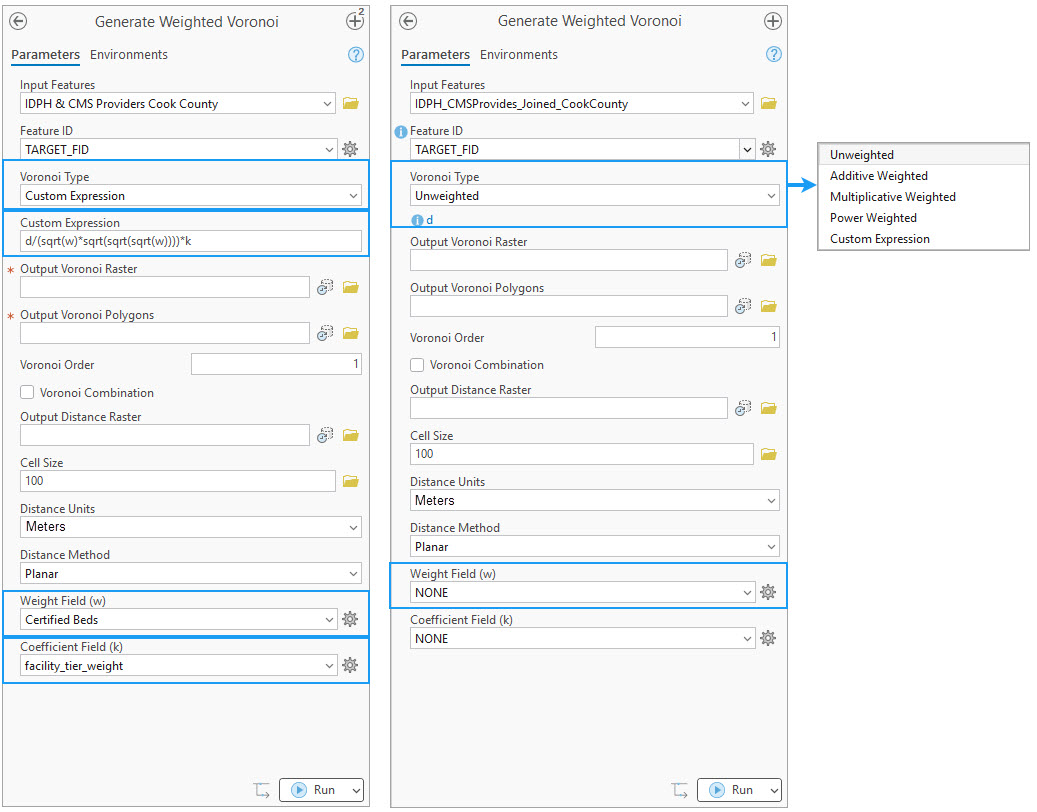
For the Cook County case study, the Weight Field value is the number of licensed beds, and the Coefficient Field value is the facility tier weight that encodes road network reachability and bed use per provider. The expression used here is:
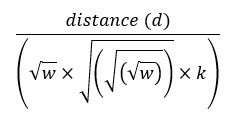
Here, the distance is the straight-line distance from the provider. Weight (w) is the licensed beds. The exponent for the w equals 0.625. The coefficient k then scales the zone by use. A facility with twice the bed count and twice the visit volume does not get twice the zone. The combined denominator grows much faster, reflecting how capacity and demand compound each other. The result is a geometry that responds to both what a facility can hold and how much it is actually used.

Connect capacity to population
The weighted zone output is a geometric framework. It becomes useful when this geometry is connected to the population it is designed to serve. This analysis answers the most common question planners and policymakers ask: given these weighted assignments, is the distribution of responsibility proportionate to the capacity available?
You can calculate this by completing the following steps:
- Join Licensed Beds data from the hospital feature class onto the Voronoi zone polygons using Join Field.
- Assign each census tract to the zone it falls within using Spatial Join.
- Aggregate the total population per facility zone using Summary Statistics to determine the true catchment population.
- Bring that aggregate back to the tract level using Join Field and compute the ratio with the field calculator: zone population divided by licensed beds.
The result shows which census tracts are currently undersupply compared to the demand.
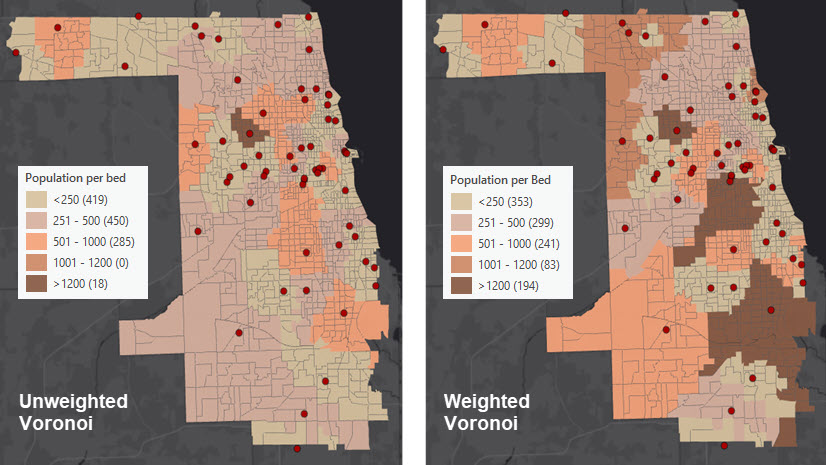
That calculate ratio—population per licensed bed—is new information. The population data was always there. The bed counts were always there. The Generate Weighted Voronoi tool provided the geometric framework that connected them: a zone structure that allocates population to facilities based on what those facilities can actually support. That number can support a certificate-of-need filing, strengthen a grant application, or inform a capital investment decision about where new capacity is most needed. It is the kind of evidence that moves planning conversations forward.
Data preparation
The analysis uses three datasets. The hospital point feature class is sourced from the IDPH Hospital Licensure Database (2023), cross-referenced with the CMS Provider of Services File for bed counts and annual visit volume. Cook County census tract boundaries and population estimates are from US Census TIGER/Line 2022 and ACS 2022 5-year estimates. All layers were projected to Illinois State Plane East (FIPS 1201, meters) before running the tool.
Conclusion and next steps
Service area analysis has always depended on geometry. The Generate Weighted Voronoi tool extends that geometry so it also incorporates the attributes that describe what each facility in the input point layer can actually do. The workflow described in this article uses hospital service areas as the example, but the expression adapts to any weighted point dataset. Swap the number of licensed beds for annual revenue, student enrollment, or unit response capacity. Swap the coefficient field used here for any site-specific coefficient that the data supports—for example, incident rate, use ratio, or demand index. The five zone types provide a range of analytical options from simple to highly customized.
Whether you are a public health analyst, an emergency management planner, or a regional equity researcher, the Generate Weighted Voronoi tool allows you to build service areas that more accurately reflect the facilities they represent.

Article Discussion: