The March 2026 update for ArcGIS Survey123 continues our focus on making survey authoring more approachable in the web, while clearly marking an important milestone for the Survey123 field app and Survey123 Connect on the current (3.x) technology stack.
This release delivers long‑requested enhancements in the Survey123 website, especially around repeats, calculations, and schema management, while the Survey123 field app and Connect 3.25 focus exclusively on bug fixes as we prepare for the next generation of Survey123.
Survey123 Website
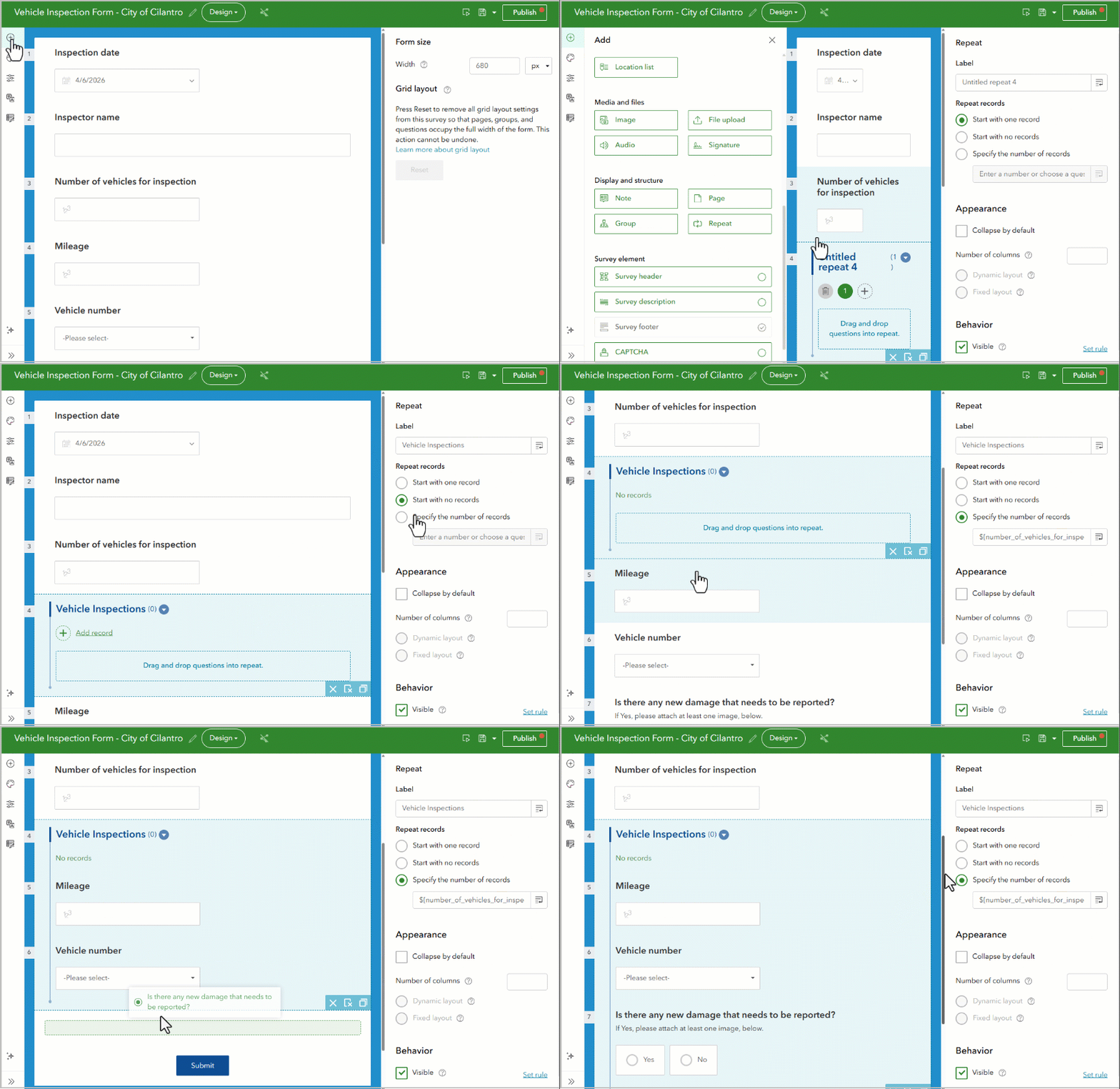
Author repeat questions directly in the web designer
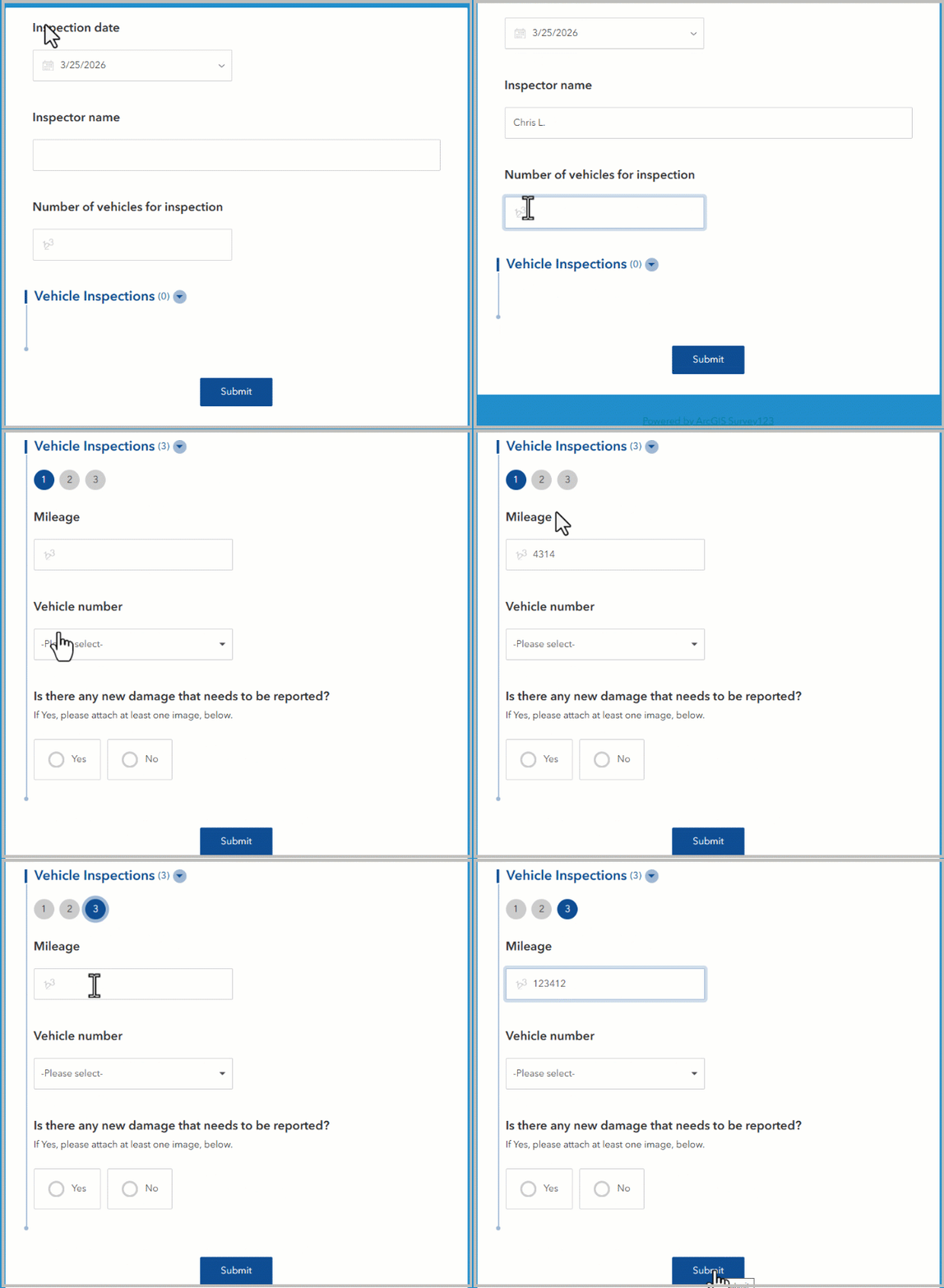
You can now author repeat questions directly in the Survey123 web designer, without switching to Survey123 Connect or working with XLSForms. Repeats are now fully supported in the web authoring experience, making it much easier to model one‑to‑many data collection patterns such as assets at a site, inspection checkpoints, or household members.
When adding a repeat, authors can:
- Insert a repeat section directly from the Add panel
- Drag and drop questions into the repeat
- Control how records are created, including starting with one record, starting empty, or specifying a fixed number of records
- Control the number of repeat records based on a previous response
This brings one of the most powerful Survey123 capabilities into the browser, significantly lowering the barrier to building more advanced surveys.
Calculation Modes: More control over how calculations are evaluated
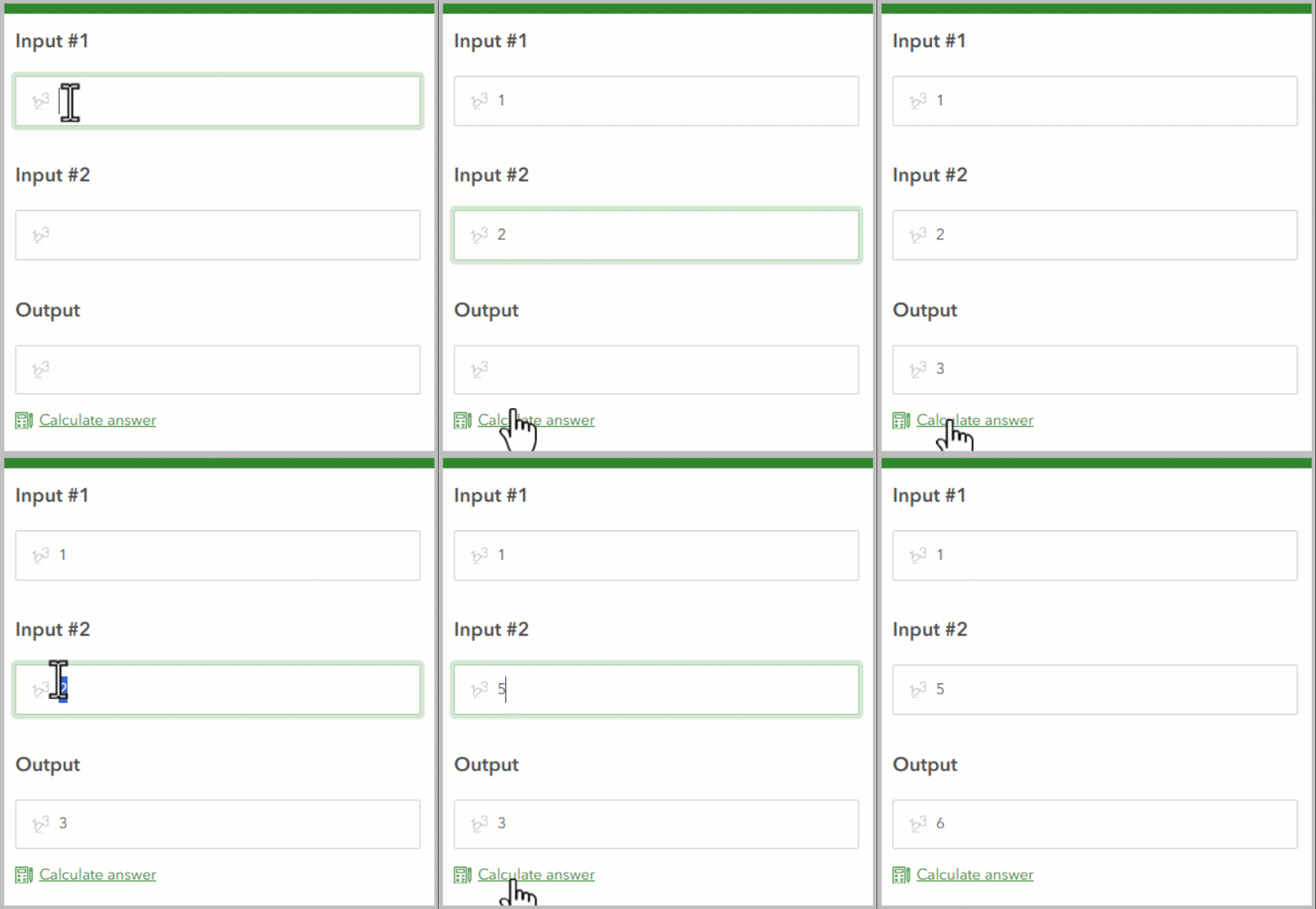
Have you ever wanted more control over when a calculation runs—such as triggering it only from a user‑initiated Calculate action, preserving values that were manually entered, or evaluating only when a field is empty? In complex surveys, knowing when a calculation runs can be just as important as the calculation itself.
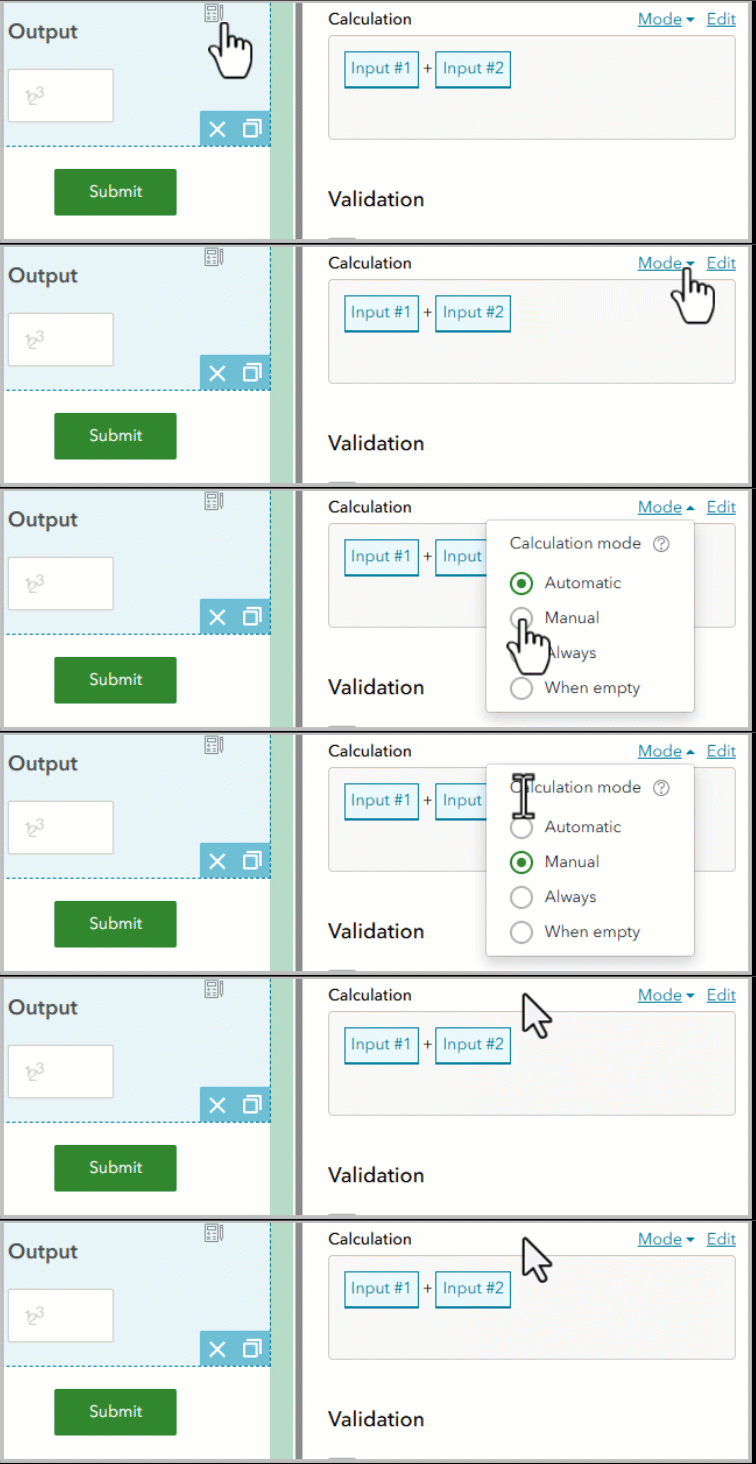
When authoring a calculation in the web designer, you can now explicitly set the calculation mode, giving you precise control over when a calculation is evaluated—especially useful for complex forms and performance‑sensitive workflows.
The available calculation modes are:
- Automatic (default) – Calculates when the question is empty or hasn’t been modified.
- Manual – Calculates only when the Calculate answer button is pressed.
- Always – Calculates when any value referenced in the calculation changes.
- When empty – Calculates until a nonempty value is returned, then behaves in the same way as manual mode.
This enhancement gives authors finer‑grained control over calculation behavior, helping prevent unintended overwrites and improving predictability in more sophisticated forms.
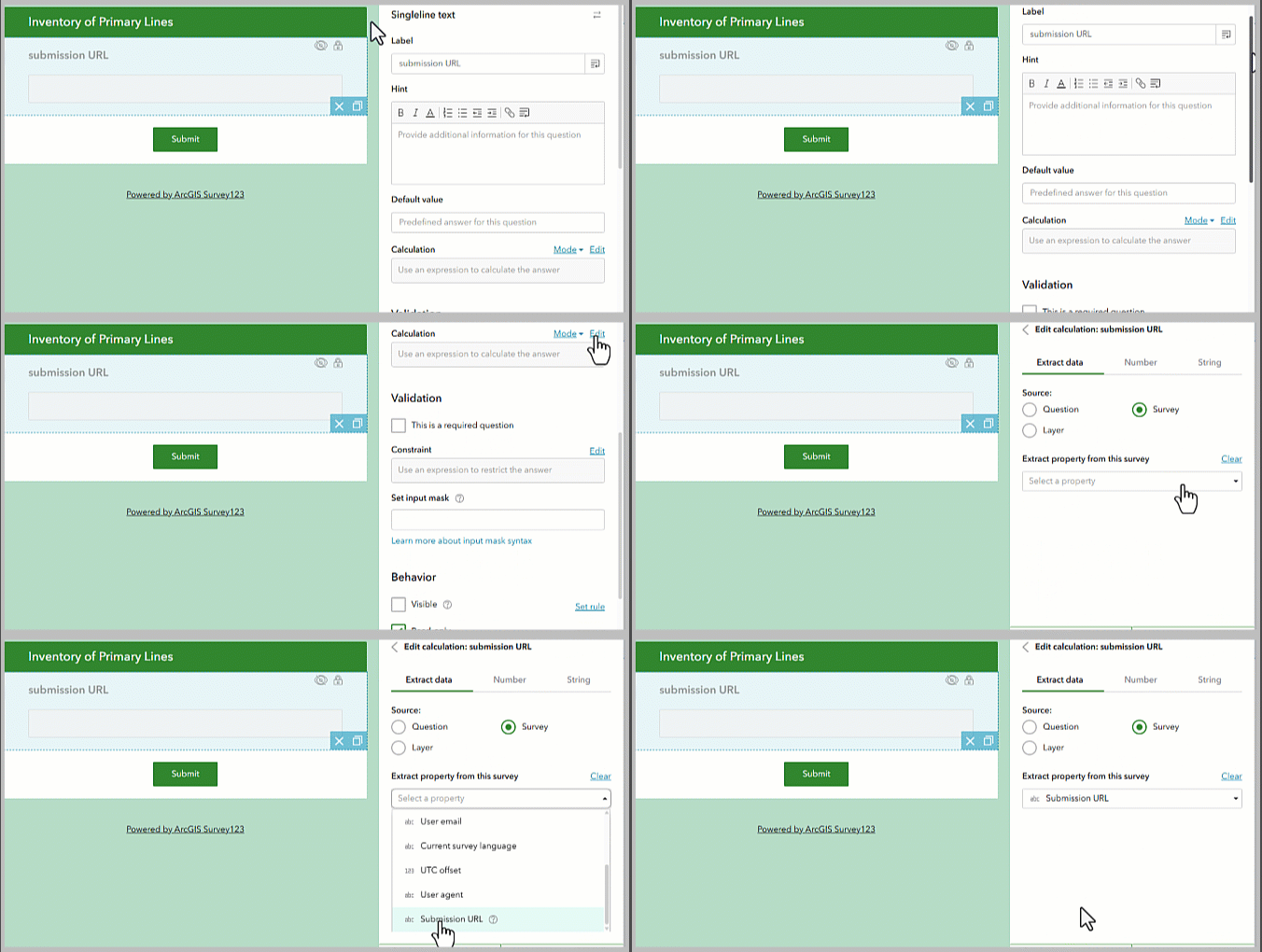
Use the submission URL in calculations
Calculations can now reference the submission URL property directly when authoring surveys in the web designer—similar to using pulldata(“@property”, “submissionUrl”) in an XLSForm. This makes it easy to capture the URL of a submitted record and store it in a field for later use.
Storing the submission URL enables more advanced workflows, such as passing a direct link to the record into downstream integrations, notifications, or external systems, where it can be used for quick navigation back to the submitted data.
The submission URL can be easily selected directly from the calculation editor.
Edit the feature layer name from the modify schema panel
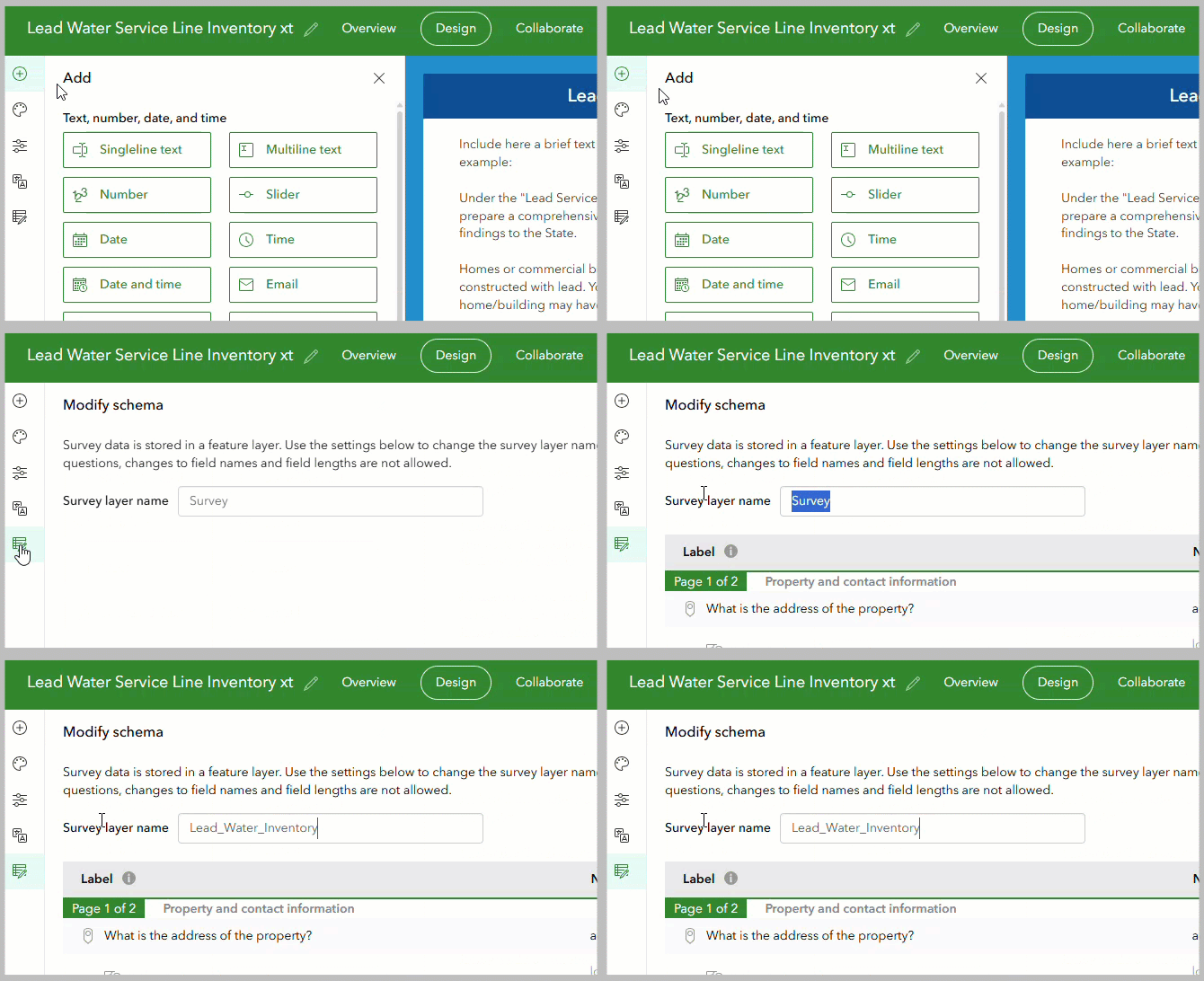
The Survey123 website now allows you to edit the name of the feature layer associated with a survey directly from the Modify schema panel.
This small but impactful improvement makes it easier to:
- Keep feature layer names aligned with organizational naming standards
- Improve clarity when surveys are shared across teams
- Reduce the need for post‑publish item management in ArcGIS Online or Enterprise
NOTE: You can only change the feature layer name before publishing the survey.
Add feature layer webhooks from the website
Webhooks are commonly used in Survey123 workflows to trigger real‑time actions when data is submitted—such as sending notifications, updating external systems, or kicking off automated processes in tools like Power Automate or custom services.
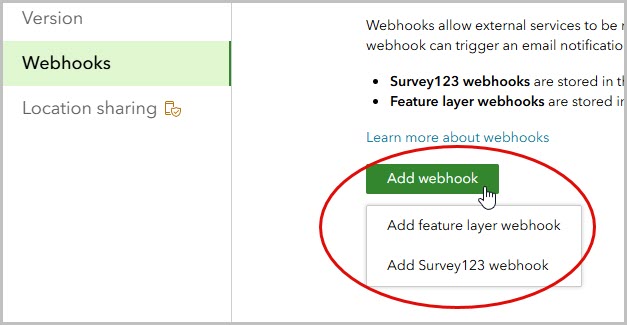
In addition to Survey123 webhooks, you can now configure feature layer webhooks directly from the Survey123 website, making it easier to set up and manage integrations without leaving the authoring experience.
The current version of Survey123 supports both Survey123 webhooks and feature layer webhooks. However, the next generation of Survey123 is standardizing on feature layer webhooks to provide a more consistent and scalable integration model across ArcGIS apps.
Survey123 Field App and Survey123 Connect (3.25)
Final update on current technology
Survey123 field app 3.25 and Survey123 Connect 3.25 mark the final release on the current 3.x technology stack. With this milestone, the team is excited to fully focus on bringing the Survey123 capabilities you rely on—and new innovations—to the next‑generation Survey123 field app and desktop authoring experience.
As previously communicated:
- The current Survey123 (3.x) apps remain supported by Esri
- No new features or enhancements will be added to the 3.x apps
- The Survey123 3.x will be retired at a future date
- Both the current 3.x apps and the next‑generation Survey123 apps can be used side‑by‑side during the transition period
This release includes a small number of bug fixes focused on stability and reliability, including:
- Fix addressing working with Inframarker RFID readers
- General stability and compatibility improvements based on customer feedback
Looking ahead
The evolution of Survey123 is accelerating. On the web, we’re continuing to invest heavily in making survey authoring both more powerful and more approachable—especially with upcoming enhancements that will leverage AI to assist with form creation and data capture. These capabilities are designed to help you move from idea to deployable survey more quickly, while maintaining the control and flexibility advanced users expect.
In the coming months, we’ll also introduce the next generation of Survey123 native applications—Survey123 Mobile and Survey123 Studio. These apps represent a major step forward, modernizing the Survey123 experience and laying the foundation for the next decade of form‑centric data collection.
To help your organization prepare, we strongly encourage you to start evaluating what’s coming next by joining the Survey123 Early Access Community. By trying the next‑generation apps now, you can test your existing workflows, understand what’s changing, and provide critical feedback that directly helps shape the future of Survey123.
Your feedback has always played a key role in how Survey123 evolves—and this next chapter is no different.
Bug Fixes and Improvements
Fixes and improvements include the following:
Survey123 field app—3.25.31
Fixes include the following:
- A bug was fixed in which the Inframarker scanner failed to load when querying a feature layer that did not contain the expected inframarkerid field.
- A bug was fixed in which an unexpected user-agent string was used when searching for content items in the portal.
Survey123 Connect—3.25.27
A bug was fixed in which an unexpected user-agent string was used when searching for content items in the portal.
Website
- Repeat questions can now be authored in the web designer (ENH-000174211).
- The name of the feature layer associated with a survey can now be edited in the Modify schema panel (ENH-000118947).
- Feature layer webhooks can now be added in the website.
- When authoring a calculation, the calculation mode can be set to one of the following: Automatic (default), Manual, Always, or When empty.
- When authoring a calculation, the submission URL property can now be selected from a survey.
- When authoring a multilingual survey, the French (Canada) locale is now supported.
- Adding more images to the survey description no longer prevents republishing a survey (BUG-000146676).
- A security vulnerability was resolved by upgrade to Bootstrap version 5.x (DE-000008931 BUG-000179178).
- CAPTCHA characters are now shown in uppercase only to reduce ambiguity (BUG-000181825).
- A bug was fixed in which deleting a record from a survey with multiple (non-nested) repeats would only delete the first repeat (BUG-000179509).
- A bug was fixed in which an error message (Unable to complete operation) appeared at the top of the Data page when filtering data on an integer field type that uses text as labels for the select_one choices (BUG-000181307).
Survey123 report service
- When printing a report, you can now reference an existing image in the media folder of the survey’s form item package (ENH-000164078).
- A bug was fixed in which an error message (An error occurred when checking the report template) is shown when using the getValue operation in a summary section for a select one question (BUG-000179209).
Survey123 web app
- Calculation mode is now supported (ENH-000161175).
- A placeholder rectangle is now shown when loading map questions (ENH-000176851).
- Querying the submission URL with the pulldata(“@property”) function is now supported.
- Complex geometries, including multipart polygons and polygons with holes, are now supported in map questions.
- A bug was fixed in which angle brackets prevented survey submission (BUG-000166208).
- A bug was fixed in which an image could not be deleted and replaced in a survey published to ArcGIS Enterprise when the Enable Sync option is disabled (DE-000008739 BUG-000180585).
- On iOS, a bug was fixed in which a survey with multiple map questions and pages would crash after tapping Next (DE-000007621 BUG-000163995).
- A bug was fixed in which Spanish date and image questions published in Survey123 Connect do not appear translated in the web app (BUG-000176617).
- A bug was fixed in which polygons drawn on a map question unexpectedly disappeared when the Edit button was tapped for surveys published in Survey123 Connect (BUG-000181775).
- A bug was fixed in which populating a single select question from an ArcGIS Experience Builder list widget does not display the expected choice values (BUG-000170157).
- On iOS, a bug was fixed in which unexpected screen zoom and display would occur when searching in map questions (BUG-000181103).

Article Discussion: