Based in Omaha, Nebraska, the Metropolitan Utilities District (M.U.D.) serves more than 600,000 residents in the metro area and manages both natural gas and water utilities. For over 10 years, M.U.D. has used GIS technology to streamline workflows and has frequently updated its technology to better serve staff and customers.
In keeping with that ethos, leaders at M.U.D. recently transitioned from ArcGIS Desktop to ArcGIS Pro and implemented ArcGIS Enterprise along with ArcGIS Utility Network. As a result, M.U.D. now has an accurate, real-world data model of its utility assets and operations with full network connectivity.
Iteratively Improving M.U.D.’s GIS
When M.U.D. initially embraced GIS, the utility wanted to replace paper workflows and reduce dispatch calls. So it implemented Utilities Viewer, an app supported by ArcMap that provided staff with access to information via iPads and tough books. But there were limitations. The app required an active internet connection, which wasn’t always available, and performance lagged when viewing the entire map area. In addition, syncing with local databases often failed.
As technology advanced, M.U.D. staff were able to develop new apps and improvements. The organization synced its GIS with SAP to help with resource planning, make field apps faster and more robust, and develop dashboards to showcase data and analytics. Yet staff still struggled to streamline outage and project management. Additionally, regulatory requirements, such as revisions made to the federal-level Lead and Copper Rule, put pressure on M.U.D. to take the next step: implementing enterprise GIS on a modern geospatial platform and upgrading to ArcGIS Utility Network.
Leadership chose to focus on initiatives that would improve system management. These goals included the following:
- Use better-quality data to upgrade and support hydraulic modeling and identify risks.
- Develop an outage management system and a lead service inventory.
- Build a foundation that could support short- and long-term goals, including enabling mobile crews with field apps and high-accuracy GPS receivers to improve efficiency.
Start with Data Cleanup
Staff began the process of upgrading M.U.D.’s GIS by performing a thorough review of the utility’s data to identify data gaps and errors before coming up with a strategy to improve data quality.
From there, staff developed pilot projects based on M.U.D.’s gas and water systems to gain a clear understanding of ArcGIS Utility Network and its features. Working through the steps to set up a gas utility network provided staff with much-needed experience in mapping system data in the Utility and Pipeline Data Model. The team went through several iterations of its gas utility network before achieving the understanding and functionality it sought.
The pilot project also included an architecture review. M.U.D. staff participated in an architecture workshop hosted by Esri. Within a year, the utility formed a plan to deploy new servers that would provide a robust environment for its ArcGIS Utility Network implementation.
“Take Esri’s advice to clean up your data and start with a pilot project. The pilot sets up a workbench that can be modified to meet your needs and support your migration,” said Lindsay Dreckman, M.U.D.’s GIS manager. “You will learn a lot and be better prepared for full implementation.”
Together with ArcGIS Pro, ArcGIS Enterprise and ArcGIS Utility Network have empowered staff with a central repository for GIS data, powerful desktop GIS capabilities, and GIS-based mobile apps. Now, staff can easily access information and create maps and apps they can share with collaborators. This has improved existing workflows, enabling the GIS team to support organization-wide initiatives.
Aligning Hydraulic Modeling
M.U.D. staff had been developing a hydraulic model of the district’s pipe network prior to implementing ArcGIS Utility Network. Because the hydraulic model demanded high-quality, accurate information, it aligned with the requirements for supporting M.U.D.’s migration to ArcGIS Utility Network.
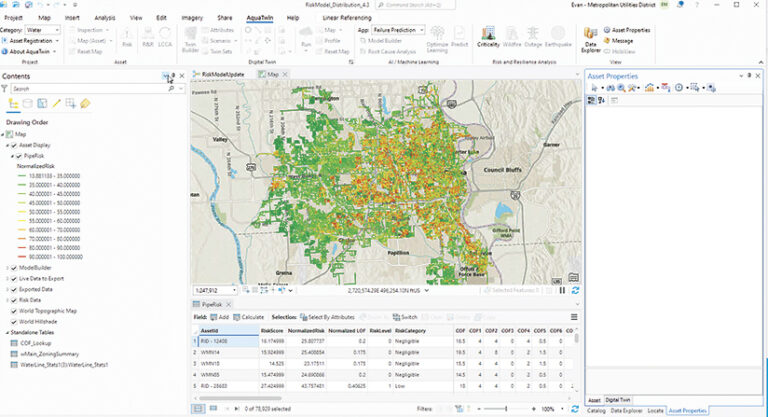
Once ArcGIS Utility Network was in place, M.U.D. engineering staff moved away from the model built in ArcGIS Desktop and implemented AquaTwin Water, a water system hydraulic modeling solution from Esri partner Aquanuity that’s built into ArcGIS Pro. With ArcGIS Utility Network as the foundation for M.U.D.’s hydraulic model, engineering staff don’t have to spend as much time cleaning up data once it’s in the model. This is because of ArcGIS Utility Network’s rules and connectivity requirements, which consistently generate high-quality data.
“Using data from [ArcGIS Utility Network] has resulted in less time fixing connectivity issues in the hydraulic model,” said Evan Martin, M.U.D.’s director of infrastructure integrity. “The built-in connectivity rules ensure good data, which is very important when modeling flow through our system [and] knowing what’s connected to what and how the system flows together.”
Determining Water Main Break Risks
M.U.D.’s robust water main break information—with digitized records dating back to the late 1950s—is the basis for risk modeling and planning. Staff use GIS to identify critical customers and previous projects in the area, and to review asset information such as a water main’s size, material, pressure, and slope. This information feeds the Aquanuity software, resulting in better risk prioritization and more informed capital improvement planning.
Results from the risk model are published to a web map and shared across departments using an ArcGIS StoryMaps digital story. This format enables staff to clearly communicate the risks associated with specific water mains, prioritize capital improvement projects and replacement program strategies, and display project areas and boundaries.
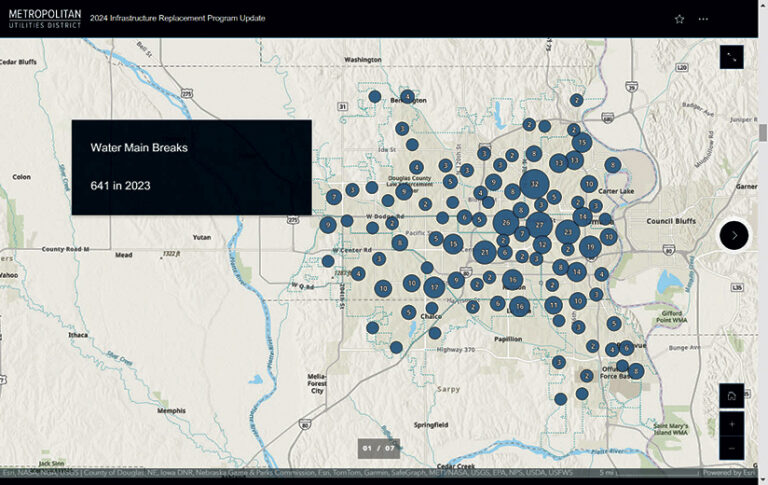
The GIS team has also developed two great maps to communicate how M.U.D. creates a capital improvement plan. One map shows water main break information and material type. This map is shared with the board of directors to help them understand why capital improvement plans target specific neighborhoods for water main replacement and others don’t. The other map visualizes the growth of M.U.D.’s water system. Exploring this map reveals how the system has expanded west through Omaha over several decades.
A New, Streamlined Outage App
Prior to modernizing M.U.D.’s GIS, during outages, staff would use a custom lasso tool in ArcMap to select all affected meters. The tool would export this information from the identified area to a spreadsheet. Mobile staff would then use a mobile mapping app to review the valves, clicking on them one by one and seeing how many turns it would take to close each valve. This process was prone to data inaccuracies, which often led to communication gaps between mobile staff and customers.
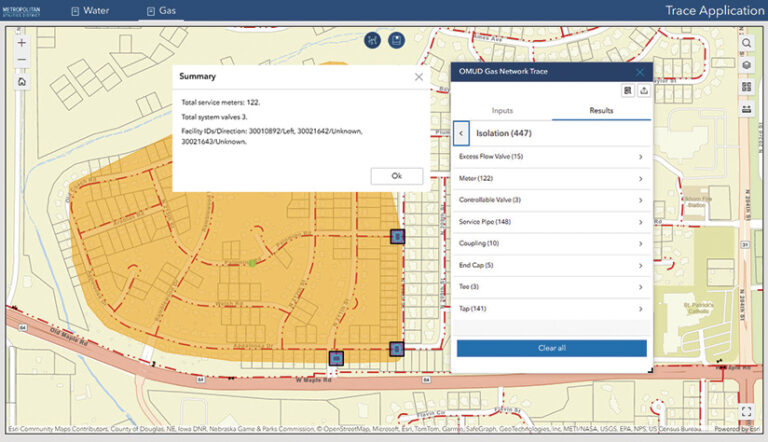
Shortly after upgrading to ArcGIS Pro, ArcGIS Enterprise, and ArcGIS Utility Network, M.U.D. launched a project to create a new outage app. The GIS team’s goal was to build a new tool that streamlined workflows and consolidated multiple solutions into one. Team members used ArcGIS Experience Builder to create an app that leverages ArcGIS Utility Network trace configurations, integrates with SAP and ArcGIS Enterprise, and notifies customers of outages in their area.
Using the app, mobile staff can identify an outage point on a map by tapping a water main. They can then perform a trace that shows which valves need to be closed to isolate a leak or main break. From there, the system automatically generates a polygon of the outage on a web map and sends SAP a list of meters in the outage area. SAP then sends out notifications to affected customers. When the outage is over, another app resolves it and ensures that SAP informs customers.
“Our outage tool…allows for flexibility that is necessary in emergency situations,” said Dreckman.
Lead and Copper Rule Compliance
Adhering to the Environmental Protection Agency’s Lead and Copper Rule Revisions and preparing for the Lead and Copper Rule Improvements—both of which seek to remove lead from water service lines across the United States—was another initiative that M.U.D. staff prioritized during GIS modernization. They needed to develop workflows and apps that would streamline the process of identifying and replacing lead pipes in M.U.D.’s service area. The GIS team wanted to employ the high-quality data within ArcGIS Utility Network and avoid creating an additional database.
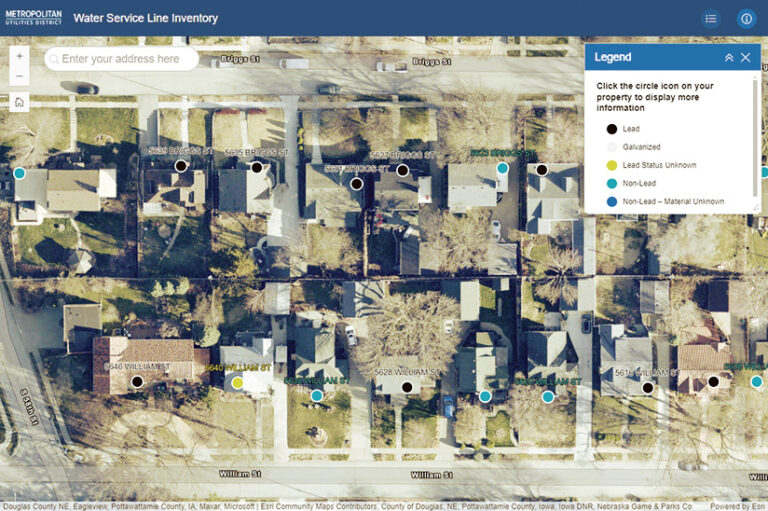
The initial goal was to compile a water service line inventory that could be published to a public-facing map. M.U.D. worked with Esri to create a Python script that employs the trace features in ArcGIS Utility Network to link linear asset data to meter points. M.U.D. is prioritizing lead service line replacements in areas with high densities of homes with infants and children, as well as areas with high concentrations of lead service lines.
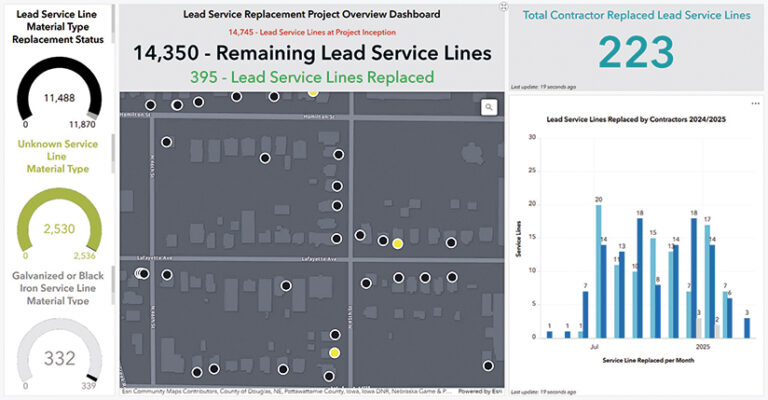
It’s primarily plumbers, not M.U.D. staff members, who replace the pipes, so the GIS team used ArcGIS Survey123, ArcGIS Dashboards, and ArcGIS Workflow Manager to build solutions that improve collaboration and transparency. Plumbers use a Survey123 form to collect information about the types of materials found at customers’ taps, on each side of a valve, and at meters. They can also capture photos at each location. This helps M.U.D. determine whether pipe replacements are necessary and gather data for state-mandated reporting.
Plumbers also use a dashboard, built with Dashboards, to view their assigned work. Pop-ups powered by ArcGIS Arcade connect plumbers to the pre- and post-inspection surveys. When plumbers submit a survey, Workflow Manager runs in the background so M.U.D.’s staff can complete quality checks and route updates back into the district’s GIS. Other dashboards are used to manage work and pipe replacement schedules.
These inventory results now feed into a publicly available map created with Experience Builder. Customers can use the app to see what their household water service lines are made of and learn more about M.U.D.’s Lead Service Line Replacement Program.
Continued Collaboration
As a 20-year member of Esri’s Advantage Program, M.U.D. has benefited from close collaboration with its Esri technical adviser and Esri Services representatives. In addition to continuing to work with Esri to refine current workflows and apps, staff at M.U.D. look forward to collaborating with Esri teams on automating reporting and work orders, streamlining corrosion control projects, and improving the as-built process by integrating GIS with Autodesk’s AutoCAD software.