Prior to ArcGIS Enterprise 12.1 on Kubernetes, the architecture profile you selected when configuring a new organization was limited to choosing the level of pod redundancy. Starting at 12.1, a new performance profile also sets the level of CPU and memory each pod has available.
There are two available performance profiles:
- Standard performance balances resource allocation for workloads with steady traffic and defined performance targets.
- Enhanced performance increases resource allocation for high throughput or latency sensitive workloads with strict service level agreements (SLA).
Requests and limits
Performance profiles work by setting default values for requests and limits, so it helps to know what they are and how they can affect the performance of Kubernetes workloads.
A request is a reservation for a certain amount of a resource, such as CPU or memory. A limit is a cap on resource usage. If a node has unused resources, a pod can use more than its request, up to its limit. When Kubernetes determines which node a pod should run on, it makes sure there are enough available resources to meet the pod’s request, but it does not look at the limits or actual usage.
When the requests are low, many pods can be scheduled on a single node. That can be good because it reduces the cost of the cluster. Imagine we need 10 replicas of a pod with CPU request of 1 and limit of 3. Our nodes each have 8 vCPU, so there is plenty of room to schedule the pods.
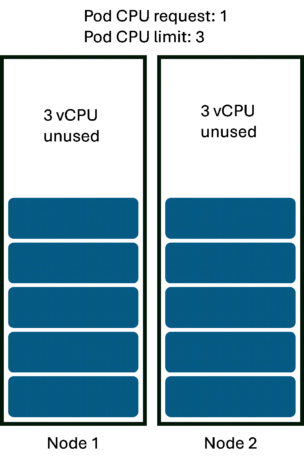
But low requests can also create what’s called a “node packing” problem. What if the pods each need to use 2 CPU to provide responses quickly enough to satisfy users? That’s below the limit, so pods are allowed to use that much CPU, but there isn’t enough total CPU on the nodes for that to actually happen. The pods’ CPU usage is throttled, and users are unhappy with slow responses.
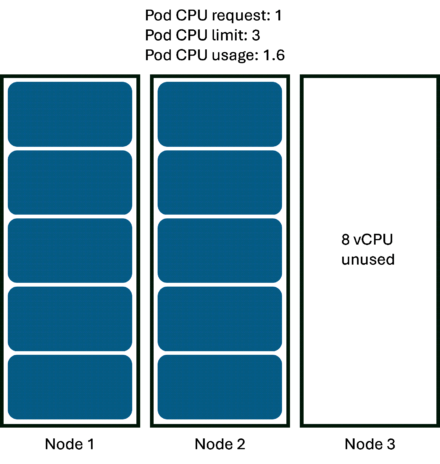
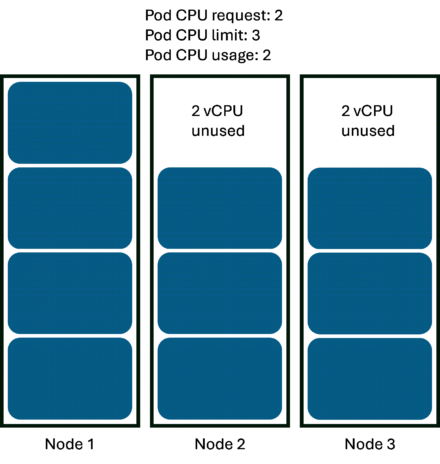
We need a third node to have enough total resources to enable each pod to use 2 CPU. But just adding a third node is not enough. On two nodes, each pod has enough CPU to meet its request, so Kubernetes has no reason to move any of the pods to the new node.
Sensible initial defaults
The problem with tuning requests and limits reactively is that you may have poor performance while you figure out the right values. Performance profiles in 12.1 provide default values that are higher than previous versions. These values are based on extensive testing, so they are closer to what your final correct values will probably need to be. For reference, the default values for each pod are listed in the Performance profiles help topic.
The standard performance profile ensures that pods have enough resources to provide good performance most of the time. For example, relational data store pods typically need about 3 CPU, but might spike to 4 on rare occasions. The standard performance profile sets the CPU request to 3 and the limit to 4. If spikes occur, the node may not have enough CPU for the pod to use 4 CPU, and users may experience degraded performance. Maybe that’s acceptable if it happens rarely, in which case standard performance is good enough.
Or maybe it’s not acceptable. Maybe you need high quality of service at all times. The enhanced performance profile better accommodates peak usage. For relational data store pods, that means both CPU requests and limits are set to 4. When a spike occurs, each pod is sure to have 4 CPU available.
Importantly, the defaults set by a performance profile probably won’t be exactly right for your organization. You still need to tune requests and limits to fit your specific needs. But a performance profile lets you start closer to the right answer.
If you have an existing ArcGIS Enterprise on Kubernetes deployment, you may have already adjusted the requests and limits to meet your needs. For that reason, upgrading to 12.1 will not apply a performance profile or change your existing values. But if you are experiencing poor performance and haven’t already adjusted requests and limits, now is a good time to tune your deployment using the values in the performance profiles as a reference.
Compute requirements
Because performance profiles have values close to what you will need for production, they should have little effect on the total number of nodes required for a well-tuned system. But because those higher values are now defaults, performance profiles do significantly increase the number of nodes needed for the initial organization configuration.
The system requirements specify the minimum requirements to create an organization. As you publish dedicated services, scale up pod replicas, or add capabilities, you may need to increase the number of nodes in your cluster.
Cost impact: The higher requests in the enhanced performance profile not only require greater initial compute compared to standard performance, but those requirements increase faster as the number of pods increases. You may need to balance your need for performance against your budget when selecting a performance profile and tuning services after initial deployment.
Licensing impact: The default pod configuration for a combination of standard high availability and standard performance is covered by your license.
Choosing the right profile
The right performance profile depends on your needs. In general:
- A strict performance SLA, such as maximum average response time, usually means choosing the enhanced performance profile.
- Minimizing costs usually means choosing the standard performance profile.
Your choice of performance profile may also be affected by the availability profile you choose to ensure redundancy. The Understand architecture profiles help topic lists several scenarios to help you make the best choice for both profiles.


Article Discussion: