ArcGIS Enterprise 12.1 on Kubernetes is now available! Following the recent release of ArcGIS Enterprise 12.1 on Windows and Linux, this update introduces enhancements designed to help you optimize performance across your Kubernetes deployment. Key enhancements include native workflow management services, improved cloud-native scaling and infrastructure, greater platform design and workload control, and expanded operational visibility and governance.
Read on to explore what’s new.
What is ArcGIS Enterprise on Kubernetes?
ArcGIS Enterprise on Kubernetes is a cloud-native deployment option for ArcGIS Enterprise. Compared to traditional deployments, it supports dynamic scaling as demand fluctuates, improves resilience and high availability, and helps reduce administrative overhead for IT teams. While its architecture differs from Windows or Linux deployments, users will recognize familiar workflows for publishing and consuming services across maps, apps, data analysis, and collaboration.
These capabilities are already being put into practice by organizations running ArcGIS Enterprise on Kubernetes in production. One example is Quiet Professionals, a veteran-founded company supporting mission-critical government workflows. To meet requirements for high availability and real-time GIS, they adopted ArcGIS Enterprise on Kubernetes, which enabled them to deliver more reliable, responsive systems for their clients. Read their full story here.

To determine whether this deployment meets your team’s needs, we recommend exploring the product documentation, reviewing ArcGIS Enterprise on Kubernetes: Is it for me?, and connecting with your Esri representative. To learn more about common system patterns that are supported in Kubernetes environments, check out the ArcGIS system patterns in the Architecture Center.
Continue reading to explore how you can take advantage of expanded functionality and new capabilities in ArcGIS Enterprise 12.1 on Kubernetes.
Highlights of What’s New
ArcGIS Enterprise 12.1 introduces new capabilities to Windows, Linux, and Kubernetes, as outlined in What’s New in ArcGIS Enterprise 12.1. This blog highlights the features and improvements unique to the Kubernetes deployment, helping you understand what’s new and why it matters. As you explore these updates, be sure to consult the ‘What’s new in this release’ documentation and Release Notes for additional details.
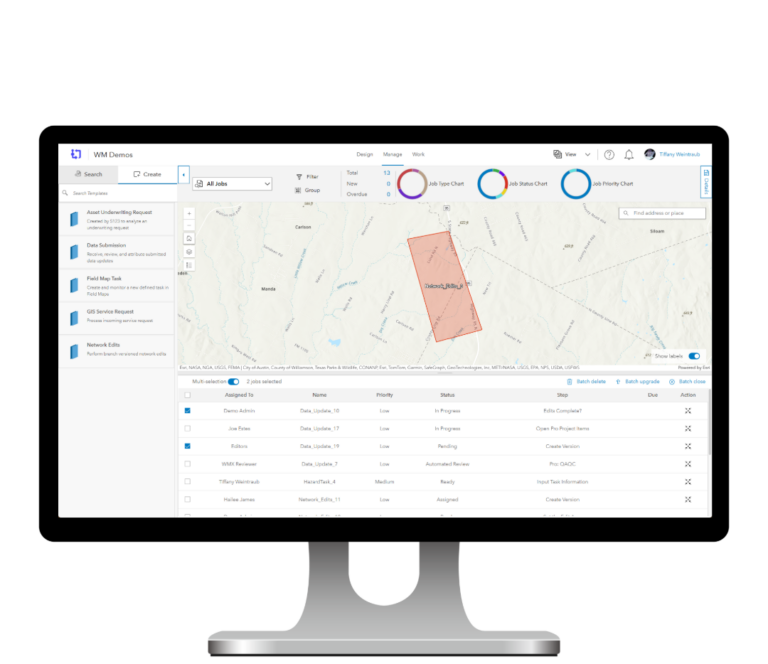
Orchestrate Processes with Workflow Management Services
We’re excited to announce workflow management services, running natively in ArcGIS Enterprise on Kubernetes and available through an additional annual subscription. This premium capability helps you automate and manage your GIS and broader organizational work by coordinating people, processes, and tasks. It allows you to define structured, multi-step workflows that move work from initiation through completion. By centralizing and standardizing workflows, organizations can reduce manual effort, improve consistency, and ensure work is completed through repeatable, well-governed processes.
Bringing these workflows into ArcGIS Enterprise on Kubernetes provides a scalable foundation to support complex operations, improving efficiency and delivering more predictable outcomes across both GIS and business-critical work.
Improved Cloud Scalability and Access Control
Karpenter is now supported for ArcGIS Enterprise on Kubernetes clusters deployed in AWS EKS and Azure AKS. This autoscaler helps you manage compute resources efficiently by automatically provisioning nodes to meet spikes in demand and scaling them back down when resources are no longer needed. This allows you to better align your infrastructure with workload demands while helping control costs in cloud environments.
EKS Pod Identity provides a more secure and flexible way to interact with AWS services such as cloud storage. By associating specific workloads with their own permissions, you can more precisely control how your services access resources like your organization’s cloud object store in AWS S3. This gives you better control over how your workloads access cloud resources.
Greater Deployment Control and Workload Placement
In ArcGIS Enterprise 12.1 on Kubernetes, architecture profiles have been expanded to give you more control over how your deployment is configured from the start. Profiles are now separated into availability and performance, allowing you to independently define redundancy and resource allocation. Availability profiles continue to determine the number of pod replicas used to support redundancy and availability, while performance profiles let you choose CPU and memory configurations, giving you more flexibility to match infrastructure with your performance needs. To learn more, check out Introducing performance profiles in ArcGIS Enterprise on Kubernetes.
Node affinity and tolerations, previously available for a limited set of services and data store pods, can now be applied to shared service resources and system deployments, giving you more control over where workloads run and how resources are allocated across your environment.
Administrative Enhancements for Monitoring
Administrators can now track user activity and system changes using audit logs, giving you better visibility into what’s happening across your deployment. This makes it easier to monitor system behavior, troubleshoot issues, and understand which users or processes are making changes and when they occur.
We’ve also expanded what you can observe through the metrics API, with the introduction of organization-level metrics alongside an expanded set of service-level metrics. This gives you a more complete view of how your deployment and services are performing over time.
Upgrading to 12.1
Upgrading to 12.1 is available to customers with an active subscription for ArcGIS Enterprise on Kubernetes. You decide when to upgrade, but we recommend moving to the latest version as soon as possible to gain the latest improvements and capabilities. Review the product lifecycle for details. While the upgrade is largely automated and managed by the system, preparatory work is still required for enterprise-grade or mission-critical deployments. Learn how to upgrade to 12.1 here.
Summary of Supported Functionality
Below is a summary of commonly used functionality that is supported with ArcGIS Enterprise 12.1 on Kubernetes, including additional highlights of what is new and improved. For a more complete list of what is now supported, review the ArcGIS Functionality Matrix and the latest release product highlights.
Supported Kubernetes Environments
Esri supports ArcGIS Enterprise 12.1 running on Kubernetes v1.33 to v1.35. See the System Requirements for details.
- Amazon AWS Elastic Kubernetes Service (EKS)
- Microsoft Azure Kubernetes Service (AKS)
- Google Cloud Kubernetes Engine (GKE)
- Red Hat OpenShift Container Platform (RHOS)
- Red Hat OpenShift running as a managed service within AWS (ROSA) or Azure (ARO)
- Rancher Kubernetes Engine 2 (RKE2)
- VMWare Tanzu
K3s, the lightweight distribution intended for resource-constrained systems typical of IoT devices or edge computing, is not supported for ArcGIS Enterprise on Kubernetes.
If you manage distributed applications on Kubernetes and you use ArcGIS Enterprise, but you don’t see your environment listed above, notify your Esri representative.
Deployment and Upgrading
- (NEW) Configure deployments using architecture profiles for availability and performance
- Deploy ArcGIS Enterprise on Kubernetes across cloud and on-premises environments, including support for disconnected environments
- Deploy and configure using Kubernetes-native tools such as Helm, setup wizards, or scripts
- Manage and upgrade deployments through ArcGIS Enterprise Manager
Administration
- (NEW) Scale infrastructure dynamically using Karpenter autoscaler in AWS EKS and Azure AKS
- (NEW) Monitor user activity and system changes using audit logs
- (NEW) Observe organization-level and services-level metrics through the metrics API
- Create custom sign-in experiences for the organization and custom categories for registered apps
- Enable location sharing and view mobile users using Track Viewer
- Monitor service usage, performance, and error reports, including integration with metrics visualization tools (e.g., Grafana)
- Create and schedule system health check reports to help you manage the system
- Monitor logs, system and utility service pod status
- Assign a classification schema to your organization to allow members to classify their items
- Manage pod placement using node affinity and tolerations and scale service and system deployments using ArcGIS Enterprise Manager or the Administrator API
- Integrate with application load balancers and configure ingress controllers for layer 4 and layer 7 routing
- Create and manage organization webhooks and subscribe to service webhooks
- Backup, restore, and recover access to the organization using ArcGIS Enterprise Manager or the Administrator API
Security
- (NEW) Integrate with EKS Pod Identity to securely manage access to AWS resources
- Configure authentication using SAML, OpenID Connect, LDAP, Active Directory, and web-tier authentication (IWA, PKI)
- Configure enterprise groups and users
- Enforce security policies including multifactor authentication and 256-bit AES encryption
- Update the list of approved host names for portal’s proxy capability, which is restricted by default
Data Management
- Migrate the relational store from persistent volume-backed storage and configure it using a cloud database service
- Enable and manage custom data feeds
- Export service definitions for map services and hosted feature services
- Export and import group content using export packages (.epk) for migration and backup
- Add persistent volumes as a user-managed resource for publishing workflows and register network file shares as folder data stores
- Monitor, manage, and scale system-managed data stores, including storage, memory, health, and volume configurations
- Configure cloud object stores for system-managed data stores (Amazon S3, Azure Blob, Google Cloud Storage)
- Integrate with cloud data warehouses, including Amazon Redshift, Google BigQuery, and Snowflake
- Register and manage data sources, including SQL Server, PostgreSQL, Oracle, SAP HANA, and enterprise geodatabases
- Support distributed collaboration, including two-way editing
Creating and Sharing Content (additional licensing may be required)
- Publish services and data, including map, feature, geocode, imagery, and tile services and packages
- Publish service definitions that reference data on federated servers
- Configure raster analytics, including custom raster function templates, deep learning models, and distributed processing
- Perform spatial analysis and share content using web tools
- Publish and consume services from ArcGIS Pro
- Configure and share location and routing services
- Extend services using SOEs and SOIs
Premium Capabilities (additional licensing may be required)
- (NEW) Workflow management services
- Image hosting
- Raster analytics
- Notebook services (Standard runtime is included in your active subscription)
Server federation supported
- Federate a standalone ArcGIS GIS Server
- Federate a standalone ArcGIS Image Server
- Federate an ArcGIS Workflow Manager Server
Server federation is not supported at 12.1 for:
- Federate an ArcGIS Data Pipelines Server
- Federate an ArcGIS GeoEnrichment Server
- Federate an ArcGIS GeoEvent Server
- Federate an ArcGIS Knowledge Server
- Federate an ArcGIS Mission Server
- Federate an ArcGIS Video Server
- Federate an ArcGIS Velocity Server
- ArcGIS Pro
- ArcGIS Experience Builder
- ArcGIS Instant Apps
- ArcGIS Enterprise Sites
- ArcGIS Dashboards
- ArcGIS StoryMaps
- ArcGIS Field Maps
- ArcGIS Survey123
- ArcGIS QuickCapture
- ArcGIS Navigator
- ArcGIS Web Editor
- ArcGIS Excalibur
- ArcGIS Workflow Manager
- ArcGIS Solutions
- ArcGIS Utility Network (through server federation)
- ArcGIS Parcel Fabric (through server federation)
- ArcGIS Trace Network
- ArcGIS for Microsoft
- ArcGIS Indoors
- Track Viewer
- Deep Learning Studio
- ArcGIS CityEngine
- ArcGIS Drone2Map
- ArcGIS Earth
- ArcGIS StreetMap Premium
Not supported at 12.1:
- ArcGIS Business Analyst Enterprise
- ArcGIS Data Interoperability
- ArcGIS Data Reviewer
- ArcGIS Knowledge Studio
- ArcGIS Maritime
- ArcGIS Mission
- ArcGIS Monitor
- ArcGIS Pipeline Referencing
- ArcGIS Roads and Highways
- ArcGIS Video Server
Frequently Asked Questions About this Release
Here are answers to a few common questions to help you plan your upgrade or adopt ArcGIS Enterprise 12.1 on Kubernetes.
What should I consider before upgrading to a new release?
Before upgrading, take time to review the latest system requirements and make sure your environment is ready. This includes checking Kubernetes compatibility, meeting storage and resource requirements, and applying any required updates. It’s also best practice to take a full backup of your deployment before getting started.
How are updates and upgrades handled in ArcGIS Enterprise on Kubernetes?
Updates and upgrades are built into the platform and managed through ArcGIS Enterprise Manager or the Administrator API. Updates focus on fixes and improvements, while upgrades introduce new versions with additional features. During this process, the system temporarily goes into a read-only state until everything is complete.
Is ArcGIS Enterprise on Kubernetes right for my organization?
ArcGIS Enterprise on Kubernetes is a great fit for organizations that are adopting cloud-native infrastructure and want to take advantage of scalability, resilience and simplified system management. It’s especially relevant if your teams already work with Kubernetes or are planning to move in that direction. For most users, the experience remains familiar, but the way the system is deployed and managed is different. For more information, check out ArcGIS Enterprise on Kubernetes: Is it for me?
Where To Go Next?
Ready to explore ArcGIS Enterprise on Kubernetes in more detail? Visit our product page for videos and articles that explain key capabilities and benefits. You can also watch recorded workshops on our media channel to see how cloud-native architecture is transforming geospatial workflows.
For a deeper technical understanding, review the product documentation, including the System Architecture page, to understand how we’ve designed the software for high availability and scalability. If you’re looking for hands-on experience, consider the instructor-led Esri course Deploying ArcGIS Enterprise on Kubernetes to learn how to install, configure, and manage your deployment.
Already familiar with ArcGIS Enterprise and Kubernetes? Connect with your Esri representative to explore evaluation opportunities.
Thank you for reading!


Commenting is not enabled for this article.