ArcGIS Enterprise 12.0 on Kubernetes is now available! This release follows the recent launch of ArcGIS Enterprise 12.0 on Windows and Linux, reinforcing Esri’s commitment to flexible, cloud-native GIS solutions that adapt with your organization’s needs. Key features of this release include expanded support for extensions, optimized data management and administration features, and updates across applications.
Read on for a look at what’s new.
What is ArcGIS Enterprise on Kubernetes?
ArcGIS Enterprise on Kubernetes is a cloud-native, microservices-based architecture designed for resiliency, scalability, and simplified management compared to traditional server configurations. While its architecture differs from Windows or Linux deployments, users will find familiar workflows for publishing and consuming services for maps, apps, data analysis, and collaboration. This approach integrates seamlessly with existing infrastructure, delivering reliable performance, easier upgrades, and agility for heavy workloads, creating a resilient and agile geospatial platform. If you are evaluating whether this deployment meets your team’s needs, we recommend reviewing the product documentation, exploring ArcGIS Enterprise on Kubernetes: Is it for me?, and consulting with your Esri representative.
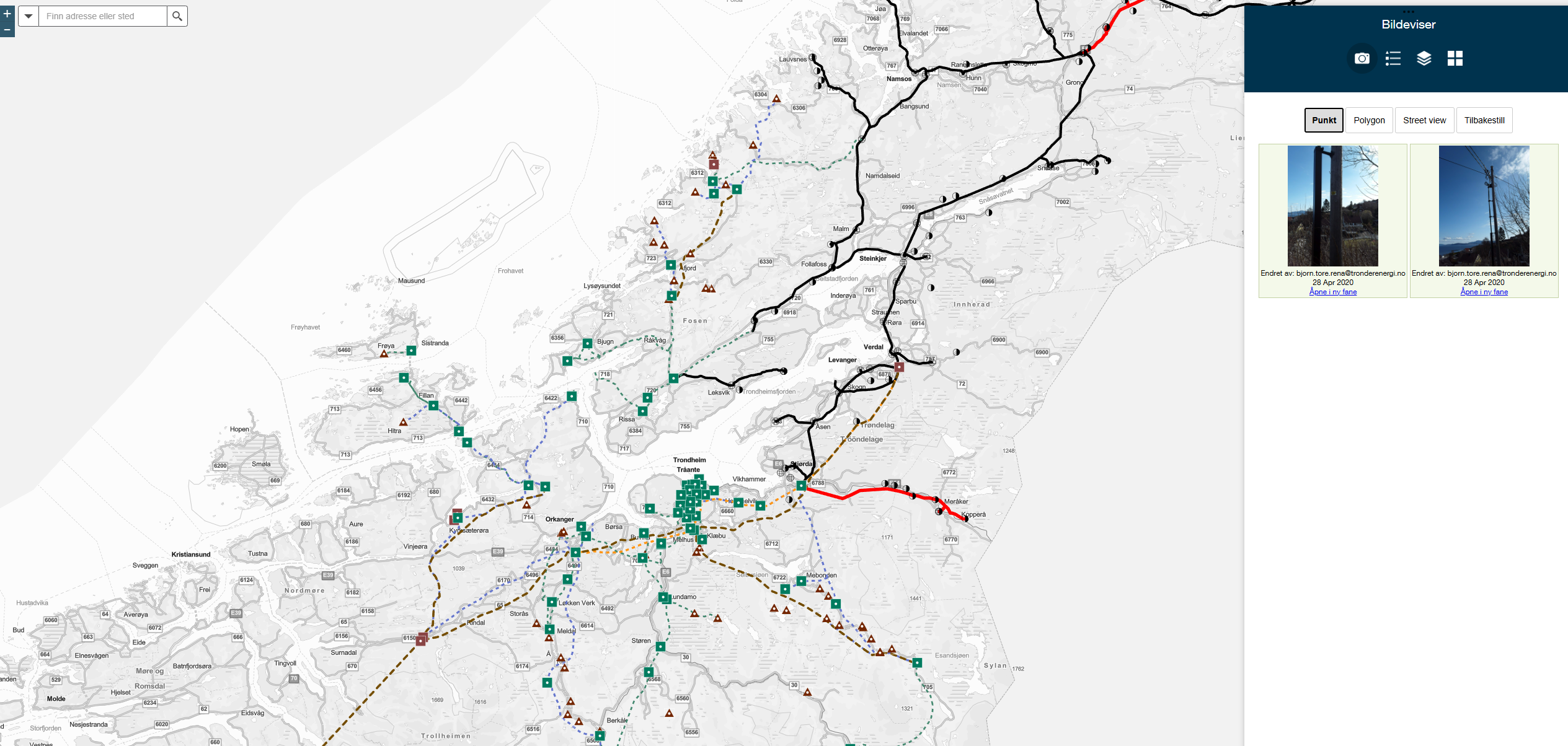
One organization leading the way is Tensio, a Nordic grid operator that modernized its enterprise GIS to strengthen mission-critical operations for the nearly half a million people they service. Their previous Windows-based cloud deployment introduced cost inefficiencies and upgrade risks, prompting a move to ArcGIS Enterprise on Kubernetes. The migration delivered a modern, cloud-native architecture that scales dynamically, automates updates, and ensures reliable service while meeting strict data sovereignty requirements. Read their full migration story here.
Continue reading to explore how you can take advantage of expanded functionality and even more tools to support your modern GIS operations with ArcGIS Enterprise 12.0 on Kubernetes.
Highlights of What’s New
ArcGIS Enterprise 12.0 brings new capabilities to Windows, Linux, and Kubernetes, as detailed in What’s New in ArcGIS Enterprise 12.0. This blog focuses on the features and improvements unique to the Kubernetes deployment, helping you understand what’s new and why it matters. As you explore these new functionalities, be sure to consult the ‘What’s new in this release’ documentation and Release Notes for detailed insights.
Location Sharing in ArcGIS Enterprise on Kubernetes
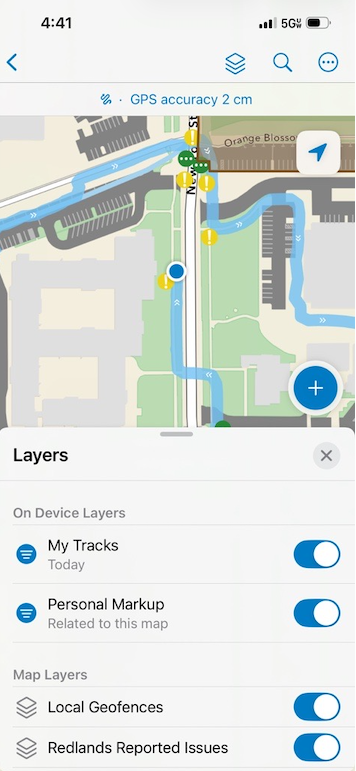
Location Sharing is now available for ArcGIS Enterprise on Kubernetes deployments. This extension enables users within an organization to share their locations via mobile apps like ArcGIS Field Maps, ArcGIS QuickCapture, ArcGIS Survey123, and ArcGIS Indoors. By leveraging location sharing layers, organizations can gain real-time visibility for mobile users, improving coordination and situational awareness. Administrators can also create track views, providing insights into last known locations and movement patterns of team members.
Enhancements to System Storage
The relational store can now be migrated from persistent volume backed storage to a cloud database service via ArcGIS Enterprise Manager. This improvement provides organizations with enhanced data accessibility and performance that comes with cloud services. This integration works seamlessly within modern applications.
Additionally, you can now set node affinity and tolerations for data store pods to optimize resource allocation and maintain high availability. This approach allows for effective management of pod distribution within data store clusters, providing improved workload separation and performance. Read more about pod placement.
Enhancements for Administrators
We have extended health care check capabilities for administrators to effectively monitor and manage their ArcGIS Enterprise on Kubernetes deployment through ArcGIS Enterprise Manager. To maintain operational efficiency, you can now perform additional checks across key areas such as backup, security, high availability, licensing, and data storage. By creating or scheduling an operational health check report in your ArcGIS Enterprise Manager, you can perform a series of tests to identify potential issues early on.
Administrators now also have the ability to switch to different container registries after deploying ArcGIS Enterprise on Kubernetes, allowing them to easily redirect their deployment to a different container registry than the one initially used. This enhancement assists customers using their own container registries in updating their registry URLs seamlessly. Read more about using your organization’s container registry.
Upgrading to 12.0
Upgrading to 12.0 is available to customers with an active subscription for ArcGIS Enterprise on Kubernetes. You decide when to upgrade, but we recommend moving to the latest version as soon as possible to gain the latest improvements and capabilities. Review the product lifecycle for details.
Steps to Upgrade to 12.0
While the upgrade itself is largely automated and handled by the system, preparatory work is still required with any enterprise-grade or mission-critical system. Read here to learn how to upgrade to 12.0.
Summary of Supported Functionality
Below is a summary of commonly used functionality that is supported with ArcGIS Enterprise 12.0 on Kubernetes, including additional highlights of what is new and improved. For more details and a more complete list of what is now supported, review the ArcGIS Functionality Matrix and the latest release product highlights.
Supported Kubernetes Environments
Esri supports ArcGIS Enterprise 12.0 running on Kubernetes v1.32 and v1.33. See the System Requirements for details. Always upgrade ArcGIS Enterprise first, before upgrading your Kubernetes cluster to a supported version.
- Amazon AWS Elastic Kubernetes Service (EKS)
- Microsoft Azure Kubernetes Service (AKS)
- Google Cloud Kubernetes Engine (GKE)
- Red Hat OpenShift Container Platform (RHOS)
- Red Hat OpenShift running as a managed service within AWS (ROSA) or Azure (ARO)
- Rancher Kubernetes Engine 2 (RKE2)
- VMWare Tanzu
K3s, the lightweight distribution intended for resource-constrained systems typical of IoT devices or edge computing, is not supported for ArcGIS Enterprise on Kubernetes.
If you manage distributed applications on Kubernetes and you use ArcGIS Enterprise, but you don’t see your environment listed above, notify your Esri representative.
Deployment and Upgrading
- Deploy an ArcGIS Enterprise organization in interactive or silent modes
- Configure an ArcGIS Enterprise organization using a setup wizard or script
- Automate ArcGIS Enterprise deployment and organize configuration with Helm
- Use the ArcGIS Enterprise Manager application, unique to the Kubernetes deployment, to monitor, tune, manage, and upgrade or update the organization
- Run on environments in the cloud or fully disconnected
- Deploy ArcGIS Enterprise on Kubernetes from your organization’s container registry
- Choose from several architecture profiles to optimize resources for high availability
- Configure layer 7 load balancer to connect client traffic cluster services
- Support multiple deployments within the same Kubernetes cluster
Administration
- (NEW) Create custom sign-in experiences for the organization and custom categories for registered apps
- (NEW) Enable location sharing to create a location sharing layer for licensed users to upload their locations
- (NEW) Use Track Viewer to view and access mobile users where this privilege has been assigned
- (NEW) Enforce multifactor authentication across the organization
- Change authenticate method with registry provider
- Download service error reports from ArcGIS Enterprise Manager
- Assign a classification schema to your organization to allow members to classify their items.
- Schedule health check reports to run at a fixed time in the future, either once or on a recurring basis
- Use ArcGIS Enterprise Manager to manage pod placement on nodes for GIS services by applying node affinity and tolerations
- Create health check reports to help you manage the system
- Integrate with application load balancers and configure layer 7 routing services during deployment
- Add custom annotations to in-cluster ingress controller service to customize layer 4 load balancers on cloud platforms
- Monitor and search logs
- Monitor system and utility service pod status
- Scale service and system deployments using ArcGIS Enterprise Manager or Administrator API
- Create and administer organization webhooks, and subscribe to service webhooks for geoprocessing and feature services
- Obtain service usage statistics for integration into your metrics visualization tool, e.g. Grafana
- Backup and restore the ArcGIS Enterprise organization using ArcGIS Enterprise Manager or Administrator API
- Recover access to the organization when administrative credentials are no longer available
Security
- (NEW) Update the list of approved host names for portal’s proxy capability, which is restricted by default
- Configure SAML and OpenID Connect
- Configure LDAP and Windows Active Directory
- Configure enterprise groups and users
- Configure web-tier authentication including IWA and PKI with ArcGIS Enterprise on Kubernetes Web Adaptor
- Enable 256-bit AES for passwords
Data Management
- (NEW) Migrate the relational store from persistent volume-backed storage to a cloud database service
- (NEW) Set node affinity and tolerations for data store pods
- Custom data feeds can now be enabled.
- The export service operation exports a service definition for a map service or a hosted feature service
- Migrate and back up group content by exporting items to an export package (.epk) and using the package to import the items
- Add persistent volumes as a user managed resource for publishing workflows, allowing you to register Windows shares directly
- Add a cloud database service for the organization’s relational store when configuring a new organization
- Update raster store properties from ArcGIS Enterprise Manager
- From the item page of imagery layers, you can start and stop the service and enable SOEs and SOIs.
- Check available storage, memory, and health of system-managed data stores
- Increase volume size of object stores, relational stores, and spatiotemporal & index stores
- Configure cloud-native services for system managed object stores such as Amazon S3, Azure Blob, or Google Cloud Store
- Support for Amazon Redshift, Google BigQuery, and Snowflake cloud data warehouses
- Register SQL Server, PostgreSQL, Oracle, and SAP HANA as databases
- Register your own data sources including folders and enterprise geodatabases
- Add network file shares as folder data stores
- Support for bulk publishing with an enterprise geodatabase
- Support for distributed collaboration including two-way editing
Creating and Sharing Content (additional licensing may be required)
- (NEW) Publish service definitions as items that reference data on federated servers
- Apply custom raster function templates to your organization
- Add deep learning models from ArcGIS Living Atlas to your organization
- Perform distributed raster analytics processing for deep learning
- Create and manage floor plan data, maps and services with ArcGIS Indoors
- Extend services with SOIs and SOEs (.NET is not supported)
- Publish map, feature, and geocode services
- Publish map, tile, and scene tile packages
- Publish hosted feature layers
- Conduct spatial analysis
- Publish and consume services from ArcGIS Pro
- Configure and share routing services
- Publish location services and share location
- Use web tools to share analysis across the organization
- Publish image data sets as an imagery layer, running as a containerized service
- Support for ArcGIS Trace Network user type extension
ArcGIS Utility Network and ArcGIS Parcel Fabric are available through an ArcGIS GIS Server hosted on Windows or Linux, and can be federated to ArcGIS Enterprise on Kubernetes.
Not supported in 12.0:
- ArcGIS Knowledge user type extension
- Publish scene services with associated feature layers
- Import and export map server cache workflows from ArcGIS Pro
- Extending services through SOIs or SOEs built with .NET
Server federations supported
- Federate a standalone ArcGIS GIS Server
- Federate a standalone ArcGIS Image Server
- Federate an ArcGIS Workflow Manager Server
Server federation is not supported for:
- Federate an ArcGIS GeoEvent Server
- Federate an ArcGIS Knowledge Server
- Federate an ArcGIS Mission Server
- Federate an ArcGIS Video Server
Capabilities (additional licensing may be required)
- Image hosting
- Raster analytics
- Notebook services (Standard runtime is included in your active subscription)
- (NEW) Track Viewer web app
- ArcGIS CityEngine
- ArcGIS Companion
- ArcGIS Connectors for Power Automate
- ArcGIS Dashboards
- ArcGIS Drone2Map
- ArcGIS Earth
- ArcGIS Enterprise Sites
- ArcGIS Excalibur
- ArcGIS Excel
- ArcGIS Experience Builder
- ArcGIS Field Maps
- ArcGIS Indoors
- ArcGIS Instant Apps
- ArcGIS for Power BI
- ArcGIS Navigator
- ArcGIS Pro
- ArcGIS for SharePoint
- ArcGIS QuickCapture
- ArcGIS Solutions
- ArcGIS StoryMaps
- ArcGIS Streetmap Premium
- ArcGIS Survey123
- ArcGIS Web Editor
- ArcGIS Workflow Manager
- ArcGIS Workforce
- Deep Learning Studio
Not supported at 12.0:
- ArcGIS Business Analyst Enterprise
- ArcGIS Data Interoperability Extension
- ArcGIS Data Reviewer
- ArcGIS Knowledge Studio
- ArcGIS Mission
- ArcGIS Monitor
- ArcGIS Video Server
Where To Go Next?
Ready to dive deeper into ArcGIS Enterprise on Kubernetes? Visit our product page for video demonstrations and articles that explain key capabilities and benefits. You can also watch recorded workshops on our media channel to learn how cloud-native architecture is transforming geospatial solutions.
For technical details, review the system documentation, including the System Architecture page, to understand how we’ve designed the software for high availability and scalability. If you’re looking for hands-on experience, sign up for the popular instructor-led class Deploying ArcGIS Enterprise on Kubernetes to learn how to install, configure, and manage your deployment.
Already familiar with ArcGIS Enterprise and Kubernetes? Talk to your Esri representative about the possibility of a software evaluation.
Thank you for reading!


Commenting is not enabled for this article.