Do you spend hours repeating the same data preparation workflow? Does your organization maintain scripts that are difficult to create, update, or collaborate on? Are you looking for a web-based, no-code, visual diagramming experience to streamline your workflows and save time?
If you said yes to any of these questions, this blog is for you.
ArcGIS Data Pipelines Streamlines Data Preparation Workflows
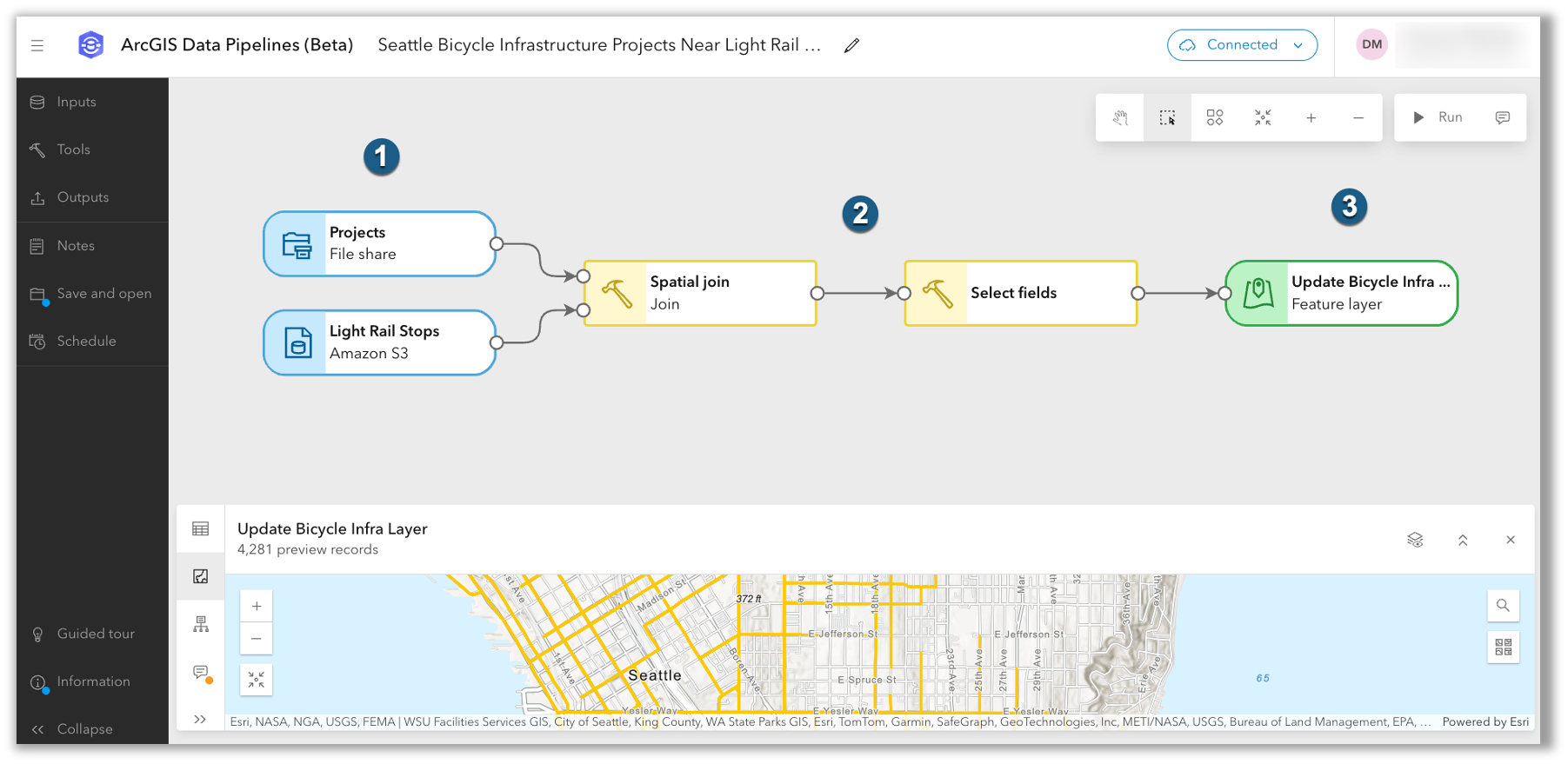
ArcGIS Data Pipelines is a no-code, visual data engineering capability that makes it easy to prepare and integrate data for mapping and analytics. First introduced in ArcGIS Online, ArcGIS Data Pipelines is now available in ArcGIS Enterprise as a beta feature with the 12.0 release on Windows and Linux.
What Can You Do with ArcGIS Data Pipelines?
Whether you need to clean messy data, combine disparate datasets, or transform file-based data into a feature layer, Data Pipelines provides a no-code solution that simplifies data preparation in ArcGIS Enterprise.
With ArcGIS Data Pipelines, you can:
- Connect to data from file shares, cloud storage (Amazon S3, Azure Blob Storage), cloud data warehouses (Snowflake, Google BigQuery), URLs and APIs, and more.
- Apply common data engineering tools (e.g. Select fields, Filter by attribute, Remove duplicates, Join, Dissolve, Calculate field) to clean, construct, format, and integrate datasets.
- Preview and validate results every step of the way to enhance accuracy and confidence.
- Automate workflows to ensure information stays up to date as source data updates.
Check out the video below to see ArcGIS Data Pipelines in action.
Save Time and Reduce Complexity
ArcGIS Data Pipelines offers a drag-and-drop interface that makes data engineering simple and intuitive. Its visual approach to data integration and preparation reduces complexity and fosters collaboration, as data pipelines are easy to share, understand, and maintain.
Easily connect to vector and tabular datasets from external sources and apply common data preparation tools to engineer your datasets. When building a data pipeline, you can preview the data at any step of the workflow, reviewing the attributes, geometry, and schema of your output datasets before writing the final result.
After you’ve completed the data pipeline, you can run it to write the prepared data to a hosted feature layer or table. ArcGIS Data Pipelines also supports scheduling, allowing you to automate data updates as often as every 15 minutes.
How do I deploy ArcGIS Data Pipelines (beta) in ArcGIS Enterprise?
The first step to getting ArcGIS Data Pipelines in ArcGIS Enterprise is for an administrator to install and configure ArcGIS Data Pipelines Server, a new server role. The ArcGIS Data Pipelines Server site should be running on its own machine, or set of machines, separate from other ArcGIS software.
To learn more, review the system and hardware requirements for ArcGIS Data Pipelines. From that documentation, you will also find a link to the installation guide which has step-by-step instructions for the installation and configuration of ArcGIS Data Pipelines. Before getting started, be sure to review the list of known issues, which is a document that is available in the ArcGIS Enterprise 12.0 Beta Features Early Adopter Community and kept up to date.
How is Data Pipelines in ArcGIS Enterprise licensed?
The license for ArcGIS Data Pipelines Server is included with ArcGIS Enterprise Advanced. Once the ArcGIS Data Pipelines Server site is federated with ArcGIS Enterprise, the Data Pipelines app will be available to all members with the required privileges. The required privileges are included with the default Publisher role. To limit access to ArcGIS Data Pipelines, administrators can create a custom role and disable the ‘Create and run data pipelines’ privilege.
Note: ArcGIS Data Pipelines does not consume credits in ArcGIS Enterprise.
How can I share feedback or report an issue?
To share feedback about ArcGIS Data Pipelines (beta), join the ArcGIS Enterprise 12.0 Beta Features Early Adopter Community. For general questions about ArcGIS Data Pipelines or to share ideas that could shape future releases, join the conversation on Esri Community.
Where can I learn more?
To get started, check out the documentation and FAQ topic for answers to common questions.
Other resources you might be interested in:
- Quick Tutorial: Create a data pipeline
- 2025 Developer & Technology Summit (Plenary): Use Data Pipelines to join CSV data from Azure Storage with a Living Atlas layer
- ArcGIS Data Pipelines Case Studies: KBC Advisors & Montgomery Parks
The ArcGIS Enterprise 12.0 release delivers other exciting updates beyond ArcGIS Data Pipelines (beta). To learn about the other highlights, read the What’s New in ArcGIS Enterprise 12.0 blog.
We look forward to seeing how ArcGIS Data Pipelines will positively impact our ArcGIS Enterprise user community!


Commenting is not enabled for this article.