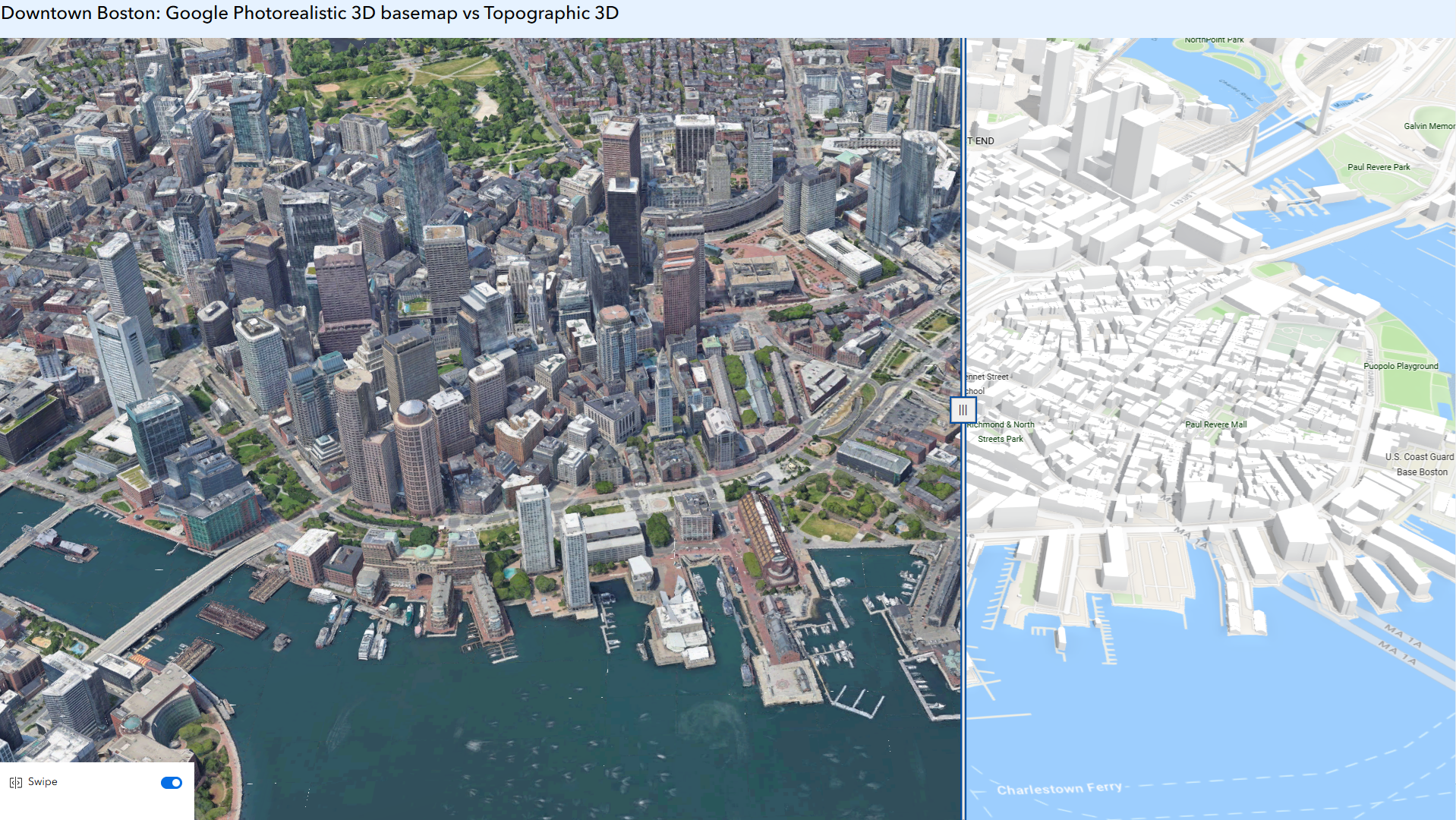
This Experience builder app exhibits the comparison between Google Photorealistic 3D basemap (left) and Topographic basemap (right) in downtown Boston.
We are excited to announce that starting June 2026, Google Photorealistic 3D basemap is in preview in both ArcGIS Online and ArcGIS Pro, and may be used in a production environment. Preview status provides ArcGIS users the opportunity to use new products, capabilities, and features prior to general release.
During the preview period, eligible organizations receive 20,000 sessions*. If your organization does not have access to the basemap or needs additional sessions beyond what was included, you can purchase additional sessions in the Esri Store under Data.
Users can select the Google Photorealistic 3D basemap (preview) from the basemap gallery within ArcGIS Online, including ArcGIS Scene Viewer, Instant Apps and Experience Builder, allowing users to create web scenes and apps which can be shared with their audience. With just a few clicks, you can add the 3D basemap to your ArcGIS workflows, no specialized coding or technical skills required.
The Google Photorealistic 3D basemap provides a seamless, high-resolution 3D model of the real world, covering over 2,500 cities across 49+ countries. The basemap allows users to create engaging and realistic 3D scenes, especially for urban areas and complex terrains.
Transform New York City with the Google Photorealistic 3D basemap, from simplified 3D building shapes in this interactive story. (Credit to ArcGIS StoryMaps Editorial team)
Create Immersive and Interactive 3D Map experience
The Google Photorealistic 3D basemap offers a lifelike representation of the real world , and allows you to easily explore, navigate, and evaluate an area with 3D imagery of buildings, landmarks, terrain, and natural surroundings, and even allows you to show how a future project could look in the real world.
Realistic map visualizations allow organizations to make more informed decisions. Let’s review a few use cases, and we are going to show several examples in the next section.
- State agencies can better evaluate an emerging disaster and create a realistic plan for evacuation with 3D terrain.
- City planning departments can better communicate and visualize proposed land use changes.
- Construction companies can better evaluate development plans through the customizable 3D map.
- News organizations can enhance their storytelling with 3D visualization.
Enhance GIS Experience by Overlaying Your Own Data with 3D Imagery
The Google Photorealistic 3D basemap uses WGS84 coordinate system, and supports OGC standard. By overlaying your own data, or other geospatial data sets from ArcGIS Living Atlas, you can easily create interactive web scenes or web apps enhancing both your data visualization and exploratory analysis experience.
Accessing the basemap in ArcGIS Pro
Use ArcGIS Pro 3.6 and above to create web scenes with Google Photorealistic 3D basemap, when you are connected to ArcGIS Online and your ArcGIS Organization Administrator enables the basemap. For more information, check out this blog article.
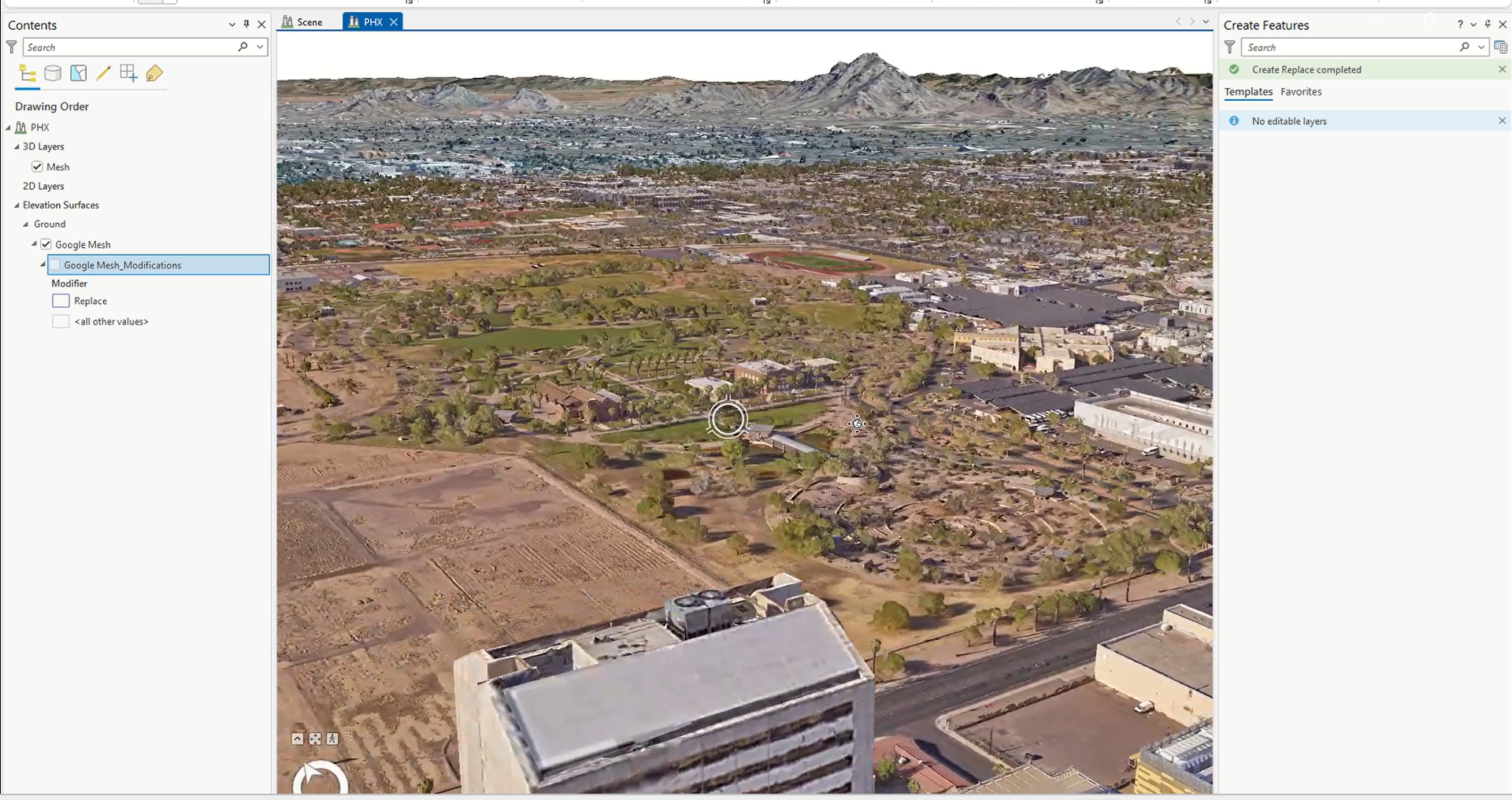
In Pro 3.7, the new capability was added to replace portions of the mesh and insert your own more detailed data. This enables more flexible 3D visualization and analysis without recreating entire surfaces.
Accessing the basemap in ArcGIS Online Scene Viewer
In Scene Viewer, you can create web scenes with Google Photorealistic 3D basemap. With the Google Photorealistic 3D basemap, you can perform precise measurements, conduct line of sight and viewshed analysis which are crucial for urban planning, environmental studies, and more. You can also use mesh modification to temporarily mask parts of the basemap, making it easy to insert alternative meshes or models for a more customized and dynamic presentation. For more information, check out the help document from Scene Viewer.
A web scene was created with Google Photorealistic 3D basemap, overlayed with a 3D Object scene layer and a feature layer from the Living Atlas. This example in Scene Viewer showcases both visualization and exploratory analysis capability with the basemap.
Note: When using the Google Photorealistic 3D basemap, you can’t extract, store results, create derivative works or use machine learning/artificial intelligence to generate external databases.
Accessing the basemap in Web Apps
Option #1: Select the Google Photorealistic 3D basemap from the Basemap Gallery
Users can browse and select the Google Photorealistic 3D basemap from the 3D basemap gallery, in a web application created with Experience Builder or Instant Apps.
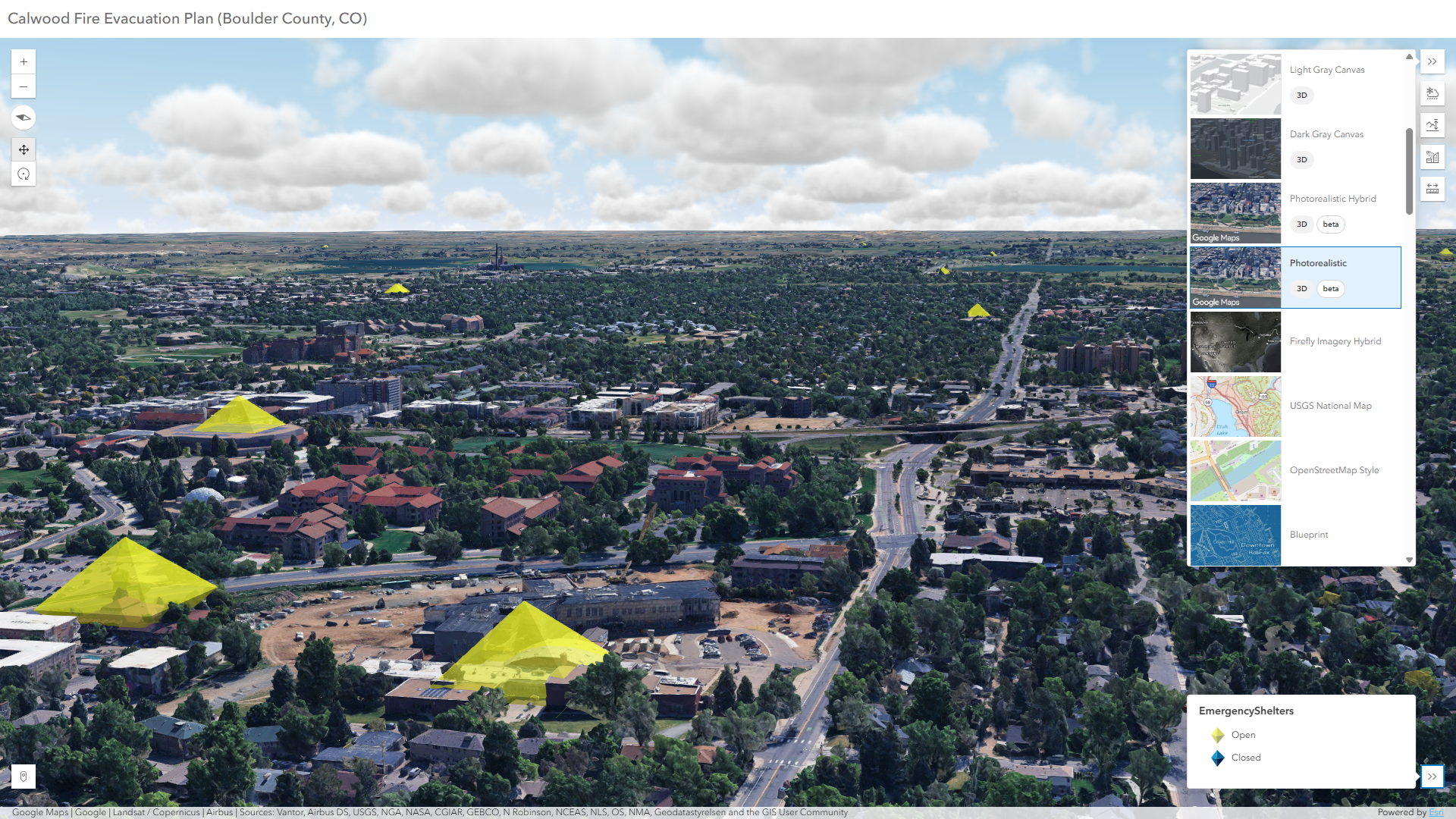
This Instant Apps 3D Viewer app expediates real–time evacuation planning, when overlaying a point feature layer with the Google Photorealistic 3D basemap from the basemap gallery
Option #2: Create ArcGIS web apps hosted in ArcGIS Online
Users can create web apps hosted in ArcGIS Online using Experience Builder, Instant Apps, Dashboards and ArcGIS StoryMaps, that includes web scenes with the Google Photorealistic 3D basemaps.
This StoryMaps include several web scenes with Google Photorealistic 3D basemap, for demonstration only. Credit to ArcGIS StoryMaps editorial team
How to get started?
In order to use the Google Photorealistic 3D basemap in your organization, the organization administrator must first enable the option “Allow members to use Google Photorealistic 3D basemap” in the organization settings under the Map and Scene tab (Refer to help document from ArcGIS Online).
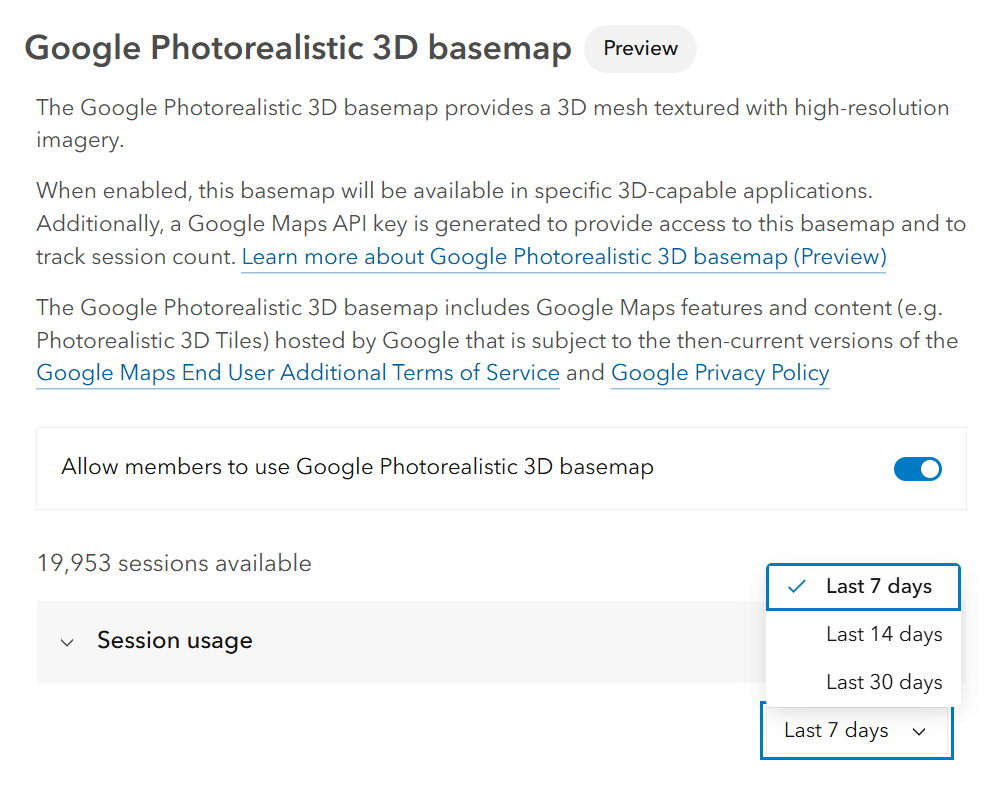
Option to enable access to the Google Photorealistic 3D basemap, monitor available sessions and view the recent usage chart in organization settings.
Usage is tracked by sessions. Sessions start when a user adds the basemap to a 3D-capable app and ends after three hours or when the app is closed. In a web browser, a session won’t reset when a user refreshes the page, unless they disable the browser cache or clear it manually.
During the preview period, eligible organizations receive 20,000 sessions*
If your organization does not have access to the Google Photorealistic 3D basemap or needs additional sessions beyond what was included, you can purchase one or multiple blocks of 60,000 sessions in the Esri Store.
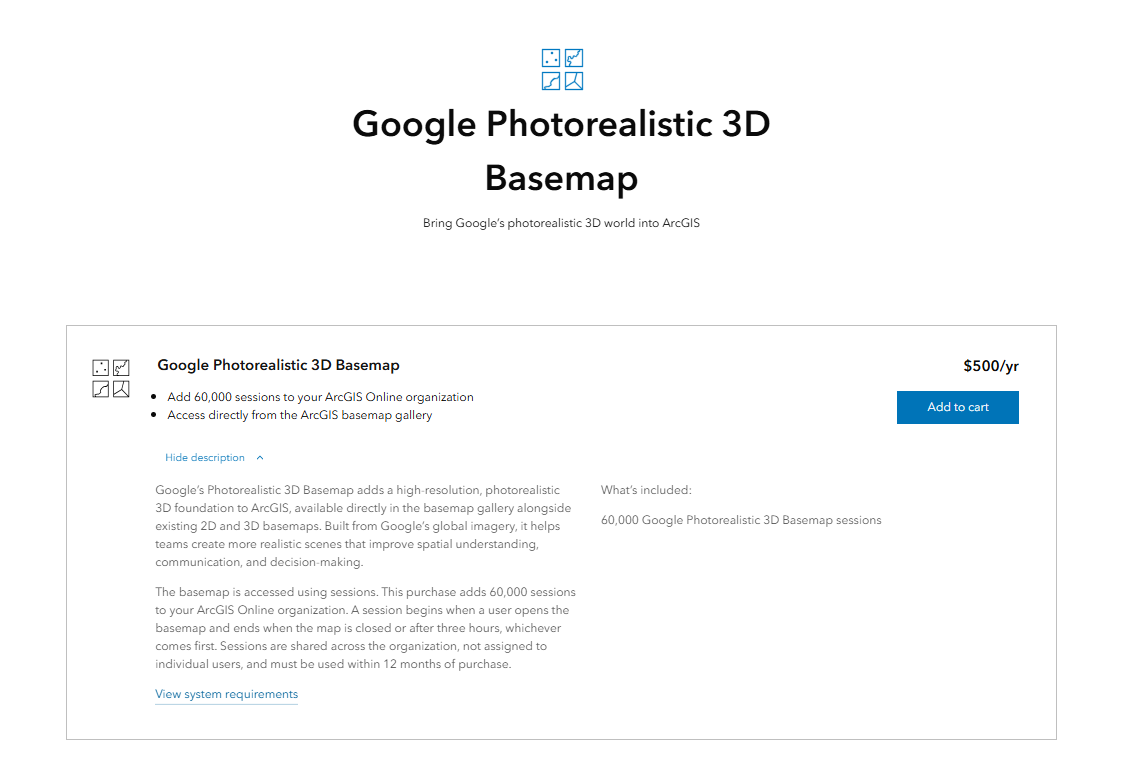
During the preview period, only named users of an ArcGIS Online organization have access to the Google Photorealistic 3D basemap, which requires you to first sign into an organization that enables the access of the basemap.
We will add support for developers to build custom apps with Google Photorealistic 3D Basemap using ArcGIS Online Google Maps API key in the future. We will also enable the Google Photorealistic 3D basemap in ArcGIS Enterprise and other Esri applications in upcoming releases. Stay tuned for updates!
Google Photorealistic 3D basemap serves as an excellent entry point for users diving into the 3D space who need quick access to high-resolution imagery basemap foundation. It opens the door to even more GIS users building in 3D to support and enhance their existing 2D and 3D GIS workflow. Start enhancing your GIS projects and be one of the first users to experience this revolutionary service!
If you would like to provide feedback during the beta period, please join our Early Adopter Program
*Please note: sessions are not provided to ArcGIS for Student Use or ArcGIS for Personal Use.
Related Resources
What’s New in Scene Viewer (June 2026)
What’s New in Scene Viewer (February 2026)
Esri Collaborates with Google Maps Platform to Offer High-Quality Photorealistic 3D Tiles
Bring Your GIS to Life in ArcGIS Pro with Google Photorealistic 3D Basemap




Commenting is no longer enabled for this article