ArcGIS Image Dedicated brings raster analytics and streaming capabilities directly to imagery in your Amazon Web Services or Microsoft Azure cloud environment. With this service, Esri will manage dedicated servers next to your imagery so you can reduce egress costs and enable scalability.
ArcGIS Image Dedicated is updated quarterly. With this release, new capabilities are introduced across Dynamic and Tiled Imagery Servers, the ArcGIS Image Dedicated App, Pro Machines, Persist Imagery, and ArcGIS and Load Balancer Server log management. The focus remains on strengthening day to day workflows and improving operational clarity and visibility.
Dynamic and Tiled Imagery Servers
RDBMS engine upgrades for managed databases
Dynamic Imagery Server now supports underlying RDBMS engine upgrades, so your managed database stays aligned with the latest server versions. During the upgrade, the system maintains the existing configurations and applies built‑in safeguards to maintain a reliable process. As a result, deployments gain improved compatibility, stability, and performance.
Note: Database upgrades require system downtime. The duration varies based on database size. Downtime begins as soon as the engine upgrade is initiated and continues until the upgrade is complete. The upgrades are irreversible.
Add newly purchased servers to existing deployments
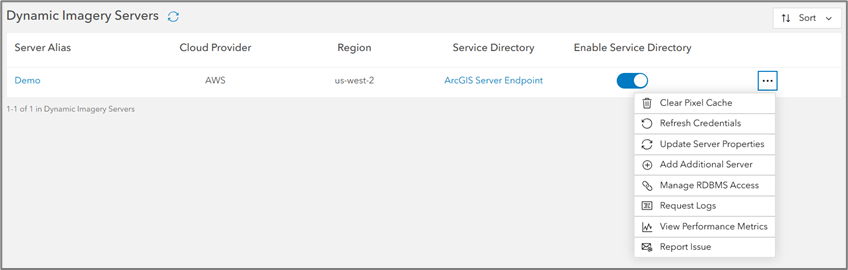
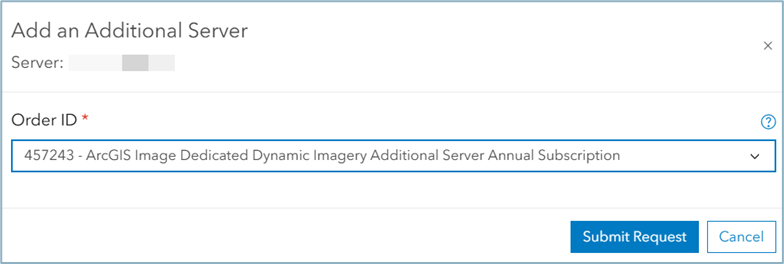
You can now add newly purchased servers directly to an existing Dynamic or Tiled Imagery Server deployment. This capability reduces setup steps, supports smoother scaling, and helps environments grow as workloads increase.
Improved job monitoring in the services list page
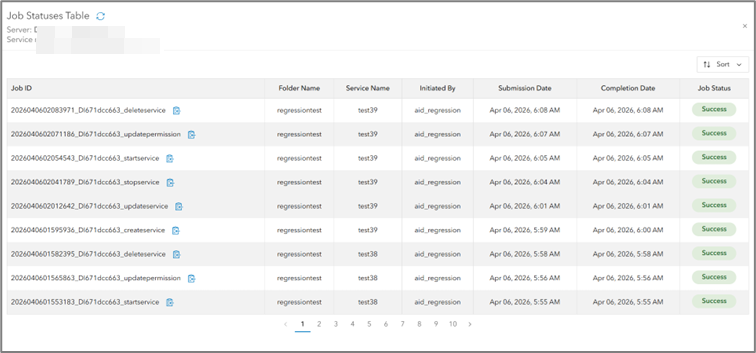
Service management operations are now easier to track. After you sign in to ArcGIS Image Dedicated, the Job status information for Dynamic and Tiled Imagery Server services is available directly within the interface. The updated Job Status table includes job IDs, associated services, initiating users, timestamps, and additional details—improving visibility and troubleshooting while still supporting the Get Job Status tool.
Support for Gaussian Splats datasets
Dynamic and Tiled Imagery Server version 11.3 and later now support Gaussian Splats datasets through its existing 3D Tiles capabilities. You can publish these datasets as 3D Tiles services and use them in modern 3D visualization workflows, including ArcGIS Online Scene Viewer and ArcGIS Pro. (Support for ArcGIS Enterprise Portal Scene Viewer is not yet available.)
ArcGIS Image Dedicated App
Current user IP indicator in machine details
The Machine Details page highlights when an inbound access IP matches your current device IP. This helps prevent accidental removal or modification of the actively used IP.
Notes field for inbound IP addresses
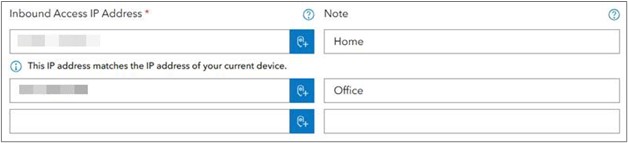
You can add optional notes or aliases to inbound IP entries, making it easier to identify the purpose, ownership, or location of each IP when managing multiple entries.
Filters added to the job status table
Multiple new filters are now available in the Job Status table of the GP Tasks page let you to narrow results and continue sorting within filtered views, reducing manual scrolling and improving job management efficiency.
Detailed cost attribution across services
The upcoming enhancements to costing reports will include initiating users and machine aliases, providing clearer attribution across services.
Pro Machines Enhancements
GPU availability at the first connection for AWS Pro machines
AWS Pro Machines now install NVIDIA GPU drivers during creation. Because of this, you gain GPU functionality immediately when you connect for the first time.
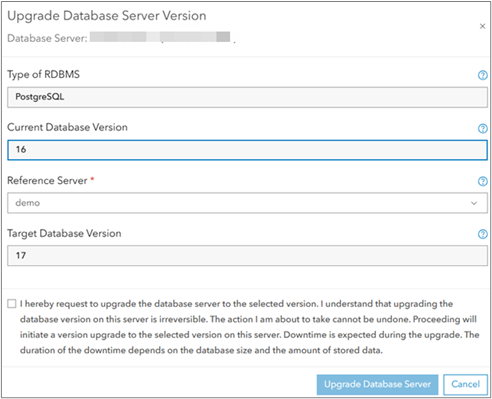
UI support for RDBMS engine version upgrades
A new UI option allows you to submit RDBMS version upgrade jobs. The upgrade button appears only for database servers created with older Dynamic Imagery Server versions. After you select a reference server with a higher version, the upgrade is initiated. The system sends a confirmation email when the upgrade finishes.
Enhanced reporting
- The Pro Machine report now correctly excludes Processing and Analysis job information when no Pro Machines are present, ensuring the report displays only relevant data.
- The Processing and Analysis Monthly Summary Report has been updated to properly align server, instance, job, and cloud details.
Persist Imagery
The Persist Imagery capability in ArcGIS Image Dedicated provides a powerful, scalable framework for converting large collections of raster datasets into formats such as Cloud Raster Format (CRF), tile caches, and tile packages—all of which support fast visualization and advanced analysis. This release introduces new tools and reliability improvements that simplify large‑scale raster processing.
Reduced reprocessing time after job failures
You can now resume partially completed CRF and Tile Cache jobs when resubmitting with the same parameters and output name. The system detects existing output and prompts you to resume or restart, avoiding unnecessary full reprocessing.
Introducing Merge Tile Caches tool
You can now merge a target cache into an existing base cache when both share the same tiling scheme, cache format, and spatial reference. This workflow supports incremental updates without requiring a full cache rebuild.
Validation enhancements across Persist Imagery tools
New safeguards help prevent invalid configurations and reduce job failures, including:
- Input and output path checks
- Cross‑region restrictions
- Cross‑cloud restrictions
ArcGIS Server and Load Balancer log insights
ArcGIS Server and Load Balancer logs provide operational information that supports performance monitoring, usage analysis, and troubleshooting. To simplify access, ArcGIS Image Dedicated includes geoprocessing tasks that allow you to request and retrieve logs. After you submit a request, the system converts the log data into Parquet files that can be explored in ArcGIS Pro or analyzed using the Python notebooks included with ArcGIS Image Dedicated.
Enhancements in this release
This release introduces several updates that improve data quality, system stability, and workflow flexibility, including:
- Improved handling of invalid requests in Server and ELB logs
Invalid or malformed requests are now correctly flagged as failures. Previously, these jobs appeared successful despite producing no output; they now fail as expected, improving log accuracy and troubleshooting clarity.
- Fixes for Parquet date‑overlap issues during job splitting
Date overlapping issues that occurred when splitting Parquet files with overlapping date ranges have been resolved. Instead of splitting logs randomly, logs are sorted by date range during batch processing, ensuring clean, non‑overlapping partitions.
- Log splitting based on actual server service type
The server’s service type is now correctly identified during Log splitting – ImageServer, MapServer, or SceneServer—so logs are categorized accurately.
- Introduced centroid (X, Y) values in MapServer Parquet files
Added support for Tile Service requests to extract X and Y values from MapServer requests. Level/Row/Column details are also captured, and centroid coordinates are now included in Parquet files. This will help you generate the heatmap to identify the sources of incoming requests.
- Python notebook support mapping spatial extents of MapServer service requests
A feature class that represents the spatial extents of MapServer service requests, using the centroid X and Y values, is created by Python notebooks. This enables spatial visualization of MapServer service request patterns.
- Export options for Python notebooks (PDF, HTML)
Python notebooks now support exporting analysis results to PDF and HTML, making it easier to share insights and documentation.
Stay Connected
These updates help you work smarter, scale faster, and deliver more value from your imagery workflows.
Explore more:

Article Discussion: