In the June 2026 release, Business Analyst will transition to using only the NAICS industrial classification system, removing the SIC code search option in POI search and SIC-based Business Summary datasets. We want to simplify the search experience and not overwhelm users with so many search options. And because SIC is a much older system and not necessarily well suited to modern business types, Business Analyst is moving focus to NAICS. Shifting focus to the NAICS system offers greater granularity and better accommodates contemporary business types such as wireless cell phone stores or social media providers.
With this change, only the Data Axle data source is impacted. However, primary SIC codes will continue to be available as a Data Axle POI data attribute, so users will have a crosswalk, or conversion table, from SIC to NAICS. Note that the SIC_ALL field (the full list of all SIC codes associated with a location) will be removed in June 2026. The primary SIC code will continue to be available as a POI data attribute.
With these changes, users should be aware that this change may impact several Business Analyst workflows. Business Summary variables such as Total (SIC01-99) Businesses will be removed, and customers will need to shift over to NAICS Business Summaries.
Why are we making this change?
NAICS and SIC are industry classification systems that have been in use within the United States for several decades. SIC is the older classification system, originally designed in the 1930s. It was last updated in 1997, and NAICS became the replacement classification system. NAICS is consistent between the United States, Canada, and Mexico, and is updated every 5 years to capture new business types.
What needs to be migrated in Business Analyst?
Currently, you can use SIC and NAICS code-based variables through Business Analyst mapping and analysis workflows as well as in infographics and reports.
The Esri Business Summary dataset has historically used both NAICS and SIC codes. Simply put, we have aggregated businesses by both NAICS and SIC to create the Business Summaries dataset for many years for analysis in the United States. You may have come across this data, for example, when mapping the count of restaurants and their total number of employees and sales by ZIP code. With the June 2026 release, SIC Business Summaries will no longer be available, but the NAICS version of it will be.
There are a few places where you may need to migrate from using SIC codes to NAICS codes, as listed below.
|
Business Analyst Web App |
Business Analyst Pro |
Business Analyst widget in ArcGIS Experience Builder |
| Standard and Advanced:
Saved searches and lists Custom variables Saved point of interest (POI) and analysis map layers |
Custom infographics and reports
Saved variable lists Custom data (Statistical Data Collections) Saved map layers and any analysis, (check python scripts!) using SIC Business Summaries |
Custom (My/Shared) infographics |
| Advanced only:
Custom infographics and reports |
All the places listed in the table impact Business Analyst Enterprise users.
How do I migrate to NAICS codes in Business Analyst?
There are some best practices to consider as you migrate from SIC to NAICS code-based variables.
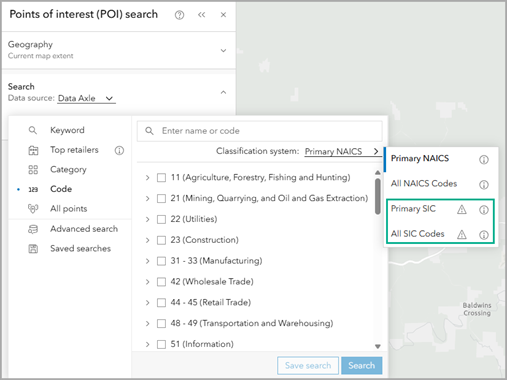
To start, you need to identify where your work is impacted, such as in custom infographics, saved lists, and saved map layers. There are some visual cues in Business Analyst Web App to identify impacted content.
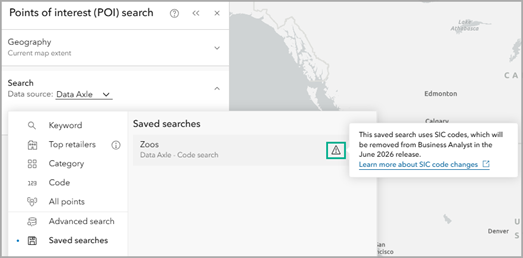
If you’re using SIC codes, there is a warning message about the upcoming deprecation in saved searches that use SIC-based attributes.
Once you’ve identified where your work is impacted, you need to decide how to replace removed variables.
Data Axle provides a 1:1 correspondence between their proprietary SIC and NAICS extended codes. Every unique SIC code has a unique NAICS code equivalent. For example, if a user clicks on a location point for a restaurant, they will see that it has a primary SIC code value of 581208 and a NAICS code value of 7225117.
For access to the complete SIC to NAICS crosswalk using Data Axle’s proprietary list, contact Customer Support:
- Call a technical support representative at 1-888-377-4575, ext. 2, from 5 a.m. to 5 p.m. (PST) from Monday to Friday (except holidays).
- For international customers, contact your country/region office.
- Chat with a technical support representative.
- Open a new case with the ArcGIS Online technical support team.
Furthermore, when you recreate your saved searches, lists, variables, and map layers in Business Analyst, you can search for codes using a description. For example, use the search field and enter fitness centers or parks to retrieve suggestions by NAICS codes.
How do I migrate to NAICS codes in reports and infographics?
You won’t need to update any of the Standard or Gallery infographics or classic reports since the Business Analyst team has designed updated infographics and reports using NAICS codes.
For example, the Business Summary Report – NAICS (Tabular) Gallery template only uses NAICS codes and provides an update to the existing Business Summary Report template.
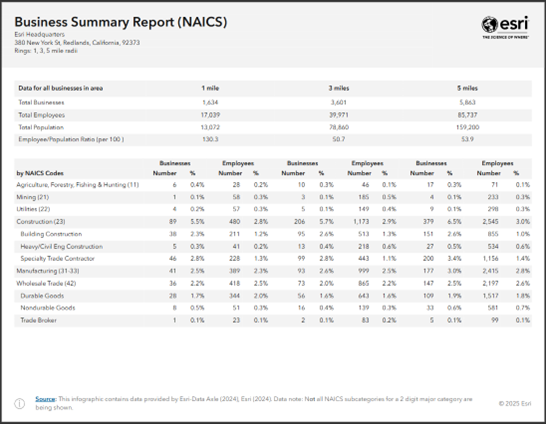
After the June 2026 release, SIC business summary data in your custom infographics and reports will no longer be available.
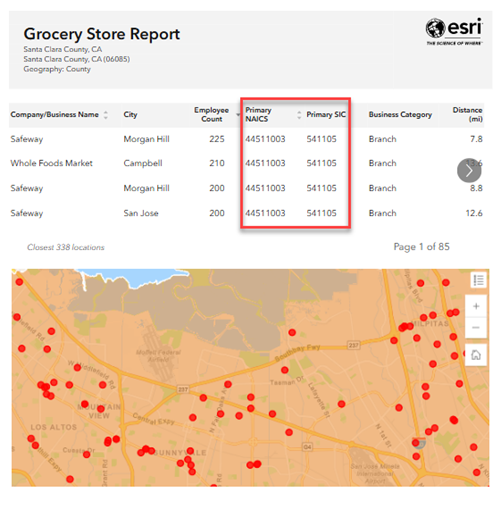
The primary SIC code will continue to be available as an attribute for individual POI records. This means users can still reference the primary SIC code in infographics and reports if needed. However, pre-aggregated SIC-based business summary variables will no longer be available.
How do I migrate to NAICS codes in my saved searches and lists?
Currently, you can save SIC-code based variables in searches and lists. This impacts the following places in Business Analyst Web App:
|
Type |
Workflow |
| Saved search | Points of interest (POI) search |
| Custom point list | Nearby analysis |
| Custom variable list | Void analysis |
| Saved variable list (My list) | Smart map search, benchmark comparisons, suitability analysis |
If you are using a SIC-based business variable in your saved variables list in any of these workflows, there is a warning message about the upcoming deprecation. With the SIC codes transition in June 2026, the variables with a warning label will be removed from your saved lists.
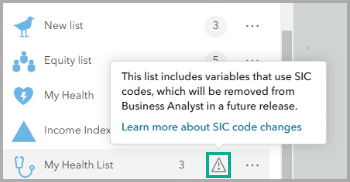
To prepare for the migration, it is recommended to edit the impacted lists and replace SIC code-based variables with NAICS code-based variables.
In Business Analyst Pro, you can edit your variable lists when using the data browser or from the Catalog pane under Business Analyst > Variable Lists > Edit.
How do I migrate to NAICS codes in custom variables?
If you’ve used SIC codes-based data to create an advanced custom variable in Business Analyst Web App or Enterprise, you’ll need to recreate the custom variable.
With the June 2026 release, SIC codes-based variables will be removed. Unlike custom infographics and reports, a custom variable will not load if any of the data is missing. You will need to recreate your custom variable using NAICS code-based data.
How do I migrate to NAICS codes in saved map layers?
You can save map layers to your project so that you can reopen, modify, and reference your saved layers. Saved layers that may use SIC code-based variables include points of interest (POI), nearby analysis, void analysis, smart map search, benchmark comparisons, and suitability analysis.
Your saved layers using SIC code-based variables will continue to be available to view after the migration. However, you won’t be able to edit those layers. It is recommended to recreate your saved map layers using NAICS codes.
What about legacy SIC codes data in Business Analyst Pro and Enterprise?
If you’re using Business Analyst Pro or Business Analyst Enterprise, you may be using locally connected and configured datasets. Unlike Business Analyst Web App users, this means you may have access to legacy data. Your administrator may provide access to legacy data after June 2026, but we recommend that you discuss the impact of these changes if you have not already done so. In other words, your SIC codes migration is not as urgent, but still highly recommended to do sooner than later.
For organizations that use ArcGIS Online as the data portal, you will need to follow the same best practices as outlined above for Business Analyst Web App.
Applied example
Let’s walk through an example to understand how the SIC to NAICS code migration might impact your saved work in Business Analyst Web App.
You are a publisher working on distribution of children’s educational material about animals. You use POI data in Business Analyst Web App to map state-wide zoos and petting zoos based on SIC codes to start your marketing campaign. With the upcoming migration, your saved search and map layer will have missing variables. So, what do you need to do?
First, if you run a new POI search using your saved list, you’ll see a warning icon.
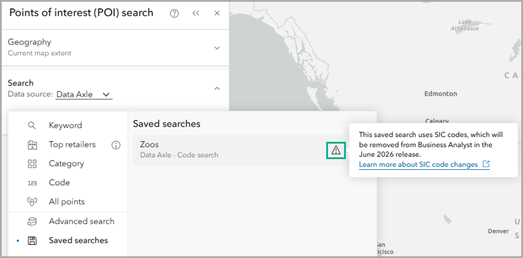
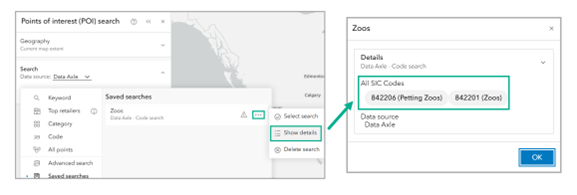
You can click the Options button and Show details to view the saved list to see which variables are used and need to be replaced.
When you reproduce the search using NAICS codes, you can enter a name describing the code, like zoos.
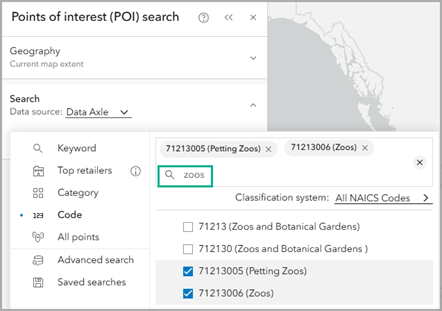
Save your new search and map layer so that you can continue using it for future analysis.
In conclusion
And that’s it! SIC codes are still available until the June 2026 release. We highly recommend looking at your saved work to see where you may have used SIC codes so that you can update it to use NAICS codes instead.
Resources
Now that you’ve learned about the SIC to NAICS code transition, we hope you’ll explore more capabilities in Business Analyst. To continue your Business Analyst journey, visit the following resources:
- Business Analyst product overview page
- Review pricing and purchase Business Analyst
- Business Analyst resources page
- LinkedIn user group
- Business Analyst Web App video channel
- Business Analyst Pro video channel
- Business Analyst on Esri Community
- Business Analyst Web App login page
- Email the team: businessanalyst@esri.com
This article uses ArcGIS Places data by Data Axle and basemaps provided by Esri.
This article uses ArcGIS Business Analyst Web App for screenshots. You can map points of interest in Standard or Advanced.
This article was originally published on February 18, 2025, and has been updated

Article Discussion: