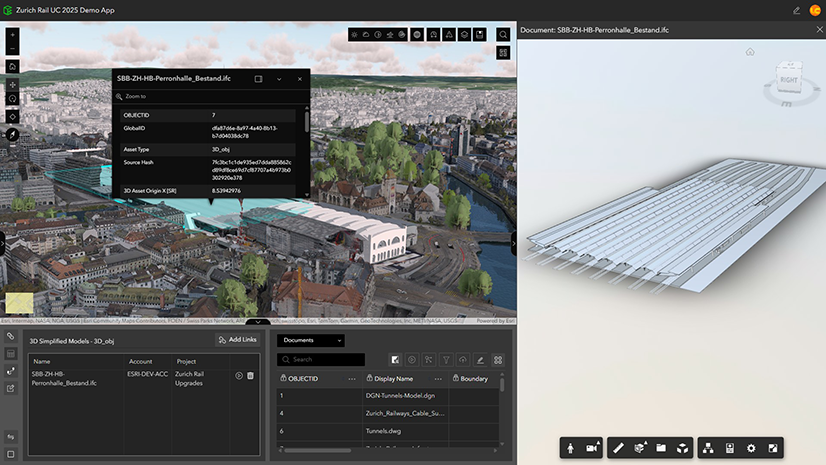
ArcGIS GeoBIM delivers a connected data environment that seamlessly links architecture, engineering, and construction (AEC) information in Autodesk Forma (formerly Autodesk Construction Cloud) with geospatial data and services in ArcGIS. By bringing these platforms together, teams can smoothly collaborate from initial design through operations—empowering better decisions and project outcomes.
Esri’s ArcGIS is an enterprise geospatial platform that provides a comprehensive set of capabilities for creating, managing, analyzing, and mapping geographic information. Together with Autodesk, Esri is committed to continually evolving connected GIS and BIM workflows between ArcGIS and Autodesk Forma.
This release on ArcGIS Enterprise 12.0 streamlines GIS and BIM integration with simplified 3D models, expands flexibility for building custom web apps, and adds support for more file formats.
Release highlights
Dive deeper into the latest capabilities now available in ArcGIS GeoBIM by visiting the product documentation and try them out for yourself. Have questions, feedback, or product ideas to share with our team? Visit and make a post in Esri Community today.
Simplified 3D models streamline GIS and BIM integration (beta)
AEC teams can now bring large infrastructure and building models into ArcGIS more efficiently during planning and design. The new Add Document Models tool creates lightweight 3D models, reducing file sizes by up to 95 percent, from Revit and IFC documents with direct links to source files in Autodesk Forma.
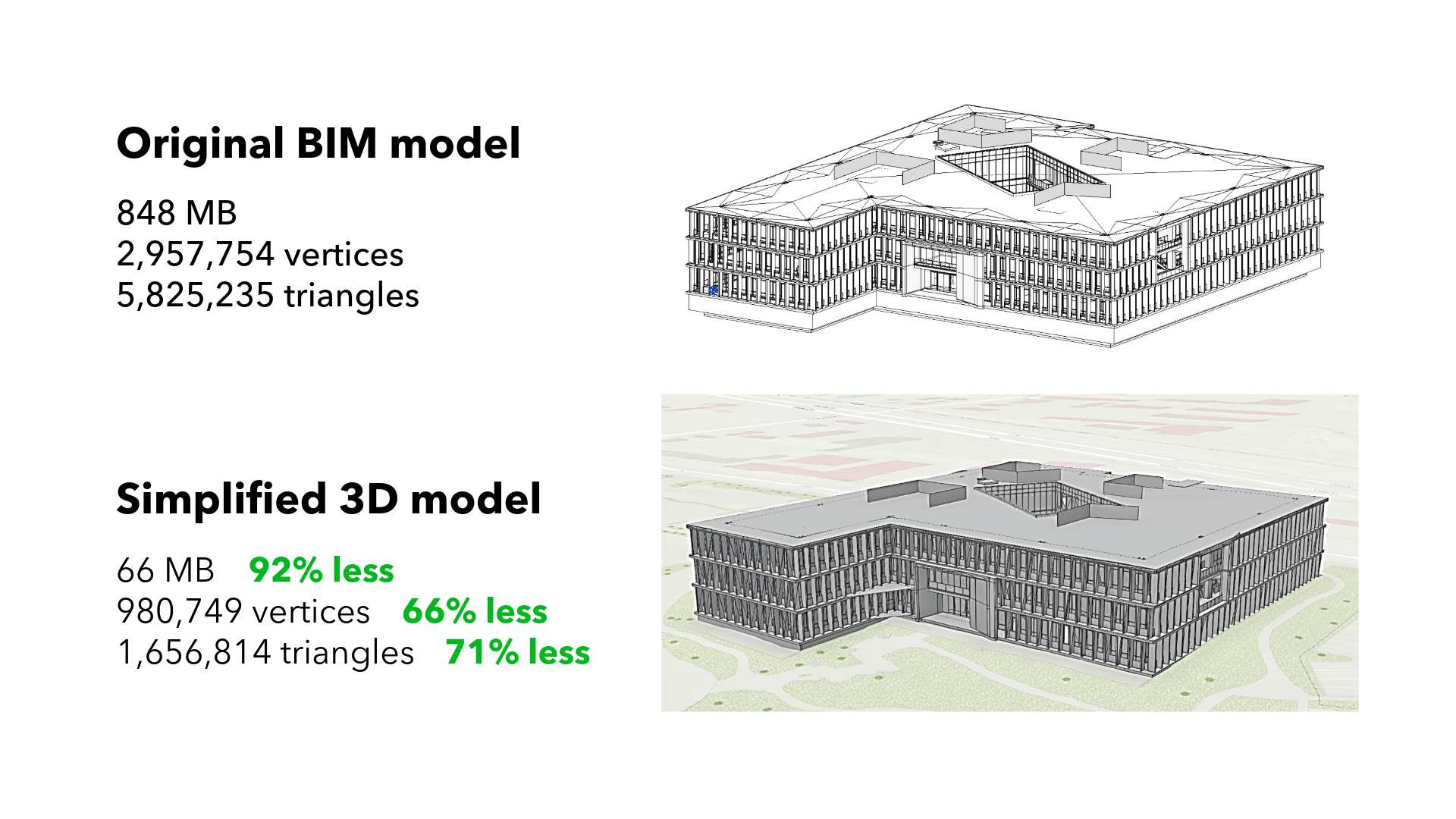
The tool automatically places models in the correct location and generates ready-to-use 3D web scenes. This eliminates the need for ArcGIS Pro when working with simple models, saving time and cost, minimizing platform switching, and making it easier to share responsive, geolocated BIM content with stakeholders. Teams gain faster access to critical design data, stronger client communication, and more confident decision-making.
Read this article to learn more about the benefits of using simplified 3D models and building layers across ArcGIS.
Build custom apps with new widgets in ArcGIS Experience Builder
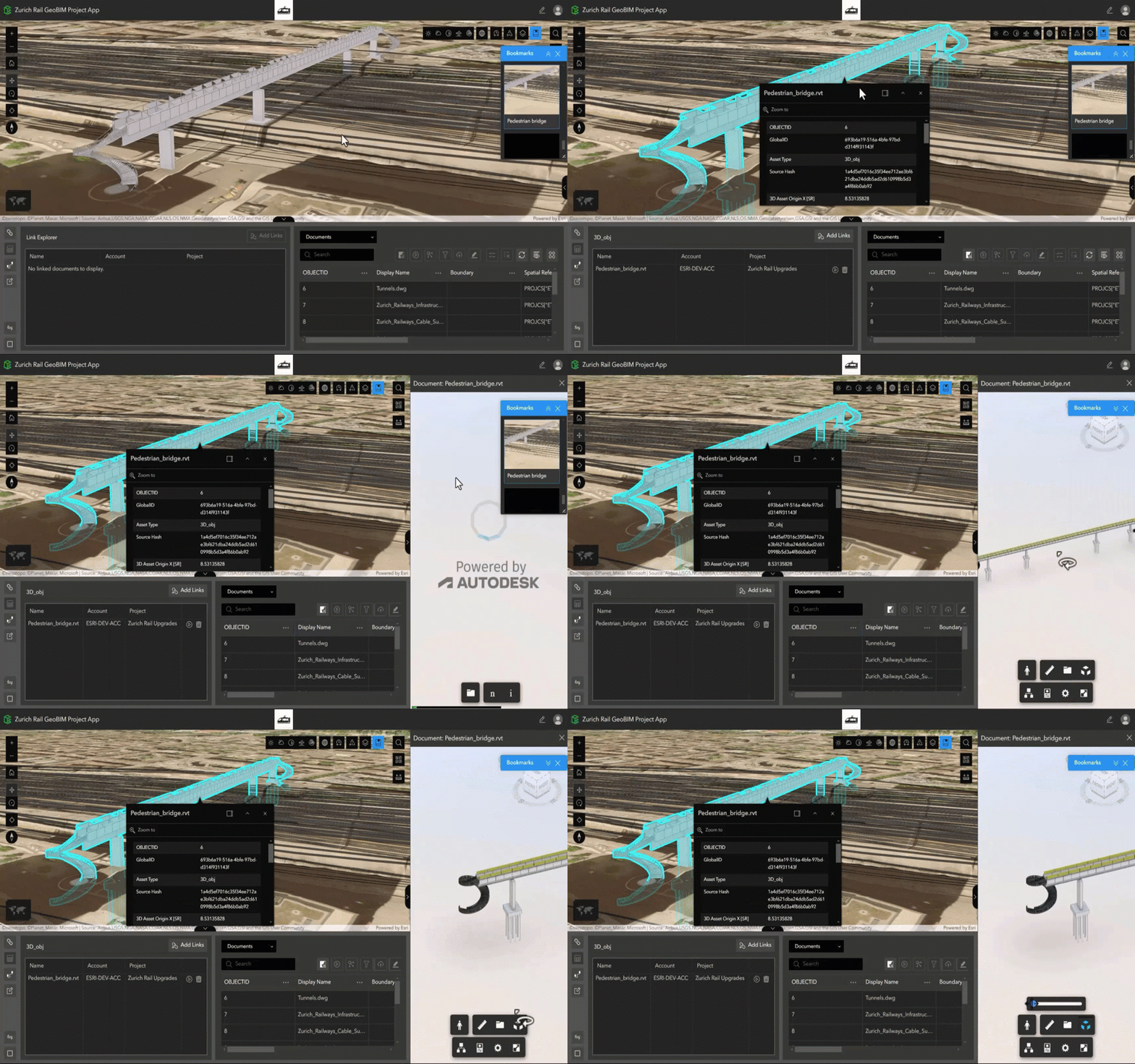
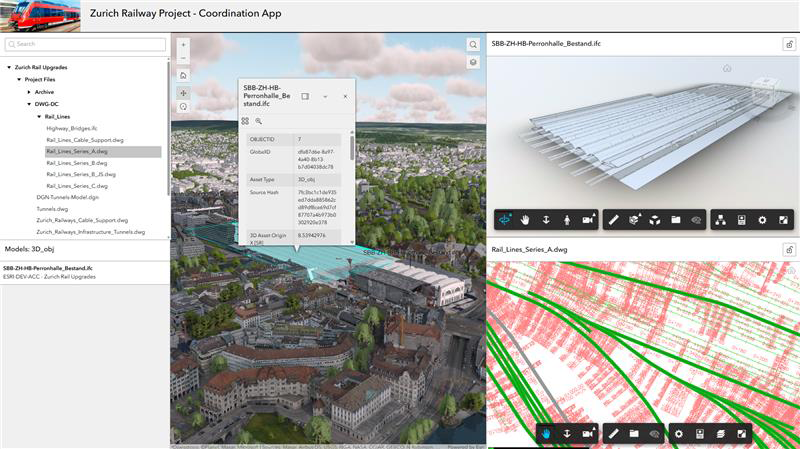
Three new widgets in ArcGIS Experience Builder make it easier to create customized web apps that connect GIS and AEC data. Designed to enhance enterprise integration between Autodesk Forma and ArcGIS, these new widgets extend the ArcGIS GeoBIM experience enabling better collaboration and project insight:
- Model Viewer: Interact with linked 3D models and 2D documents.
- Link Explorer: Explore all project documents linked to features in web maps or scenes.
- Document Explorer: Easily browse a folder tree of all project documents and data.
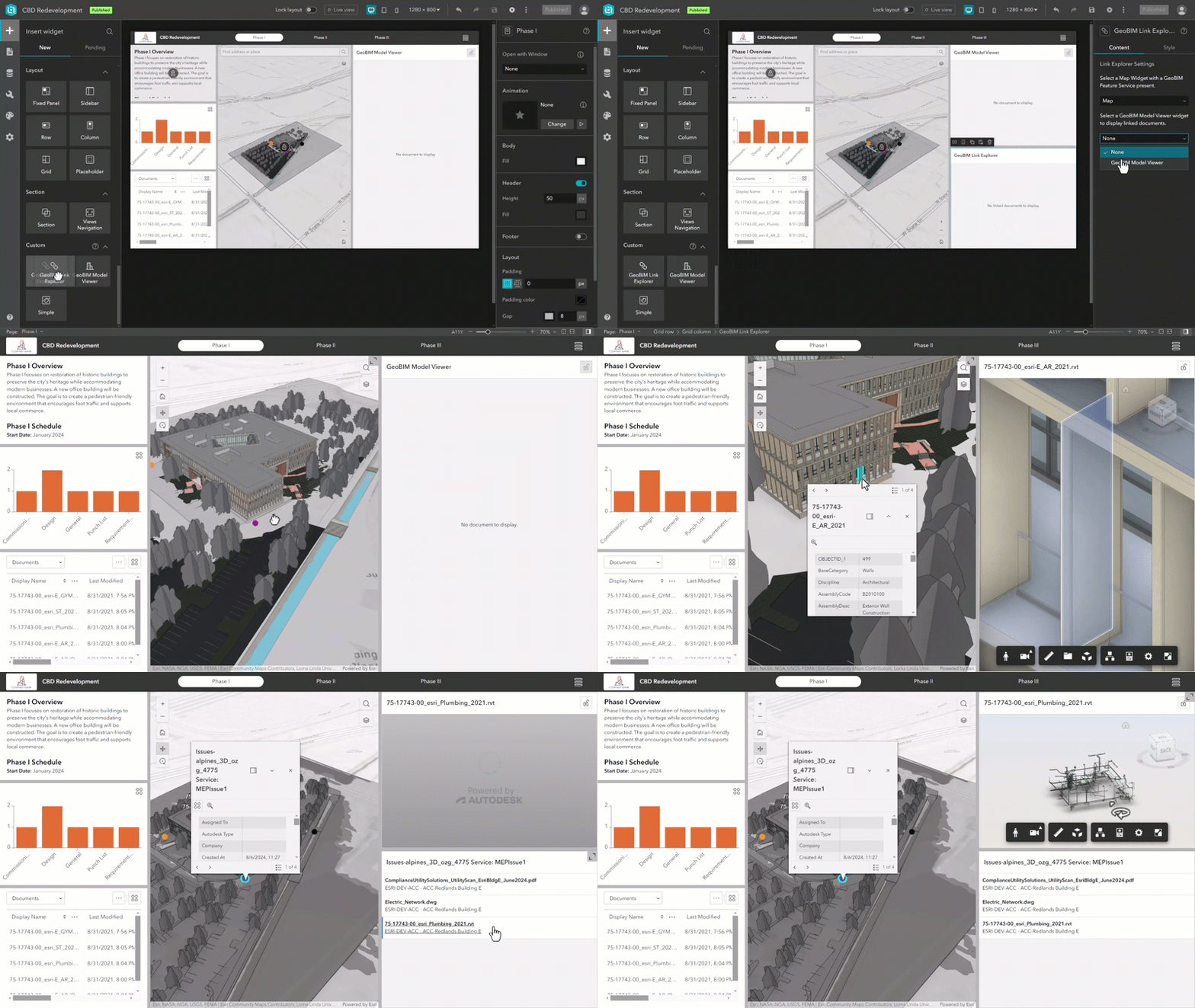
With more ways to connect GIS and AEC data in customized ArcGIS Experience Builder web apps, teams can share information more effectively, collaborate with stakeholders, and gain deeper insight into project performance.
Whether you’re a user of ArcGIS GeoBIM looking to customize project apps—or a user of ArcGIS Experience Builder looking to work with building information modeling (BIM) data—these new widgets offer expanded possibilities for building web apps your way.
Read this article to learn more about the widgets, what you can build, and how to get started.
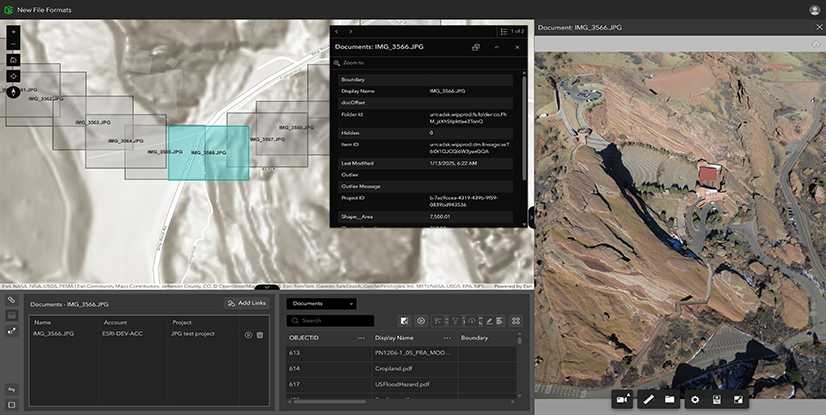
Expanded file support for JPG, PDF, and DGN files
By integrating commonly used formats, including PDFs and DGNs often used in transportation workflows, ArcGIS GeoBIM transforms static files into strategic, collaborative assets. With a unified platform for accessing CAD drawings, field images, and engineering documents, project teams can reduce delays, improve coordination, and focus more time on execution instead of file management.
Other enhancements
Extended support for new Autodesk Forma regions
New Autodesk Forma regions are now available to customers using ArcGIS GeoBIM in ArcGIS Enterprise 12.0. On July 1, 2025, Autodesk announced the availability of five new regions—UK, Germany, Japan, Canada, and India—for hosting project data in Autodesk Forma products, expanding beyond US, EU, and APAC.
Learn more in the release notes
Resources
Get started with ArcGIS GeoBIM tutorial series
If you’re new to using ArcGIS GeoBIM, start learning the basics of preparing your data to create and share your first GeoBIM project and app. Then, advance your skills to collect, monitor, and address project issues with office to field collaboration. With four tutorials series that build on each other, you’ll also find learning content for extending ArcGIS GeoBIM as a system to build custom apps, tailor 3D scenes, and work with schedules.
Tutorial: Prepare your data for ArcGIS GeoBIM
Georeferencing your design files is a critical first step for integrating BIM and GIS. Doing so ensures that when these files are uploaded to Autodesk Forma and linked in ArcGIS GeoBIM, they align to the correct location on earth. This helpful guide provides a comprehensive, step-by-step approach to georeference CAD and BIM files entirely within Autodesk AutoCAD, Civil 3D, and Revit. It also covers setup, assigning a coordinate system, and three Revit workflows for establishing shared coordinates.
Learn how to georeference your data
Q&A: When digital twins meet real-world infrastructure challenges
GIS and BIM integration (or GeoBIM) is helping to bring clarity to complex infrastructure projects—from airports and data centers to nuclear plants. In this interview with George Floros of AtkinsRéalis, you’ll learn how GeoBIM moves beyond creating impressive visualizations to delivering tangible improvements in project coordination, safety, and operational efficiency.
Read the interview to learn more
Take the next step
If you’re using ArcGIS Enterprise 11.4 or higher, you can access ArcGIS GeoBIM as an included app with a Contributor user type or above. To begin creating ArcGIS GeoBIM projects and apps, you’ll need at least one Creator, Professional, or Professional Plus user type along with Autodesk licensing.
There are many reasons to upgrade to the next generation of ArcGIS Enterprise. Discover what’s new in ArcGIS Enterprise 12.0 for an overview of the exciting enhancements and powerful geospatial capabilities included to support your work.


Article Discussion: