We’ve heard your feedback and are making changes to better support your transition. The retirement timeline for ArcGIS Web AppBuilder in ArcGIS Online has been extended from Q1 2026 to Q2 2027. This extension gives you more time and additional resources to make your migration as smooth as possible. In the meantime, you can continue updating existing apps until Q4 2026 and viewing them until retirement. After the retirement, all existing Web AppBuilder apps will no longer function. Esri Technical Support will remain available until retirement, ensuring you have assistance throughout your transition. We are also completing planned parity features in ArcGIS Experience Builder, giving you the tools you need to match and enhance your current workflows. Start your migration today to stay ahead of the retirement date.
Retirement Timeline
- Q1 2026: You will no longer be able to create new Web AppBuilder apps.
- Q4 2026: Updates to existing Web AppBuilder apps will no longer be possible.
- Q2 2027: Web AppBuilder will be retired, and all existing Web AppBuilder apps will no longer function.
These phases correspond with the ArcGIS Online releases in February 2026, October 2026, and June 2027. Please note that this retirement affects only ArcGIS Web AppBuilder in ArcGIS Online.
Safely Updating Your Apps
Limitations apply when Map Viewer Classic is removed in Q1 2026 — follow these guidelines for safe updates.
Important Compatibility Notes
Web AppBuilder is compatible with web maps created in Map Viewer; however, some newer capabilities in Map Viewer are not fully supported. This could result in differences in appearance or functionality within your apps. Once Map Viewer Classic is retired in Q1 2026, updating web maps used in Web AppBuilder apps will be limited. It is recommended that you follow best practices and be aware of existing limitations when updating your apps.
Best Practices for Safe Updates
To avoid unexpected issues during updates, whenever possible, update only the Web AppBuilder app, not the web map. If updating the web map in Map Viewer is necessary, make a copy of both the production map and app, then test the copied app before deploying changes to production.
Steps to Safely Update:
- Make a copy of both the production app and map.
- Reconnect the copied app to the copied map and reconfigure as needed.
- Review known limitations before making changes.
- Make updates to the copied map and app.
- Test the copied app; if it functions as expected, apply the changes to production.
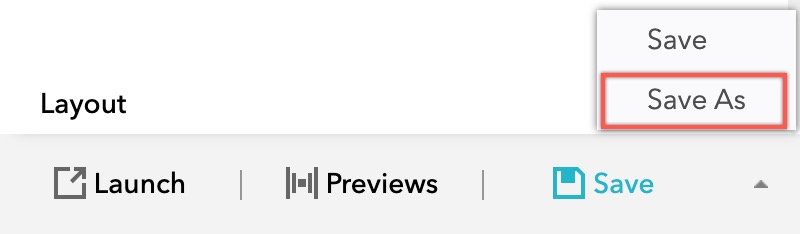
Tip: To make a copy of the app, open it in the builder, click the Save menu, and choose the Save As button as demonstrated below.
Known Limitations
- Widgets generally do not function with newer layer types that are unsupported in Map Viewer Classic.
- Maps may display symbols, styles, pop-ups, labels, and other configurations differently.
- The Layer List widget displays group layers in a flattened view, listing all layers individually. For more details, see this article.
- The Basemap Gallery widget does not support basemaps with spatial references different from the default.
Feature Parity Updates
Ongoing feature parity updates in ArcGIS Experience Builder aim to facilitate your migration. In the upcoming ArcGIS Experience Builder in ArcGIS Online February release, you can expect:
- The ability to copy and paste features into the same or different layer with the same geometry type using the Edit widget.
- Options to customize fields for batch editing within the Edit widget.
- The Map locate tool displays your real-time location as you move.
- Importing and exporting drawings via the Draw widget.
- Printing directions from the Directions widget.
Migration Resources
- ArcGIS Web AppBuilder Migration Webinar
- ArcGIS Web AppBuilder Retirement document
- Migration Resources for ArcGIS Web AppBuilder
We are committed to keeping you informed, supported, and confident throughout this transition. The planned parity features you’ve waiting for are ready in ArcGIS Experience Builder and other ArcGIS apps. Now’s the time to migrate!
Thank you,
The ArcGIS Experience Builder Team

Article Discussion: