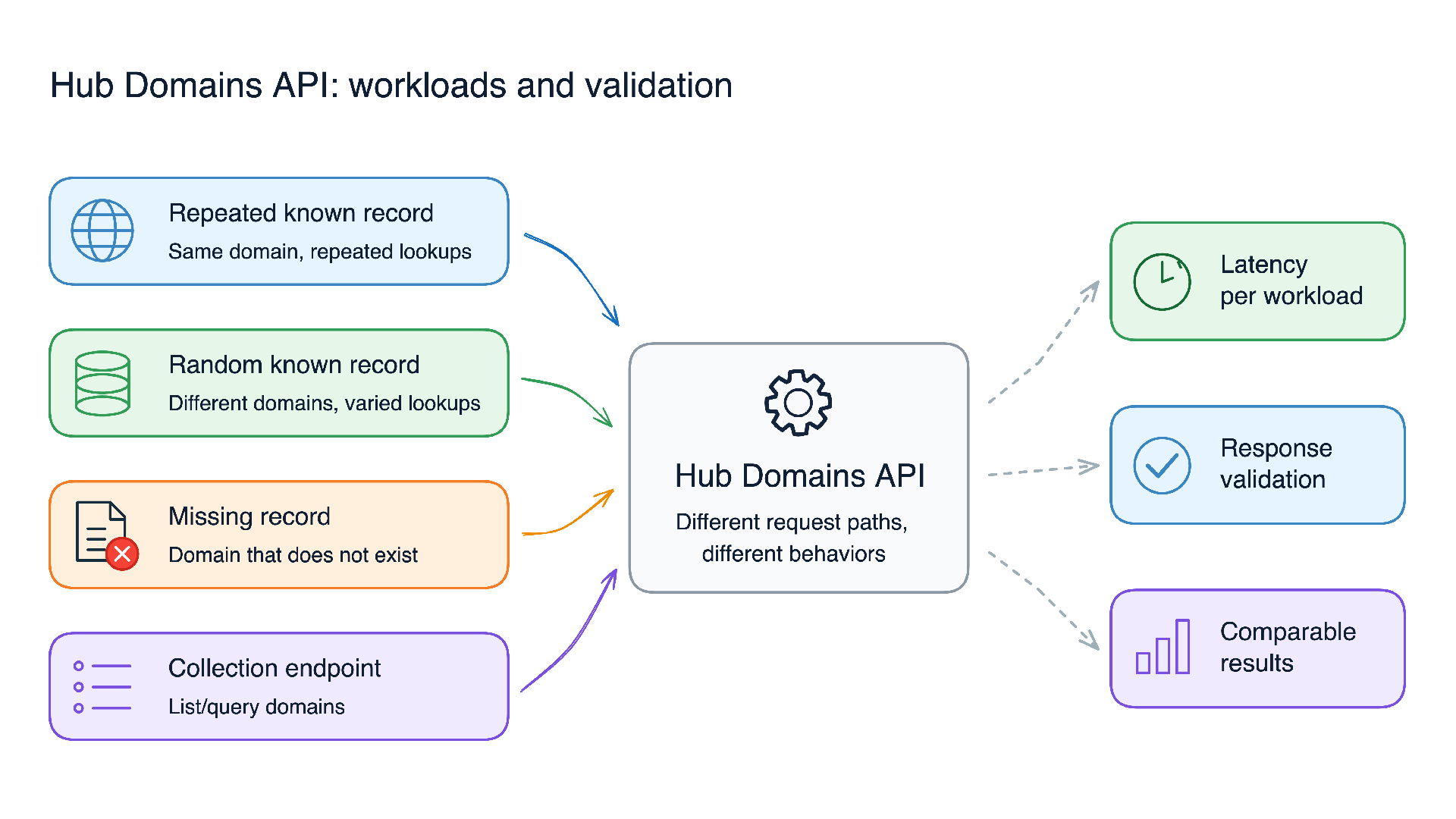
API traffic is rarely uniform. A service can receive a mix of requests for known records, frequently accessed records, missing records, and collection endpoints. Treating all of this as one generic load test makes it difficult to understand what a result actually means.
The Hub Domains API uses k6 to model these read paths independently. The goal is not to publish a single capacity benchmark. It is to create a repeatable harness that validates API contracts, highlights path-specific latency changes, and produces evidence engineers can compare across revisions and environments.
This post describes the test workloads, the rate-driven k6 design behind them, and the operational practices that make the results useful.
The Hub Domains API
ArcGIS Hub sites can be associated with Hub-provided or custom hostnames. The Hub Domains API is the REST-backed registry for those domain records. It connects a hostname to the Hub site and organization it represents, along with configuration used for access, HTTPS behavior, and redirects.
The API supports retrieving a record by hostname or internal ID, listing records by parameters such as site or organization, validating whether a hostname’s CNAME resolves to Hub, and managing the record lifecycle through authenticated create, update, and delete operations.
What is k6?
k6 is an open-source load-testing tool built for developers and performance engineers. Test scripts are written in JavaScript and executed by the k6 runtime, making it possible to define traffic patterns, issue HTTP requests, validate responses, collect metrics, and enforce thresholds in version-controlled code.
Unlike browser-based end-to-end test tools, k6 focuses on protocol-level testing. For the Hub Domains suite, that means k6 sends HTTP requests directly to the API rather than loading a browser page and simulating a user interface workflow.
A k6 script typically contains four parts:
- Test configuration, such as the executor, arrival rate, duration, and virtual-user allocation.
- Request logic, such as an HTTP GET request to an API endpoint.
- Checks that validate the expected response contract.
- Thresholds that determine when a metric should cause the test run to fail.
k6 supports multiple execution models. The Hub Domains suite uses the ramping-arrival-rate executor, which starts iterations at a defined rate rather than asking a fixed number of virtual users to run as quickly as possible. This allows the suite to test whether the API can sustain a known incoming request profile.
The tool also collects standard HTTP metrics, including request duration, failed-request rate, and data transfer. Engineers can add tags to segment those metrics by stable request dimensions, such as the hostname and ID lookup paths used by the Hub Domains suite.
Because the test scripts, fixture configuration, thresholds, and output artifacts can be versioned together, k6 provides a practical foundation for repeatable performance testing in local development, CI pipelines, and approved non-production environments.
Why a single load test was not enough
A generic endpoint loop can provide an overall latency number, but it cannot explain which API behavior produced that number.
A repeated lookup for one popular hostname may follow a different cache or data-access path than lookups distributed across many records. A missing hostname has a valid 404 contract, not the same failure semantics as an unexpected server error. Collection requests also have a different query and response shape from individual-record lookups.
If these request types are mixed into one undifferentiated test, aggregate metrics can hide a regression in one path behind acceptable results in another. The Hub Domains k6 suite addresses that limitation by modeling each read contract independently and tagging hostname and ID traffic for comparison.
The goal is not to publish a single capacity benchmark. It is to create a repeatable harness that validates API contracts, highlights path-specific latency changes, and produces evidence engineers can compare across revisions and environments.
Start with workload contracts
Each script encodes one request contract rather than looping over a generic endpoint.
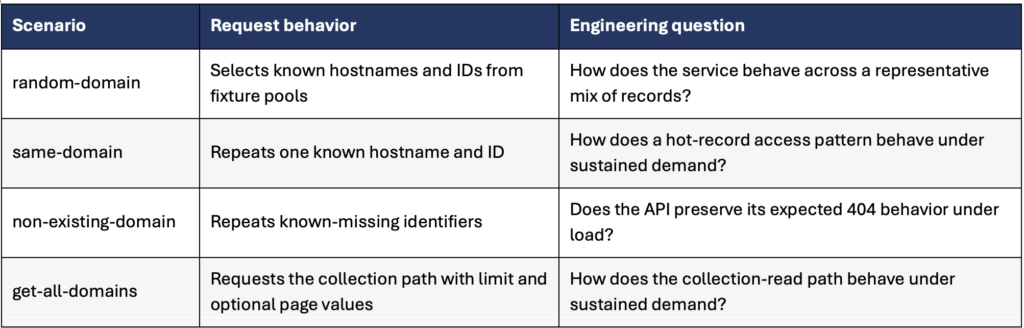
This separation matters. A repeated lookup can exercise a different cache or data-access path than a varied lookup. An expected missing record also has a different correctness contract from an unexpected server error.
Each iteration performs exactly one HTTP GET request, so the configured iteration arrival rate directly represents the intended HTTP request-start rate for that scenario.
Model incoming demand with arrival rate
The suite uses k6’s ramping-arrival-rate executor rather than a closed virtual-user loop.
A closed model measures how quickly a fixed set of virtual users can complete work. If the API slows down, that model naturally emits fewer requests. An arrival-rate model instead asks whether the service can sustain a defined incoming demand, even when response times change.
The shared profile currently uses these settings:
const TARGET_RPS = 20;
const RAMP_DURATION = '30s';
const STEADY_DURATION = '120s';
const RAMP_DOWN_DURATION = '30s';
Each scenario ramps from zero to 20 requests per second over 30 seconds, holds that rate for two minutes, and ramps down over 30 seconds. Hostname and ID scenarios run concurrently, so lookup workloads target 20 request starts per second per lane, or 40 in total during the steady phase.
k6 preallocates virtual users for each scenario and can add more when required to maintain the arrival rate.
Those virtual-user settings control the capacity of the k6 load generator. They should not be interpreted directly as the application’s concurrent-request count or as a service-capacity claim.
Tag the paths you need to compare
The framework assigns an identifier tag to each scenario and routes it to the appropriate execution function:
tags: { identifier: tag },

exec: tag === 'hostname' ? 'runByHostname' : 'runById'
This gives engineers separate hostname and ID metrics without adding a high-cardinality tag for every individual domain. The suite can therefore evaluate both global latency and tagged metrics such as:
http_req_duration{identifier:hostname}

http_req_duration{identifier:id}
The shared defaults evaluate a 95th percentile request duration below 1.5 seconds, a 99th percentile below 3 seconds, and a low failed-request rate. Individual workloads can override thresholds when they have more specific expectations.
Validate response contracts as well as timing
Fast responses are not necessarily correct responses.
Known-record helpers validate HTTP 200 and confirm that the JSON response contains domain data. The missing-record workload explicitly validates HTTP 404. All shared requests use a consistent header set and a 60-second timeout.
Checks, thresholds, and HTTP failure metrics answer different questions:
- Checks validate the API response contract.
- Thresholds define whether selected metrics should fail a run.
- HTTP failure metrics use k6’s expected-response classification.
A passing check does not, by itself, make an HTTP response “expected” for k6’s built-in HTTP metrics, and a failed check does not necessarily fail the overall test unless a threshold enforces it.
That distinction is especially important for expected 404 responses. k6 normally counts a 404 as failed for http_req_failed, so the missing-record scenario relies on its explicit status is 404 check to validate the contract.
For teams using this approach as a strict CI gate, two useful hardening steps are to classify expected responses explicitly and threshold semantic checks:
const expected404 = http.expectedStatuses(404);

http.get(url, {
 ...requestParams(),
 responseCallback: expected404
});

thresholds: {
 checks: ['rate==1'],
 dropped_iterations: ['count==0']
}
A checks threshold ensures a contract violation fails the run. Monitoring dropped_iterations verifies that the load generator actually achieved the intended arrival profile.
Keep inputs environment-specific
The harness selects its configuration through an ENVIRONMENT variable and loads the matching environment data during k6 initialization. This keeps base URLs and fixture values out of the request logic.
A focused run looks like this:
cd load-testing

ENVIRONMENT=qa k6 run scripts/random-domain.js
The random workload selects a fixture value on each iteration. The repeated-known and missing-record workloads use designated values. The collection workload builds query parameters with the URL API, using a default limit and an optional page.
Environment-specific configuration makes the scripts reusable, but it does not eliminate the need for test-data stewardship. Fixtures should be safe to exercise, representative of the intended path, and reviewed as the service evolves.
Generate evidence, not just console output
Each run produces a terminal summary, an HTML report, and raw JSON data. The HTML report is useful for quick inspection, while the JSON artifact is better suited for CI retention and deeper comparison.
A useful comparison records the environment, application revision, fixture revision, k6 version, scenario, and arrival profile. Without that context, two results can look comparable while representing different conditions.
The actual load profile should come from the shared configuration and observed k6 metrics rather than hand-maintained summary labels. This keeps report descriptions aligned with the test that actually ran.
Make the harness reproducible in CI
A meaningful performance signal must be reproducible by another engineer.
For automated use, pin the k6 version, retain reports as build artifacts, and version-pin or vendor reporting dependencies. The framework imports report utilities at runtime, so mutable external dependencies can change independently of the test code.
The same discipline applies to infrastructure. A non-production result is a comparative signal, not a production-capacity guarantee. Cache state, database size, network topology, competing workloads, and deployment configuration all affect the outcome.
Lessons Learned
Building the Hub Domains harness reinforced a few principles that apply to almost any API.
Model contracts, not just endpoints
An endpoint can have several meaningful behaviors. For the Domains API, a known-record lookup, a repeated hot-record lookup, a missing-record lookup, and a collection query all exercise different contracts.
A useful load test begins by asking:
- Which request patterns matter to clients?
- What does a correct response look like for each pattern?
- Which paths are likely to have different cache, database, or payload characteristics?
This produces scenarios that can explain a result. A generic request loop can report aggregate latency; contract-based scenarios can identify where behavior changed.
Choose a load model that matches the question
A virtual-user loop is useful when modeling user workflows. An arrival-rate executor is more appropriate when the question is whether an API can sustain a defined incoming request rate.
The important lesson is to treat load configuration as part of the experiment. The requested rate, ramp profile, virtual-user allocation, and duration should be explicit, versioned, and recorded with the result.
Load generators also have limits. If k6 reports dropped iterations, the test client may not have generated the intended request rate. In that case, the run describes generator capacity as much as API behavior.
Separate expected errors from failures
Not every non-`200` response is a service failure. A `404` for a deliberately missing domain is the expected API contract; a timeout or unexpected `500` is not.
Tests should make that distinction explicit through response checks, expected-status classification, and thresholds. Otherwise, a valid negative-path test can appear unhealthy, or an incorrect response can be hidden in an aggregate success metric.
Make every run reproducible
A performance result without context is difficult to trust. Record the environment, application revision, fixture revision, k6 version, scenario, and load profile with the output.
Human-readable HTML reports support fast investigation, while raw JSON supports comparison and automation. Both are useful, but neither replaces a clear record of test conditions.
Treat thresholds as engineering guardrails
Thresholds are not universal definitions of acceptable performance. They are explicit expectations for a known workload in a known environment.
They should be reviewed as the API, infrastructure, traffic profile, and customer expectations change. A threshold that is too loose fails to detect regressions; one that is too strict creates noise and teaches teams to ignore the signal.
Conclusion
The Hub Domains k6 suite is more than a collection of request loops. It models distinct API-read contracts, applies a consistent arrival-rate profile, separates hostname and ID metrics, validates response semantics, and produces artifacts that support engineering investigation.
The value of a load-testing harness is not the largest number it can produce. It is the confidence that a known workload can be reproduced, its API contract verified, and a change in behavior explained. By modeling Hub Domains read paths independently and preserving the context around every run, the k6 suite turns performance testing into repeatable engineering evidence.
The next step is to keep the suite aligned with real behavior: refresh fixtures, revisit traffic profiles, strengthen CI gates around semantic checks and dropped iterations, and preserve enough execution context to make every result explainable.