At a high level, an ArcGIS system delivers a positive return on investment when it enables your organization to produce measurable business benefits. For example, enabling your organization to achieve its goals, reducing operating expenses, or providing higher quality products and services more efficiently.
As a GIS leader in your organization, you play a key role in ensuring you achieve an ArcGIS system’s expected ROI. That role being to deliver ArcGIS system(s) that provide users with the capabilities they need to produce the positive business outcomes listed above. However, those outcomes aren’t guaranteed. You need to design your system in alignment with the work it needs to support. Otherwise, your organization’s technology investment might not deliver the intended or expected value.
What are workflows, and why should I document them?
For our purposes, a workflow is the sequence of steps a user performs to complete a task. This could be removing an asset from a network, splitting a parcel, or performing an inspection. Even viewing a dashboard, straightforward as it might be, qualifies as a workflow.

One key reason you need to understand and document your system’s workflows is because different kinds of workflows impact a system differently. For example, viewing a dashboard, editing a network, and performing spatial analysis all have different transaction lengths. They also typically have different response time expectations. For instance, a user panning a map expects smooth rendering with almost no delay. However, a user performing spatial analysis might be more willing to wait a few seconds for a response. Additionally, outlining the optimal steps users should take to perform those workflows can help avoid negative system impacts.
Ultimately, you need to design systems that not only deliver required functionality, but that also provide a positive user experience. To do this, you need to understand your organization’s workflows and user expectations. This information should inform key design decisions. For instance, where to employ workload separation, add more server resources, or when to pursue different deployment options.
Other benefits to workflow documentation
There are other benefits to understanding and documenting your organization’s workflows. For example, documenting workflows can:
- Streamline the onboarding and training of new users, as the documentation provides step-by-step instructions to your organization’s workflows.
- Drive standardization of internal practices, ensuring users work efficiently and in alignment with the system’s design and configuration.
- Help prevent the ad-hoc addition of workflows the system wasn’t designed to handle, which could impact system performance.
- Improve troubleshooting of complaints, by providing a baseline understanding of how long a workflow (and its steps) should take.
In summary, designing an ArcGIS system around the workflows it supports can improve performance, user experience and efficiency, and therefore, overall return on investment.
Capturing workflow information and details
While there’s no single right way to document your workflows, here’s a good place to start:
- Identify and engage the system’s stakeholders and subject matter experts (SMEs)
- Build a comprehensive list of workflows that outline what kind of work and the users the system needs to support
- Collaborate with stakeholders to document the steps users take to do their work, starting with the core workflows to the system
This might seem straightforward enough, but we regularly get questions like:
- What aspects of the workflows need to be captured, and in how much detail?
- How should workflows be documented, and in what format?
- How often do I need to revisit and revise our workflow documentation?
There’s no single right answer to these questions. However, we can outline options for consideration and share the general approach that helps us provide meaningful results in our internal systems validation initiative. We hope you build upon this approach in a way that’s appropriate within the context your organization’s needs.
Capturing the right level of detail
Whether you are preparing to design a new system, or to introduce changes to an existing system, you want to capture all the work that the system is expected to support. Understanding the workflows and their respective load will help you design a performant, reliable system. Consider different aspects that can impact the system, such as:
- The type of workflow, like whether it’s:
-
- Editing, viewing, or analysis – each type impacts a system differently and users typically have different expectations for responsiveness
- Connected or disconnected – lack of network connection access, whether for security requirements or due to unavailability, impacts different aspects of how workflows can be conducted and have their outputs synched
- Office or mobile – mobile workflows typically require simplified interfaces and efficient processes with considerations for network connectivity
- User-performed (manual), automated, or batch – Manual and automated workflows typically generate consistent system loads. However, batch workflows process large volumes of data at scheduled intervals (which can result in significant, but periodic resource consumption)
- How many users will be working in the system, and their respective roles
- What steps the user will take to execute their workflows
- Workflow duration (how long it generally takes to execute the workflow)
- Frequency of workflow execution (how often is the workflow performed)
- When the workflow is typically performed, like during business hours or weekends
Workflow documentation format
You have many choices when it comes to the actual format of your workflow documentation. You might employ several, with different levels of detail, for different purposes. For example:
A simple list of workflows: provides a succinct, high-level view of what the system does
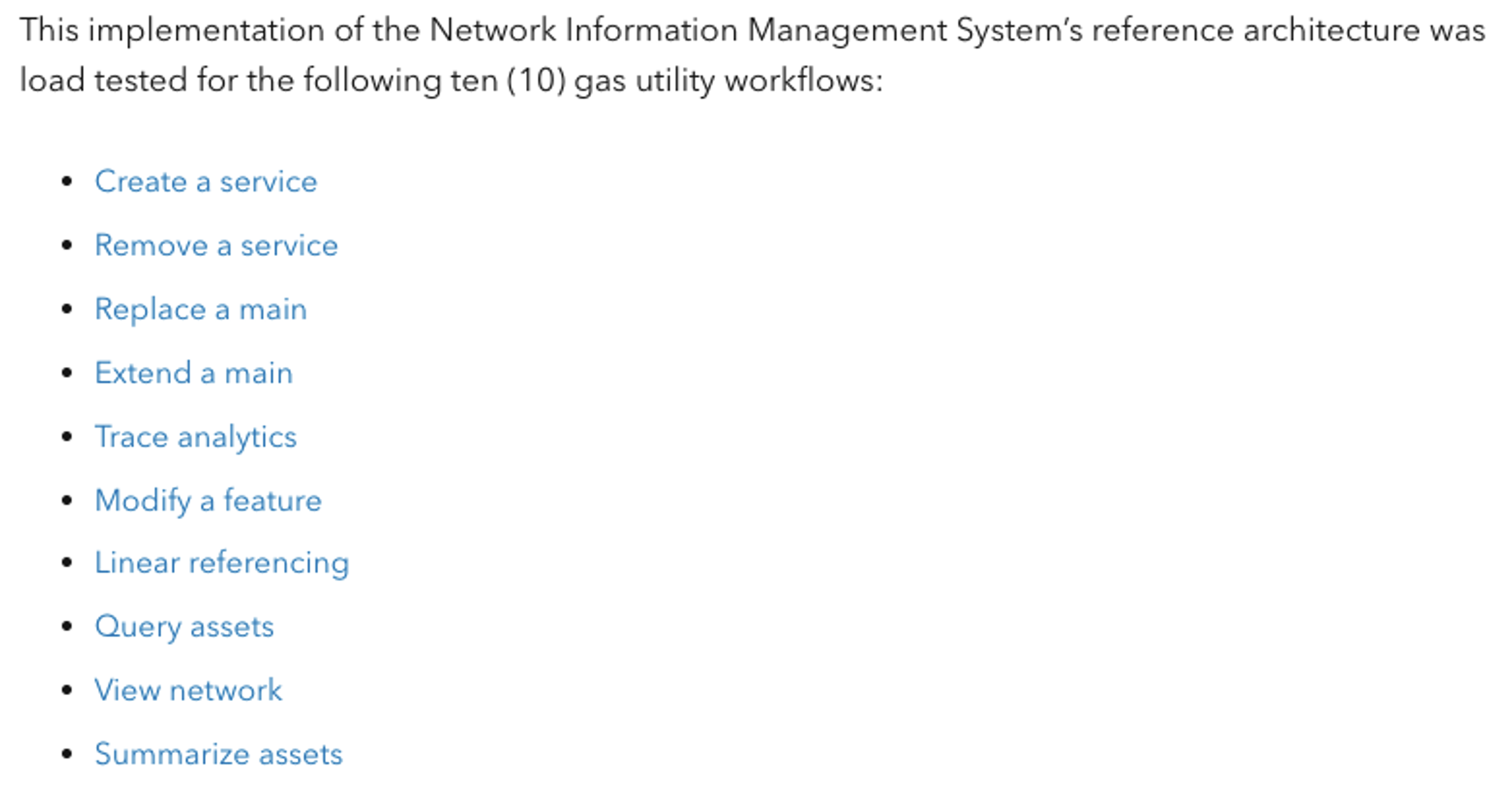
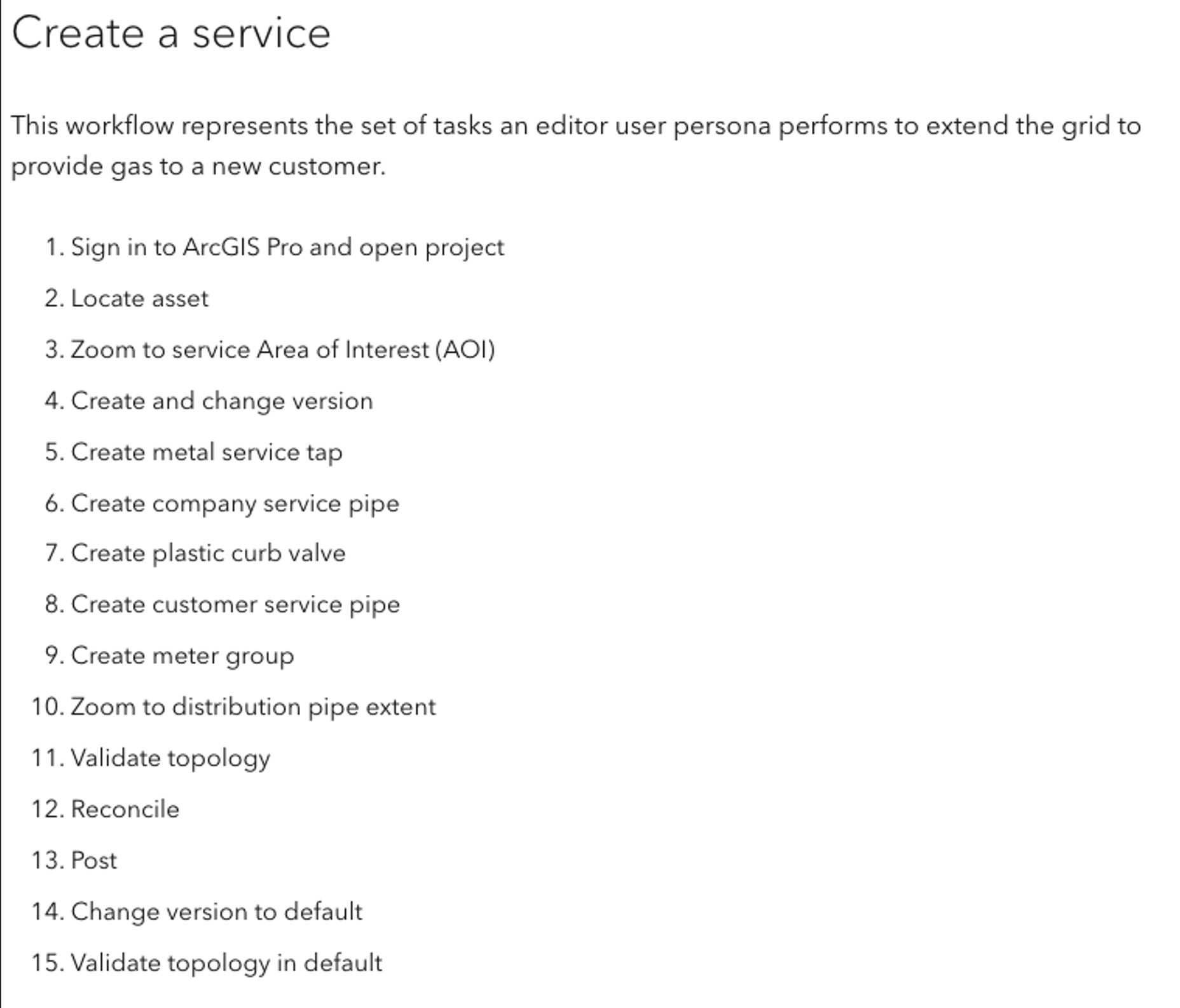
A detailed list, with each workfow’s sequence of steps: helpful for troublshooting and establishing consistent practices
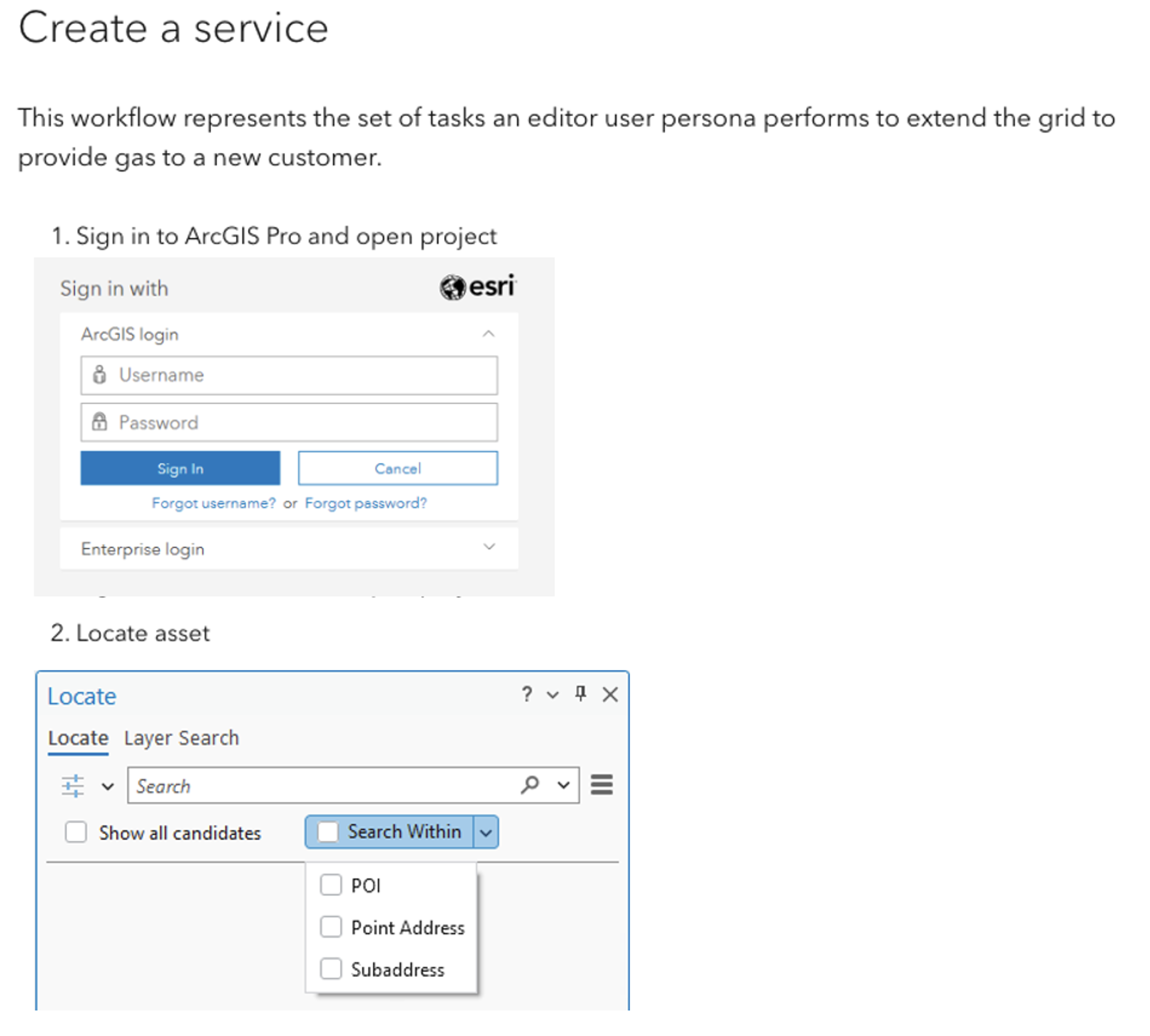
A detailed list, with steps and screenshots: helps establish consistent practices and supports training of new users
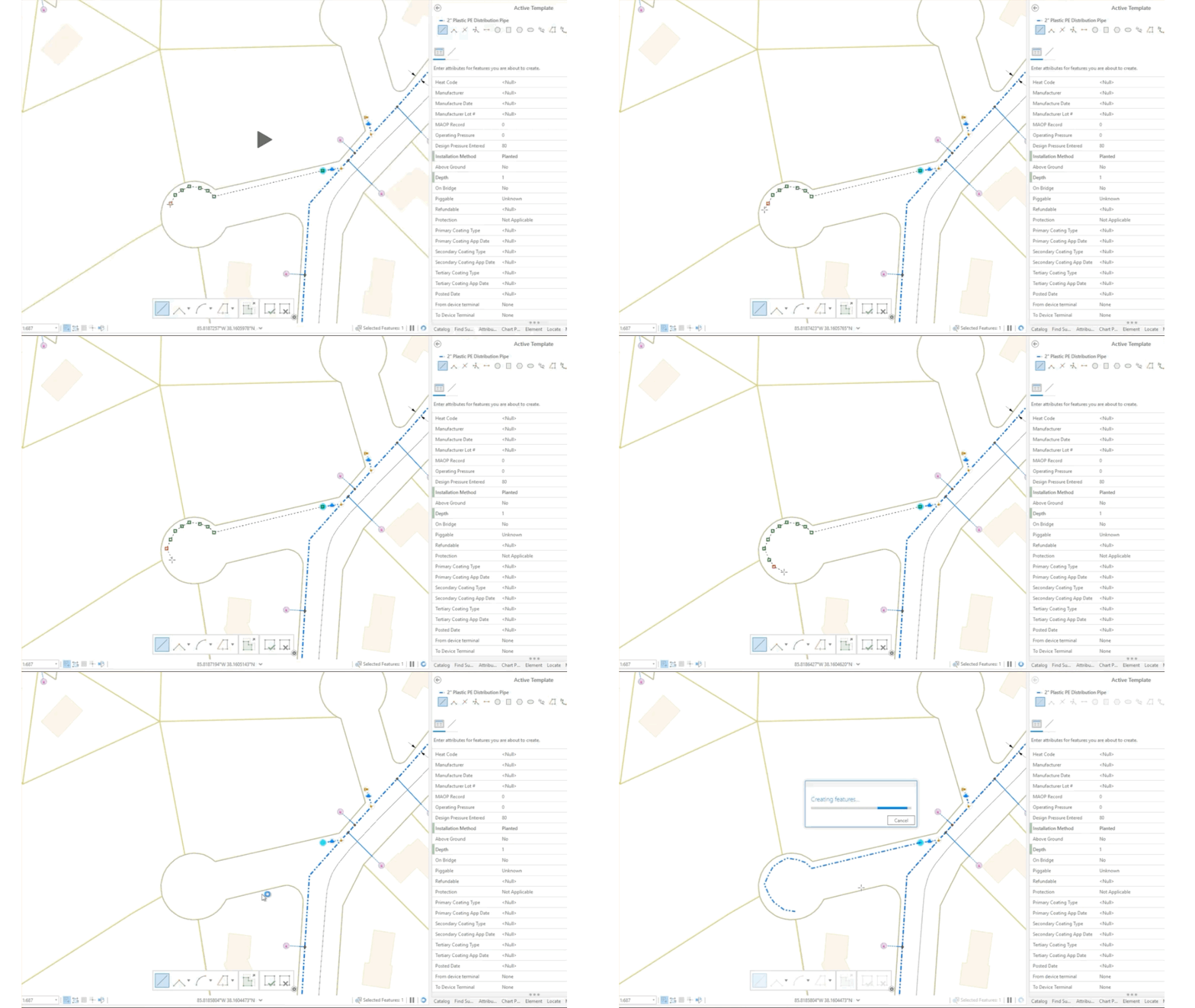
Video or screen recording of the workflow: streamlines and supports training new users, establishes understanding of how long a typical workflow and its steps should take, and helps document user experience
Flowchart or swim lane diagram: helps facilitate stakeholder feedback, clarifies complex workflows that span multiple business units and roles, and provides a broader understanding of how users participate in the system
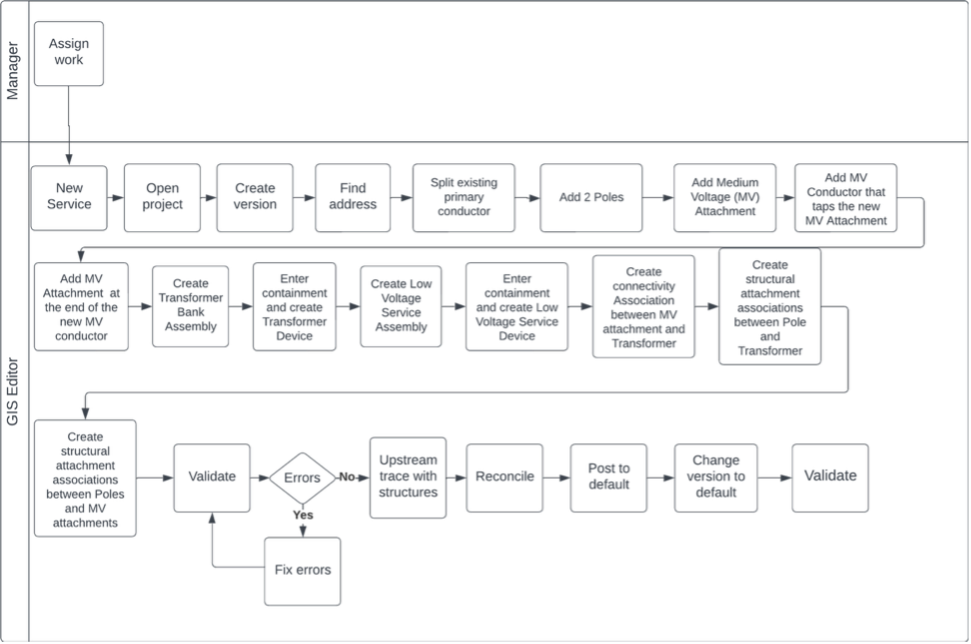
Capturing workflow frequency
In addition to the workflows themselves, you should document the volume and frequency of each workflow. These details will have significant influence on the system design and configuration needed to support the expected load.
Keep in mind that this is not a one-time exercise. Make sure to revisit your workflow documentation and compare it to how people do work in the system today:
- Are staff following the defined procedure?
- Is the actual number of users aligned to what was originally expected?
- Is there an expectation or need to support new workflows soon?
- Is there a need to plan for an increased numbers of users?
Internal example – systems validation initiative
We can make these ideas a little more concrete. Let’s walk through how we define and document the workflows we use in our internal system validation initiative. Within this initiative, we evaluate a given system design and configuration to support common use cases. Ultimately, we aim to lower the barrier to entry for our customers, and help you learn from our mistakes!
We always start with understanding and documenting the workflows. Only then do we design the system and conduct our load tests. We’ve found our workflow documentation practice to be immensely valuable for system design, system configuration, training, and troubleshooting.
Documenting our workflows
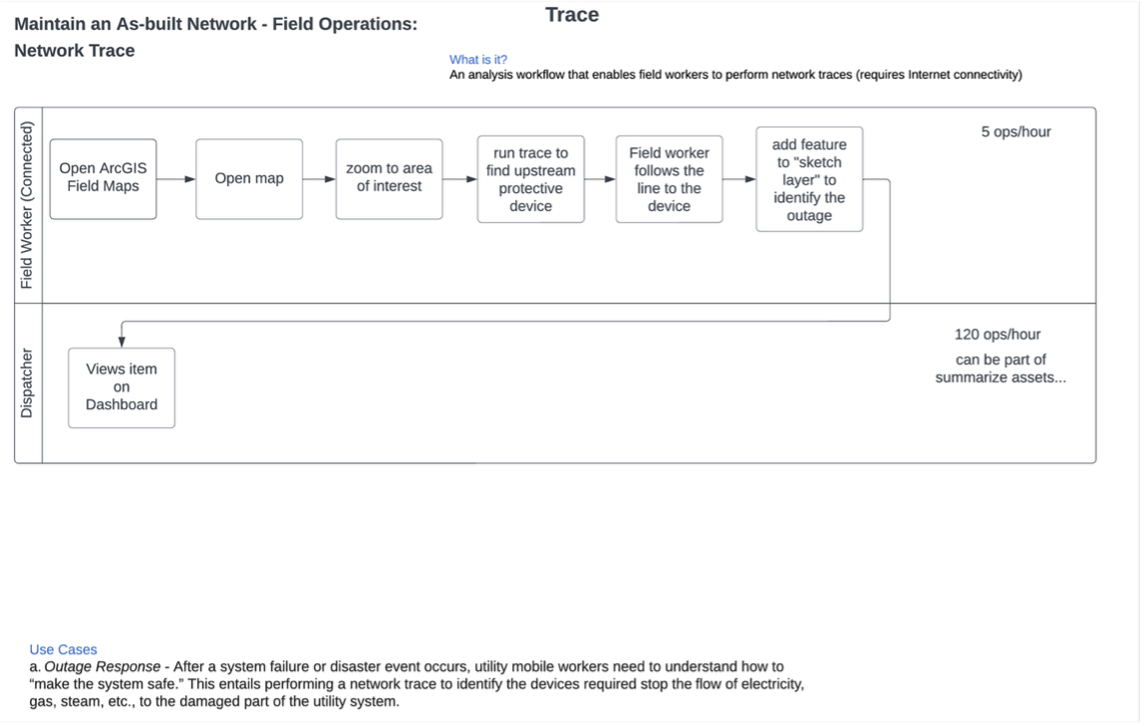
To document the workflows, we collaborate with our internal account teams and customers to identify and define common workflows that a certain kind of system would support. For example, with an ArcGIS Network Information Management System, we looked for the core workflows that organizations would use to maintain and access their as-built network. Then we refine and carefully validate the list – we want to make sure we’re testing the right work!
Once we have the list, we begin documenting the individual steps users would take to complete the workflow. This often includes a flowchart, a numbered list, and a list with screenshots. These different formats help us collaborate and communicate around a shared picture of what we think is happening.
Capturing our workflows
We also capture screen recordings of someone executing the workflow as defined, which helps us to:
- Train our team who needs to perform the workflows during testing. This helps them learn the steps as well as see the outputs. Our testers, who aren’t necessarily industry experts, need to learn new workflows – just like someone who is being newly onboarded to a company would.
- Understand how long a workflow should generally take. This informs the workflow pacing for test runs, where we sequence workflows to start at different times to simulate how real-world work happens. Workflow durations serve as a valuable baseline measurement to assess your system performance and user experience. For example, if performance complaints are submitted, you can compare production workflow durations to screen recordings to determine if there are differences. Any differences you see might also help you identify clues in where to start troubleshooting. Perhaps users are noticing a delay with a particular workflow step, a layer might be rendering slowly, or it might be graphics-related lag (like a slow-moving cursor).
Designing our systems around workflows has been an invaluable part of our systems validation initiative. Without it, we would be designing systems without knowing what we are designing for, and it’s unlikely we’d be able to provide meaningful or useful results. In other words, we don’t want to spend a year designing and building a mall, when our customers actually need an apartment building!
Conclusion
To sum it all up, clearly defined and well-documented workflows serve as the foundation for achieving success with ArcGIS systems. Here are some of the key takeaways to keep in mind:
- Work with internal stakeholders to identify and define the kind of work your system(s) need to support, and how that work will be optimized and executed.
- There’s no one right way to document workflows. In fact, you may find more than one format useful for different purposes in designing, operating, and maintaining your ArcGIS systems – from design, to employee onboarding, to troubleshooting.
This isn’t just advice we give – it’s advice we strictly follow! By involving internal teams and customers in our own workflow definition process, we ensure our system testing efforts are relevant and impactful. Using multiple documentation formats and real-world screen recordings not only enhances training, but also provides valuable benchmarks for ongoing performance monitoring and troubleshooting. Ultimately, this disciplined approach helps us build systems that are flexible, testable, performant, and provide a good user experience.
If you’re interested in learning more about our system testing efforts, check out our test study gallery available on the ArcGIS Architecture Center.
Please share your feedback - help us make these resources better!
➡️ You can also find our full catalog of test studies and blogs here
➡️ If you have questions or keep the conversation going, consider joining our LinkedIn group






Article Discussion: