Enterprise environments are complex, made up of business systems, security frameworks, data platforms, compliance requirements, and custom applications. Modern enterprises don’t operate in silos, and neither should their GIS.
From the beginning, ArcGIS Enterprise has been built to be flexible, adaptable, and deeply integrated into the systems organizations already rely on. It ensures organizations can bring meaningful GIS capabilities directly into their existing workflows, without rearchitecting their systems or abandoning their current investments.
At a high level, extensibility in ArcGIS Enterprise follows three patterns: Integrate. Extend. Intercept. These three patterns are enabled through APIs, webhooks, custom web tools, and the ArcGIS Enterprise SDK—which is included with an ArcGIS Enterprise license. These extensibility patterns equip developers, system integrators, and business partners to extend ArcGIS Enterprise with new logic, capabilities, and data connections.
Integrate: Connecting GIS to the Broader Business
Integration is about making GIS part of enterprise-wide processes. Organizations today depend on event-driven systems, automation pipelines, and interconnected applications. One of the primary ways this can be done in ArcGIS Enterprise is with webhooks. With webhooks, ArcGIS Enterprise can connect with external business systems in real time—triggering workflows, notifying downstream systems, and responding to change as it happens.
In ArcGIS Enterprise, there are two types of webhooks: organization webhooks and service webhooks.
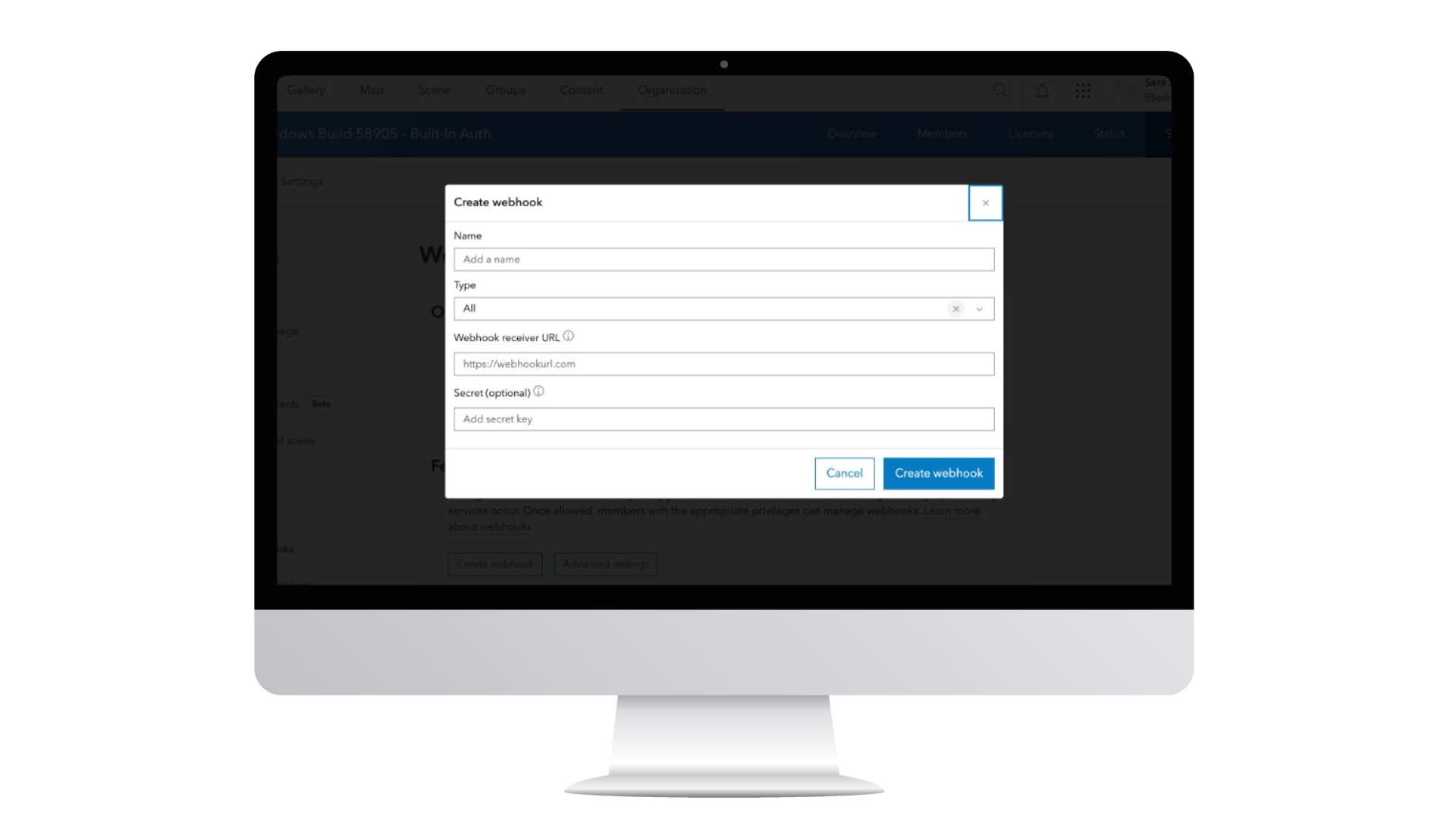
Organization webhooks can be configured to listen for events on items, users, groups, and roles. An example of this is a webhook being configured to trigger when a specific user signs in to the Enterprise portal or any content has been shared to a group.
Service webhooks can be configured to listen to specific interactions associated with feature services and geoprocessing services. Feature service webhooks can be created for both hosted and by-reference feature services. The webhook can be configured to send a message when edit operations, such as create, update and delete events occur. Geoprocessing service webhooks can be triggered whenever a job ends – whether that job is successful, it was stopped, or it failed.
These webhooks can help bridge the gap between GIS and other enterprise platforms. A change in a layer, the completion of a geoprocessing task, or an update to a service can automatically initiate actions in external systems.
Read more about webhooks in our Introduction to ArcGIS Enterprise webhooks blog.
This integration pattern ensures that GIS doesn’t operate in isolation. Instead, it becomes part of the organization’s enterprise architecture, supporting automation, orchestration, and enterprise-scale coordination.
Extend: Expanding What ArcGIS Enterprise Can Do
While integration connects ArcGIS Enterprise outward, extension expands what it can do inward so organization can support unique workflows, proprietary processes, and specialized data sources. ArcGIS Enterprise’s out-of-the-box capabilities are powerful, but when organizations need to go further, this extension pattern is powered by two key mechanisms: server object extensions (SOEs) and custom data feeds.
Server Object Extensions (SOEs)
SOEs allow organizations to add new business logic to referenced map and image services. Built using Java or .NET, SOEs introduce new REST operations, enabling services to perform tasks they otherwise would not be able to do.
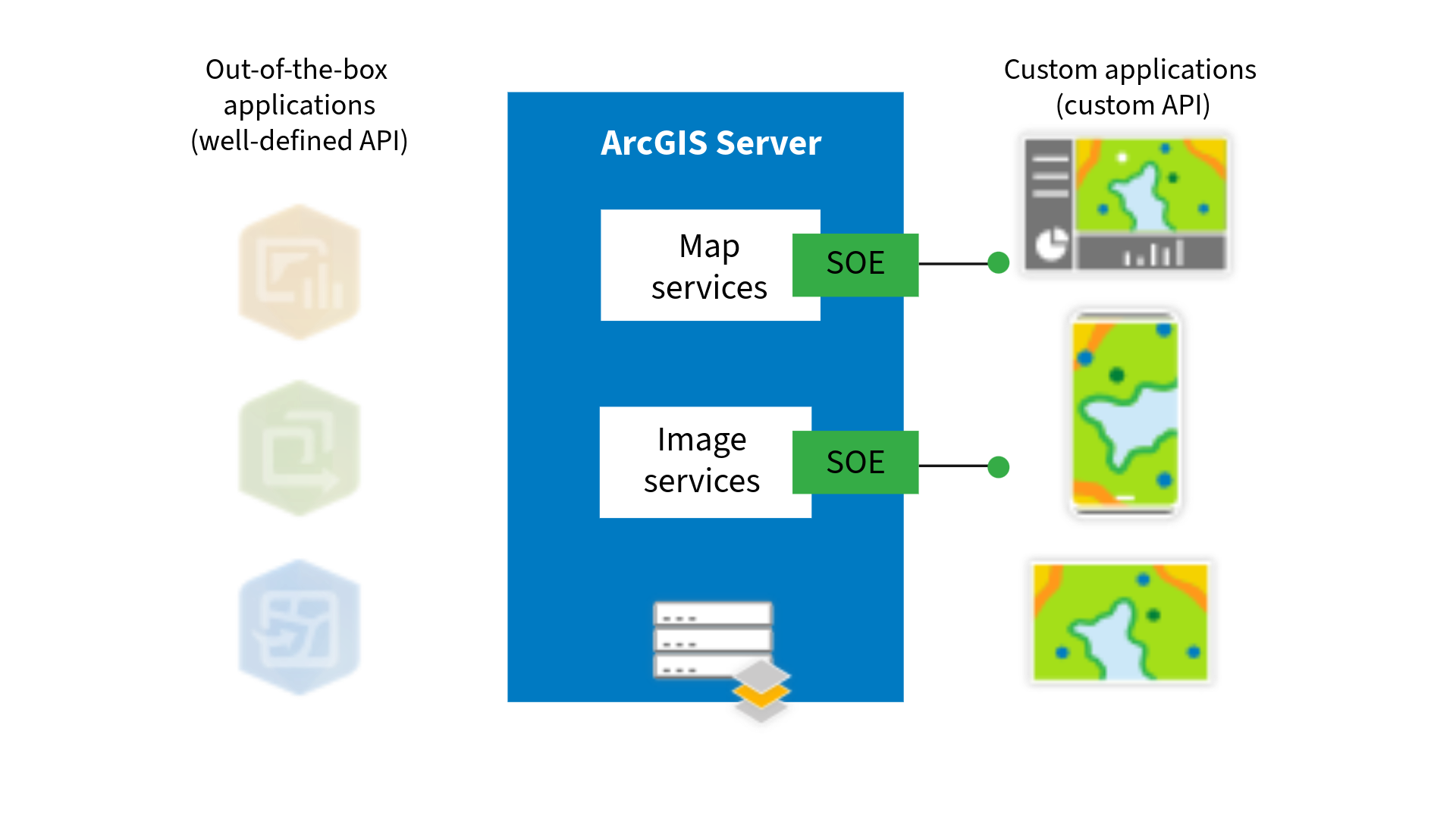
For example, an SOE can support on-the-fly calculations, enforce specialized transformations, or embed proprietary business logic directly into a service. Once deployed, that logic is exposed through the ArcGIS Server REST API for use by custom applications. These are nonstandard APIs designed for custom applications, so will not work with out of the box apps like ArcGIS Pro or Map Viewer but can be configured to work with custom applications, such as those built with the ArcGIS Maps SDK for JavaScript. They allow organizations to build highly tailored solutions that reflect their unique business needs and help services do more than they were originally designed to do.
Read more about SOEs in the Overview of developing SOEs product documentation.
Custom Data Feeds
Extending ArcGIS Enterprise isn’t only about adding new operations; it’s also about expanding access to data. With custom data feeds, ArcGIS Enterprise can connect directly to data sources that aren’t natively supported, without migration or duplication.
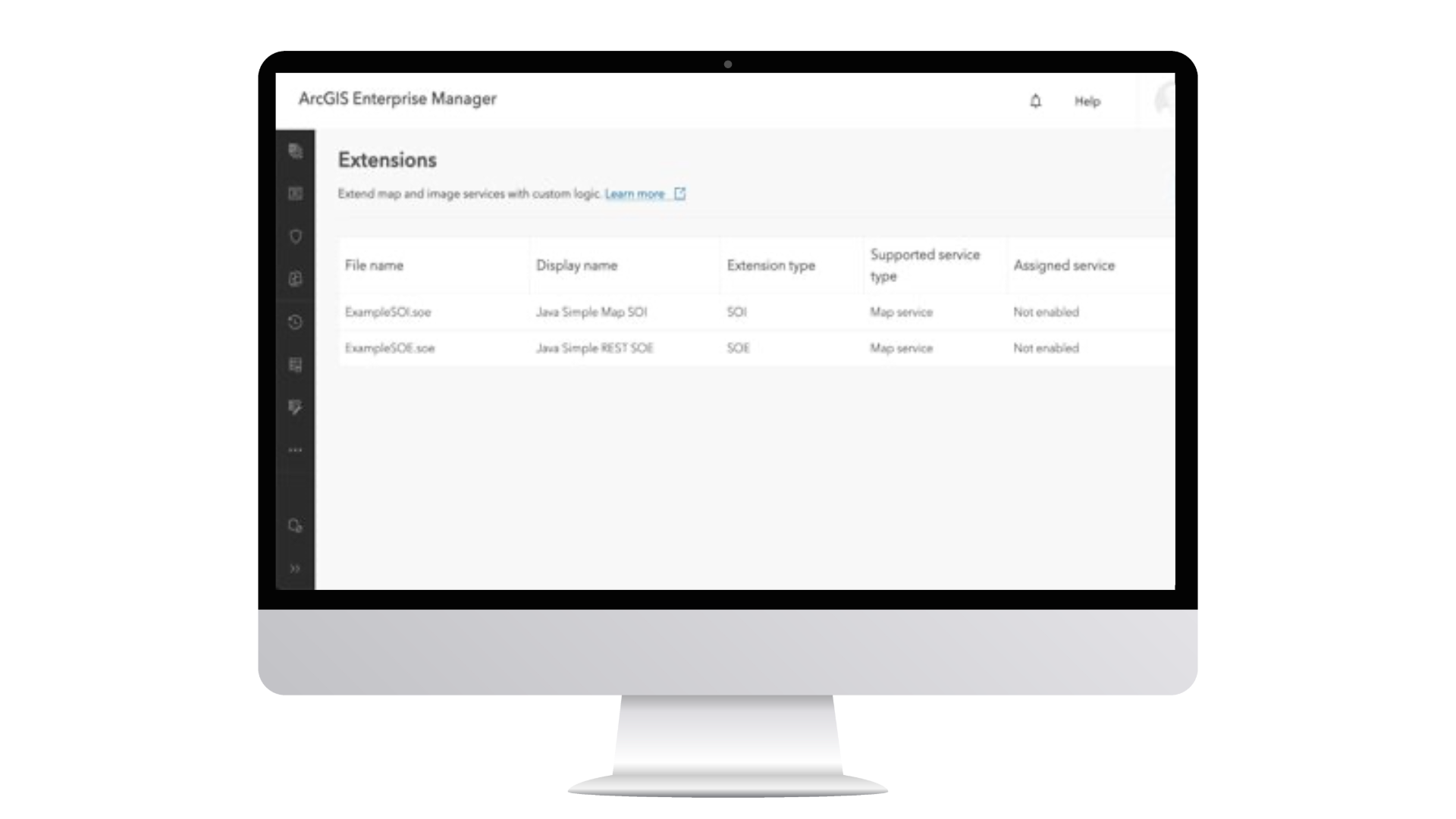
With a custom data provider created specifically to the data source, ArcGIS Enterprise can fetch and read data from an external source while the data remains in its original location. A feature service is created in ArcGIS Enterprise that reflects the source data, and updates in the source can be surfaced in the service, depending on how the feed is configured. This approach unlocks data that would otherwise be inaccessible within ArcGIS workflows.
And with recent updates from 11.5 bringing custom data feeds to ArcGIS Enterprise on Kubernetes, extensibility capabilities continue to evolve across deployment models, ensuring parity and flexibility regardless of how your ArcGIS Enterprise is deployed.
Read more about custom data feeds in our New in ArcGIS Enterprise 11.1: custom data feeds blog.
Intercept: Injecting Logic into Requests and Responses
Sometimes organizations don’t just need to connect or extend; they need to intervene. They need to enforce compliance, audit activity, validate data, inject security controls, or apply business rules to every request flowing through the system.
This is where interception, the third and final extensibility pattern, comes into play. ArcGIS Enterprise provides two primary interception mechanisms: service interceptors and server object interceptors (SOIs):
Service Interceptors
Released in ArcGIS Enterprise 12.0 on Windows and Linux, service interceptors operate at the web services tier and expand standard REST requests and responses through pre- and post-processing.
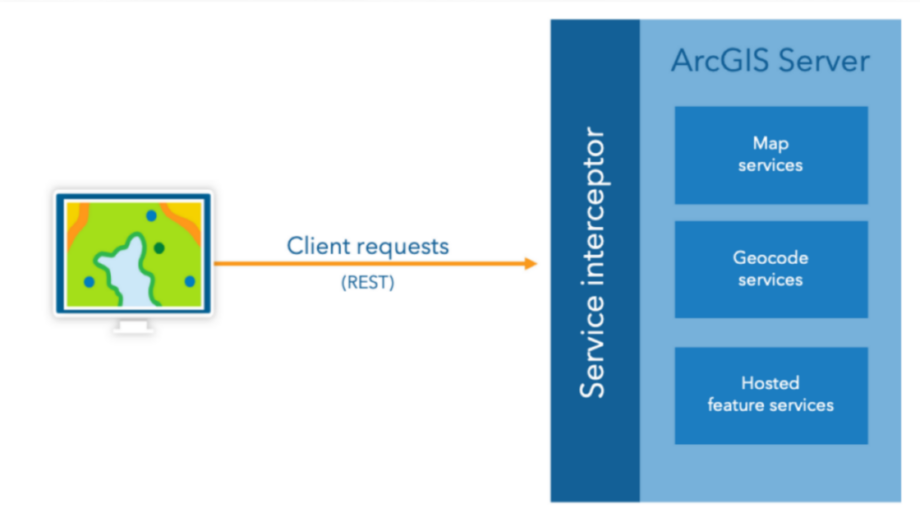
Written in Java, they allow organizations to use high-level APIs to intercept web service traffic without necessarily requiring knowledge of the underlying service runtime. They are not tied to individual services and are not limited to map or image services; they can be configured to be applied to all web services published to ArcGIS Enterprise. Common use cases include auditing and logging, enforcing security compliance, access control, and applying customer-specific business logic.
One of the most powerful aspects of service interceptors is their ability to enable custom workflows at the request and response level without changing client applications or fortifying backend services. This allows organizations to implement enterprise-wide logic in a centralized, scalable way.
Read more about service interceptors in our New in ArcGIS Enterprise 12.0: service interceptors blog.
Server Object Interceptors (SOIs)
SOIs operate at a finer level of control and add business logic that expands existing, standard Esri REST APIs through pre- or post- processing of requests.
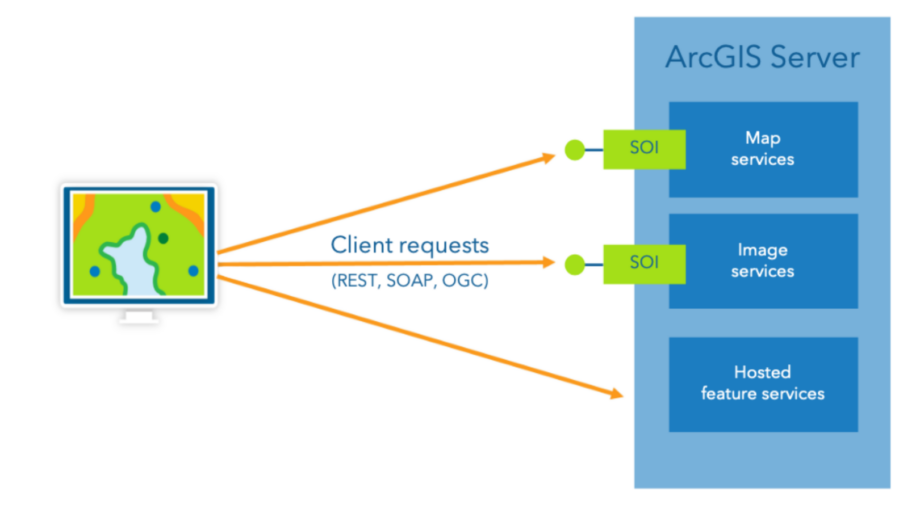
Written in Java or .NET, SOIs work at the data tier and enable pre- or post-processing of requests to individual referenced map and image services. They expand standard Esri REST APIs and can be invoked by any client, whether custom-built or out-of-the-box Esri applications – such as ArcGIS Pro, Map Viewer, and more.
Unlike service interceptors, SOIs require some knowledge of the underlying service runtime. They are ideal for use cases such as watermarking, detailed data validation, or applying logic specific to a single service.
Read more about SOIs in the Overview of developing SOIs product documentation.
Together, service interceptors and SOIs give organizations flexibility in where and how they apply business logic, at the web tier or the data tier.
Enterprises today operate in highly regulated, highly customized, and highly interconnected environments. In these settings, GIS must align with security frameworks, compliance mandates, proprietary workflows, and evolving IT architectures.
ArcGIS Enterprise was built with that reality in mind, and through integrating, extending, and intercepting, organizations can:
- Integrate GIS to existing business systems.
- Expand platform capabilities with custom logic and data sources.
- Enforce security, compliance, and workflow rules without rearchitecting applications.
Together, these patterns ensure GIS operates as a governed, extensible, and deeply integrated part of the enterprise.


Commenting is not enabled for this article.