The ability to intercept web requests for all types of GIS services is one of the most requested features for ArcGIS Enterprise SDK – and we have heard you! With the introduction of service interceptors, a new feature included in the ArcGIS Enterprise 12.0 release, you can now intercept REST-based requests to all GIS services. This means hosted feature layers, geocode services, and more.
Note: Service interceptors are only available for ArcGIS Enterprise on Windows and Linux and are not yet available in ArcGIS Enterprise on Kubernetes.
Read on to learn more about service interceptors; how they tie into the ArcGIS Enterprise SDK, what they are, and a quick overview of the steps to create them in your own ArcGIS Enterprise environment.
Sound familiar?
You may have already heard about service interceptors in ArcGIS Enterprise earlier this year at our Developer and Technology Summit in Palm Springs. Be sure to check out the video below for a demo in action!
ArcGIS Enterprise SDK review
Before getting into service interceptors, let’s review what has already been available in the ArcGIS Enterprise SDK. The ArcGIS Enterprise SDK, introduced with ArcGIS Enterprise 10.6.1, allows developers to extend ArcGIS Enterprise functionalities. This includes extending the functionality of map services and image in the form of server object extensions (SOEs) and server object interceptors (SOIs). Custom data feeds, introduced with ArcGIS Enterprise 11.1, enables connecting to and integrating with remote data sources not natively supported otherwise.
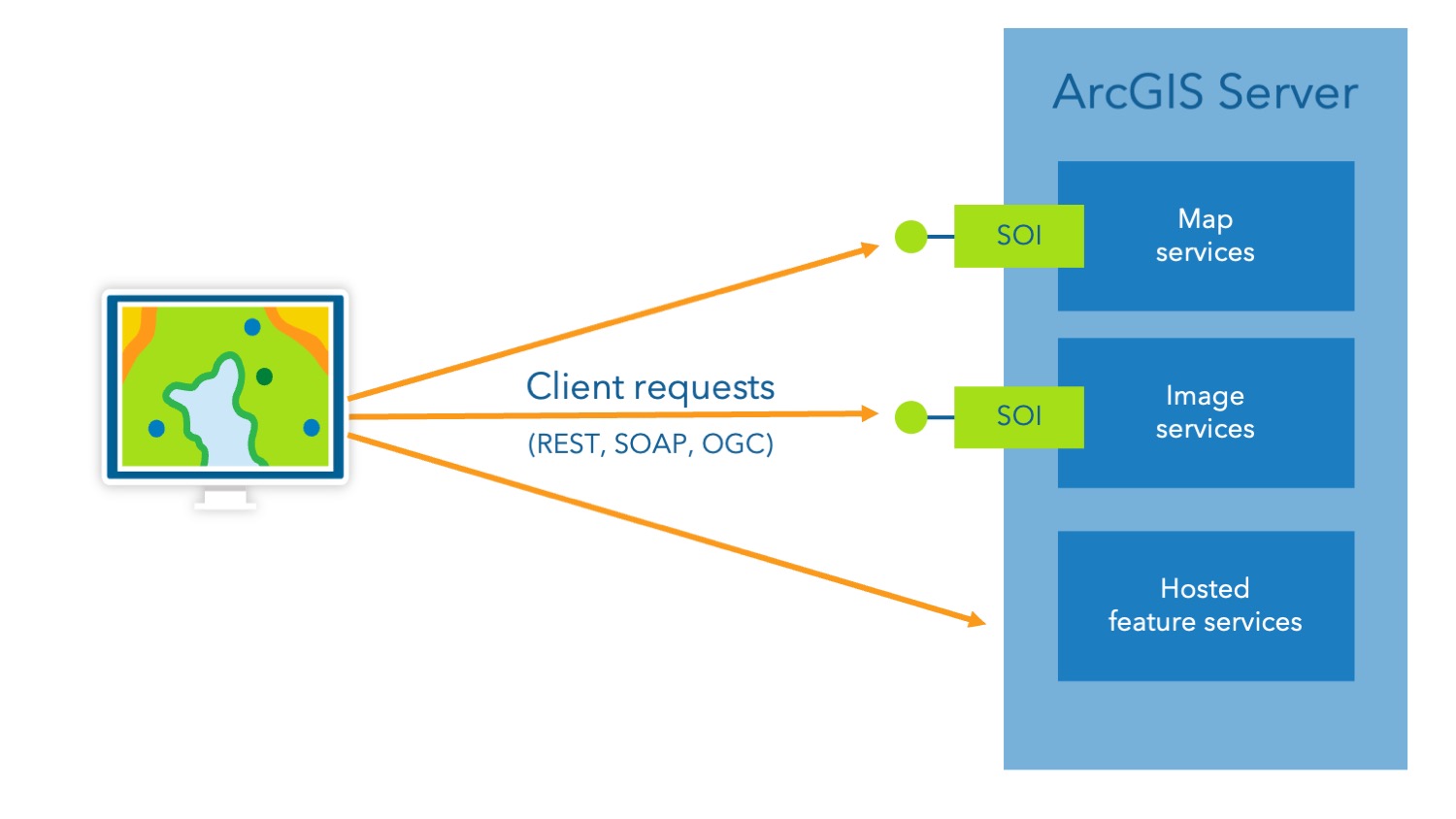
To understand service interceptors, it’s important to first understand a bit more about SOIs. SOIs intercept requests for built-in operations of individual referenced map services and image services from user-managed data sources. This allows for the execution of custom logic that is seamless to existing ArcGIS clients, as well as clients outside of the ArcGIS system.

Understanding service interceptors
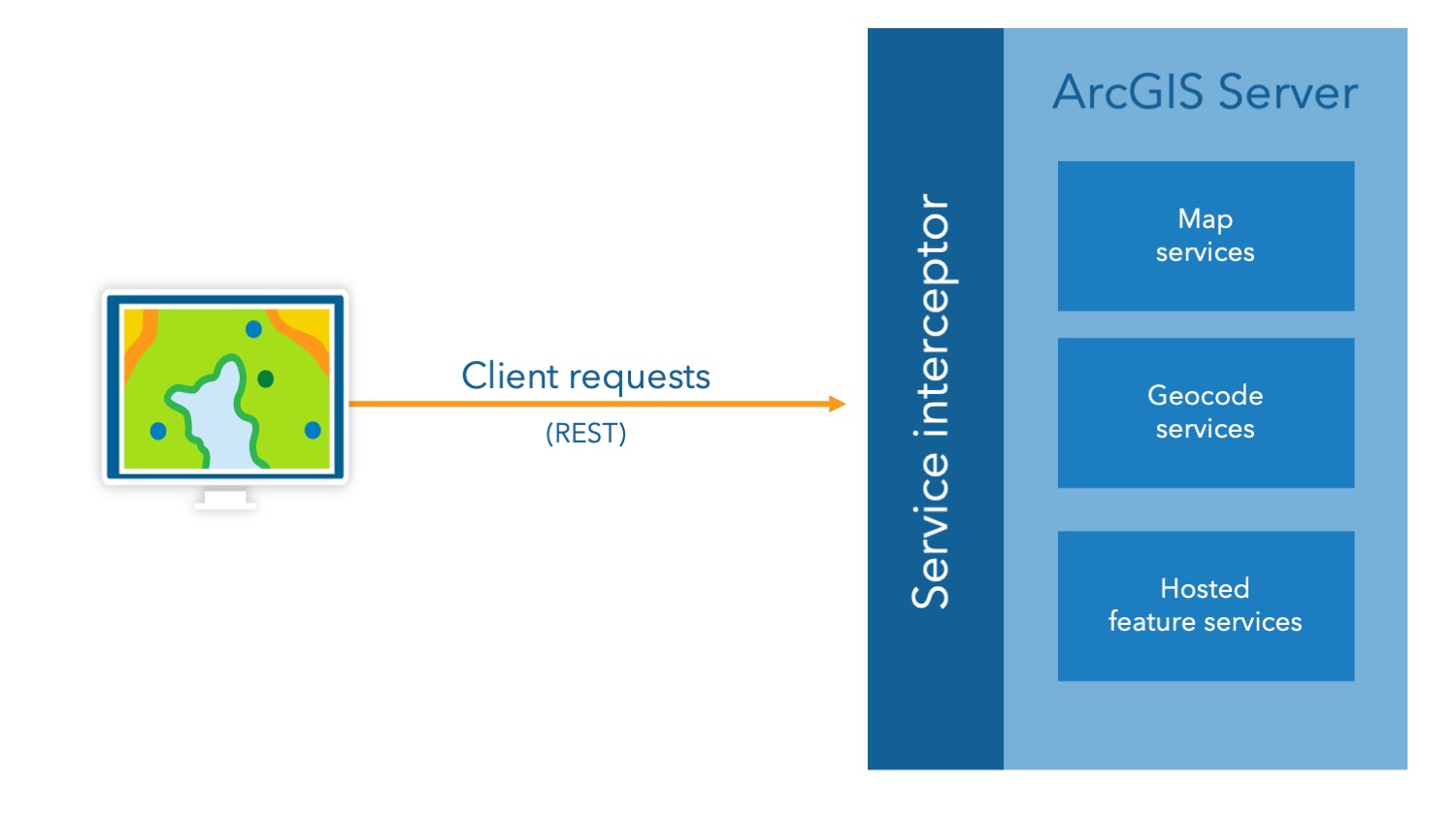
Now that we’re all on the same page about SOIs, we can get into service interceptors. Just like SOIs, service interceptors also expand standard REST requests and responses through pre or post processing. Where SOIs are limited to referenced map and image services, service interceptors can be applied to all GIS services that can be published to ArcGIS Server – regardless of if it’s federated with an ArcGIS Enterprise portal or a standalone instance. Service interceptors can also be configured to be applied to multiple GIS services at once, where SOIs have to be applied to individual GIS services.
We’ll get into a lot of the details but know that more on this topic can be found in the service interceptors product documentation.
Relationship between service interceptors and SOIs
Both service interceptors and server object interceptors (SOIs) extend ArcGIS Enterprise by allowing custom logic to run which can intercept request and response. Although they sit at different layers of the architecture, they share the common goal of enhancing, validating, or modifying service behavior.
Choosing between them isn’t an either–or decision. In fact, many enterprise workflows benefit from using both together. At a high-level, it’s important to keep in mind that:
- Service interceptors operate at the ArcGIS Server framework level, giving you the ability to intercept any request or response for any service types—without attaching on individual services.
- SOIs attach directly to specific map/image services, providing deep, service-level customization of business logic with direct access to service configuration and data used by a service.
It’s important to remember that service interceptors focus on high-level request and response interception for any REST-based service and are ideal for lightweight, cross-service logic such as logging, authentication, or data transformation. Use cases can range from auditing and logging, security compliance, access control, workflow automation, and for integrating custom business logic.
More on this can be found in the Relationship between service interceptors and SOIs section of the product documentation.
Developing a service interceptor
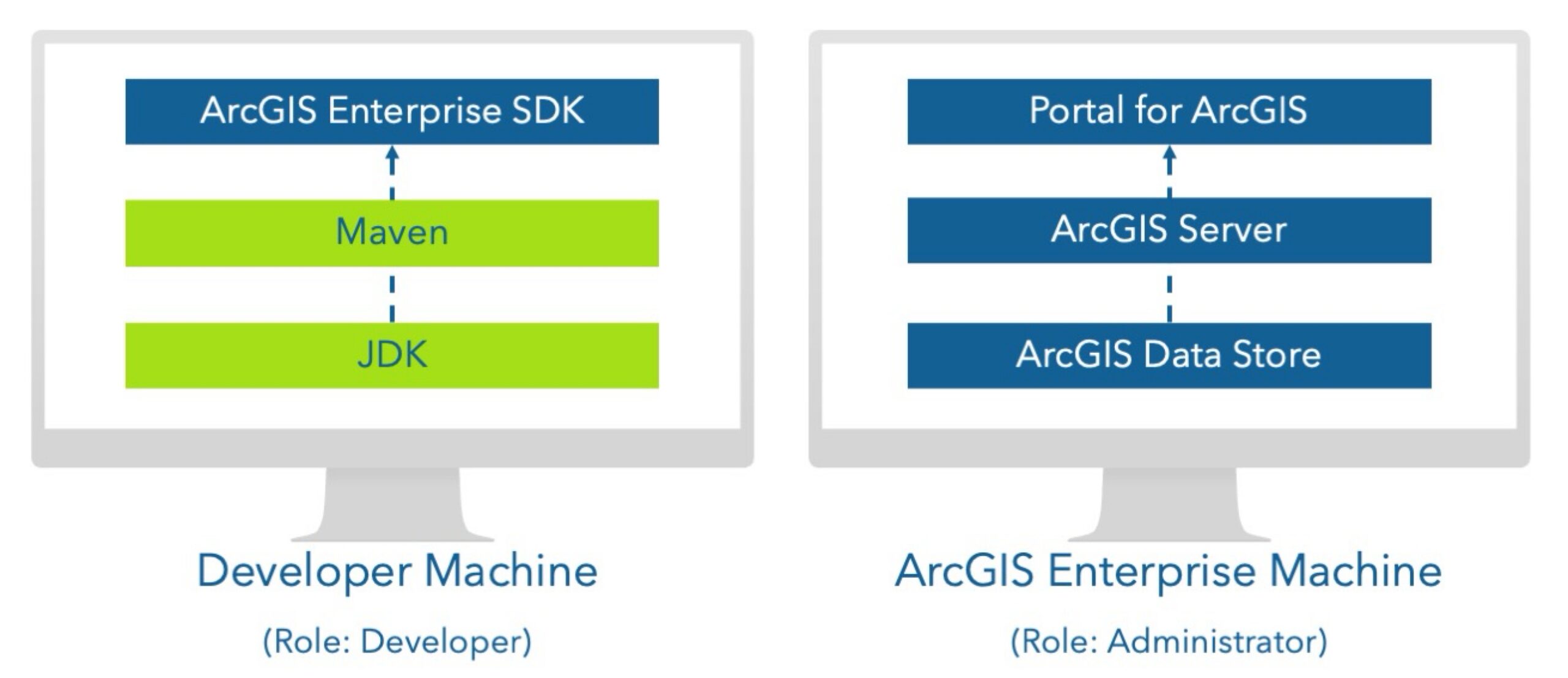
There are two respective roles to consider when configuring an environment for service interceptors: a developer and an administrator.
Service interceptors follow a developer-administrator workflow, with each role carrying distinct responsibilities throughout the interceptor lifecycle. Developers create interceptors using Java and package them using the tools provided by the ArcGIS Enterprise SDK. Administrators then register these interceptors with ArcGIS Server to activate them.
Role of the developer
The developer is responsible for creating service interceptors using the ArcGIS Enterprise SDK by:
- Installing the ArcGIS Enterprise SDK and its prerequisites on the development machine.
- Installing the Maven archetype deployed by the ArcGIS Enterprise SDK to bootstrap development.
- Writing the interceptor logic in Java.
Role of the administrator
The administrator is responsible for deploying and managing service interceptors within an ArcGIS Enterprise or a standalone ArcGIS Server environment. The administrator decides which services the interceptor runs on by:
- Registering the .interceptor file with ArcGIS Server.
- Managing interceptor properties, such as the URL pattern and description.
- Enabling or disabling interceptors as needed.
- Defining the execution order when chaining multiple interceptors.
Bringing it all together
Once deployed, service interceptors activate immediately and start intercepting requests for target services, enabling organizations to extend and customize the behavior of their services in innovative and impactful ways
Multiple service interceptors can be registered. The order in which they run is controlled by the administrator in a process called chaining. The first interceptor in a chain is able to review the incoming request first and is the last one to review the outgoing response. The second interceptor in the chain is the second to review the incoming request (or request modified by first interceptor) and the second-to-last one to review the outgoing response. Key benefits of chaining include separation of business logic, controlled execution flow, flexibility in configuration, scalability for complex use cases, and ease of debugging and maintenance.
Let us know what you think
This is just the beginning for interceptors in ArcGIS Enterprise. Add a comment below if there is something specific, you’d like to see in a future release of service interceptors. We look forward to hearing from you!

Article Discussion: