Discover the latest enhancements with ArcGIS Knowledge at the ArcGIS Enterprise 12.0 release, including strengthened graph analytics in ArcGIS Pro and ArcGIS AllSource, adding easy editing and no-code path-finding to Knowledge Studio, and streamlining the process of managing graphs across ArcGIS Enterprise. Learn how ArcGIS Knowledge delivers practical wins for knowledge graph creators and users by empowering analysts with deeper insights, simplifying knowledge graph creation and exploration, and streamlining enterprise-wide knowledge graph management.
Some highlights include:
- Graph Analytics: New Filtered Find Path (FFP) tool options to handle cyclical paths and use weights to find Least Cost Paths, plus this streamlined FFP tool will now be available in Knowledge Studio.
- Knowledge Studio: Web-based editing and new URL parameters for seamless exploration across apps, expanding usefulness to more users.
- Data Management: Easily publish copies of graphs, use new geoprocessing tools, and tune load table options to streamline knowledge graph creation.
- ArcGIS Enterprise Integration: Edit pop-ups for Knowledge Graph layers in web Map Viewer, including those enhanced with Arcade-enabled graph queries.
To explore these changes, we will look at their impact across ArcGIS Pro and ArcGIS AllSource, Knowledge Studio, other ArcGIS web applications, and ArcGIS Knowledge Server.

ArcGIS Pro and ArcGIS AllSource
With the latest releases of the ArcGIS desktop applications, ArcGIS Pro 3.6 and ArcGIS AllSource 1.5, analysts can now uncover more complex patterns. Solution architects or knowledge graph creators can also help automate graph creation, manage data with greater precision, and streamline workflows using centrality graph analytics metrics.
Graph Analytics
Filtered Find Path matures (Least-Cost + Cycles)
The robust Filtered Find Path tool now includes even more powerful configuration options, including a Least Cost Path option (optimize for the lowest cumulative “cost” from relationship weights) and a new Cyclical Path option to uncover loops and feedback patterns. Together, they go beyond “find me the shortest paths by hops” so analysts can prioritize the “best” route through complex networks, even if those paths are circular, revealing patterns such as conflicts of interests or money laundering rings.
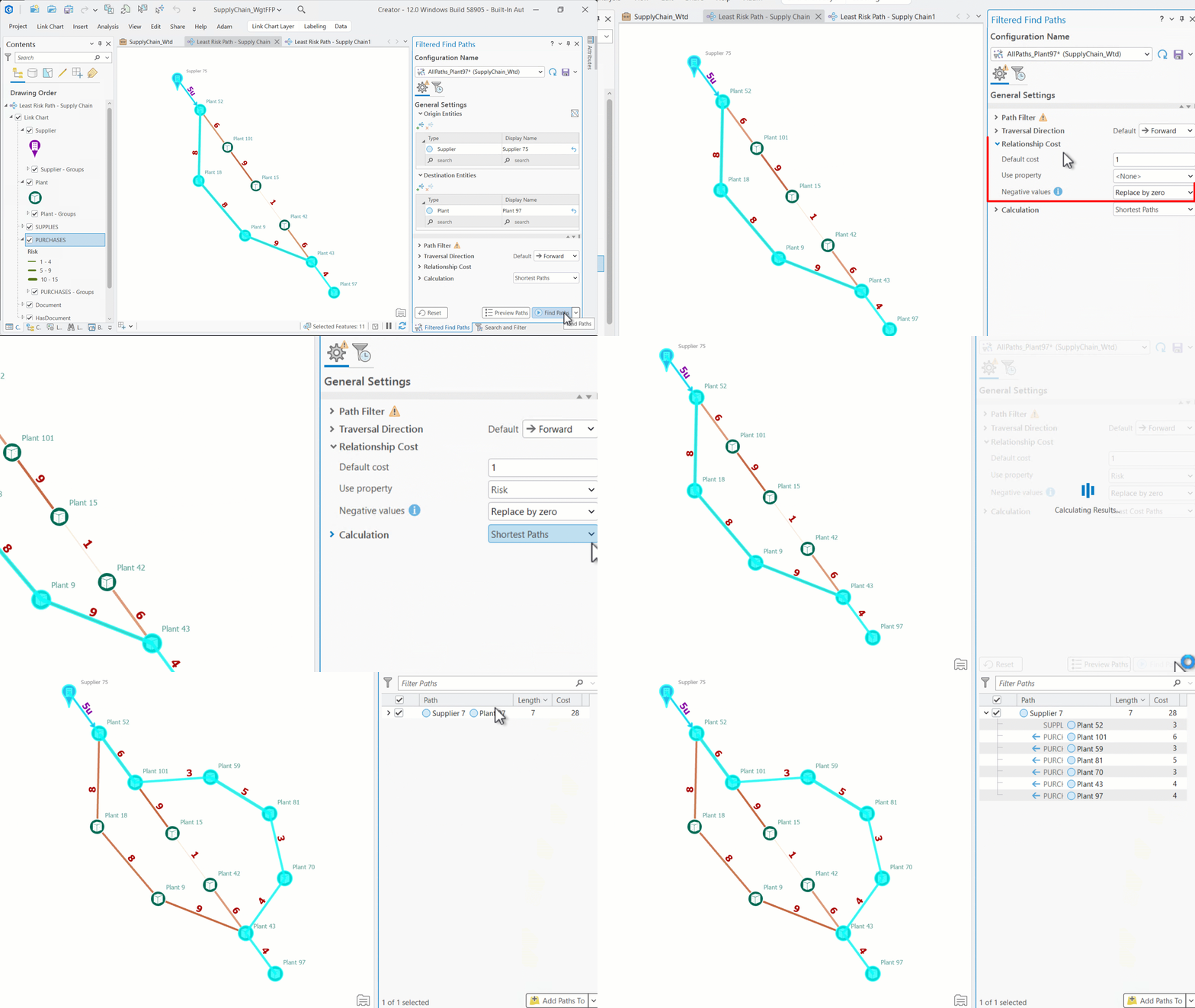
The Filtered Find Path tool began in Pro as a point-and-click way to constrain shortest-path results by types, instances, directions, and hop limits, helping analysts avoid complex query syntax while staying precise.
Run Centrality across the entire graph via the .NET Pro SDK
Power users and solution teams can now compute Centrality metrics (degree, betweenness, etc.) across the full graph or parts of the graph from custom add-ins and tools built with the .NET Pro SDK—and write those metrics back as properties of entities in the graph. This ability enables users to use those important metrics in graph queries and automated prioritization workflows, and even downstream symbology driven by fresh metrics.
Data management: smarter load options + new GP tools
Tune your Load Table options, use new GeoProcessing (GP) tools and easily publish copies of graphs to streamline knowledge graph management across the enterprise.
- Load Table enhancements: Analysts and knowledge graph creators use the Load Table tool to configure how to batch load tabular data into their knowledge graphs. With the latest tool enhancements, users can now configure the tool to merge multiple input rows or features that have identical geometries into one output entity in the graph, look for existing duplicate entities in the graph across multiple Entity Types (e.g. Companies, People, etc), and handle null-values in different ways to keep your data models clean as you scale.
- Create Knowledge Graphs (GP) & Load Table to Knowledge Graph (GP): Creators and data managers can now use these two new GP tools as building blocks to create new knowledge graphs or append data to existing knowledge graphs. Using these GP tools and others inside ModelBuilder, or Python notebooks, data managers can create data pipelines to create copies of knowledge graphs and programmatically load CSVs, tables, or feature layers.
- Export & Publish Knowledge Graphs: IT admins and architects can also now export and publish knowledge graphs using an API endpoint for each graph data service—better supporting migration between ArcGIS Enterprise deployment tiers, backup/restore patterns, or moving curated slices to downstream environments. Users can use the “Upload Service Definition” GP tool to publish the exported file package from their ArcGIS Pro and ArcGIS AllSource applications.
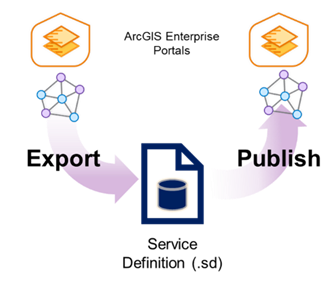
These data management features enable more DevOps-style workflows that streamline and accelerate the data loading process for complex knowledge graph datasets. They:
- Make it easier to integrate and manage large or heterogeneous data sources.
- Enable users to export a Knowledge Graph from one portal and publish it to another, supporting data migration and sharing across environments.
- Facilitate backup and recovery by creating a self-contained service definition file that includes the data model, data, service description, and client data.
- Simplify automation via Python, allowing users to streamline export and publish workflows for efficiency and repeatability.
Knowledge Studio
Knowledge Studio is a dedicated web app included with ArcGIS Enterprise that enables analysts to explore and edit connected data. The latest version with ArcGIS Enterprise 12.0
- introduces web editing of your knowledge graph,
- expands link analysis in the web with a streamlined filtered find path tool,
- allows greater flexibility in managing Enterprise portal items in your project, and
- exposes links that can launch specific views of Knowledge Studio from third party applications.
Edit your knowledge graph in the browser
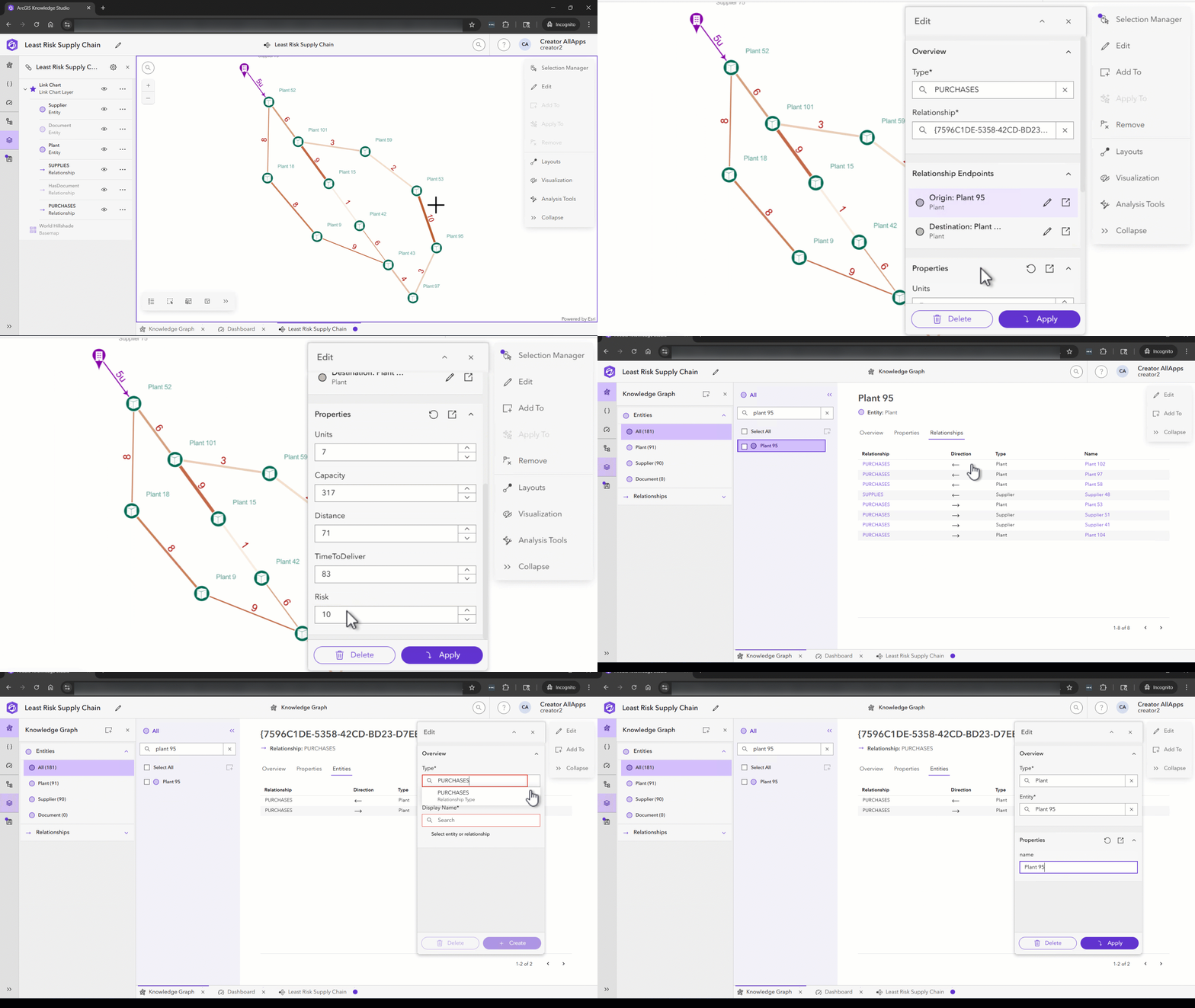
Analysts can now easily edit properties on existing entities and relationships—and create new entities and relationships—directly in Knowledge Studio. The simple web form experience is perfect for quick corrections, analyst-curated relationships, or lightweight enrichment.
The editing experience is consistent and easy, no matter where you are at in your project:
- Launch the editor pane from within maps, link charts, and data views.
- Launching the editor pane from a particular entity card in the data view will prefill that pane with the information from the card you are on.
- Creating entities or relationships will add those to your current view as well as to the underlying your graph database.
- Once in the editor pane, easily change between different entities, relationships, and types.
More Link Analysis in the Web
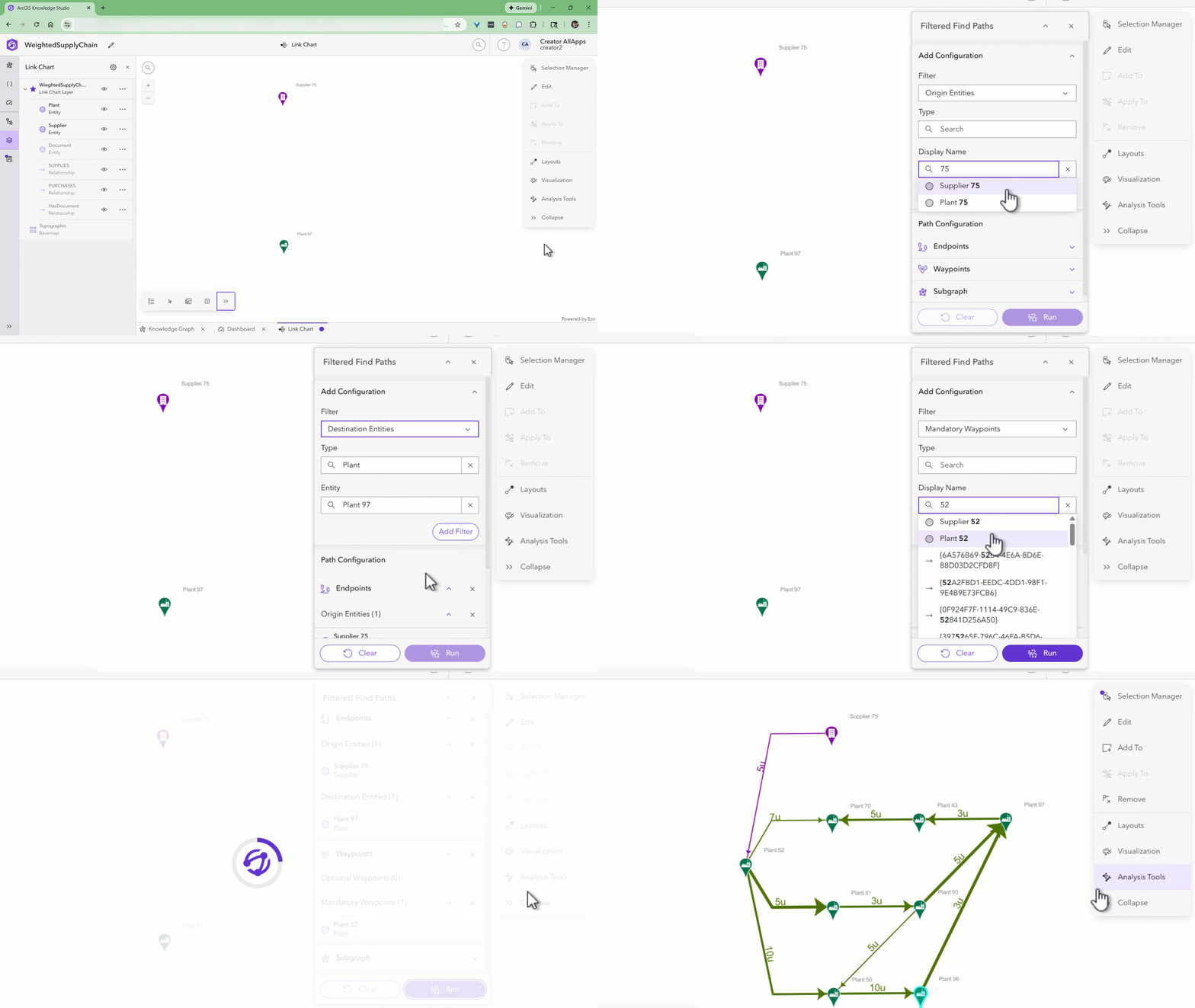
Need to find how two or more things are indirectly connected? Try the pathfinding tool, Filtered Find Path, now available to analysts in Knowledge Studio in ArcGIS Enterprise 12.0. Each release of ArcGIS Pro continues to expand the desktop-based version of the Filtered Find Path tool. Now, the core functionality of that tool has been brough to the web so anyone can trace meaningful connections quickly. Users can configure the tool in the web to:
- Set origin and destination Entities or Entity Types
- Include and exclude Entity or Relationship Types
- Include and exclude specific entities or relationships
- Define specific entities or relationships as waypoints
Additional path finding features are planned for future Knowledge Studio releases. You can also check out additional configuration options, such as time-based filtering across many transactions, in Filtered Find Path available in ArcGIS Pro and ArcGIS AllSource.
Seamless links to tailored views in Knowledge Studio
In Knowledge Studio, teams can now create custom URLs that launch users directly into specific analytical views – such as Link Charts, Maps, or Saved Queries – from any connected ArcGIS web application. This pattern includes launching Knowledge Studio from existing Web Maps and Dashboards, as well as custom experiences, using Arcade in a custom pop-up configuration to create dynamic URLs. This feature can streamline workflows by allowing stakeholders to instantly access additional context and visualizations with a single click, saving time and making it easier to explore and analyze specific features or relationships as needed. It also allows stakeholders to ask additional complex questions and get additional context about a feature or set of features selected in another application.
Flexible, URL-powered customizations
Getting context-specific handoffs between systems relies on new Knowledge Studio URL parameters. Teams can configure URLs that can launch the following actions inside Knowledge Studio from another ArcGIS app or third-party system:
- Instantly create new maps and link charts, including reusing symbology templates from existing visualization templates.
- Add records to current maps or link charts in an ongoing analysis.
- Run existing stored queries with new variables, or parameters, ,determined by your starting application for tailored pattern matching.
- Create and save new stored queries in your Studio Project.
Since its release in ArcGIS Enterprise 11.3, Knowledge Studio has focused on easy exploration and shareable web views through URLs. These deep linking parameters further extend that “send a URL, get context” pattern.
Project flexibility: Work with independent Map & Link Chart items
Studio projects now support independent Link Chart and Map items stored in your ArcGIS Enterprise portal. This support makes sharing these specific views across projects and team members much easier, and aligns with how other ArcGIS web content items are managed across applications.
For example, any analyst can now add a web Link Chart or Map item, shared with them from the ArcGIS Enterprise portal, into their Studio project or another ArcGIS application, such as an ArcGIS Dashboard or Storymap for other stakeholders. Then, if the owner of that item updates it – like adding data, changing the layout, or adding entities and relationships – the updated version will automatically be reflected in that first analyst’s Studio project the next time they open or refresh their project.
ArcGIS Enterprise
Share insights to stakeholders with ArcGIS Web app integrations
Knowledge graph support in ArcGIS web apps is expanding this release in the following ways:
- Map Viewer: Users can now edit their pop-ups for Knowledge Graph layers in their Maps, including custom pop-ups that have Arcade expressions with graph queries in them that help bring context from related entities into maps.
- Instant Apps: Use the Basic (Media) Instant App template to present web Link Charts, and with the latest release, even spin up an on-the-fly web Link Chart viewer from a URL. This pattern of web sharing enables dynamic web Link Chart viewing scenarios inside other applications like Experience Builder and Storymaps without needing to create and persist Instant App items.
Example: Use the item id of your link chart portal item and apply it after the “?linkchart=” parameter.
https://www.arcgis.com/apps/instant/basic/index.html?linkchart=5edf26721c3948c69f9424820a944d40
Learn more & next steps
- Upgrade your ArcGIS Enterprise and desktop clients to unlock the full 12.0 experience across ArcGIS Pro or ArcGIS AllSource, Knowledge Studio, and Knowledge Server
- If you share link-chart insights broadly, consider Instant Apps for targeted “view-only” access and easy embeds.
- Keep exports of your knowledge graph or blank data models files for your organization to standardize deployments across projects and environments.
More information about release versions
ArcGIS Knowledge is released in conjunction with ArcGIS Enterprise, ensuring that new knowledge graph and analytic features are fully integrated across the platform. While ArcGIS Pro 3.6 and ArcGIS AllSource 1.5 are desktop applications with distinct release schedules and version numbers, these latest application versions are designed to complement the capabilities of ArcGIS Enterprise 12.0. Therefore, some features in 12.0 may not work without having the latest versions of these desktop applications. For the best experience and compatibility, organizations upgrading to ArcGIS Enterprise 12.0 are encouraged to also update their desktop applications to ArcGIS Pro 3.6 or ArcGIS AllSource 1.5. Importantly, upgrading desktop software does not disrupt ongoing work with the latest ArcGIS Enterprise version, allowing users to seamlessly leverage new features across both desktop and web environments.
These updates enhance the capabilities and workflows of ArcGIS Knowledge, empowering analysts and stakeholders to explore, visualize, and analyze their enterprise knowledge graphs with ease. Stay tuned for more exciting features and enhancements in the future! For more information and to get started, visit our product page or contact our support team.



Article Discussion: