Metadata is increasingly central to content discovery, understanding, reuse, and AI readiness. To help simplify metadata Esri introduced Dublin Core+ in ArcGIS Online and ArcGIS Enterprise.
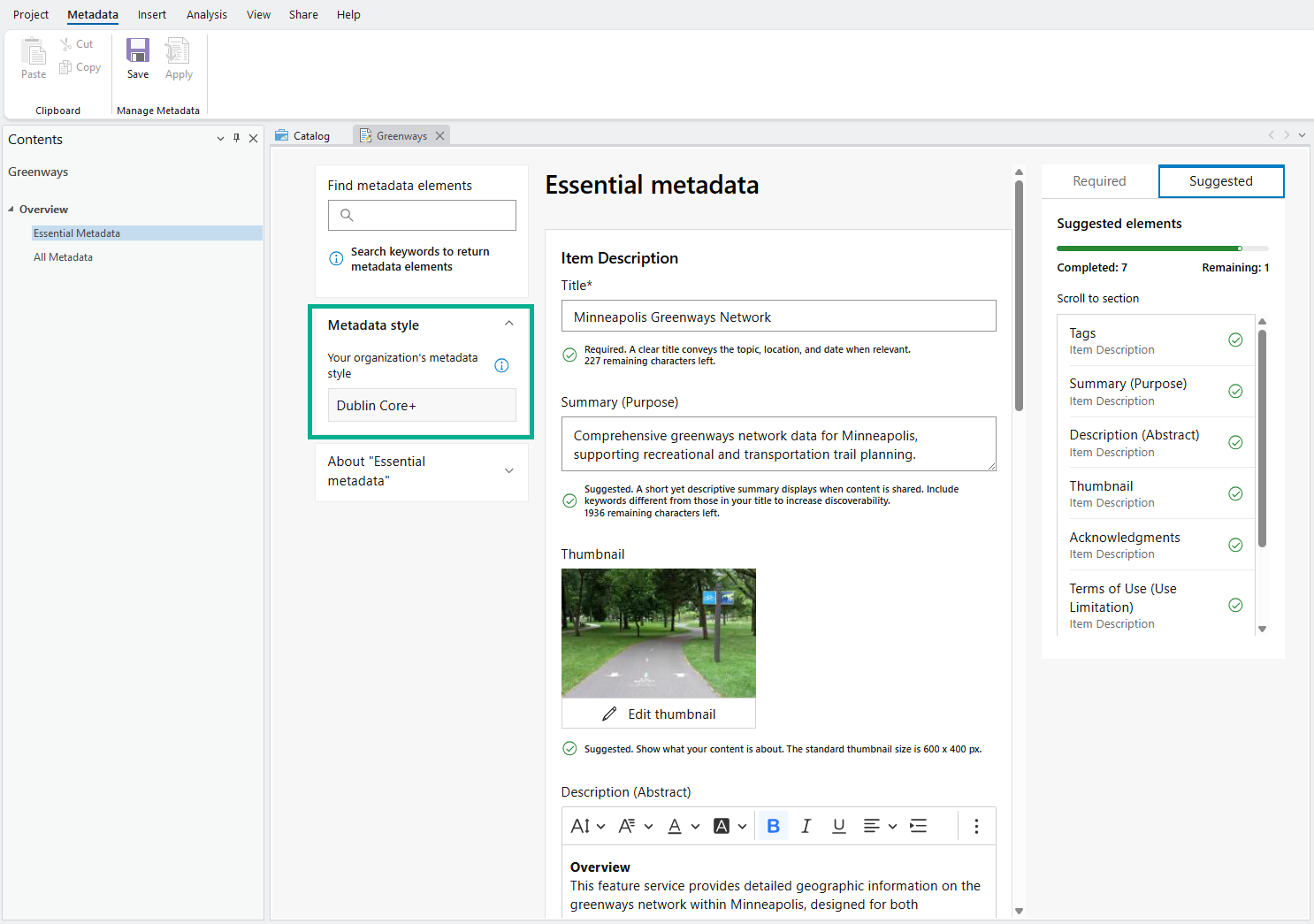
With ArcGIS Pro 3.7, the Dublin Core+ metadata style is available in the metadata editor across ArcGIS, providing a unified experience focused on priority metadata elements.
What is Dublin Core+?
Dublin Core+ is Esri’s new metadata style based off the Dublin Core Metadata Initiative (DCMI) vocabulary. Dublin Core is a widely used metadata standard, with a broadly applicable set of terms. Esri extended the Dublin Core vocabulary with additional terms specifically for describing spatial datasets, such as attribute field metadata elements and scale range, while keeping the style lightweight and approachable.
Why use Dublin Core+?
Not sure where to start with metadata?
✅ Dublin Core+
Wondering which metadata elements matter most, for example, for search and AI readiness in ArcGIS?
✅ Dublin Core+
Dublin Core+ focuses on the most important metadata elements needed for discovery, reuse, and AI readiness. It is the essential metadata elements, without the complexity introduced with other metadata standards.
Prioritizing metadata for discovery, reuse, and AI readiness
Traditional metadata standards are critical for many organizations but are often complex. Many organizations do not require this complexity or strict adherence to any given metadata standard. Instead, they benefit most from capturing priority metadata that improves search, enhances the ArcGIS experience, and provides the information needed to understand and use the data (both for humans and machines).
Last year, the National Geospatial Advisory Committee (NGAC) published a paper, Advancing the Nation’s Geospatial Ecosystem: Guidance and Best Practices for Sharing Priority National Data that examined metadata from a modern perspective, focusing specifically on what is essential for discovery, reuse, and AI readiness. One of the most valuable outcomes of that work was how effectively it boiled metadata down to its must‑have elements.
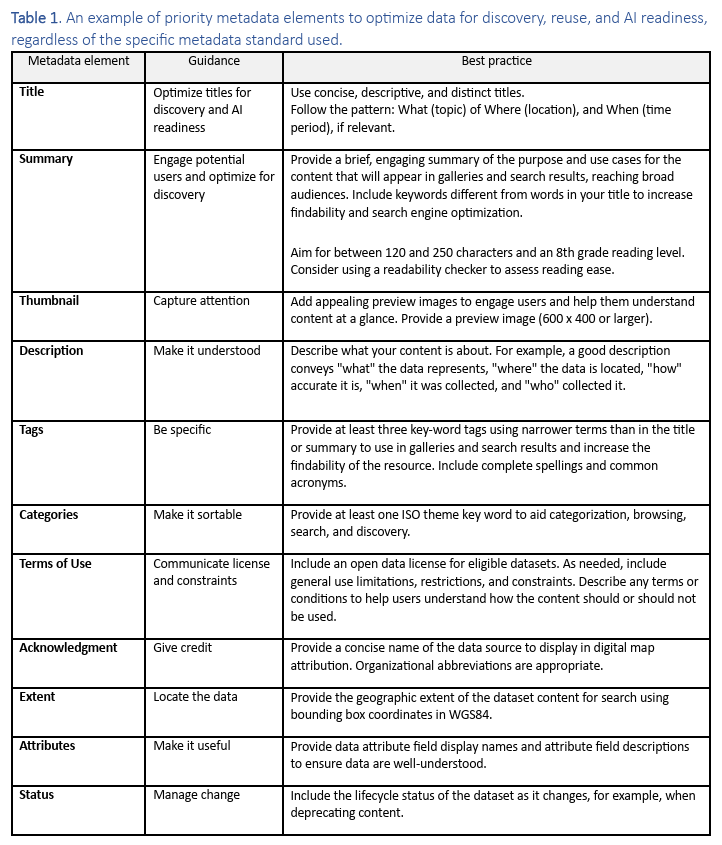
This isn’t to say that other metadata elements are not important; all metadata is important! However, the NGAC work clearly identified the highest‑priority metadata elements that have the greatest impact on whether content can be found, understood, reused, and leveraged by emerging AI‑driven workflows.
Below is a table where you can find the essential metadata elements to optimize search and AI readiness in ArcGIS today.
| Metadata element | ArcGIS Pro indexed in search |
ArcGIS Online & Enterprise indexed in search |
|---|---|---|
| Title | ✅ | ✅ |
| Tags | ✅ | ✅ |
| Summary (Purpose) | ✅ | ✅ |
| Description (Abstract) | ✅ | ✅ |
| Acknowledgments | ✅ | ✅ |
| Terms of Use | ✅ | |
| Scale Range | ✅ | |
| Extent | ✅ | ✅ |
| Attribute field metadata
-Alias (Display name)
-Description -Field value type |
Attribute field metadata, while not currently indexed for search, is critical for AI readiness because it provides the descriptive context agents need to accurately interpret and act on data. These, along with a small set of additional metadata elements that help determine whether data is fit for purpose or reuse, are included in Dublin Core+.
Dublin Core+ metadata elements
Below is the list of metadata elements included in Dublin Core+.
| Metadata element | Description |
|---|---|
| Title | A descriptive name that identifies the resource and distinguishes it from similar content. |
| Summary (Purpose) | A brief overview that explains what the resource is and its purpose. |
| Thumbnail | An image that visually represents the resource. |
| Description (Abstract) | Detailed information explaining the content, context, and intended use of the resource. |
| Tags | Searchable keywords that describe the content and support discovery. |
| Topic Categories | High-level thematic classifications used to group related resources. (Different from item page categories.) |
| Acknowledgments | The individual or organization responsible for creating or providing the resource. |
| Terms of Use (Use Limitation) | Information describing how the resource may be used, including restrictions or attribution requirements. |
| Geographic Extent | The bounding rectangle defining the geographic area covered. |
| Scale Range | The range of map scales for which the resource is appropriate. |
| Temporal Extent | The time period represented by the resource. |
| Attributes (Attribute field metadata) | Structured information documenting individual data fields to ensure correct interpretation and reuse.
Table or entity name
For each attribute field..
-Name
-Alias (Display name) – A human‑readable label for the attribute field. -Description – An explanation of what the attribute represents, including its meaning and how values should be interpreted. -Type – The data type of the attribute values (e.g., integer, decimal, text, date). -Length – The maximum number of characters allowed for text attributes.
-Precision – The total number of digits allowed for numeric values, including both whole numbers and decimals.
-Index – Indicates whether the attribute field is indexed to improve query and retrieval performance. |
| Resource Contact | Contact information for the organization or individual responsible for the resource.
-Organization
-Individual name -Phone |
| Resource URL | A web link providing access to the resource. |
| Resource Type | The type of resource being described, such as a dataset, service, map, application, or document. |
| Resource Created | The date the resource was initially created. |
| Resource Updated | The most recent date the resource was updated. |
| Resource Update Frequency | How often the resource is expected to be updated. |
| Resource Status | The current lifecycle status of the resource. |
| Coordinate Reference System | The spatial reference system defining geographic coordinates.
-Unique Identifier code – A unique identifier that defines a specific coordinate reference system (CRS).
-Codespace – The authority that defines the identifier. |
| Resource Language | The primary language used for the resource. |
| Region of Language (Country) | The country or regional variant associated with the language. |
| License | The legal license constraints that defines permissions, obligations, and reuse conditions. |
| Access Rights (Security Classification Level) | Information describing access restrictions or security classifications. |
| Metadata File Identifier | A unique identifier for the metadata record. (By default, the item ID.) |
| Metadata Update Frequency | How often the metadata record itself is reviewed or updated. |
Get started
To use Dublin Core+ in ArcGIS Pro 3.7, the first step is to make sure you are using the correct metadata editor. Only the ArcGIS metadata editor supports Dublin Core+, which is the unified, metadata editor used across ArcGIS Online and ArcGIS Enterprise.
Step 1: Set the metadata style and editor
1. In ArcGIS Pro, go to the Settings page:
- On the ArcGIS Pro start page, click the Settings tab.
- In an open project, click the Project tab on the ribbon.
2. Click on Options and navigate to the Metadata tab.
3. Review your current metadata settings and update them as follows:
- Metadata style: Dublin Core+
- Metadata editor: ArcGIS metadata editor

Step 2: Edit metadata
- Open the Catalog pane or Catalog view.
- Right‑click a dataset.
- Select Edit Metadata.
The metadata editor will open with the Dublin Core+ metadata style applied.

Dublin Core+ best practices
If you are accustomed to completing only the required fields in more complex metadata standards, you’ll need to think differently when working with Dublin Core+.
Because the standard is intentionally lightweight, the value of Dublin Core+ comes from thoughtfully populating recommended and high‑priority elements rather than stopping at minimum requirements. To ensure your metadata delivers maximum value for discovery, reuse, search, and AI readiness, consider the following best practices:
- Don’t populate more metadata than you have to, synchronize metadata prior to editing! Learn more here.
- Review the Essential Metadata > Suggested tab to focus on high‑priority metadata elements.
- Use the All Metadata tab to review and prioritize the remaining metadata elements.
FAQs
What happens if I was previously using a different metadata style and then switch to Dublin Core+? Will I lose my metadata?
👉 You will not lose your metadata! ArcGIS stores metadata in ArcGIS Metadata XML, which is an internal storage format. This storage format preserves metadata regardless of the selected metadata style. Switching metadata styles (for example, from ISO or FGDC CSDGM to Dublin Core+) changes how metadata is displayed and edited, not how it is stored.
Is Dublin Core+ metadata style available for my ArcGIS Online and/or ArcGIS Enterprise organization?
👉 Yes! Dublin Core+ is available in ArcGIS Online and is available in ArcGIS Enterprise starting at 12.0.
Is Dublin Core+ the same or similar to Item Description?
👉 Dublin Core+ is similar to Item Description in that they share many of the same core metadata elements. The key difference is that Dublin Core+ is available in the new metadata editor, while Item Description is limited to the ArcGIS Pro classic metadata editor. Dublin Core+ is also standards‑based, whereas Item Description is not. It includes all the Item Description elements plus a few additional ones.
Dublin Core+ has only a few required metadata elements (e.g. title). Am I done with only a title?
👉 No. You are technically complete, but not practically finished. Dublin Core+ is intentionally lightweight and flexible, with few required elements. However, stopping at the minimum requirement (for example, only a title) significantly limits the value of your metadata. Because there are so few required elements, the responsibility shifts to prioritization, not compliance. Best practice is to:
- Don’t populate more metadata than you have to, synchronize metadata prior to editing! Learn more here.
- Review the Essential Metadata > Suggested tab to focus on high‑priority metadata elements.
- Use the All Metadata tab to review and prioritize the remaining metadata elements.
What is the best practice to ensure my attribute field metadata is up to date with my current data schema?
👉 Attribute field metadata include both properties (such as field name and type) and descriptive metadata (such as aliases and descriptions). Field aliases are stored directly in the geodatabase as part of the data schema. Best practice is to maintain aliases in the geodatabase and then synchronize them to the metadata. Synchronization automatically populates property metadata and aliases from the data into the metadata record. After synchronizing, you can complete the remaining metadata. Synchronization can be run again as the data changes and is performed as a manual, one‑time action each time. Learn more here. This can help keep metadata aligned with the current structure of the data, especially after schema changes.
How does Dublin Core+ work with the Item Details assistant?
👉 Dublin Core+ and the Item Details assistant are designed to work together! The Item Details assistant is a new tool to help create and enhance priority metadata elements available in ArcGIS Online and ArcGIS Enterprise. Learn more here.
Used alongside Dublin Core+, the Item Details assistant can help:
- Reinforce metadata best practices
- Encourage more complete and meaningful descriptive metadata
- Improve overall metadata quality without adding new requirements or complexity
Is Dublin Core+ supported in the ArcGIS Pro .NET SDK, ArcPy, and the ArcGIS REST API?
👉 Yes, Dublin Core+ support is available across developer workflows. Export to Dublin Core+ RDF/XML is supported in both the ArcGIS Pro .NET SDK and ArcPy, and the ArcGIS REST API supports viewing metadata with Dublin Core+.
🤝Stay in touch!
Using Dublin Core+? Have feedback? Connect with us on Esri Community -Metadata, Catalogs, and Search.
We look forward to working with you to continue making metadata more impactful – together.
Resources:








Commenting is not enabled for this article.