This piece of content is no longer being maintained and may reference events in the past or product features that have changed.
ArcGIS StoryMaps is the professional tool for harnessing the power of maps to communicate your work using place-based storytelling. The easy-to-use builder enables you to combine maps, 3D scenes, embedded content, multimedia, and more to create an interactive narrative that can inspire interest — and action — from your readers.
Each month, our team uses community feedback to help inform new capabilities that can enhance your storytelling adventures. Check out what’s new this month!
Quick links
ArcGIS Apps block
Integrating other ArcGIS apps into stories and briefings can enrich your geospatial storytelling with tools that offer specialized functionality. Whether you’re crowdsourcing field data using ArcGIS Survey123, presenting location-based analytics with ArcGIS Dashboards, sharing interactive maps using ArcGIS Instant Apps, or immersing your readers in a scene with ArcGIS Experience Builder, adding an app can dynamically enhance your readers’ understanding and bridge the gap between storytelling and decision-making.
You’ve long been able to add ArcGIS apps with options like embedding URLs, but with the endless possibilities (and benefits) of layering your storytelling with these tools, we’re excited to share that it’s now easier than ever with the ArcGIS Apps block.
Now, you can select ArcGIS Apps from the Media section of the block palette. On the next screen, select Apps from the drop-down menu to access available content. Once added, enhance the app by using familiar options like adjusting its size or adding alternative text.
Note: Your ArcGIS apps need to be shared publicly to be added.
Ready to level up your geospatial storytelling game? Read our blog on elevating your story by integrating apps in ArcGIS StoryMaps, and then browse these stories that integrate apps for inspiration. Want to practice before diving into your own story? Follow this tutorial on integrating maps, apps, and scenes to tell a story.

Mute/unmute audio
Ambient sounds from a location. Interviews with local voices. Narrated explanations of complex spatial data. Audio is a powerful sensory layer to make your geospatial storytelling feel more immersive and memorable, especially when added to the background of your synchronized media via the Sidecar block.
Adding background audio to your sidecar slides has long been available, but we are pleased to add the other half of background audio’s efficacy: muting it when enough is enough. Now, both in the builder and in published stories, you and your readers can opt to Unmute media or Mute media.
Inspired to add audio to your story? Check out these great examples that demonstrate creative uses of audio in stories.
Map tour enhancements
Categorized map tour
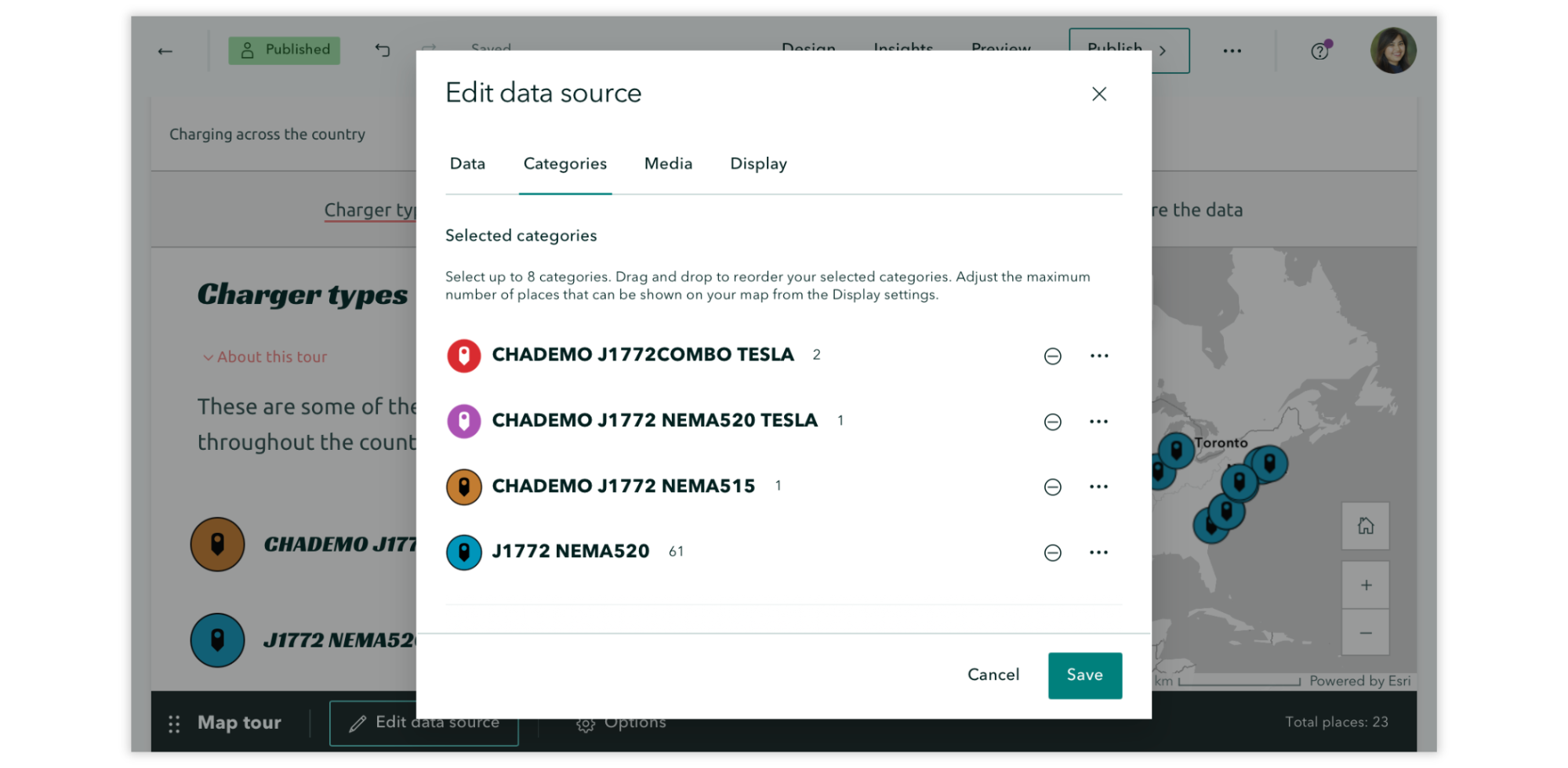
When configuring your Categories in Edit data source, you will now see how many places are in each category, and you’ll get a warning if the number of places in your selected category exceeds the current maximum. Also here, the order of categories sets the order of the layers on the map, meaning you can drag and drop layers in the editor to control how they appear on the map.
Categorized and Explorer map tours: List view
Improvements have been made to how the title and description of a point are displayed; the full title and as much of the description that fits are now viewable, enhancing the browsing experience.
And more…
- Upload limits for the following image file formats have been increased to 50MB or 15,000 pixels: JPG, PNG, BMP, WEBP, HEIC, and HEIF. Upload limits remain at 10MB or 5,000 pixels for GIF, SVG, TIF, and TIFF file formats.
- Advanced script embedding now supports collections and briefings.
- Keyboard shortcuts have been added to move the active slide in briefings and immersive blocks.
- Table options now include the capability to toggle a header column on/off.
- Lists now support three levels of text.
- Theme builder now includes previews of additional features such as the navigation bar, tables, and charts.
- Text size and space utilization have been improved for infographics. Additionally, when editing infographics, a true representation of the panel’s aspect ratio is now viewable.
- Briefings now support the quote block.
- Swipe block now includes the option to Keep legend open.
- Code text formatting is now found under the More options in the text menu.
Check out the release notes for more details about other small changes and fixes released this month.
Thank you to Ashley Du and Will Hackney for their contributions to this post.
All Adobe Stock images are © 2025 Adobe Stock. All rights reserved.


Great update thanks. Are custom domains on the backlog for stories and collections, they would be quite handy. [spoiler title=”Custom domain?”] [/spoiler]
Hi Duane,
A builder feature for custom domains isn’t on the road map, but you can embed items via script directly in a web page: https://www.esri.com/arcgis-blog/products/arcgis-storymaps/constituent-engagement/introducing-story-embeds-via-script
Take care,
Andria