Find the right image faster—and work with it more efficiently
The February 2026 ArcGIS Online update delivers a set of focused enhancements to oriented imagery that make it easier to find the image you need and work with it more effectively once you do.
Enhancements include time‑aware and 3D‑aware search, faster navigation, and a cleaner, easier-to-use viewer.
Whether you’re reviewing repeat collections over time, inspecting elevated assets in 3D, or building streamlined web apps for image access, these updates reduce friction and help oriented imagery fit more naturally into everyday ArcGIS workflows.
Let’s walk through what’s new in this release.
Better control over imagery search
These updates introduce additional ways to refine imagery results using time and spatial context.
Search oriented imagery through time
The oriented imagery viewer now respects time filters defined in a map or scene. When working with a time‑enabled oriented imagery layer, the viewer uses the active time window to filter available imagery, allowing users to narrow results to a specific timeframe before selecting a location.
This makes it much easier to work with repeat collections. Instead of scrolling through every available image at a location, you can focus on imagery captured within a specific date range. You can focus on the most recent inspection, a pre‑event condition, or a historical snapshot for comparison. Inspection and monitoring workflows benefit in particular, with faster access to relevant imagery and a clearer view of change over time.
Learn more about time-enabling a feature layer.
More precise searches in 3D scenes
Searching for the right image is especially challenging when assets aren’t on the ground. With 3D‑aware oriented imagery search, image queries can now take elevation into account.
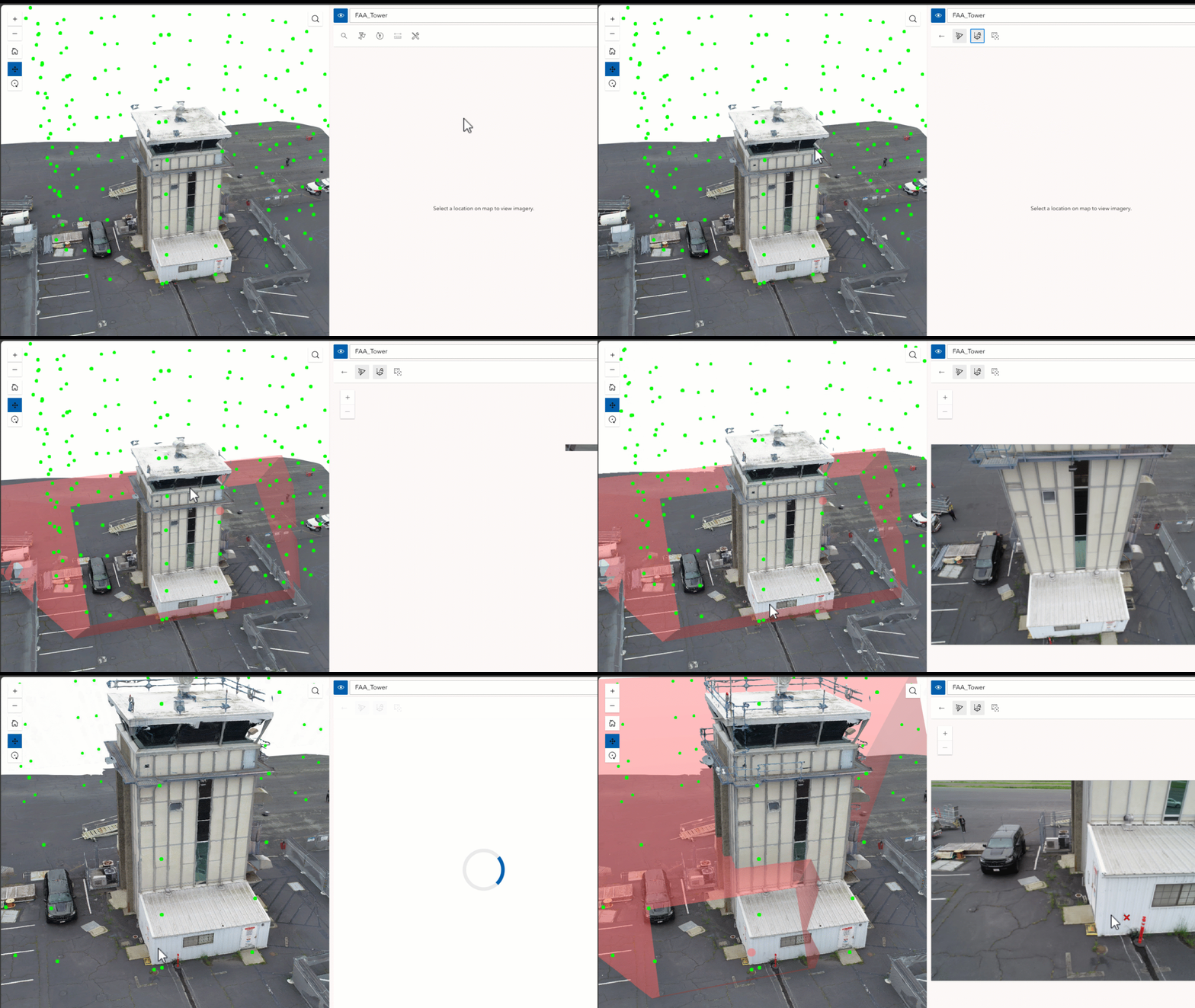
When you click a location in a 3D scene, the viewer captures the full (X, Y, Z) coordinate and uses that height to filter and rank results. Instead of defaulting to ground‑level imagery behind an asset, the viewer returns images that reflect the actual elevation and viewing angle of what you selected, like rooftops, bridge decks, tower tops, or upper stories of a building.
This results in more relevant image matches for faster, more efficient workflows.
3D‑aware search is now supported in Experience Builder apps, Instant Apps, and the Oriented Imagery Viewer component in the ArcGIS Maps SDK for JavaScript.
Select a specific image to view
In addition to clicking a location to find the best image, you can now explicitly select a camera location to view a specific image. The new Display Images option makes it easy to inspect imagery from a known camera position, which is useful when validating capture coverage or reviewing individual frames.
You can use the Display Images tool to switch between location‑based search and camera‑based image selection without closing the viewer, supporting both map navigation and targeted image review in a single workflow.
An easier‑to‑use oriented imagery viewer
These updates focus on making the oriented imagery viewer easier to use day to day, by simplifying the interface, speeding up image navigation, integrating the viewer more naturally into Map Viewer and making it easier to create usable, purpose-driven apps in Experience Builder. Together, these changes help users stay focused on accomplishing their task (rather than navigating the viewer) by keeping the interface streamlined and out of the way.
A simplified, organized toolbar
The viewer interface has been streamlined. Tools are now grouped into five logical categories, reducing visual clutter and improving discoverability:
- Search tools – Options for finding imagery, including 2D search, 3D search, and camera‑based selection
- Overlays – Image and map overlays such as footprints, camera locations, and feature layers (plus digitizing options in Experience Builder)
- Image navigation – Directional, sequential, compass‑based, and gallery‑based navigation tools
- Image measurement tools – Ground‑based and triangulated measurement tools
- Utilities – Image enhancements, pop‑ups, and other supporting tools
Each group expands only when needed, helping users focus on the task at hand while keeping advanced functionality readily available.
Faster image navigation with predictive caching
Directional and sequential navigation modes now take advantage of image caching. As users move through images, the viewer anticipates likely navigation paths and preloads upcoming imagery. This reduces load times and supports smoother, more efficient review, particularly when working with dense image collections or repeat inspection sequences.
A more natural integration with Map Viewer
The oriented imagery viewer is now launched directly from the oriented imagery layer in Map Viewer. With a layer selected, the viewer opens from the layer’s options menu (consistent with how other ArcGIS layer tools are accessed).
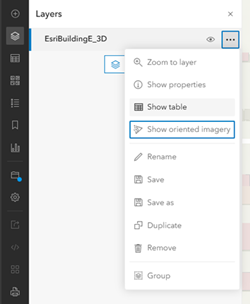
Because the viewer is now associated with the source layer rather than the web map, it opens in the center panel, providing more space for imagery and greater flexibility when working with maps that include multiple layers or views. Users can also open and switch between viewers for multiple oriented imagery layers as needed (only one viewer is active at a time), and use map tools without closing the oriented imagery viewer.
Clearer configuration in Experience Builder
Experience Builder includes an updated configuration experience for the oriented imagery viewer widget that mirrors the viewer’s tool groupings. Tools are organized by purpose, making it easier to expose only the capabilities an app requires and turn off tools that aren’t relevant.
This improved alignment between the viewer interface and app configuration helps teams build focused, task‑specific oriented imagery apps, supporting clearer workflows without unnecessary interface complexity.
Designed to support real‑world image workflows
Taken together, these updates focus on practical improvements:
- Less time searching, thanks to time filtering, 3D‑aware queries, and more explicit selection options
- More relevant results, especially for elevated or complex assets
- Smoother review, with faster navigation and a cleaner interface
- Better integration, so oriented imagery feels like a natural part of Map Viewer
- Clearer configuration, so you can build focused Experience Builder apps with only the tools your users need


Article Discussion: