
The ArcGIS Business Analyst team is excited to see you July 13-17, 2026, at the San Diego Convention Center for the 2026 Esri User Conference. Esri UC is the world’s largest Geographic Information Systems (GIS) conference, connecting GIS professionals and enthusiasts for the opportunity to share learnings, network, and discover the latest in GIS products and solutions.
To help you plan your experience, the ArcGIS Business Analyst team has designed this blog to serve as your ultimate guide to Business Analyst sessions and activities. Glean powerful insights to drive informed business decisions from all things ArcGIS Business Analyst!
Not yet registered for the conference? No problem! Visit the registration page and follow the steps to register for in-person attendance or gain digital access. Don’t forget to follow @ArcGIS Apps on “X” or join our ArcGIS Business Analyst LinkedIn user group for the latest updates and news.
Quick Navigation
- Visit the team
- Frequently Asked Questions
- ArcGIS Business Analyst Sessions
- Do Not Miss These Events
- Plan Your Schedule with the Business Analyst Custom Agenda
- Want to Learn More About ArcGIS Business Analyst?
- Additional Resources

Visit the Team
We can’t wait to see you in person! This year, the ArcGIS Business Analyst team will be waiting to meet you in the Business or ArcGIS Apps areas of the showcase. Come see us to learn about the latest product news and gain technical insight. We will be available during the following times to answer your questions, listen to your ideas and success stories, and learn how ArcGIS Business Analyst can support your organization.
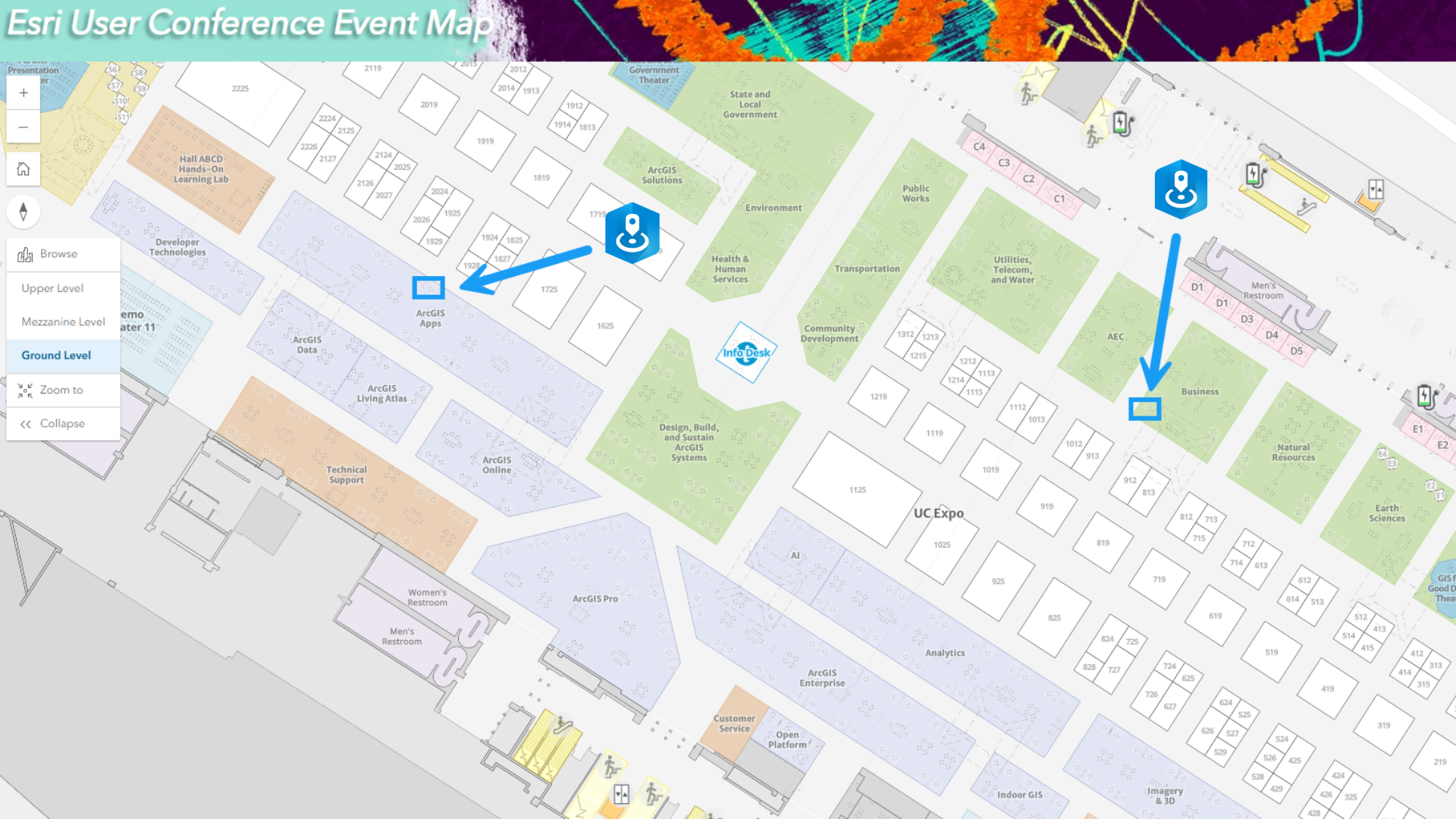
| Date | Time (PDT) | Location |
| Tuesday, July 14 | 9:00 a.m. – 5:30 p.m. | Expo Floor – Business Showcase and ArcGIS Apps Showcase |
| Wednesday, July 15 | 9:00 a.m. – 5:30 p.m. | Expo Floor – Business Showcase and ArcGIS Apps Showcase |
| Thursday, July 16 | 9:00 a.m. – 4:00 p.m. | Expo Floor – Business Showcase and ArcGIS Apps Showcase |
Frequently Asked Questions
Q: How can I try ArcGIS Business Analyst?
A: If you have an ArcGIS Creator, Professional, or Professional Plus user type license, ArcGIS Business Analyst Web App Standard, including ArcGIS Business Analyst Mobile App, is included in your license. Business Analyst Web App Standard includes tools for quick analysis, mapping, reporting, and infographic creation to support site evaluation and market research. It also provides access to Esri’s extensive global data collection spanning more than 177 countries and over 15,000 demographic, lifestyle, and business variables.
For more advanced analysis and customization to better understand your site’s context, Business Analyst Web App Advanced is recommended. If you’re a current ArcGIS user interested in evaluating advanced capabilities, contact your account manager to learn more about your evaluation options.
If you’re new to Esri, you can sign up for the 21-day free trial of ArcGIS Business Analyst Web App, which includes all three apps: ArcGIS Business Analyst Web App Standard, ArcGIS Business Analyst Web App Advanced, and ArcGIS Business Analyst Mobile App.
Q: What kind of data is included with ArcGIS Business Analyst Web App?
A: ArcGIS Business Analyst Web App provides access to over 15,000 variables from over 177 countries. All ArcGIS Business Analyst users have access to the data within ArcGIS Business Analyst, including advanced demographics sourced from a number of data providers, and standard demographics sourced from Michael Bauer GmbH.
To find a list of variables by country, region, source, methodology, or frequency of updates, please visit our data documentation page.
Q: Can I use my own internal customer data and combine it with Esri data in Business Analyst?
A: Yes, with ArcGIS Business Analyst Web App Advanced and ArcGIS Business Analyst Pro you can bring in your own internal data to create custom analyses, configure reports, and gain deeper insights by combining your data with Esri’s extensive global data collection.
ArcGIS Business Analyst Sessions
Tuesday, July 14 |
|||
| Time (PDT) | Session | Location | |
| 8:30 a.m. – 9:30 a.m. | ArcGIS Business Analyst: Fundamentals | Room 30 D | SDCC | |
| 1:00 p.m. – 1:45 p.m. | ArcGIS Business Analyst: Understanding Demographic and Place-Based Data | Demo Expo Theater 7 | SDCC | |
| 2:30 p.m. – 3:15 p.m. | ArcGIS Business Analyst: Using Your Data in Analyses, Reports, and infographics | Demo Expo Theater 7 | SDCC | |
| 2:30 p.m. – 3:15 p.m. | ArcGIS: Maximizing the Value of Demographic Content | Demo Expo Theater 6 | SDCC | |
| 4:00 p.m. – 5:30 p.m. | ArcGIS Business Analyst: Explore the Next Generation UX | Room 26 A | SDCC | |
Thursday, July 16 |
|||
| Time (PDT) | Session | Location | |
| 1:00 p.m. – 2:00 p.m. | ArcGIS Business Analyst: Maximizing Workflows Using Advanced Techniques | Room 9 | SDCC | |
| 1:00 p.m. – 1:45 p.m. | Esri U.S. Demographics: What’s New | Demo Expo Theater 4 | SDCC | |
Events You Don’t Want to Miss
Monday, July 13 |
||
| Time (PDT) | Event | Location |
| 8:30 a.m. – 4:00 p.m. | Esri UC Plenary | Halls F-H, SDCC |
| 4:00 p.m. – 5:30 p.m. | Academic GIS Program Fair | Ballroom 20 Lobby | SDCC |
| 3:30 p.m. – 6:00 p.m. | Map Gallery Reception | Sails Pavilion | SDCC |
| 4:00 p.m. – 6:00 p.m. | Women and GIS Social | Mezzanine Lobby | SDCC |
Tuesday, July 14 |
||
| Time (PDT) | Event | Location |
| 6:30 a.m. – 07:30 a.m. | Morning Yoga (separate registration required) | Promenade Plaza/The Pointe | Hilton |
| 7:00 a.m. – 06:00 p.m. | Map Lounge | Sails Pavilion | SDCC |
| 8:00 a.m. – 05:00 p.m. | Hands on Learning Lab | Hands-On Learning Lab Sails Pavilion | SDCC |
| 6:00 p.m. – 07:30 p.m. | Business Social | Indigo Foyer and Terrace | Hilton |
Wednesday, July 15 |
||
| Time (PDT) | Event | Location |
| 6:30 a.m. – 07:30 a.m. | Morning Yoga (separate registration required) | Marriott Marquis San Diego Marina |
| 6:30 a.m. – 8:00 a.m. | Esri 5K Fun Run/Walk
(separate registration required) |
Embarcadero Boardwalk | Hilton |
| 7:00 a.m. – 06:00 p.m. | Map Lounge | Sails Pavilion | SDCC |
| 3:30 p.m. – 5:30 p.m. | Esri Awards Ceremony | Hall F | SDCC |
Thursday, July 16 |
||
| Time (PDT) | Event | Location |
| 5:30 p.m. – 10:00 p.m. | Thursday Night Party | Balboa Park |
Friday, July 17 |
||
| Time (PDT) | Event | Location |
| 10:30 a.m. – 12:00 p.m. | Closing Session | Hall F | SDCC |
Plan Your Schedule with the Business Analyst Custom Agenda

The Esri User Conference is packed with presentations and events to choose from. For a full list of sessions and to create your own schedule, view the detailed agenda here.
We know you will be on the go and eager to attend as many sessions as possible. To help you stay organized at the User Conference, we have prepared a custom Business Analyst agenda that you can download and save for convenience.
Want to Learn More About ArcGIS Business Analyst?
ArcGIS Business Analyst is Esri’s location-based market and community intelligence software that combines demographic, business, lifestyle, spending, and Census data with map-based analytics for smart decision-making. Through desktop, web, and mobile apps, Business Analyst demographic mapping software helps you identify under-performing markets, pinpoint the right growth sites, find where your target customers live, and share the analysis across your organization as accurate infographic reports and dynamic presentations.
If you’d like to learn more or want to try ArcGIS Business Analyst Web App, sign up for a free 21-day trial.
Additional Resources
We cannot wait to meet you in sunny San Diego at the 2026 Esri User Conference! Below, you can find additional resources you may find useful:
- Register for the Esri User Conference
- Things to do at the Esri User Conference
- ArcGIS Business Analyst Product Overview Page
- Join our LinkedIn Business Analyst User Group
- Join our Business Analyst Esri Community
- Read more Business Analyst blog articles on ArcGIS Blog
- Watch Business Analyst Web App videos
- Watch Business Analyst Mobile App videos
- Watch Business Analyst Pro videos
- Visit the Business Analyst Resources page


Article Discussion: