True curve geometries are an essential part of many datasets for land parcels, transport infrastructure and utility networks. They are used in workflows where curved features such as roads, rivers, and pipelines must be represented accurately.
Over the past few months, the ArcGIS system has expanded support for creating and editing true curves. ArcGIS Pro has long supported these workflows, and in February that support also expanded to the ArcGIS Web Editor, Map Viewer, and the ArcGIS Maps SDK for JavaScript.
As true curves become more common across the platform, Native Maps SDK 300.0 strengthens its support for mobile and desktop developers. This blog summarizes what has changed and what it means for your apps.
Note: While this blog’s content applies to all platforms in Native Maps SDKs (Kotlin, Qt, Swift, Flutter, and .NET), the code snippets are from .NET.
- True curve clients by default
- True curves in offline replicas
- Editing true curves with GeometryEditor
- Supported curve types
- True curves in 3D scenes
- Summary
True curve clients by default
In release 300.0, we changed the default behavior of ArcGISRuntimeEnvironment.ServiceCurveGeometryMode. Previously, the default value was DensifyCurves. It is now TrueCurveClient.
True curves vs densified curves
A densified curve uses connected line segments to approximate a curve (curve can look segmented and non-smooth). A true curve uses a mathematically defined arc and is smooth.
What makes an app a true curve client?
A true curve client is an app that retrieves and preserves true curve geometries when working with feature services.
When your app has ArcGISRuntimeEnvironment.ServiceCurveGeometryMode set to TrueCurveClient it can update true curve geometries when the service’s ArcGISFeatureServiceInfo.OnlyAllowTrueCurveUpdatesByTrueCurveClients is true. When this property is false, the service allows updates from all clients.
With a true curve client, features with true curves can be edited or replaced with straight segments, so apps should ensure these edits are intentional and appropriate for the dataset.
What does this mean for you?
By default, apps now retrieve true curves and act as true curve clients when editing feature services where true curves are supported. This means that mobile geodatabases and map packages also preserve curves when generated.
Your app, by default, meets the requirement for editing feature services where ArcGISFeatureServiceInfo.OnlyAllowTrueCurveUpdatesByTrueCurveClients is true.
If editing services where this property is false, as an app developer you can decide whether you need to adjust your code to account for true curves being fetched, and preserve true curves in editing workflows, if you think it’s appropriate.
When do you need to take extra care?
By default, your app behaves as a true curve client because ArcGISRuntimeEnvironment.ServiceCurveGeometryMode is set to TrueCurveClient. Unless you explicitly set this to DensifyCurves, your app can update true curve geometries. Because of this, it is important to review editing workflows and prevent changes that might unintentionally replace true curves with densified ones. If you work with services where true curve geometries are important, consider adding safeguards such as confirmation prompts and undo support.
Be especially careful when using GeometryEngine APIs for operations such as buffering or offsetting. Methods like GeometryEngine.Buffer(Geometry, double) and GeometryEngine.Offset(Geometry, double, GeometryOffsetType, double, double) return densified geometries.
For example, imagine a transportation department maintaining road data that includes curved ramps and roundabouts. Those features need to remain true curves for accuracy, and the service only allows updates from true curve clients. The transportation department may create buffers to enlarge roundabouts or use offsets to reposition a curved road segment. Replacing the original true curve geometry with either result would replace true curves with densified data.
It’s up to you as a developer to choose an appropriate workflow for your app and dataset. If your app needs to create or replace curve segments you can use EllipticArcSegment and CubicBezierSegment and insert these into your geometry.
When might you want to choose not to be a true curve client?
Set ArcGISRuntimeEnvironment.ServiceCurveGeometryMode to ServiceCurveGeometryMode.DensifyCurves if your app does not preserve true curves in its editing workflows.
Note: the ArcGISRuntimeEnvironment.ServiceCurveGeometryMode property must be set before the app makes any service calls and cannot be changed afterward. It’s recommended that you set this property at the start of your app.
Returning to the transportation example, ServiceCurveGeometryMode.DensifyCurves setting is safer for apps that do not need true curve data and might otherwise write densified shapes back to a service. It avoids treating the app as a true curve client while still allowing geometry updates.
Furthermore, if you know your app does not handle true curve data, it may be more appropriate for your app to choose not to be a true curve client.
How true curve editing is determined by feature service settings and client mode
The following flowchart summarizes how the service setting ArcGISFeatureServiceInfo.OnlyAllowTrueCurveUpdatesByTrueCurveClients works with the client setting to determine whether an app can update true curve geometries.
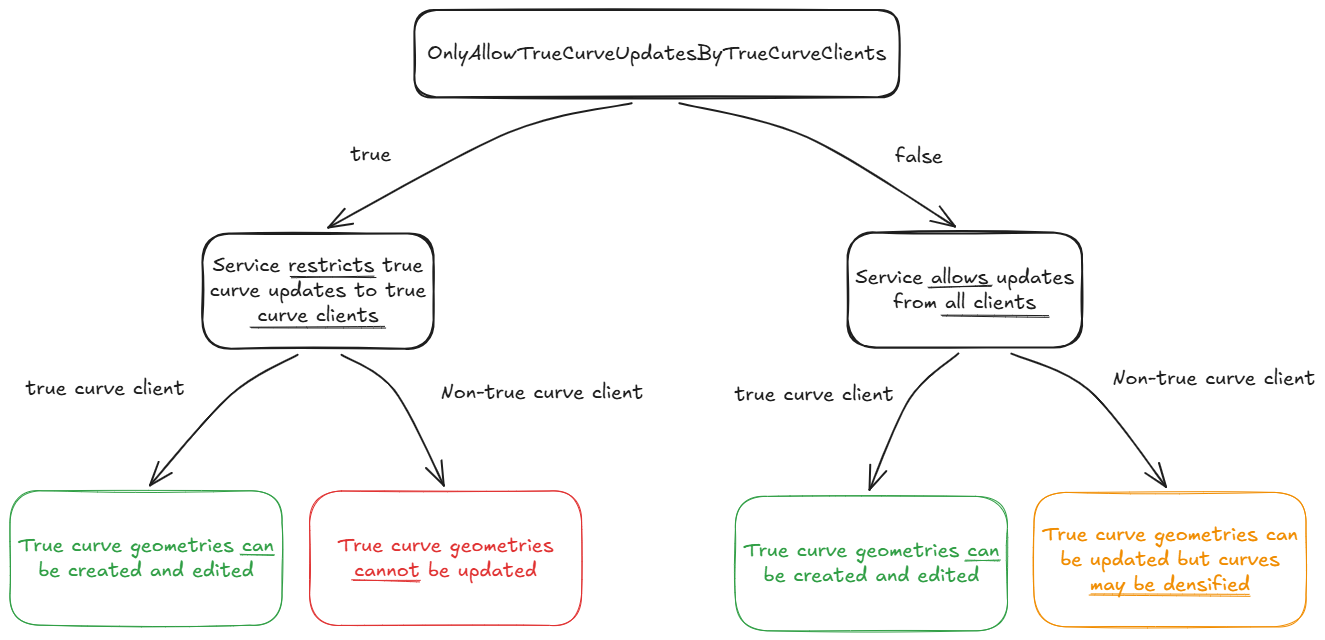
A client is considered a true curve client if either of these conditions is met:
- The client is an app where
ArcGISRuntimeEnvironment.ServiceCurveGeometryModeis set toTrueCurveClient. - The client is a replica where
Geodatabase.IsTrueCurveClientistrue.
True curves in offline replicas
When you generate a sync-enabled replica, true curves are now taken offline by default. The replica then synchronizes as a true curve client, so you can create or edit curve geometries offline and sync them back later.
If you do not want true curves in a replica, set ArcGISRuntimeEnvironment.ServiceCurveGeometryMode to ServiceCurveGeometryMode.DensifyCurves before generating it. Curves will be densified in the replica, and it will not sync as a true curve client.
We added Geodatabase.IsTrueCurveClient, which indicates whether a sync-enabled replica will be treated as a true curve client. This is useful to check before enabling geometry editing workflows in your app.
The Geodatabase.IsTrueCurveClient property is set when the replica is created and the property is fixed for the lifetime of the replica. If you’d like to include true curves in existing replicas, recreate the replica with your app ArcGISRuntimeEnvironment.ServiceCurveGeometryMode set to ServiceCurveGeometryMode.TrueCurveClient.
As in the transportation example, if your app uses GeometryEngine APIs to perform operations such as creating buffers, you can use Geodatabase.IsTrueCurveClient to decide whether those operations should be disabled while a user is editing geometry.
Note: when syncing a replica Geodatabase.IsTrueCurveClient is what determines whether the replica is a true curve client, not the value of ArcGISRuntimeEnvironment.ServiceCurveGeometryMode at sync time. The ArcGISRuntimeEnvironment.ServiceCurveGeometryMode only determines whether the replica is a true curve client at the time of generation.
Editing true curves with GeometryEditor
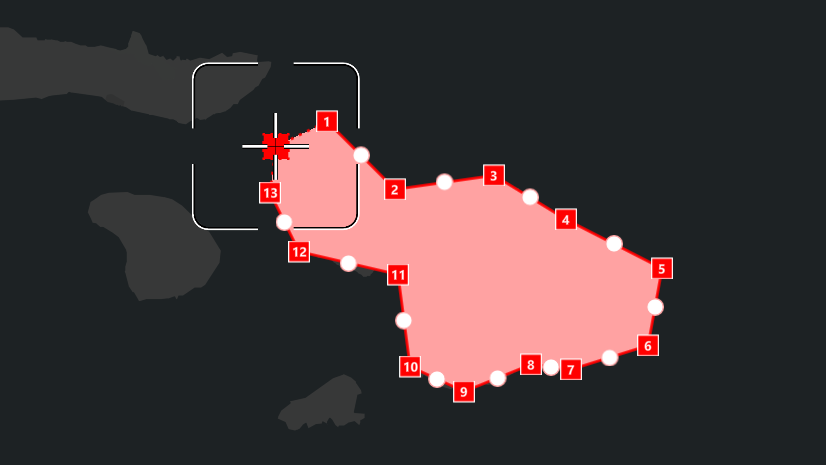
GeometryEditor now supports editing geometries that contain true curves, with some important limitations designed to preserve those curve segments.
Polygons and polylines containing true curves can be edited. However, curve segment editing is limited to vertex movement only.
Whole geometries and parts containing true curve segments can be moved, rotated, and scaled.
Non-uniform scaling by interactive editing is disabled for parts containing circular arcs. ArcGIS Online currently supports circular arcs, but not Bezier curves or elliptic arcs. Non-uniform scaling would convert a circular arc to an elliptic arc, which cannot be saved back to ArcGIS Online.
Note: non-uniform scaling can be achieved programmatically using GeometryEditor.ScaleSelectedElement(double, double, MapPoint).
Mid-vertices are hidden and vertex insertion is disabled on curve segments for interactive tools. If your app needs vertex insertion on curve segments, use ProgrammaticReticleTool or implement this behavior with GeometryEditor APIs.
GeometryEditor.InsertVertex(MapPoint)
ProgrammaticReticleTool.PlaceElementAtReticle()
This release focuses on foundational curve editing support, with an emphasis on preserving existing true curve geometries. Today that includes vertex editing for curve segments and safeguards such as disabling non-uniform scaling for geometries that contain circular arcs. We are continuing to evaluate additional curve editing capabilities for future releases, although there are no firm plans to share at this time.
In the following video you can see an example of true curve editing using GeometryEditor.
Supported curve types
Not every data source supports every kind of true curve, so release 300.0 adds a SupportedCurveTypes property to ArcGISFeatureServiceInfo and ArcGISFeatureLayerInfo to help your app understand what is allowed. You can use this information when creating or editing features so your workflows stay aligned with the capabilities of the service you are working with.
As noted earlier, ArcGIS Online currently supports circular arcs, but not Bezier curves or elliptic arcs. If your app is working with a service that only supports circular arcs, you can use the SupportedCurveTypes property to ensure your editing workflows only create or modify circular arcs.
True curves in 3D scenes
In 3D scenes, true curves in polygons and polylines can now be displayed, identified, and selected in graphics overlays and feature layers when using SurfacePlacement.DrapedFlat.
An example of identification and selection of draped 3D curve features is shown in the video below.
Note: in release 300.0, true curves are not supported in 3D scenes using dynamic rendering mode. To display true curves in 3D, set GraphicsOverlay.RenderingMode to GraphicsRenderingMode.Static for graphics and FeatureLayer.RenderingMode to FeatureRenderingMode.Static for features.
Summary
Native Maps SDKs release 300.0 brings curve handling in line with broader platform support by making true curve workflows the default, allowing true curves to be taken offline in replicas, and enabling GeometryEditor support for curve geometries. It also adds clearer service capability information through SupportedCurveTypes and extends true curve display and identification to 3D scenes with SurfacePlacement.DrapedFlat.
If your apps work with true curve data, review editing workflows to ensure they preserve curves where required. If your apps do not need true curve handling, consider setting ArcGISRuntimeEnvironment.ServiceCurveGeometryMode to ServiceCurveGeometryMode.DensifyCurves.
Tell us about your experience with curves in Native Maps SDKs and what you’d like to see next on ArcGIS Blogs or the Esri Community forums.
Useful resources
Check out these resources to learn more about geometry in the ArcGIS Maps SDK for Native Apps and how to work with them in your apps:

Commenting is not enabled for this article.