Community engagement is most effective when it doesn’t stop at collecting feedback. Organizations need ways to listen to the community, manage that input at scale, and then act on it with confidence. ArcGIS Instant Apps makes it possible to support that entire lifecycle using a set of focused, purpose-built applications.
In this post, we’ll walk through a simple but realistic scenario to show how Reporter, Manager, Web Editor, and Portfolio Instant Apps work together as a complete, end-to-end workflow.
The scenario: Improving parks and adding new playgrounds
Imagine a city launching an initiative to improve its parks and decide where to add new playgrounds. Residents are invited to share ideas, report issues, and suggest locations. City staff need to review that feedback, track progress, and make updates to authoritative data that will ultimately drive decisions. Leadership also needs a clear way to understand progress and communicate outcomes.
This is a common challenge and a great example of where Instant Apps shine.
Step 1: Collecting community input with Reporter
The workflow starts with Reporter, a public-facing Instant App designed for map-based crowdsource engagement.
Using Reporter, community members can submit reports about park improvements or suggest locations for new playgrounds directly on the map. These submissions are driven by edit forms configured in Map Viewer, ensuring the data collected is structured, accurate, and consistent from the start.
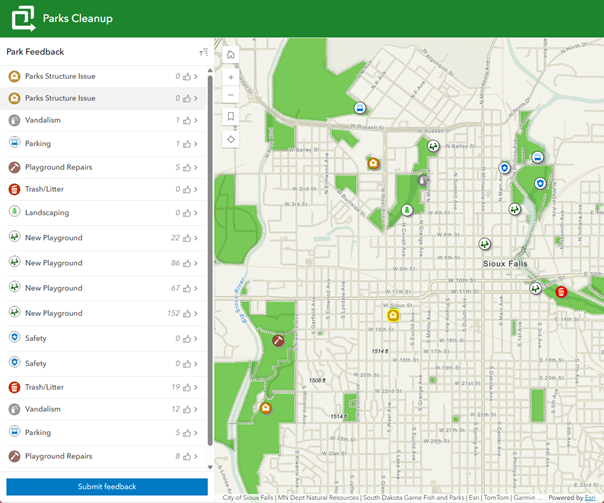
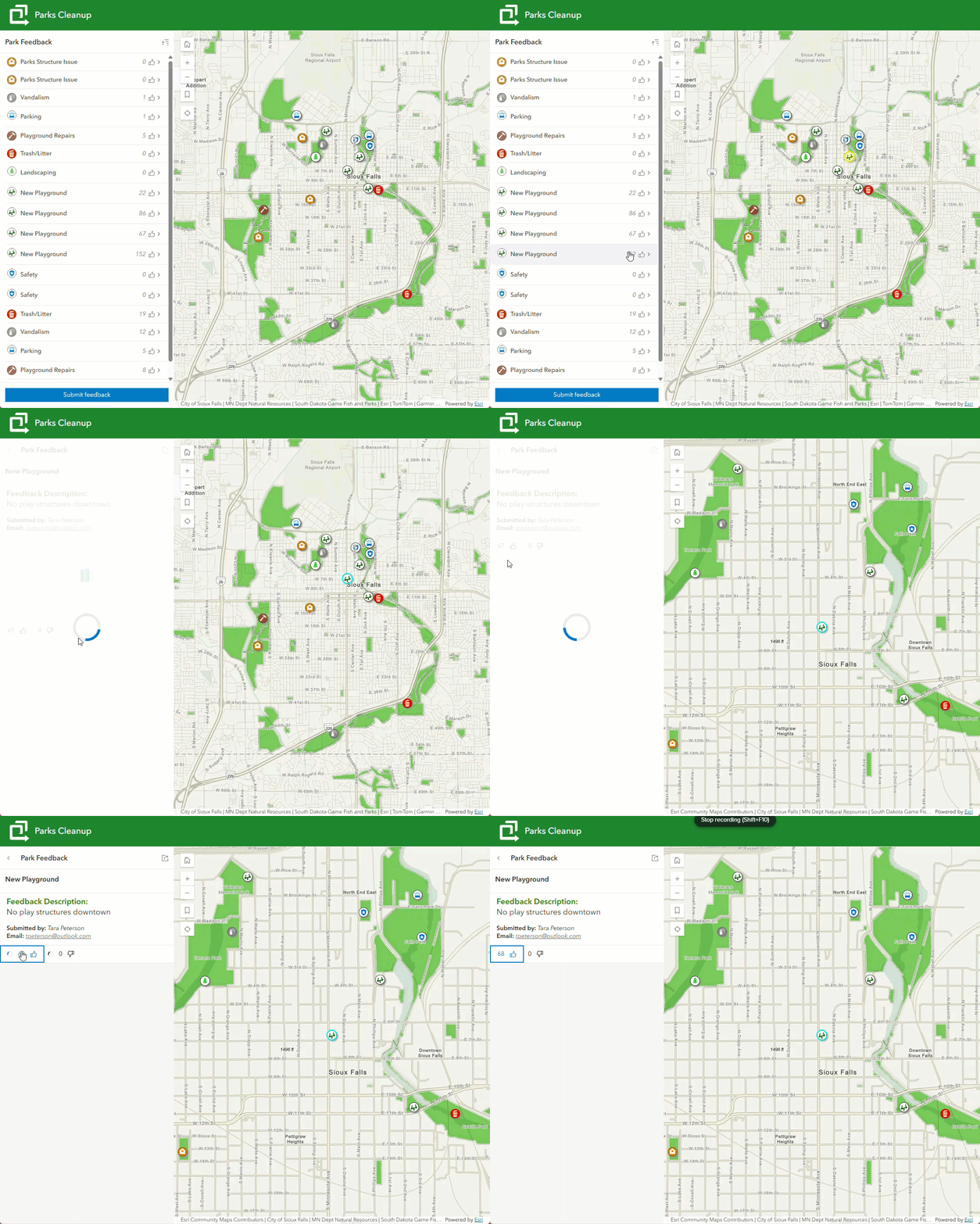
Beyond submitting new reports, Reporter also supports interaction with existing submissions. Community members can like or dislike reports, helping surface the ideas and issues that matter most. If your data includes a related table, comments can be configured to solicit feedback on existing reports. Learn more about configuring Reporter in this blog.
New AI capability: AI image extraction (beta)
Reporter also introduces a new AI image extraction capability (currently in beta). Note: during the beta phase, this feature is only available when signed in. When enabled in the app’s configuration, this feature can extract information from an uploaded photo and use it to populate fields in the edit form.
For example, an app author can select specific fields, associate them with a layer, and provide AI prompts that describe exactly what should be extracted from the image, such as a category or description. When a user uploads a photo while submitting a report, those fields can be automatically populated, reducing manual entry and improving data quality.
Once submitted, the report immediately becomes part of a shared dataset, ready for internal review.
Step 2: Reviewing and triaging feedback with Manager
Next, we shift from the public experience to the staff perspective with Manager.
Manager is an Instant App designed for reviewing and editing data collected through surveys, forms, and apps like Reporter. Manager has different layout options, but in this scenario the split view layout works well, showing the map and table.
Many Instant Apps support creating custom filters, including Manager. Using the filter capability, city staff can view only recently submitted reports. Instead of editing records one by one, they can select multiple submissions and update them all at once using the edit multiple option. This option is also available in Web Editor and Sidebar Instant Apps.
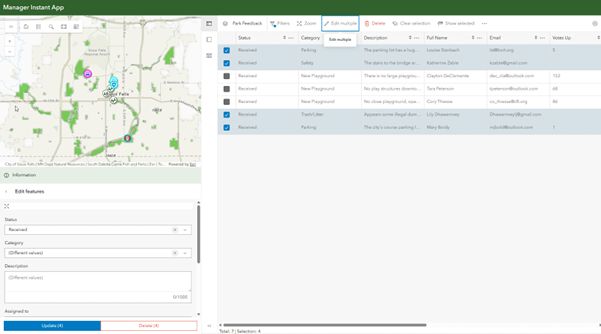
Manager excels at attribute editing and review workflows, especially as feedback volumes grow. While it also supports basic geometry edits, some updates require more advanced editing capabilities.
Step 3: Making precise updates with Web Editor
Next up is the Web Editor Instant App. Web Editor is designed for precise, authoritative data editing. In this scenario, it can be used to refine park boundaries or update playground infrastructure. It provides a focused editing environment that can be simplified to match specific roles and workflows of the person using it.
In configuration, app authors have a lot of control over which layers can be edited and which tools are available, allowing them to simplify the editing experience. For this parks initiative, the app can be limited to adding new playground features and reshaping park boundaries. When launched, editors see a clean, purpose-built interface that supports exactly the tasks they need to perform.
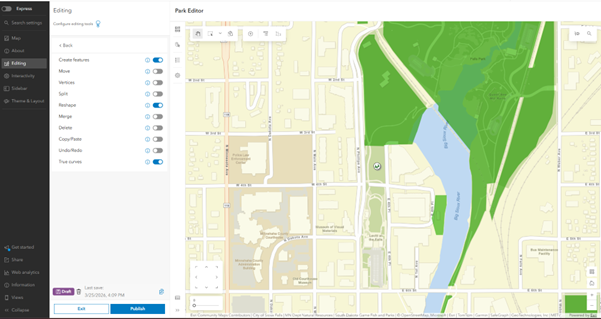
Learn more about all the options in the Web Editor app in this blog.
Step 4: Bringing it all together with Portfolio
Once engagement is underway, organizations need a clear way to brief leadership, share progress, and provide transparency around the initiative. This is where the Portfolio Instant App plays a key role.
Portfolio acts as a binder that brings together all the apps, maps, and resources associated with a project into a single, shareable experience. For this parks initiative, a Portfolio app might include:
- The Reporter app is used for community outreach and idea collection
- The Manager and Web Editor apps support internal review and data updates
- A Hub site (or StoryMap or public webpage) that documents the initiative, goals, and timeline
- A Sidebar Instant App that visually showcases proposed playground designs or planned improvements
By curating these items in one place, Portfolio provides leadership with a clear, up-to-date view of progress while also offering the public transparency into how community feedback is shaping decisions.
A complete workflow, connected by design
ArcGIS Instant Apps includes more than two dozen purpose-built templates, each designed to support a specific audience or task. In this workflow, we’ve focused on a small subset that work especially well together to support community engagement from start to finish:
- Reporter captures structured community input and engagement
- Manager enables efficient staff review and triage
- Web Editor supports precise, authoritative updates
- Portfolio connects everything into a single experience for communication and decision-making
Together, these apps demonstrate how Instant Apps can be combined intentionally to support real-world workflows.
Whether you’re managing a parks initiative, collecting public feedback, or briefing leadership on project status, Instant Apps provides flexible building blocks to move seamlessly from input to action.
Explore further
- Learn more about ArcGIS Instant Apps and available templates
- Explore a gallery of Instant App examples
- Try learn lessons using Instant Apps

Article Discussion: