We are pleased to announce the beta release of the AI components package in version 5.0 of the ArcGIS Maps SDK for JavaScript (JS Maps SDK).
This package contains a set of components that enables developers to build agentic web mapping applications. Agentic web mapping applications provide a chat interface for users to navigate and explore data in web maps using natural language queries. This has the benefit of allowing end users to interact with web maps with a simplified, accessible UX.
Assistant component
The primary star of this package is the arcgis-assistant component. This component provides a chat interface for end users to interact with a web map via one or more agents.
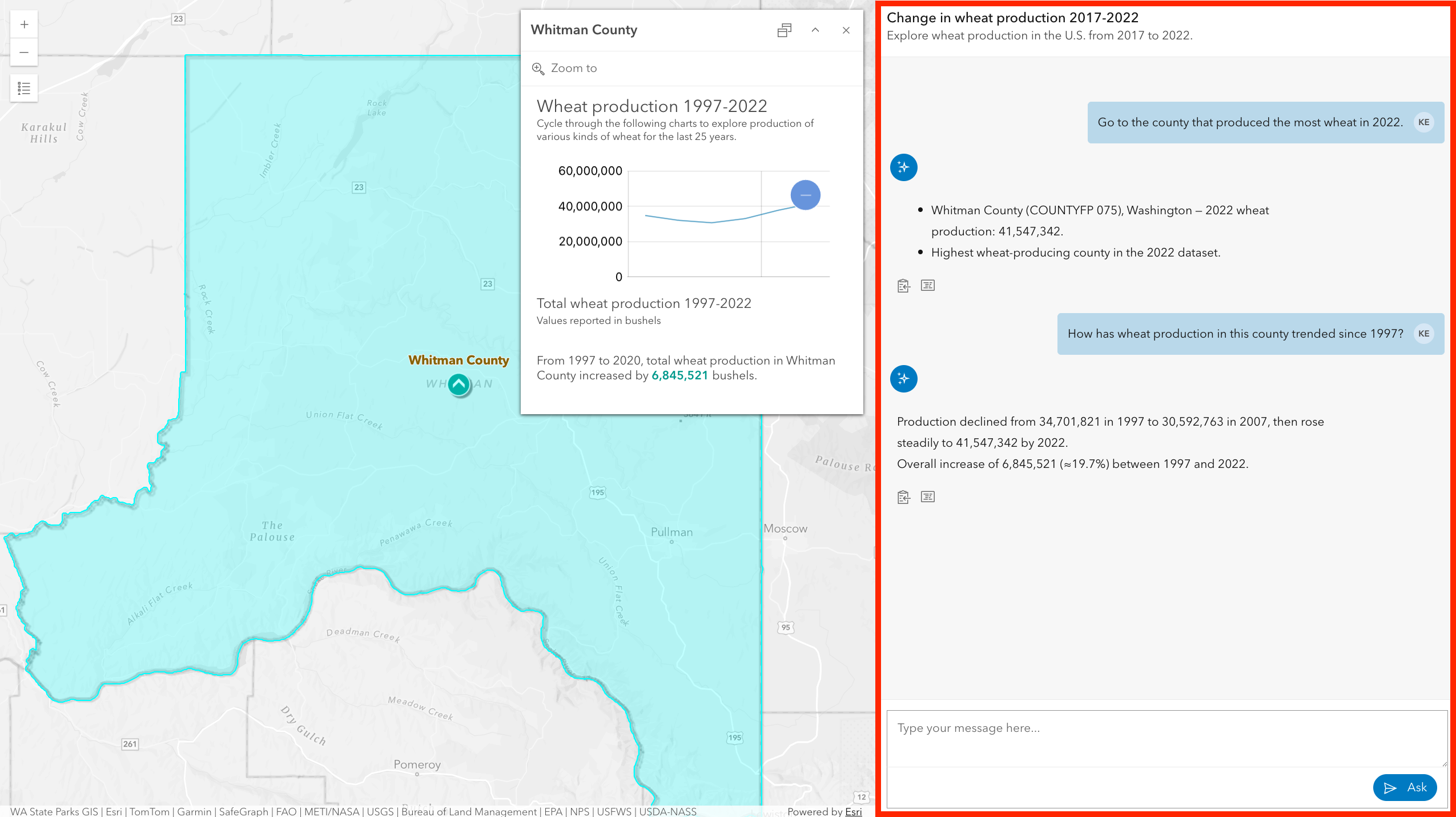
To get started, simply import the 5.0 version of the JS Maps SDK, and add the arcgis-assistant component to your application. The assistant must reference a web map, and contain at least one agent to function.
<arcgis-map id="wheat-map" item-id="dd6e8957e7a94765bf32bc07097cbf46"></arcgis-map>
<arcgis-assistant reference-element="#wheat-map">
  <arcgis-assistant-navigation-agent></arcgis-assistant-navigation-agent>
  <arcgis-assistant-data-exploration-agent></arcgis-assistant-data-exploration-agent>
  <arcgis-assistant-help-agent></arcgis-assistant-help-agent>
</arcgis-assistant>
Each agent is an unrendered subcomponent of arcgis-assistant.
Check out the sample in the JS Maps SDK documentation to see this component in action.
Agents
One or more agents must be registered to the arcgis-assistant component. Agents process natural language inputs using a large language model (LLM) to generate responses as either plain text or by executing a tool or action that interacts with the map.
Behind the scenes, agents ask the LLM to determine a user’s intent, determine tool parameters, or summarize information. While the LLM calls are made to a server, the JS Maps SDK defines and executes an agent’s core logic within the browser, making for performant interactions between users and the client application.
The JS Maps SDK provides three out-of-the-box agents for interacting with a web map:
- Navigation agent
- Data exploration agent
- Help agent
Navigation agent
The Navigation agent enables the end user to navigate to different areas of a web map. This includes navigating to an address or place name, layer extents, features within a layer, web map bookmarks, or coordinates.
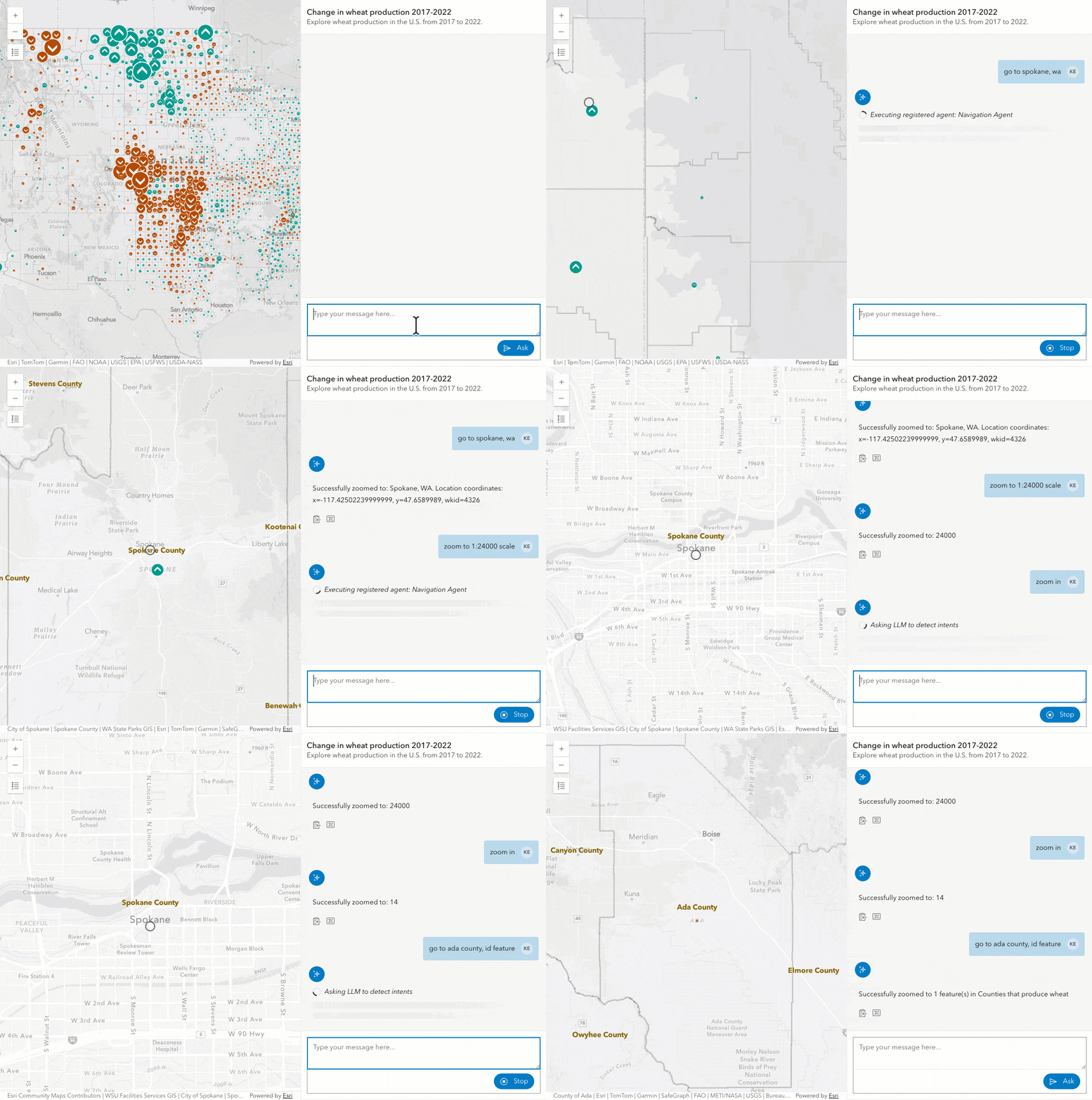
See the Navigation agent documentation for details of this agent’s capabilities, its limitations, and examples of how a user can interact with it.
Data exploration agent
The Data exploration agent enables the end user to query features and statistics based on attributes and geometry from a layer within a web map. It also allows users to visually filter data in the map.
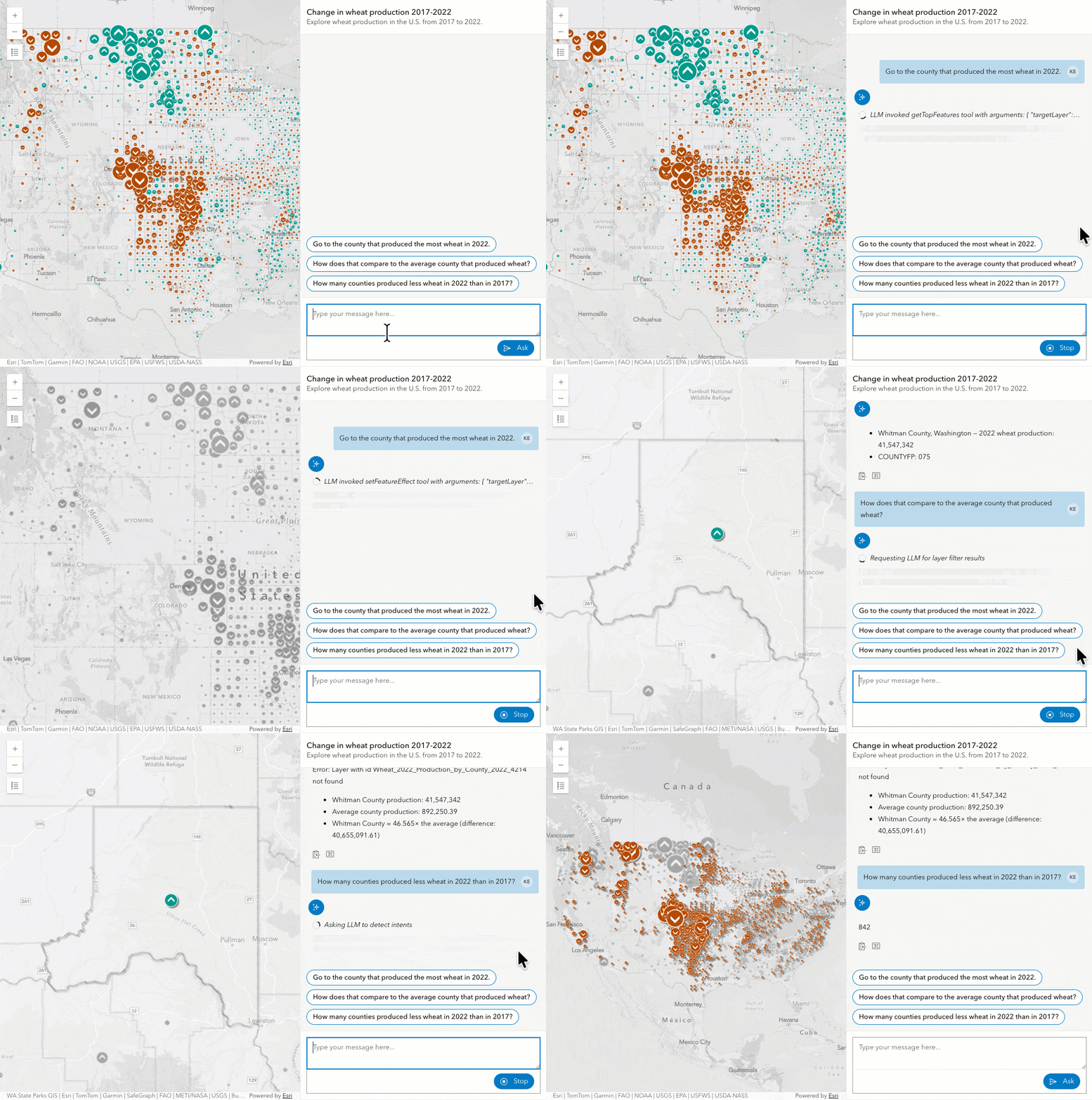
As you try out the data exploration agent, take note of the questions and conversations that feel natural related to data queries. If you discover questions this agent can’t answer well, please let us know! And we’ll do our best to make improvements to its performance.
See the Data exploration agent documentation for more details of this agent’s capabilities, its limitations, and examples of how a user can interact with it.
Help agent
The Help agent provides guidance about the capabilities of the assistant, the agents registered to it, and can answer general questions about the data included in the web map.
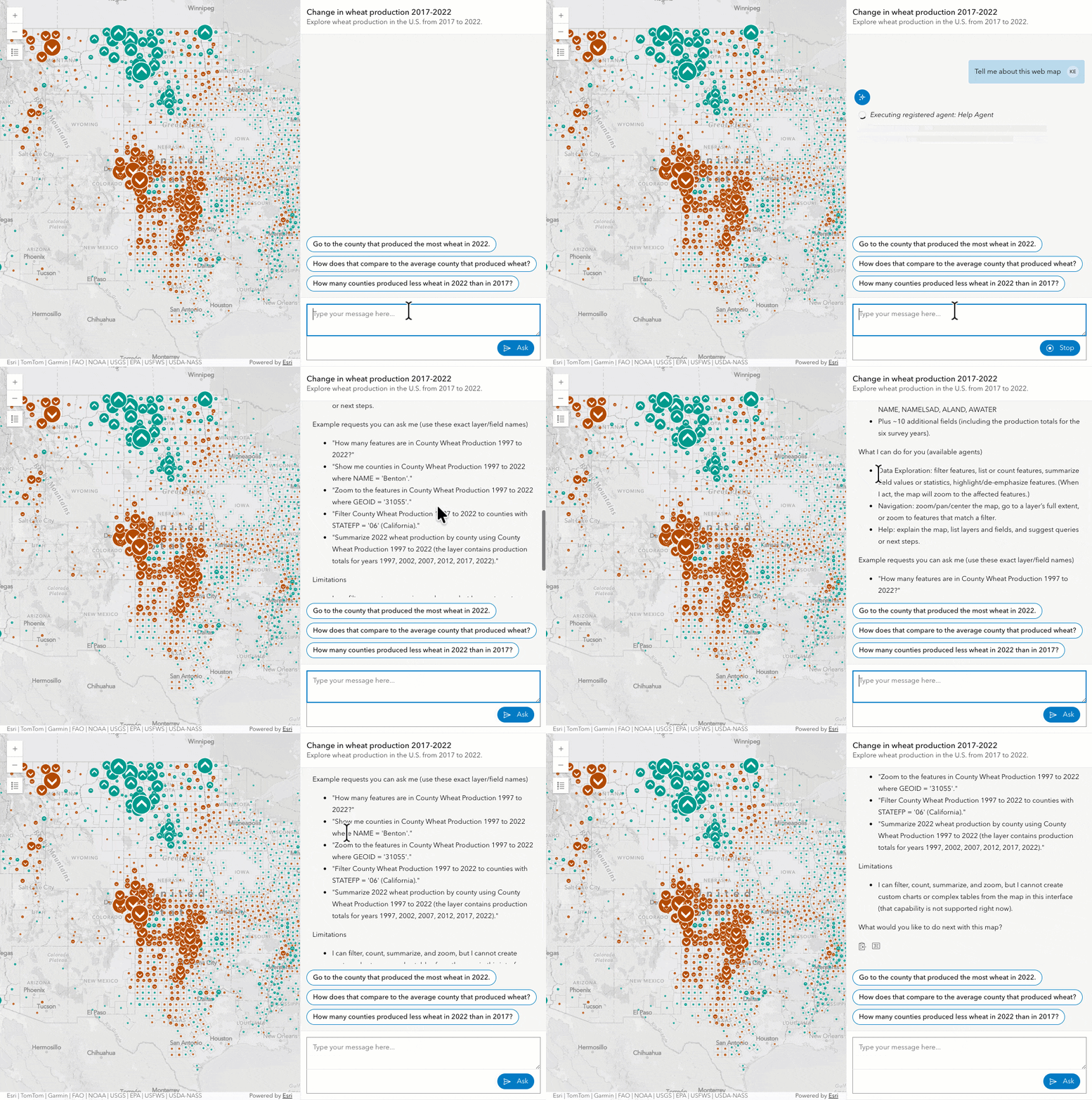
See the Help agent documentation for details of this agent’s capabilities, its limitations, and examples of how a user can interact with it.
Custom agents
In addition to the agents provided by JS Maps SDK, developers can create custom agents to extend the capabilities of the arcgis-assistant component. A custom agent could be created to provide specialized data analysis, integrate with external services, or support domain-specific queries specific to an application.
For example, in the video below, a custom agent calculates a drive time from a location using natural language.
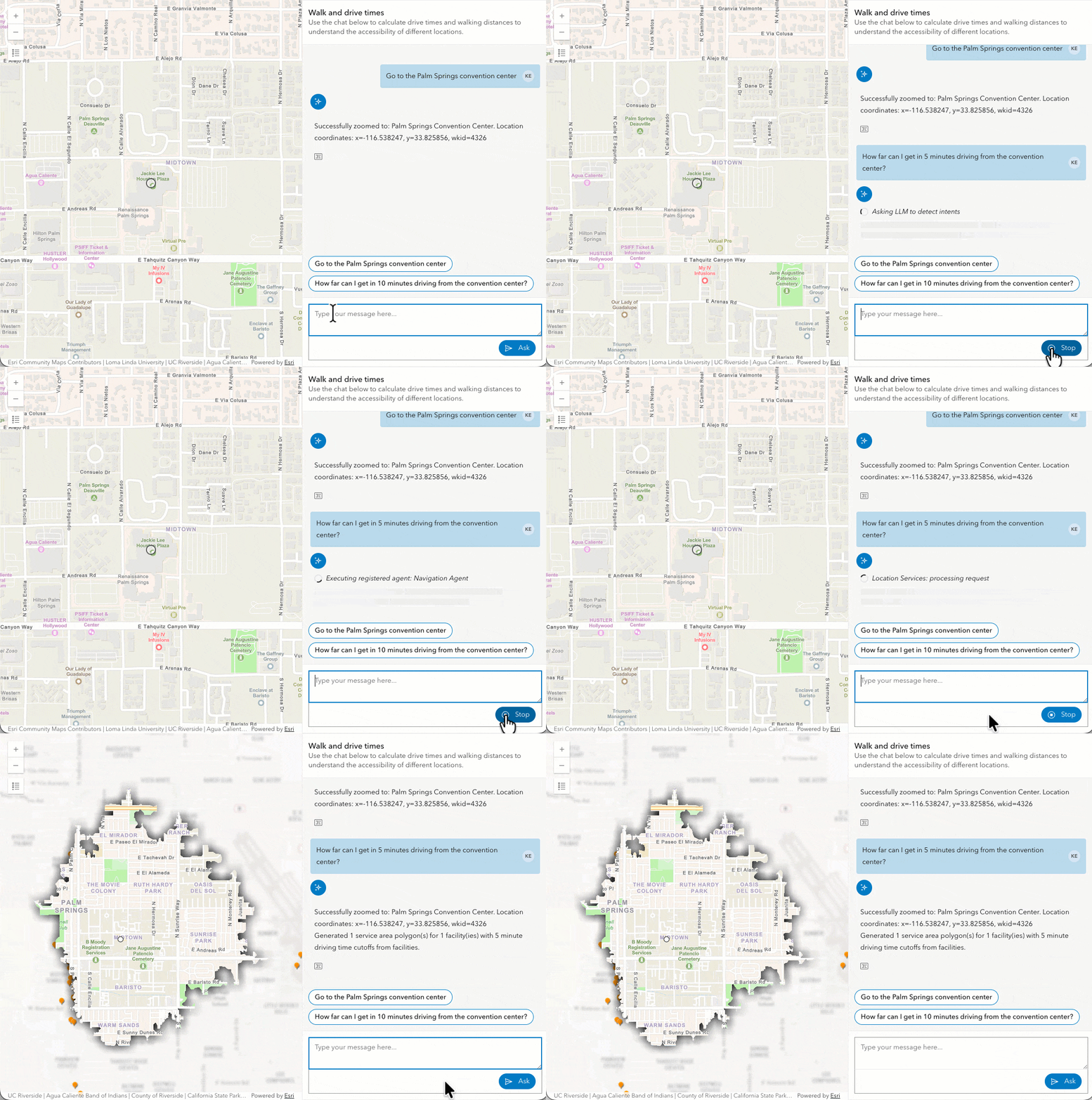
Learn more about how to create custom agents in the documentation, which includes links to the code for this example and others.
Web map setup
The primary context of the out-of-the box agents are the feature layers within a web map. User questions often target data in specific layers. To resolve these user requests, agents send layer metadata to the LLM along with the user’s input so the agent will know which layers and fields to target.
To work within the LLM context limits and improve response accuracy, web maps used in the arcgis-assistant component must have vector embeddings stored as a resource to the web map item. Embeddings are generated in the “Manage AI vector embeddings” section of the settings tab of the web map item.

If you don’t see this option in the web map settings, then you must first enable AI assistants for your ArcGIS Online organization.
Web map embeddings are vector representations of the layer titles and field metadata for all feature layers in the web map. This allows agents to determine the layers and fields that are most relevant to the user’s natural language query before sending the information to the LLM.
Once the embeddings are generated, the web map may be used by any of the out-of-the-box agents.
Layer metadata
Vector embeddings require good layer metadata, including field aliases and descriptions. It is best if these are authored by someone familiar with the data, but this metadata can also be generated using the Item details assistant (beta).
Read more about embeddings and setting up your web map for agentic applications in the documentation.
Conclusion
We look forward to seeing the apps you create with these components! Remember, AI components are currently in beta. Due to the non-deterministic nature of generative AI, there may be inaccuracies or unexpected behavior when using the out-of-the-box ArcGIS agents. We are actively working on improving the accuracy and capabilities of the agents. During the beta period, we welcome your feedback to help us improve and shape the future of these capabilities.
Also, check out this FAQ for more information.




Hi Kristian & Team
I am really impressed with the new AI components in the JS Maps SDK 5.0 beta, which I was waiting/expecting for… and I’m excited to integrate them into our project too!
As we plan our architecture, I have a few quick questions:
Custom LLMs: Is there a way to plug our own custom LLM endpoint (like a private Azure OpenAI, Gemini model) into the out-of-the-box Data Exploration agent, or is building a custom the only way to achieve this?
Usage Costs: Since the out-of-the-box agents route through Esri’s hosted AI services, will there be any ArcGIS Online credit costs or usage fees associated with these LLM calls?
Session Memory: The active session memorization works great. Is there a way via the SDK API to extract and save this chat history so a user can safely reload the app and resume their exact conversation?
Regards
Nanda Kishore Jampala
> Is there a way to plug our own custom LLM endpoint (like a private Azure OpenAI, Gemini model) into the out-of-the-box Data Exploration agent, or is building a custom the only way to achieve this?
Currently, the only way to achieve this is with a custom agent. You cannot designate your own model for use in JS SDK provided agents, including Data Exploration.
> Usage Costs: Since the out-of-the-box agents route through Esri’s hosted AI services, will there be any ArcGIS Online credit costs or usage fees associated with these LLM calls?
During the beta or preview periods, there will be cost for building or using these agents or for their associated LLM calls. However, when the components become available for general release, then we will transparently communicate the pricing strategy for using these agents.
> Session Memory: The active session memorization works great. Is there a way via the SDK API to extract and save this chat history so a user can safely reload the app and resume their exact conversation?
We currently don’t have an experience for this. However, you could potentially use the messages property of the component to preserve memory for a future session for a user. You would need to define the logic for that though.
The AI Components are a fantastic addition to the ArcGIS Maps SDK for JavaScript and feel like a clear step toward the future of GIS.
Enabling intuitive, AI-driven interaction with spatial data has great potential for both developers and end users.
I hope to see these capabilities adopted in standard applications like Experience Builder and further enhanced through richer, built-in AI agent tools.