The new ArcGIS Maps SDK for JavaScript’s @arcgis/create CLI tool in release v5.0 allows you to quickly scaffold modern web mapping applications using templates that are tailored to your favorite frontend development environment.
Whether you’re integrating the JavaScript Maps SDK with npm into an existing project or starting anew, the CLI tool lets you get started in no time. While the tool can’t directly insert code into an existing app, it offers a comprehensive, working example that serves as a valuable reference.
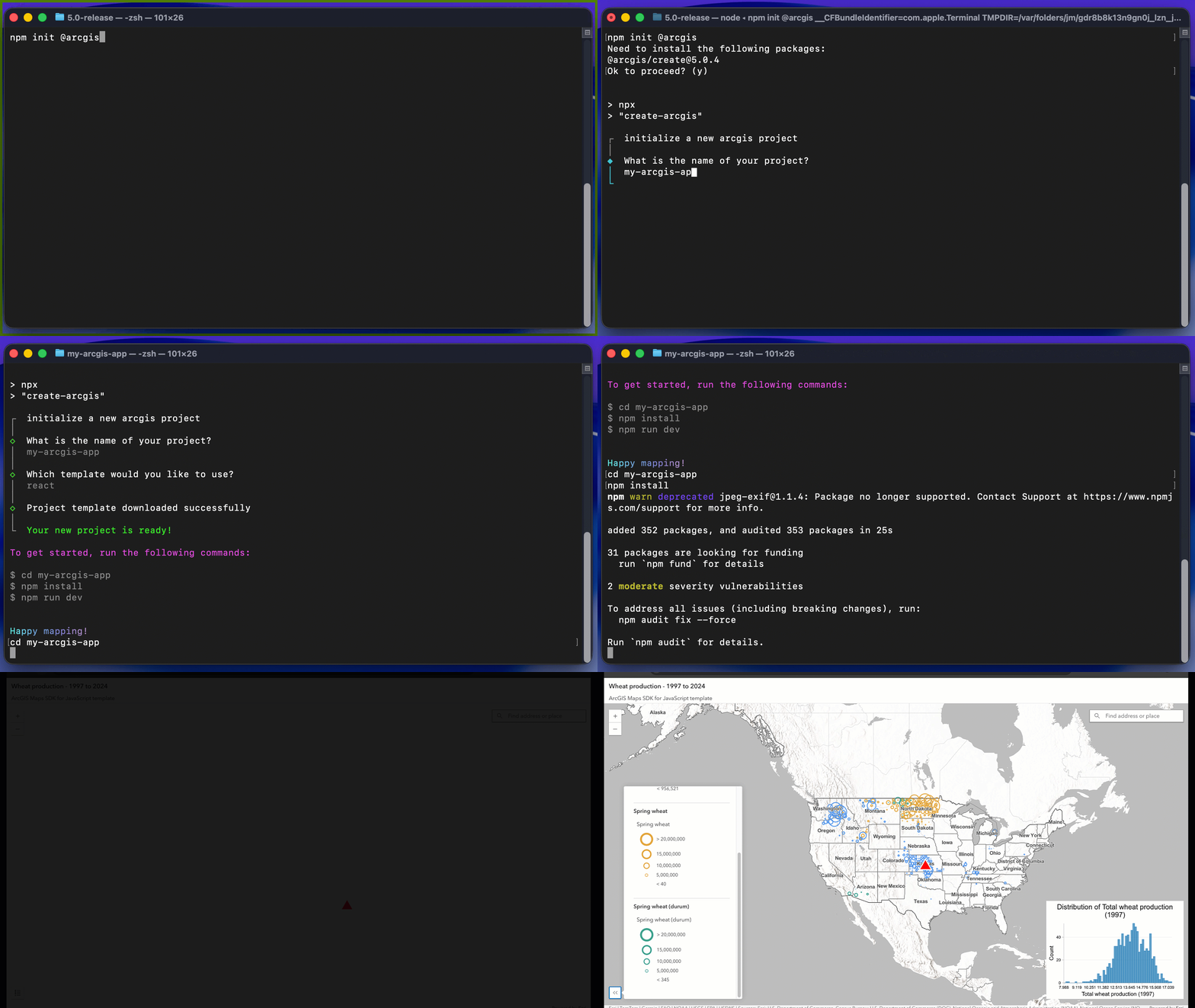
To try the tool right away, run npm init @arcgis or npx @arcgis/create in your terminal (full setup instructions are below).
What is the ArcGIS Maps SDK for JavaScript, and what’s included?
The ArcGIS Maps SDK for JavaScript is a powerful mapping and spatial analysis technology that enables any developer to build compelling web GIS experiences. At Esri, we use this foundational SDK to develop geospatial applications. These applications allow users to create, analyze, collaborate on, and share their maps.
The JavaScript Maps SDK is made up of three main parts:
- The Core API offers the main functionality for maps, layers, visualization, and client-side analysis through its classes, methods, properties, events, and type definitions.
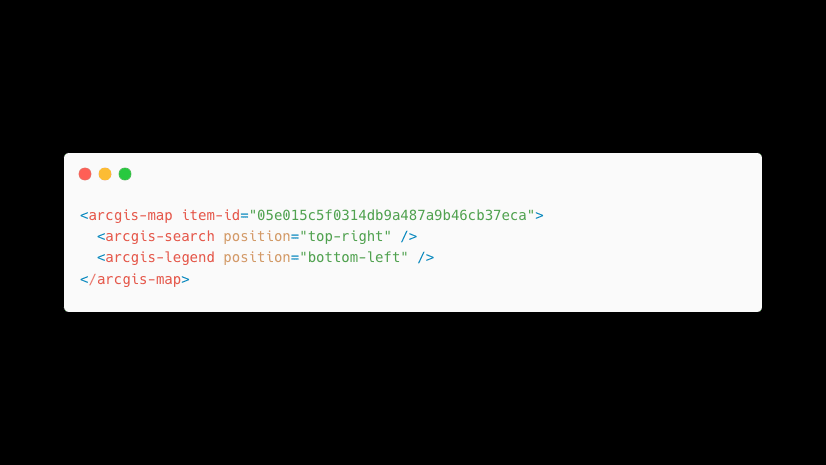
- Components provide W3C standards-based, framework-agnostic UI web components designed for declarative programming, enabling seamless integration into any frontend. The SDK’s component packages, like Map components, utilize Calcite components as foundational elements to ensure a consistent and accessible UI.
- The documentation includes a range of resources to facilitate getting started, such as programming patterns, tutorials, application templates, sample code, and references.
Why use @arcgis/create?
Manually integrating a library into a frontend application takes time, and using an AI assistant for this task might lead you to use an outdated version of the library unless you explicitly tell the assistant otherwise.
This is why the SDK includes application templates as a helpful starting point in your preferred frontend. They incorporate best practices for the Core API, Map, Charts, and Calcite components and require no additional setup, making it easier to incorporate code drawn from guides, blogs, references, or sample code. Now, the @arcgis/create CLI further simplifies creating a new ArcGIS Maps SDK for JavaScript web application.
Each template incorporates the latest version of the ArcGIS Maps SDK for JavaScript and its dependencies. They feature secure authentication flows for sensitive items, such as private WebMaps secured at the organizational level, and use TypeScript for type safety and an enhanced developer experience.
These templates also serve as minimum reproducible samples that developers can use for troubleshooting with tech support to clarify the sources of bugs, specifically whether they come from the frontend framework and build tool or the SDK.
Get started
The @arcgis/create CLI tool offers a range of templates tailored for specific workflows, frameworks, or build tools. You can choose from options like React, Angular, Vue, Vite, Webpack, or a minimal vanilla JavaScript application without a build step, leveraging the ArcGIS CDN.
The CLI tool works with the npm init or npx command. Ensure you have Git installed along with the latest LTS version of Node.js and npm before you begin.
Run npm init @arcgis or npx @arcgis/create to quickly set up a new web mapping application with interactive prompts.
If you’d prefer to skip the interactive prompts, there are also CLI options when using npx to specify your project name and preferred template:
npx @arcgis/create -n my-arcgis-app -t vite
This command scaffolds a new Vite-based app, preconfigured with the JavaScript Maps SDK, Calcite, OAuth, and TypeScript.
What about templates for other scenarios?
The application framework templates aren’t the only ones included. In some cases, you might want a template that covers specific workflows you wouldn’t normally find in sample code or tutorials. For example, you can try an AI components (beta) template to create your own custom agent:
npx @arcgis/create -n my-arcgis-app -t "ai-components-custom-agent-hil-react (beta)"
Explore the interactive prompts to see which additional templates are available.
Learn more
Check out our Get started documentation for more details. If you’re more interested in manual setup processes, we’ve got you covered too:
Try it today
Whether you’re building a prototype or a production-ready mapping app, @arcgis/create gets you started in seconds with best practices built in. Try it today and share what you build!

I can’t get this going. I run the following: C:\inetpub\wwwroot>npm init @arcgis. I get as far as selecting a template and it throws errors: Error downloading project template. An unexpected error occurred while creating your project. Please try again.
Hi, Jared. To use the Create CLI tool on Windows, please ensure you have write permissions to the folder, git is > 2.25.0 & node > 20. I was able to reproduce the error, and the solution was to run the command with admin privileges for that particular directory.