
Snowflake has become a key component of many organizations’ modern data stack, providing a scalable platform for storing and analyzing large volumes of enterprise data. ArcGIS brings geographic context to that information through advanced visualization and spatial analytics.
ArcGIS and Snowflake can be used together in several ways depending on your goals. You can access Snowflake data directly in ArcGIS for mapping and analysis, create and maintain datasets in ArcGIS using data from Snowflake, build advanced data integration workflows between the two systems, or use ArcGIS Location Services directly in Snowflake.
In this third entry in The Science of Where in the Modern Data Stack blog series, we’ll explore these four integration approaches and discuss when each may be the right fit.
To jump to a specific method, use these links:

Use Query Layers to Access Snowflake Data Without Moving It
Need to visualize or analyze data stored in Snowflake without copying it into ArcGIS?
Query layers provide a straightforward way to do exactly that. After establishing a database connection to Snowflake in ArcGIS Pro, you can create a query layer using SQL and use the results for mapping and analysis. Because the data remains in Snowflake, updates made to the source data are immediately reflected when the layer is refreshed.
Additionally, you can leverage any SQL function supported by Snowflake in your query layer definition. This includes joins, filters, aggregations, and geospatial functions that can be used to shape the data returned to ArcGIS. Rather than bringing entire tables into ArcGIS, organizations often use query layers to create analytical views of their data that are optimized for visualization and analysis.
For organizations using ArcGIS Enterprise, query layers authored in ArcGIS Pro can be shared as referenced feature layers or map image layers. After registering the Snowflake data source with ArcGIS Enterprise as a data store item, these web layers can maintain a connection to Snowflake and allow maps, apps, and dashboards to access current information without requiring a separate copy of the data to be stored in ArcGIS.
To see how Snowflake data can be integrated with ArcGIS Pro and ArcGIS Enterprise via query layers, see this video:
For organizations interested in integrating data from Snowflake with ArcGIS Pro and ArcGIS Enterprise, you can learn more about the relevant best practices by reviewing this ArcGIS Blog: Best practices when integrating data from cloud data warehouses with ArcGIS Pro and ArcGIS Enterprise.
To learn more about creating query layers in general, see this related ArcGIS Blog: The Science of Where in the Modern Data Stack: Data Integration Approaches and Methods in ArcGIS.
Best used for: Live visualization and analysis of data stored in Snowflake.

Prepare Snowflake Data for Mapping and Analytics with ArcGIS Data Pipelines
Looking for a way to integrate Snowflake data with ArcGIS Online or ArcGIS Enterprise using a fully integrated web app?
ArcGIS Data Pipelines is a no-code, visual data engineering capability that streamlines data integration and preparation in ArcGIS. Using an intuitive, drag-and-drop app, you can connect to data in Snowflake and other supported sources, apply built-in tools to clean, format, and combine datasets, and create or update layers and files for downstream visualization and analytics. Workflows can be saved, shared, reused, and automated, helping reduce manual effort and keep information current as source data changes.
Data Pipelines is particularly useful when Snowflake data needs to be prepared before it is ready for use in ArcGIS. For example, you may need to combine Snowflake data with GIS layers, standardize schemas, calculate new fields, create geometry from tabular data, or automate recurring data updates. Data Pipelines makes these recurring data integration and preparation workflows easier to build, understand, and maintain.
For ArcGIS Enterprise users, ArcGIS Data Pipelines can also complement query layers. While query layers are often used when data is already structured and ready for visualization and analysis, Data Pipelines is a better fit when Snowflake data needs additional preparation or transformation before it can be used in downstream workflows. Common examples include blending Snowflake data with GIS layers, enriching data with calculated fields, transforming schemas, or creating geometry from tabular records.
To see a great example, watch the video below. In this demonstration, data from multiple Snowflake tables is joined together and then combined with an ArcGIS feature layer, with the resulting information being used to power a dashboard in the natural resources sector.
To learn more about ArcGIS Data Pipelines, see the resources listed in this related ArcGIS Blog: The Science of Where in the Modern Data Stack: Data Integration Approaches and Methods in ArcGIS.
Best used for: Web-based ETL for preparing and automating Snowflake data for use in ArcGIS.
Build Advanced Integration Workflows with ArcGIS Data Interoperability
Need to move data between ArcGIS and Snowflake?
Some integration scenarios require an advanced extract, transform, and load (ETL) solution. Organizations may need to synchronize information between business systems, convert data between specialized formats, support bidirectional workflows, or implement sophisticated transformation logic. For these requirements, ArcGIS offers ArcGIS Data Interoperability.
Built on Safe Software’s FME technology, ArcGIS Data Interoperability extends ArcGIS Pro with hundreds of readers, writers, transformers, and integration tools. Using a visual authoring experience, users can create reusable ETL workflows that connect Snowflake with databases, cloud platforms, APIs, GIS systems, and enterprise applications. These workflows can extract, transform, validate, and load information while supporting complex business rules and data exchange requirements.
A common use case is maintaining synchronized information across systems. For example, an organization may maintain authoritative parcel information in an enterprise geodatabase in SQL Server while also using Snowflake for reporting, analytics, and enterprise data science initiatives. An ArcGIS Data Interoperability workflow can identify changes made to parcels and update only the modified records in Snowflake, reducing unnecessary processing while keeping systems aligned. This flexibility makes Data Interoperability a powerful option when integration requirements extend beyond the capabilities of standard data preparation workflows.
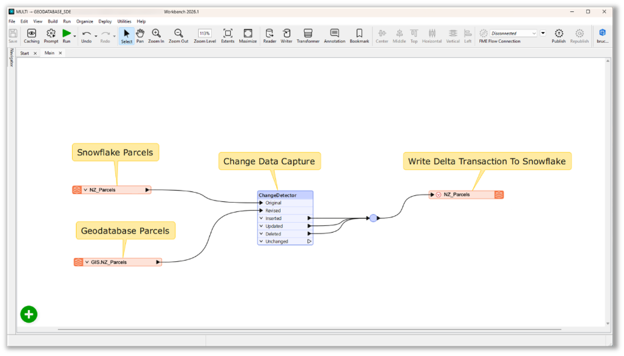
To automate the execution of spatial ETL tools created using ArcGIS Data Interoperability, you can schedule the tool from ArcGIS Pro. Beginning with ArcGIS Enterprise 11.4, web tools can also be scheduled directly through ArcGIS Enterprise, allowing ETL processes to run automatically on the server. Alternatively, web tools can be shared to ArcGIS Enterprise 11.x or later and scheduled programmatically using the Enterprise Sharing API.
To learn more about this ArcGIS extension, see the resources listed in this related ArcGIS Blog: The Science of Where in the Modern Data Stack: Data Integration Approaches and Methods in ArcGIS.
Best used for: Desktop-based, advanced ETL for complex integration workflows, including moving data from ArcGIS to Snowflake.
Bring ArcGIS Location Services to Snowflake using ArcGIS Location Platform
ArcGIS Location Platform provides access to Location Services, allowing developers to integrate capabilities such as geocoding, routing, basemaps, places, elevation and spatial analysis directly into custom applications and business processes. These services can be used to add geographic context to business data while allowing organizations to continue working within the platforms and workflows they already use.
For organizations investing in Snowflake as a central component of their modern data stack, this approach opens the door to bringing location intelligence from ArcGIS directly to where data is stored, enriching it with valuable geographic information.
Esri and Snowflake continue to partner and invest in deeper integrations between ArcGIS and Snowflake. Both organizations co-developed an application that will be available in the Snowflake Marketplace. Soon, users will be able to geocode tabular records directly within Snowflake using a Snowflake-native app, allowing organizations to spatially enable their data without moving it outside the Snowflake environment. Once more information is available, we’ll be sure to update this blog.
Best used for: Extending Snowflake workflows with ArcGIS geocoding, routing, and spatial enrichment capabilities.
In this third entry in The Science of Where in the Modern Data Stack series, we explored four ways ArcGIS integrates with Snowflake. Query layers provide live access to Snowflake data for visualization and analysis, while ArcGIS Data Pipelines helps prepare, transform, and automate data for mapping and analytics workflows. For organizations with more advanced data transformation requirements, including bidirectional ETL workflows, ArcGIS Data Interoperability provides a flexible integration solution. Finally, ArcGIS Location Platform allows organizations with development expertise to bring ArcGIS capabilities such as geocoding and routing directly to third-party systems, including Snowflake.
Whether your goal is live access to Snowflake data, automated data preparation, enterprise integration, or enriching business data with geographic context, ArcGIS provides multiple ways to bring location intelligence into your modern data stack.
If you’d like to learn more about how ArcGIS integrates with Snowflake, review the Snowflake and ArcGIS integrations page in the ArcGIS Architecture Center.
Questions, suggestions, or need help getting started? Connect with us on Esri Community or reach out to your local Esri representative.





Commenting is not enabled for this article.