
ArcGIS for AutoCAD is a plug-in application that connects GIS and CAD teams, while also centralizing project data for use by other stakeholders. Whether gathering existing conditions or transacting on the system of record, CAD technicians, civil engineers, and surveyors become collaborators in GIS processes.
Use the plug-in to contextualize site data with maps and imagery from your ArcGIS system and ArcGIS Living Atlas of the World. Consume, create, and share ArcGIS web layers interchangeably as design data whether working in Autodesk AutoCAD® or Civil 3D®. Draw upon geographic data as needed and make better informed design decisions by combining CAD geometry with location intelligence.
This release of ArcGIS for AutoCAD delivers new capabilities to enhance civil design and improve collaboration between the office and the field. Key updates include support for related records, m-enabled polylines, and more. In addition, a new Microsoft .NET software development kit (SDK) gives developers expanded options to customize, automate, and extend ArcGIS for AutoCAD.
Release highlights
Dive deeper into the latest capabilities now available in ArcGIS for AutoCAD by visiting the product documentation and try them out for yourself. Have questions, feedback, or product ideas to share with our team? Visit and make a post in Esri Community today.
New support for related records
ArcGIS for AutoCAD now enables users to instantly view and edit related GIS data, such as asset conditions from field inspections, directly within their designs. With this capability, civil engineers can make more informed decisions using up-to-date information. This helps identify patterns, update asset attributes in bulk, and make more informed design recommendations. The result is tighter CAD and GIS collaboration and faster, data-driven decision-making across project and asset teams.
The use of related records is enhanced by branch versioning, which allows teams to incorporate and package design recommendations without overwriting project data. To make edits to existing related records, you’ll need a Contributor user type or higher.
New support for m-enabled polylines
ArcGIS for AutoCAD now supports m-enabled polylines, preserving alignment information and enabling civil-to-field workflows. Civil engineers can use asset centerline data from ArcGIS to better inform infrastructure designs, such as roads, railway tracks, and pipelines. With this enhancement, CAD users can add GIS web layers to contextualize project site plans, while stationed centerlines can be shared with field crews to help them situate themselves accurately and efficiently on site.
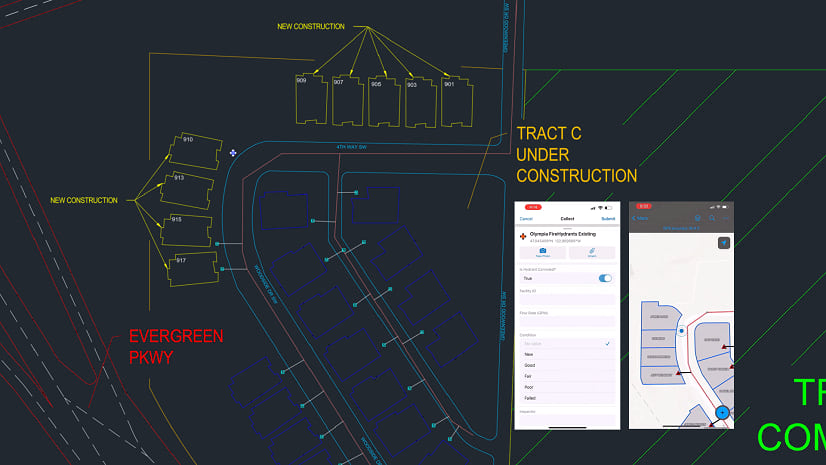
This lets field teams use web maps to walk along project alignments — like a proposed rail line — and easily collect site data such as protected tree locations, all with stationing and offset context. As a result, CAD designs and GIS workflows stay in sync, making it easier to integrate and share both design intent and field data across project teams.
Customize, automate, and extend with the Microsoft .NET SDK
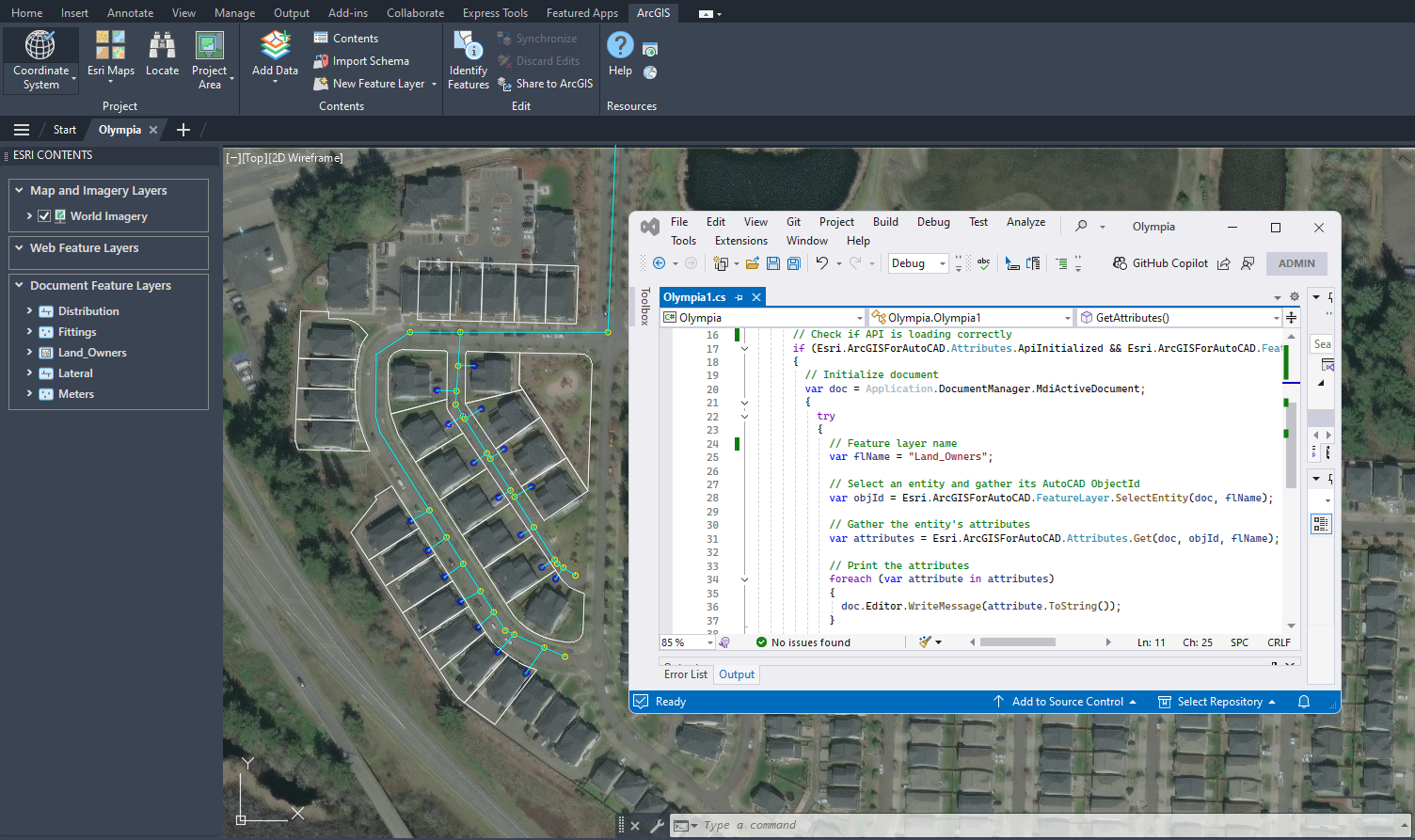
Users can now customize ArcGIS for AutoCAD exactly the way they want. This release adds a Microsoft .NET SDK to help users automate workflows, extend functionality, and create experiences tailored to the needs of their organization. Along with the AutoLISP SDK, users now have more ways to automate and extend ArcGIS for AutoCAD, such as supporting asynchronous workflows.
To get started, install the latest version of ArcGIS for AutoCAD and view the documentation to learn more about the various supported methods. Then, access our GitHub repository where you’ll find .NET samples alongside LISP scripts. We’re interested in hearing your feedback and enhancement ideas, which you can share on our GitHub site or by posting in Esri Community.
Other enhancements
Add web feature layers by URL
Users can now select specific layers from a feature or map service for an easier way to access the GIS data they need. The updated Add Data button lets you browse and add needed layers to CAD drawings, as well as view feature counts when a coordinate system has been set.
Support for hatches
Users can better preserve the design intent of areas within drawings when working between CAD and GIS. Hatches are now supported as a symbol type on polygons in web and document feature layers, making it possible to include boundaries and edit hatch properties like pattern, angle, and more.
Support for multipoint layers
Civil 3D users can now create and update surface models more efficiently by using data from the GIS. Multipoint layer support improves how ground information is shared between ArcGIS and Autodesk design environments to generate and maintain surfaces with GIS terrain data.
Resources
Get started with four refreshed tutorial series
If you’re new to using ArcGIS for AutoCAD, learn the basics and advance your skills to enable CAD and GIS collaboration between the office and field. You’ll also find new tutorial series for getting started in Civil 3D and preparing CAD floor plans for use in ArcGIS Indoors.
Start learning ArcGIS for AutoCAD

GIS, CAD, and drones for land surveying innovation
Environmental and engineering consulting firm Dudek uses drones and GIS integrated with CAD to share real time project data with teams and clients. Read how they brought CAD and reality mapping together with GIS for faster, more informed decision-making.

Miami International Airport gets a new view with Indoor GIS
One of America’s busiest airports used ArcGIS for AutoCAD to highlight issues in CAD files before import, paving the way for a detailed, interactive indoor map with ArcGIS Indoors. Read how this integration of CAD and GIS data now helps airport teams visualize, manage, and update data on a map, streamlining decisions and supporting future facility planning.

Get started today
If you use Autodesk AutoCAD or Civil 3D, download the latest version of ArcGIS for AutoCAD today at no cost.




Article Discussion: