In June 2022, the ArcGIS Business Analyst Pro 3.0 release introduced a modern approach to working with local data behind your organization’s firewall or on your local computer. This change introduced the “connectable dataset,” which eliminated the extra step to install the data using Microsoft Windows Installer, to access the demographic, points of interest, streets, geocoding, and routing data.
With the June 2026 release, all Business Analyst data packages will only be released as connectable datasets, eliminating the cumbersome and time-consuming installation process.
What are the benefits of connecting to datasets?
These connectable datasets are a flexible and dynamic way to access Business Analyst data, providing:
- Data on the go: Take your data with you on external drives and connect dynamically as needed.
- Easy to update, extend, and patch: No need to uninstall when there is a new version of data or when your licensing needs change.
- Only download and configure one copy of the data: Reduce the storage of 125 gigabytes of data for every user to one single, shared storage location.
- Access from various locations: Improve administrative management for modern storage and user authentication by pointing to a local or shared drive while using centralized or distributed user access.
- Separate licensing from the datasets: Rather than each user needing to install a copy of the data on their own computer, multiple users can access a single copy of the data stored in a single, shared location. The shared dataset is not separately licensed, so each user must have their own data license installed on their computer, along with the appropriate software license, to use the shared dataset.
What is changing?
As part of the upcoming June 2026 release, you will no longer be required to run Microsoft Windows Installer after downloading the data from My Esri before unpacking it. You simply connect to the data in Business Analyst Pro. This is a huge benefit in terms of saving time and storage space.
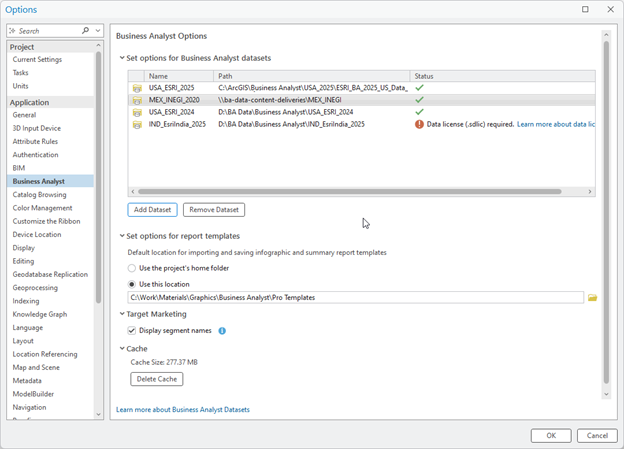
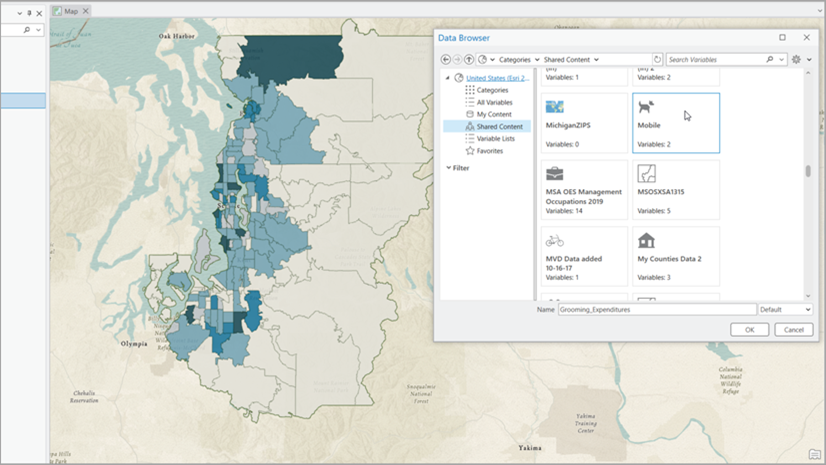
ArcGIS Business Analyst Pro data management panel showing data that can be connected using the computer’s internal hard drive, a remote shared data drive and external portal media. Note that all data needs to be licensed for the computer running ArcGIS Business Analyst Pro.
What do I need to know as a Business Analyst data user?
Things to consider:
- Connectable datasets are only available for ArcGIS Business Analyst Pro 3.0 or later. ArcMap and older versions of ArcGIS Business Analyst Pro are not supported and will not be able to access or use the 2026 data packages.
- Data packages for the United States and international locations created after June 2022 onwards can be accessed via the connectable data access. All U.S. and international datasets will switch to the connectable datasets model beginning in June 2026.
- Organizations that have automated data and software deployments that rely on installers to push automatic updates will need to be updated to support this data connection requirement.
- Performance can be impacted when pointing to data located on a remote network share due to network performance constraints.
- Applying an SDLIC data license is required on any machine that runs ArcGIS Business Analyst Pro used to access the connected datasets.
- It is recommended to restart ArcGIS Pro after adding any connectable dataset and/or applying a data license.
We think you and your systems administrator will appreciate this new, simpler, and more modern way to access and configure local content in ArcGIS Business Analyst Pro. As always, keep providing us great feedback and ideas on what you want and how we can keep improving and innovating!
Resources
We hope you’ll explore more capabilities in Business Analyst. To continue your Business Analyst journey, visit the following resources:
- Business Analyst product overview page
- Review pricing and purchase Business Analyst
- Business Analyst resources page
- LinkedIn user group
- Business Analyst Web App video channel
- Business Analyst Pro video channel
- Business Analyst on Esri Community
- Business Analyst Web App login page
- Email the team: businessanalyst@esri.com



Article Discussion: