
Image featuring a predominantly black background with a thin horizontal red line along the top edge.

Airport Planning, Design and Development

ArcGIS brings spatial, environmental, and design data together to support smarter airport planning, design, and construction decisions.

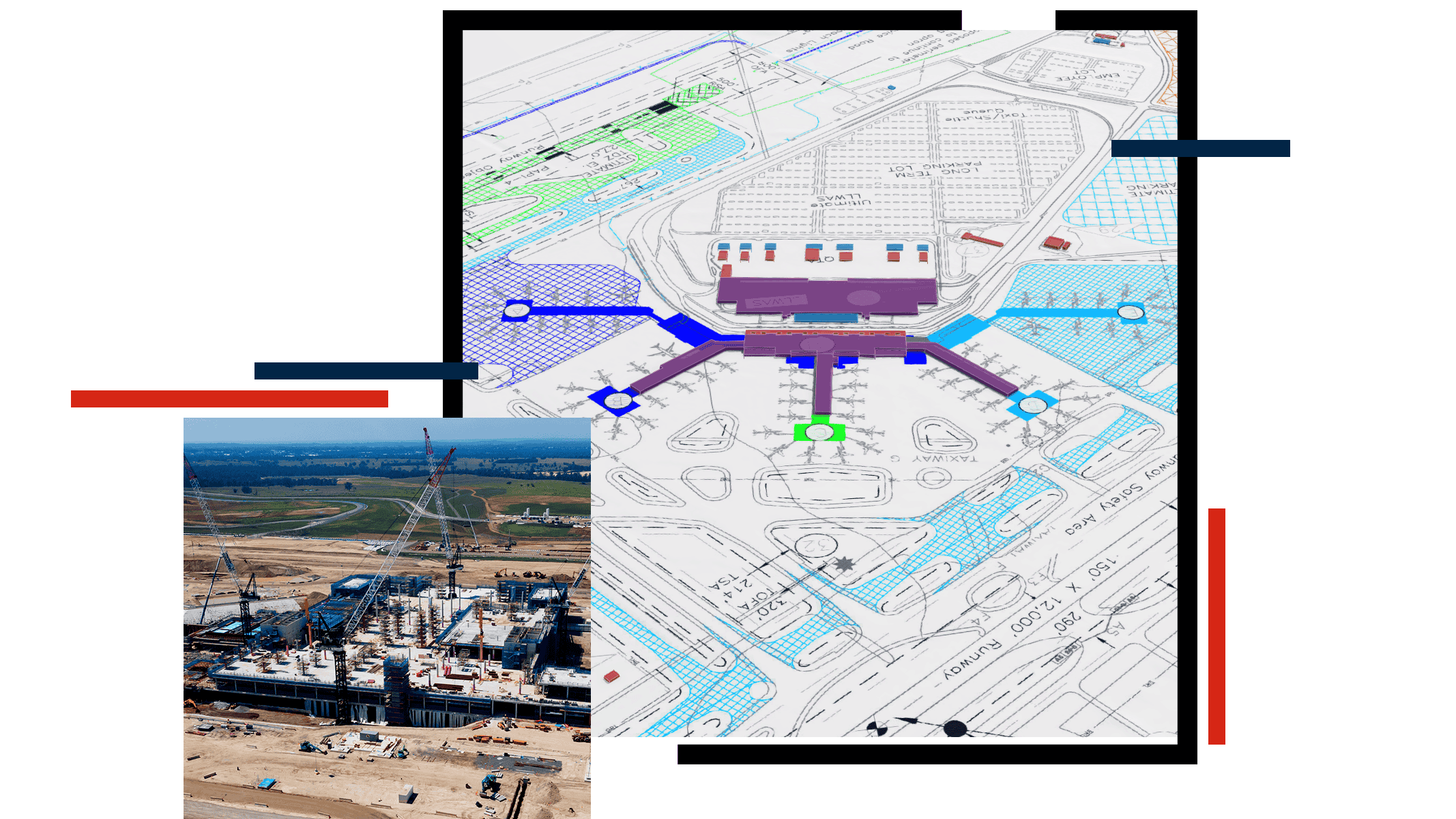
Composite image showing an airport construction site alongside a detailed architectural site plan.

Unify airport construction management and capital program data with ArcGIS

ArcGIS brings together airport asset, project, BIM, CAD, and real-time data models into a single, location-based airport planning software for airport project management.

Dashboards visualize how airport construction activities interact with assets and operations, helping project managers coordinate long-term capital programs, reduce disruption, and transition long-term projects smoothly into operations.

Spatial insights support better program management, project delivery, and budgeting by revealing underperforming areas and resource gaps.

Link airport planning, construction, and operations data

ArcGIS provides a shared spatial foundation that connects airport planning, construction, and operations—helping teams work from the same trusted information as the airport changes.

Plan and deliver airport projects with integrated, data driven workflows

ArcGIS gathers authoritative location‑based data—such as land use, environmental constraints, infrastructure, and hazards—into a single system. By analyzing how and where these factors intersect, teams can create feasibility studies and conduct site selection, risk assessments, and environmental impact analyses before airport construction begins.

A digital project management dashboard displays the Project P6 Schedule with multiple task metrics.

Design and build from a real-world perspective

ArcGIS brings 3D BIM models into a shared geospatial environment. Teams can plan and build with a clear understanding of the surrounding environment. With ArcGIS, airport planning and development teams can:

  • Evaluate building placement, scale, and constraints by placing BIM models in real-world context.
  • Coordinate site logistics and construction phasing across active airport operations.
  • Integrate infrastructure and utilities with existing airside and landside systems.
  • Assess impacts before construction to reduce conflicts and support smooth project delivery.

ArcGIS places 3D BIM models in a shared, real world context of your airport. This helps airport planning and design teams coordinate and build with a clear understanding of surrounding assets, operations, and constraints.

A detailed 3D building information model shows the interior infrastructure of an airport terminal.

Support post-construction operations with connected airport data

Bring real‑time asset and operations data into ArcGIS and create one shared resource for post-construction airport facility management.

Use maps and dashboards to:

  • Visualize asset performance.
  • Manage utilities.
  • Track maintenance, services, and work orders.

ArcGIS also supports digital twin workflows by showing how facilities and operations change over time.

Digital dashboard visualizes building energy and temperature data.

Real-world stories of innovation powered by ArcGIS

ArcGIS Blog

Transforming airport revenue management with GIS

Learn how airports optimize indoor space, use real-time data, and deploy innovative solutions to boost operations and improve passenger experience.

Read the blog

Products for airport planning and development

Use airport planning, design, and construction software to manage upgrades from concept through long-term operations.

Previous
Next

Frequently asked questions

Find answers to common questions about using ArcGIS airport management software.

GIS is the airport project management software that supports airport planning and construction by giving every stakeholder a shared, up-to-date view of where work is happening, what is changing, and how construction will affect operations—so teams can make faster decisions and reduce risk.

Airport planning, design, and construction software solutions work together when they share a common system of record: GIS, which connects projects, assets, BIM/CAD, and operational constraints to the same real‑world locations. As information moves from concept to design to delivery, teams can coordinate phasing, reduce conflicts, and keep airport operations informed.

Yes. Modern airport design software can integrate BIM and CAD data by connecting those files to a shared, location-based system (GIS). This lets teams view 2D drawings and 3D models in a real-world context, alongside existing airport assets, utilities, and operational constraints, so design and construction decisions are based on one source of truth.

Contact sales

Please share your information and our sales team will contact you soon. We look forward to communicating with you.