Coordinate systems are fundamental knowledge for a GIS specialist. But there’s so many confusing terms!
Can’t remember the difference between this geodesy thing and that? I’ve put together a list of things that have confused me at one time or another when working with coordinate systems. Hopefully these explanations will help clear things up for you too.
What is the difference between:
- A GCS and a PCS?
- A datum and a geographic coordinate system?
- A projection and a projected coordinate system?
- WKT and WKID?
- The Define Projection tool and the Project tool?
- Projection on the fly and geographic transformations?
- A spatial reference and a coordinate system?
What’s the difference between a GCS and a PCS?
A geographic coordinate system (GCS) is a reference framework that defines the locations of features on a model of the earth. It’s shaped like a globe—spherical. Its units are angular, usually degrees.
A projected coordinate system (PCS) is flat. It contains a GCS, but it converts that GCS into a flat surface, using math (the projection algorithm) and other parameters. Its units are linear, most commonly in meters.
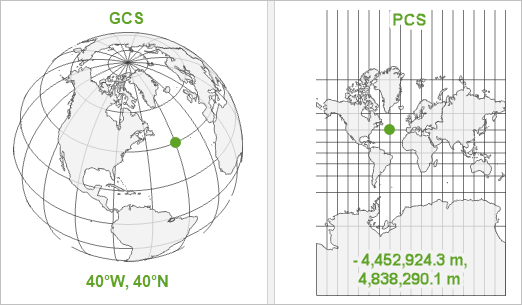
A GCS is necessary for data to know where exactly on earth’s surface it is located. A PCS is necessary to draw the data on a flat map.
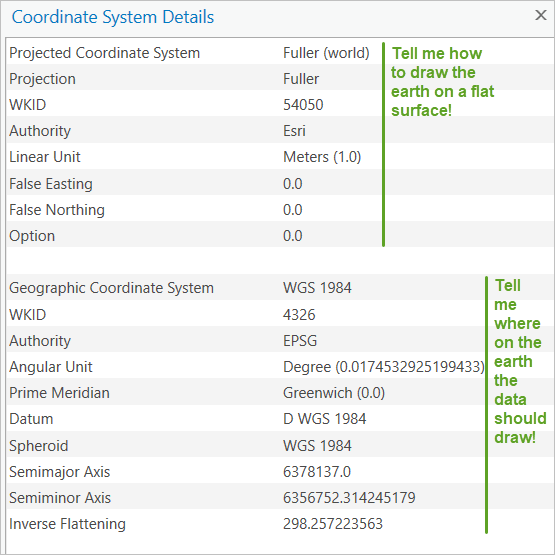
To learn more, see Geographic vs Projected Coordinate Systems.
What’s the difference between a datum and a geographic coordinate system?
A datum is one parameter in a geographic coordinate system (GCS).
The datum is the part of the GCS that determines which model (spheroid) is used to represent the earth’s surface and where it is positioned relative to the surface. Since the earth’s surface is not perfectly smooth or round, there are many different datums designed for different parts of the world.
A GCS is the full definition of how to tie coordinate values to real locations on the earth. In addition to a datum, a GCS includes a prime meridian (which specifies the location of 0° longitude), and an angular unit (often degrees).
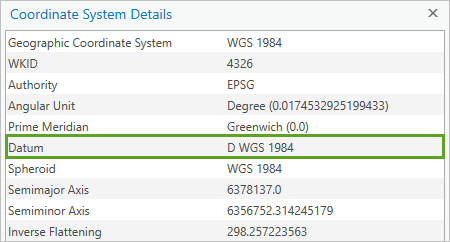
The datum includes a spheroid, which is defined by its semimajor axis, semiminor axis, and inverse flattening values.
What’s the difference between a projection and a projected coordinate system?
A projection is one parameter in a projected coordinate system (PCS).
The projection is the mathematical algorithm that defines how to present the round earth on a flat map. You can see all of the projections available in ArcGIS in the List of supported map projections.
A PCS is the full definition of how a specific round earth model is projected onto a flat map. In addition to a projection, a PCS includes a geographic coordinate system (which defines the earth model), a unit (often meters), and a set of parameter values which vary depending on the projection (false easting, central meridian, standard parallel, and so on). These can be used to center the PCS on different parts of the world.
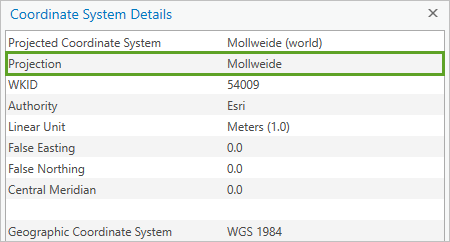
As its name implies, a PCS is a coordinate system. A projection is not a coordinate system; it’s an algorithm that is used to create a PCS.
What’s the difference between WKT and WKID?
These are both means of identifying coordinate systems, so you can be sure that you are using exactly the same parameters as someone else.
Well-Known Text (WKT) is a string that defines all necessary parameters of a coordinate system. Save a projection file (.prj) of any coordinate system and open it in a text editor to see its WKT.
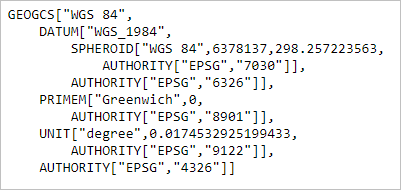
The Well-Known ID (WKID) is a unique number assigned to a coordinate system. You can find the WKID in the Coordinate Systems Details window. Once you know this number, it’s a handy way to search for the coordinate system later.
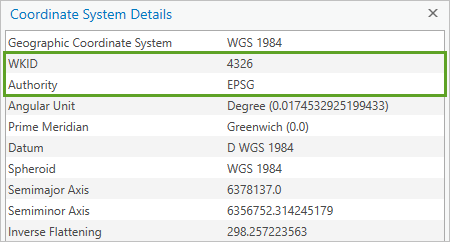
The authority of the WKID will either be EPSG (European Petroleum Survey Group) or Esri but these numbers don’t overlap, so there’s no need to worry about which authority defined the ID.
What’s the difference between the Define Projection tool and the Project tool?
The Define Projection tool is used mainly when data has an unknown coordinate system. It reassigns the coordinate system information in the metadata. It won’t change the actual coordinate values.
The Project tool converts all coordinates from one coordinate system to another. It also updates the metadata information.
To learn more, see Define Projection or Project?
What’s the difference between projection on the fly and geographic transformations?
Geographic transformations are one part of the projection on the fly process.
Projection on the fly is what ArcGIS does to resolve conflicts when your data is in a different coordinate system than your map. If you didn’t have projection on-the-fly, you wouldn’t be able to draw the data before first converting it to the same coordinate system as the map.
Whenever projection on the fly includes converting between geographic coordinate systems, the process will include geographic transformations. These are calculations that convert coordinates from one GCS to another. They are sometimes referred to as datum transformations.
You can choose which transformation to use. If your data uses a different GCS than your map, and you don’t use a geographic transformation, the data will draw in the wrong place.
To learn more, read Projection on the fly and geographic transformations.
What’s the difference between a spatial reference and a coordinate system?
There isn’t one. At least not in Esri products. The terms are used interchangeably.
You can watch the video Introducing Coordinate Systems and Map Projections to learn more about all of these terms and concepts. You can also read these other articles that I have written about coordinate systems:
- Geographic vs Projected Coordinate Systems
- Projection on the fly and geographic transformations
- Define Projection or Project?
- Transformation warning: What does it mean and what should I do?
Many thanks to Bojan Šavrič and Melita Kennedy for their help and support in writing this and other recent articles!



Excellent small series of blog posts about projections Heather!
Brief but really concise, clear and to the point. Should be of help to many.
Thank you very much!
This is excellent.
Thank you very much.
Just Perfect Heather
Hi,I am Mujuni Desdery ,Cartographer ,currently work with Geological Survey of Tanzania.
I have challenge on using both Geographical Coordinate System & Projected Coordinate System
Always I made Georeference Raster with GCS , I create a Layers with PCS ,(in
File Geodatabase).Finally at Layout stage I should display both GCS & PCS
There error on displaying both GCS & PCS on fixed final layout Map.Main displayed at GCS looks like miss or overlaping either Easting or Northing of GCS . but PCS looks perfect
Any one who experience this fatal, please help me to overcome it.
…May be I was thinking its ArcGIS layout ,its flat not curved as Original Latitude & Longitude line is..
Each Geological map coverage is 30 minutes both width & Length
Hi Mujuni,
This article about projection on the fly and transformations might help: https://www.esri.com/arcgis-blog/products/arcgis-pro/mapping/projection-on-the-fly-and-geographic-transformations/ It may be that a geographic transformation is not available or you need to use a different one.
I also recommend posting your question on GeoNet, where more people can see and respond: https://community.esri.com/groups/coordinate-reference-systems
Please include the coordinate system used by your map and each layer, and include a picture or two of the problem you are seeing.
Hi,
Great post for Coordinate System, just one comment for last section (What’s the difference between a spatial reference and a coordinate system?). Actually there are difference between them as follow:
– Spatial Reference for 2D data = Horizontal Projected Coordinate System +XY Resolution+ XY Tolerance
– Spatial Reference for 3D data = Horizontal Projected Coordinate System + XY Tolerance + Vertical Coordinate System + Z Resolution +Z Tolerance
based to this Documentation:
https://desktop.arcgis.com/en/arcmap/latest/manage-data/geodatabases/the-properties-of-a-spatial-reference.htm
Thanks,
Mohamed Magdy
Thanks for the informative article. Coordinate Systems and Projections are topics that we have to keep revisiting because they can be complicated and it is easy to forget some of the details. It is kind of like math in a way. You think you know it but when you dive in after a break you realize you don’t know it as well as you thought
Thank you for your hard working, Heather! It’s really great article 🙂
Hello everyone.
Thanks a lot for this beneficial article.
I just have a quick question. Should all the data and layers in a map have the same GCS and PCS? I have put together two layers in a map whit different GCS and PCS to see what happened and I am able to see both layers and apparently, it works well with the location.
Thanks a lot!
Sara
Hi Sara,
The short answer is yes: once you’ve decided which data to use, it’s best to use the Project tool to make sure all data layers and the map use the same coordinate system.
This answer is especially true if you’ll be doing any kind of spatial analysis. You can think of GIS analysis like a scientific experiment: you want to have full control over all of the variables, and the coordinate system is an important variable. Therefore, to have full confidence in your results, you should keep this variable consistent.
But in my opinion, if you’re simply visualizing data and not using any analysis tools, making sure everything is in the same coordinate system is not necessary. It’s still advisable though.
You can read my other article Projection on the fly and geographic transformations to learn more about this topic.
Thanks for your clear answer!