Part 2: Preparing for an ArcGIS Enterprise Deployment

Key Takeaways You’ll Get from Reading Part 2 of This Blog:
- Preparing for an ArcGIS Enterprise deployment entails an architecture review, content inventory, and migration planning.
- Esri and/or partners can support you in your journey of preparing for and undergoing an ArcGIS Enterprise deployment.
Introduction
As you learned in Part 1, it’s important to determine which environment best suits your organization’s needs, and that ArcGIS Enterprise and ArcGIS Online can work together in a hybrid environment.
In Part 2, learn how a successful ArcGIS Enterprise deployment requires planning and preparation to ensure a stable, scalable, and secure GIS foundation. Thoughtful planning before installation—such as assessing existing infrastructure, defining architecture and deployment patterns, and identifying security and integration needs—helps reduce risk and avoid costly rework later. By taking the time to prepare, organizations can ensure their ArcGIS Enterprise environment is well‑positioned to support current workflows, while remaining flexible enough to grow with future demands.
Esri’s ArcGIS Architecture Center provides comprehensive guidance on architecture and technology foundations, system requirements, and best practices. This resource should be your first stop for technical planning and troubleshooting. Additionally, review the ArcGIS Enterprise documentation for essentials on system architecture, deployment tools, security, operations, and sharing content.
Architecture Review
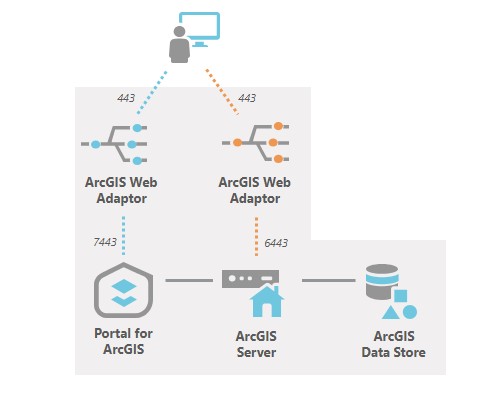
Before implementation, an architecture review helps ensure the proposed solution aligns with business objectives, technical standards, and operational realities, while proactively identifying risks related to scalability, performance, security, and integration. By validating architectural decisions early, you can move into deployment with greater confidence that the system will support both current needs and future growth.
An architecture review assists in identifying sizing requirements based upon your users and workloads, designing an appropriate deployment pattern, planning for integration points, and preparing for scalability. Review “Best practices for system architecture”; highlights below include:
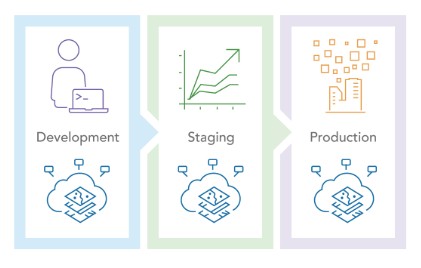
- Environment isolation: design your system to enable development and testing of new elements outside of the production environment
- Load balancing: include a load balancer component to improve server security, balance system use, and simplify service delivery
- Content delivery: consider the entire ArcGIS ecosystem and how you deliver content; separate operational and transactional users from public information users
- Workload separation: allocate workload traffic to appropriate server resources and isolate different geospatial functions based on resource use
Content Inventory
If you already have an existing ArcGIS organization, conducting a thorough inventory of your organization’s existing content is a foundational step in preparing for successful migration planning. By understanding what content exists—such as web maps, layers, apps, services, groups, and dependencies—organizations can make informed decisions about what should be migrated, retired, redesigned, or replaced. A comprehensive inventory helps uncover usage patterns, ownership gaps, data quality issues, and technical constraints, ensuring that migration efforts are aligned with business priorities and that the resulting ArcGIS Enterprise environment is purposeful, streamlined, and ready to support future workflows. There are a variety of avenues to consider when conducting a comprehensive inventory of content:
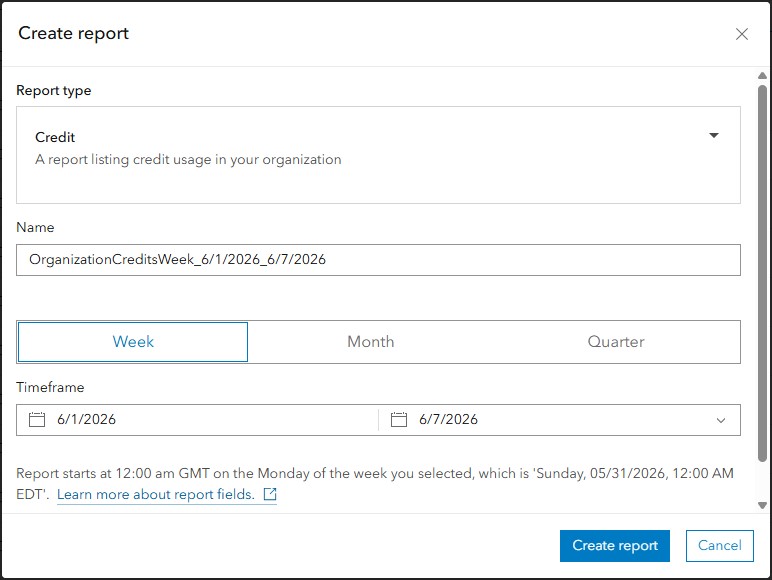
- Self-service tools: Use tools like dashboards and ArcGIS Online’s built-in reporting to assess your content
- Leverage partner tools: Deploy search and indexing solutions, from our partner network, to understand your content landscape
- Partner or Professional Services engagement: For large, complex environments, consultants can help inventory and assess your content
Migration Planning
Migrating from ArcGIS Online to ArcGIS Enterprise requires thoughtful planning, especially for project-based organizations like AEC’s (Architecture, Engineering, Construction and Environmental Consulting). The following are key elements to consider:
Content Triage
Not all content needs to migrate immediately or at all. Organize your content by priority:
- Active projects: Require immediate migration and careful testing to ensure no workflow disruption
- Upcoming projects: Can be migrated on a schedule before project kickoff
- Archive projects: May remain in ArcGIS Online or be archived offline to reduce migration complexity
- Mission critical projects: Cannot afford any downtime; require meticulous planning, redundancy, and potentially phased migration
Migration Strategies
There are different methodologies and workflows for moving content. Your migration strategy may consist of multiple methodologies, depending on amount of content, type of content, infrastructure and resources available.

Methodologies to consider include:
- Manual export and re-publish: for a small amount of data or applications that can be rebuilt quickly
- Scripting and automation: python scripts using ArcGIS API for Python can automate bulk migrations
- ArcGIS Assistant: web-based UI tool from Esri Professional Services that allows you to copy items between ArcGIS Online and ArcGIS Enterprise
- Third-party migration and backup tools such as GEO Jobe and CivicLens: commercial tools can facilitate content migration with varying degrees of automation

Challenges and Limitations
As you build a migration strategy and plan, be aware ArcGIS Enterprise may not be at parity with ArcGIS Online:
- Not all ArcGIS Online item types have direct ArcGIS Enterprise equivalents
- Application configurations may need adjustment when pointing to ArcGIS Enterprise services
- Authentication and security models differ, requiring reconfiguration
- Sharing and collaboration settings need to be recreated in ArcGIS Enterprise
Get Help
Many AEC firms will determine that performing a content inventory, planning for migration, performing the migration and/or deploying ArcGIS Enterprise requires resources and expertise outside of the firm itself. There are a variety of pathways to get help, including training materials, Esri Partners that specialize in these capabilities, as well as Esri Professional Services. If you think you may need help, reach out to your Account Manager to discuss options that can fit your specific needs.

Next Steps:
- Review Esri’s ArcGIS Architecture Center prior to deployment; get comfortable and familiar with the site and resources available.
- Perform an architecture review.
- Inventory your existing content.
- Plan for migration.
- Consider options, including Partners and Esri Professional Services, for an architecture review, migration planning, and jumpstart deployment.
In Summary
Preparing for an ArcGIS Enterprise deployment is ultimately about reducing risk and setting the organization up for long-term success. By investing time upfront in an architecture review, gaining a clear understanding of your existing content, engaging stakeholders through a jumpstart, and planning thoughtfully for migration, AEC firms can avoid common pitfalls and accelerate time to value. This preparation ensures that ArcGIS Enterprise is not just deployed, but purpose-built to support project teams, integrate with enterprise systems, and scale as business needs evolve. With a strong foundation in place, your GIS platform becomes a strategic asset—ready to support everything from day-to-day project delivery to enterprise-wide insight and innovation.
Stay tuned for Part 3 of this blog series: Managing & Maintaining ArcGIS Enterprise.