The Esri Developer & Technology Summit is almost here, showcasing the new 12.x generation of ArcGIS Enterprise. While this is far from an exhaustive list, here are a few ArcGIS Enterprise‑related themes and resources to help you navigate the agenda, spot sessions especially relevant to your work, and get the most out of your time in sunny Palm Springs, California.
Themes
ArcGIS Enterprise Extensibility
Explore how developers can extend ArcGIS Enterprise with the ArcGIS Enterprise SDK, APIs, services, automations, and custom applications. Here are a few sessions to check out.
- ArcGIS Enterprise: An Introduction for Developers – ArcGIS Enterprise provides comprehensive functionality for mapping, visualization, analytics, data management, and geospatial applications. It supports a wide range of users across different roles and professional backgrounds. Specifically for developers, it provides a robust launching point for automation, customization, extensibility, and app-building. This technical session covers an introduction to ArcGIS Enterprise and reviews the APIs that you can use to script and automate workflows, the ArcGIS Enterprise SDK for extending your deployment, and related products and components to take ArcGIS Enterprise to the next level.
- ArcGIS Enterprise: Server Object Extensions, Server Object Interceptors, and Service Interceptors – Discover how to extend ArcGIS Enterprise with advanced developer tools. This technical session introduces server object extensions (SOEs), server object interceptors (SOIs), and the new service interceptors—empowering you to add custom functionality, optimize performance, and enforce granular control over services. See practical demonstrations, learn integration strategies, and gain insights into building secure, scalable solutions tailored to organizational needs. Expect actionable guidance and real-world examples to elevate your ArcGIS Enterprise deployments.
- Extending ArcGIS Enterprise with Custom Data Feeds – Learn how to use powerful developer technologies to extend ArcGIS Enterprise. Custom data feeds will allow users to expose their data as an input for read-only feature services. Potential input data includes formats not natively supported by ArcGIS clients, without even needing to register it with ArcGIS Enterprise.
- Extending ArcGIS Enterprise with Webhooks – Learn how to extend ArcGIS Enterprise with webhooks that enable event-driven notifications based on organizational actions in the ArcGIS Enterprise portal, feature service changes, and geoprocessing service completion.
- Publishing Web Tools – Learn how to build, share, and run custom analytics as services with web tools across ArcGIS, starting from custom geoprocessing tools, notebooks, or analysis models.
- Increasing Productivity by Using ArcGIS Developer Tools to Build Applications – See how to use ArcGIS developer tools to increase productivity when building applications, including tools for creating developer credentials, managing data, creating layers, defining visualizations, and styling basemaps.
Architecture Patterns: Best Practices for Your Deployment
Modern GIS teams configure ArcGIS in many different ways—across cloud-native setups, hybrid environments, on-premises systems, and SaaS offerings. Use the week to explore architecture patterns and best practices that help you get the most out of your deployment, no matter how your ArcGIS Enterprise environment is configured. Here are some sessions that expand on this theme.
- ArcGIS Online and ArcGIS Enterprise: Deployment Patterns and Practices – This technical session explains how to choose the right deployment for your needs while highlighting hybrid patterns that leverage the strengths of each environment.
- Data integration: Streamlining Your Data Flow from Source to ArcGIS – Discover the most effective strategies for moving data between systems so you can streamline and modernize your data integration process.
- ArcGIS Notebooks: Automating Administration, Data Management, and Analysis – ArcGIS Notebooks in ArcGIS Online and ArcGIS Enterprise provide tools and automation capabilities for administrative, data management, and analysis workflows, and this session highlights techniques to help you streamline and orchestrate notebook-driven processes.
- Designing and Implementing Modern ArcGIS Systems – Learn how to use ArcGIS system patterns and apply architectural pillars to real-world designs so you can align with organizational goals and build a resilient, effective ArcGIS system.
- Architecture Diagramming for ArcGIS Systems – Documenting your architecture is essential for communicating design intent and ensuring long-term system success, and this demo theater presentation walks through architectures of different scopes and scales along with effective diagramming approaches and styles.
Kubernetes in Practice
See automatic recovery under real failure and learn how cloud-native services can support you and your organization. Relevant sessions are listed below.
- ArcGIS Enterprise on Kubernetes: Wreck It and Recover It – Live chaos scenario showing automatic recovery and minimal downtime
- ArcGIS in the Cloud: Demystifying SaaS, PaaS, Cloud, and Cloud-Native-Learn how ArcGIS Enterprise, ArcGIS Online, ArcGIS Pro, and ArcGIS Location Platform operate in the cloud to help you choose the right patterns for your organization.
Upgrading with Confidence
If you are planning your next ArcGIS Enterprise upgrade, use this opportunity to clarify your path forward and understand what is new in the software. Here are a few sessions to get you started.
- Upgrading ArcGIS Enterprise – Approach your next upgrade with confidence with this session covering practical steps before, during, and after an upgrade.
- ArcGIS Enterprise: The Road Ahead – Take a look at what’s coming across Windows, Linux, and Kubernetes so you can plan for the future.
- ArcGIS Enterprise: Low to No Downtime Upgrades – Discover how to upgrade ArcGIS Enterprise with minimal disruption using a blue-green deployment approach, including the step-by-step process, best practices, and key considerations.
Run Anywhere. Govern By Code.
ArcGIS Enterprise is optimized to run in the cloud, pair that flexibility with automation to achieve consistency, resilience, and speed. Whether you choose clicks or code, you get repeatable, secure deployments that integrate cloud services and scale with your organization. Here are a few sessions to help you get started.
- Automating ArcGIS System Deployments – Deploying ArcGIS systems at scale can be complex, but automation using Infrastructure as Code (IaC), DevOps practices, and Python scripting makes deployments faster and more consistent, with this session showcasing best practices and tools.
- ArcGIS Enterprise: Cloud Deployment Options and Cloud-Native Services – Discover how to automate ArcGIS Enterprise deployments in the cloud using Esri’s latest tools and learn how to leverage cloud-native services to support resilient, reliable, and cost-effective data management solutions.
Observability in ArcGIS
Observability is a critical pillar of a well-architected system, providing insight into how the system is running to ensure it is in a steady state and be able to respond efficiently if issues arise. Here are some sessions that cover this area.
- ArcGIS Enterprise Observability – Observability is a core pillar of the Well-Architected Framework, and this demo theater presentation introduces key observability concepts and patterns for ArcGIS Enterprise components.
- Enhancing Observability with ArcGIS Monitor: Turning Alerts into Action – See a real-world example of how ArcGIS Monitor was used to improve observability, interpret alerts, and turn telemetry into actionable insights.
- Enhancing System Insights through ArcGIS Monitor Integration – This user-led presentation highlights an observability-focused approach to system monitoring, sharing real-world benefits of integrating ArcGIS Monitor to improve visibility and operational performance.
Integrating Data with ArcGIS Enterprise
Data is the foundation of all mapping and analytics, making data integration a critical workflow for every organization using ArcGIS Enterprise. Here are a few sessions that offer additional context.
- ArcGIS Data Pipelines: Empowering Developers for Data Engineering – Learn about a new and exciting no-code data engineering application available in ArcGIS Online and now— ArcGIS Enterprise (beta).
- Data Integration: Streamlining Your Data Flow from Source to ArcGIS – Learn about the various strategies you can use to integrate data with ArcGIS Online and ArcGIS Enterprise.
- Extending ArcGIS Enterprise with Custom Data Feeds – For data sources that ArcGIS does not support natively, custom data feeds allow you to expose your data as an input for read-only feature services.
- Working with Hosted Feature Layer Views: Meet the needs of different audiences without duplicating data or compromising security.
- Web Editing with ArcGIS: Evaluating Your Options: A comprehensive session that details the various ways data can be edited in ArcGIS web applications.
- Version Management with ArcGIS: Learn about the technical details behind the branch versioning model that is used in ArcGIS Enterprise to support multi-user editing with conflict control using a geodatabase.
AI in ArcGIS
Look for sessions and demos that make GeoAI and assistants practical and actionable for GIS professionals, administrators, architects, and developers working on ArcGIS Enterprise. Here are a few sessions that highlight this topic.
- GeoAI with arcgis.learn – Learn how to integrate AI with the science of GIS using geospatial deep models through the arcgis.learn module in the ArcGIS API for Python and ArcGIS Pro.
- Agentic AI in ArcGIS: The Road Ahead – Explore how Esri is enabling the future of agentic GIS through Agent Builder, a new visual environment for creating geospatial agents, and the development of agentic mapping applications with ArcGIS Maps SDK for JavaScript.
- AI-Infused Development: Lessons Learned and Patterns from Esri Engineers – See how Esri engineers apply AI to improve code quality, speed up development and testing, streamline documentation, and spark new ideas, with practical guidance on tool recommendations, security considerations, and common AI-assisted development patterns.
- ArcGIS AI Assistants: Fundamentals – ArcGIS AI assistants use generative AI to streamline everyday ArcGIS workflows, and this session introduces the available assistants along with their roadmap.
- ArcGIS Maps SDKS for JavaScript: Building AI Assistants – Learn how to build an AI assistant for your web application using the emerging framework in the ArcGIS Maps SDK for JavaScript, leveraging built-in components, out-of-the-box workflows, and custom workflow definitions.
Useful Pre-Reads
Dive into ArcGIS Enterprise 11.5 before you delve into 12.0
Update to ArcGIS Enterprise Product Lifecycle
What’s New in ArcGIS Enterprise on 12.0
What’s New in ArcGIS Enterprise 12.0 on Kubernetes
ArcGIS Enterprise on Kubernetes: Is It For Me?
New in ArcGIS Enterprise 12.0: Service Inteceptors
Three Lenses of Observability with ArcGIS
Where to Find Us at the Conference
You can visit the ArcGIS Enterprise team at our showcase booth.
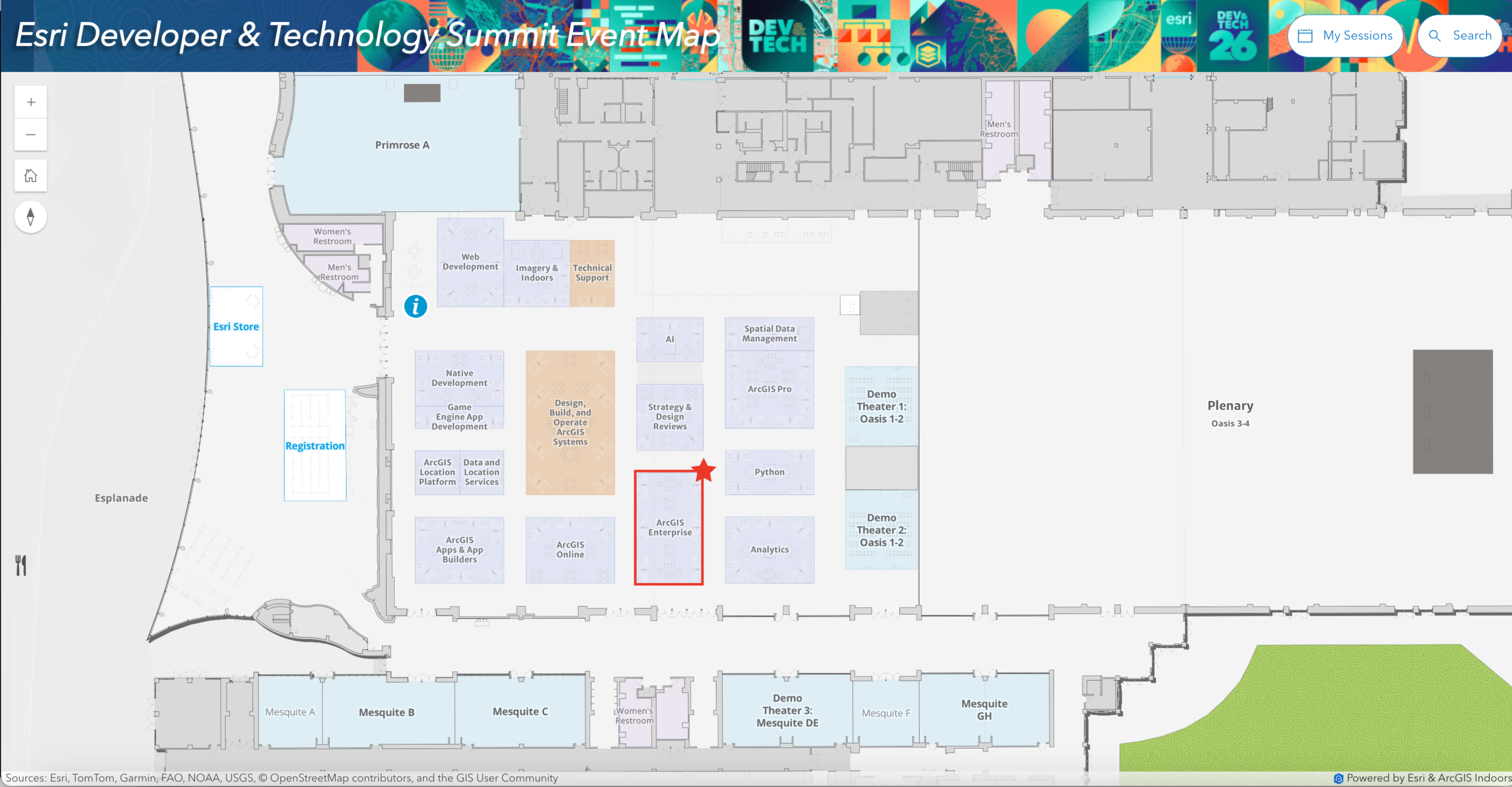
Expo hours:
- Tuesday, March 10: 1:00 p.m. – 6:00 p.m.
- Wednesday, March 11: 11:00 a.m. – 6:00 p.m.
- Thursday, March 12: 10:30 a.m. – 11:30 a.m. and 1:00 p.m. – 6:30 p.m.
In addition to our list, we encourage you to explore the full detailed agenda to see what other sessions might interest you and to check out our ArcGIS Enterprise Extensibility blog to learn more about how Enterprise can be extended. You can stay up to date on all things ArcGIS Enterprise at the 2026 Developer & Technology Summit by connecting with us on X or subscribing to the ArcGIS Enterprise newsletter. See you in Palm Springs!


Article Discussion: