ArcGIS Knowledge is an enterprise capability that brings knowledge graphs and graph analytics to ArcGIS Enterprise, desktop and web applications, and developer tools. Organizations and analysts can leverage knowledge graphs to map and fuse their enterprise data, spatial and nonspatial, together into networks on a shared ontology. Knowledge graphs unlock new insights through tools to explore indirect relationships, query to understand cascading impacts of decisions or disruptions, and to create smarter recommendations.
In this blog, you will discover the latest enhancements with ArcGIS Knowledge in May 2026 with the ArcGIS Enterprise 12.1 and ArcGIS Pro 3.7, and ArcGIS AllSource 1.6 releases.
Key highlights include:
- Access to advanced graph analytic capabilities with File Knowledge Graph support across ArcGIS Pro Advanced and ArcGIS AllSource – no Enterprise or Server licenses needed!
- Richer, more intuitive data editing in Knowledge Studio, including drawing relationships directly within link charts.
- Expanded web app integrations, bringing knowledge graphs deeper into Dashboards, Instant Apps, and StoryMaps.
- Enterprise knowledge graph replication and synchronization (initial release).
Quick Links
- ArcGIS Pro, ArcGIS AllSource and File Knowledge Graphs
- ArcGIS Knowledge Studio
- ArcGIS Enterprise & Knowledge Server
Let’s dive in and learn more!

ArcGIS Pro and ArcGIS AllSource
File Knowledge Graphs
Knowledge graph analysis built for the desktop, designed to work anywhere
A File Knowledge Graph is a new file-based format that lets analysts create, explore, and analyze knowledge graphs directly within ArcGIS desktop applications, available starting with ArcGIS Pro Advanced 3.7 and ArcGIS AllSource 1.6. GIS analysts can now get started quickly with advanced graph visualizations in link charts and maps, point-and-click analytic tools, and data integration and management capabilities—without requiring an ArcGIS Enterprise deployment or Knowledge Server license. With ArcGIS Professional Plus user type, Pro Advanced Standalone, or ArcGIS AllSource licensing, analysts can work with rich graph models locally while still using familiar desktop workflows.
As requirements grow, File Knowledge Graphs provide a clear path to scale into enterprise knowledge graphs with ArcGIS Enterprise. With Knowledge Server, organizations benefit from the multi-user collaboration and sharing features, the web analysis workbench Knowledge Studio and the ability to monitor for complex patterns in your data using the service driven architecture of ArcGIS Enterprise, among other features.
Existing users of ArcGIS Knowledge Server with ArcGIS Enterprise now also have a path to take graph analysis offline in disconnected or restricted environments where access to centralized services is limited. Future release will include more seamless integration options between File and Enterprise-based Knowledge Graphs.
Manage knowledge graphs with greater consistency and less manual effort
New geoprocessing tools and workflow enhancements help teams manage knowledge graphs with greater consistency and less manual effort. Tools such as Create File Knowledge Graph, Copy Knowledge Graph Types, and Export Enterprise Knowledge Graph within ArcGIS Pro and ArcGIS AllSource support standardized, repeatable workflows for creating, reusing, and moving graphs across local files and shared systems, in desktop workflows. Along with the geoprocessing tools from the previous release, users and data managers can leverage these tools in ModelBuilder to automate and streamline knowledge graph creation and management.

ArcGIS Knowledge Studio
Reduce friction between analysis and data editing by drawing entities and relationships
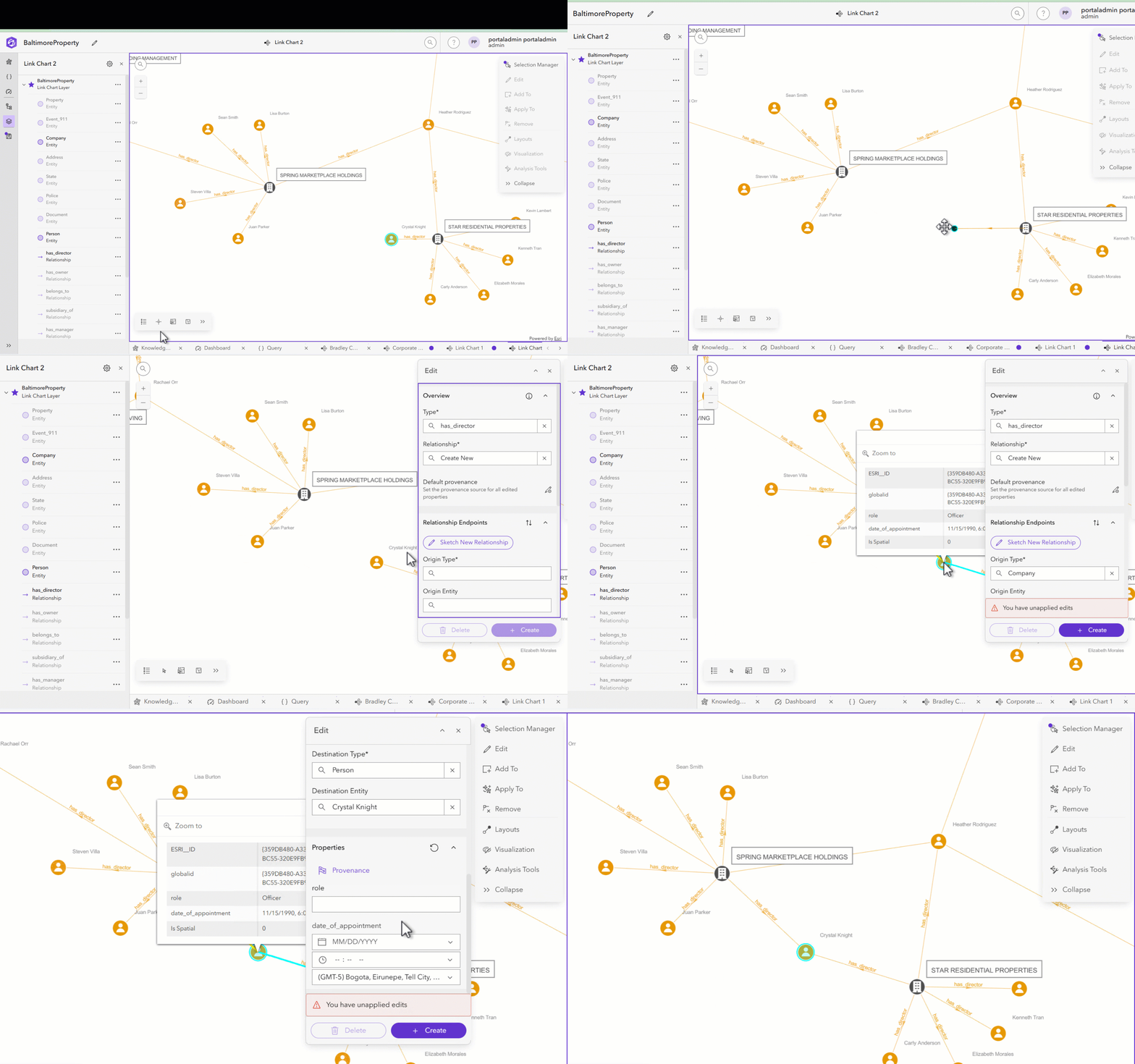
ArcGIS Knowledge Studio, the web app that accompanies ArcGIS Knowledge Server, introduces additional options for in-context editing directly within the browser. Analysts can now draw entities and relationships in Link Charts, edit domains including range and coded domains, update provenance, and refine geometry in map views, all within Knowledge Studio. This enables teams to curate, correct, and enrich graph data as questions emerge, move faster from insight to action, and maintain higher quality knowledge graphs.
Improve graph query exploration with syntax highlighting and charts
ArcGIS Knowledge Studio improves graph exploration by making it easier to write queries and understand results. The query experience is improved with syntax highlighting and autocomplete, helping you write and refine queries faster and with fewer errors.
To better interpret results, you can now preview query outputs as charts, making it easier to identify patterns, filter relevant entities and relationships, and add them directly to maps or link charts. Within link charts, new controls such as setting root nodes provide finer control over how results are visualized, supporting both new and advanced users as they explore graph data.
Enable consistent context on the web with custom overview cards
Custom overview cards allow teams to define how key entities and relationships are summarized, highlighting the most relevant information in a consistent, curated view. For example, a “person” entity could display a name, known associated, recent activity, and risk score, instead of a long list of fields.
These cards, created in ArcGIS Knowledge Server desktop investigation views, can now be used directly in ArcGIS Knowledge Studio when set as a default. This allows analysts to bring trusted summaries from desktop to the web, preserving context and reducing the need to recreate information when switching environments.

ArcGIS Enterprise
Share insights to stakeholders with ArcGIS Web app integrations
Enhancements with ArcGIS Dashboards, ArcGIS Instant Apps, and ArcGIS StoryMaps
Knowledge graph layers now integrate more deeply across ArcGIS web apps, making it easier for you to share graph–driven insights in focused experiences. ArcGIS Dashboards now officially supports knowledge graph layers in maps as well as graph queries in ArcGIS Arcade expressions as data sources for visualization and cross–filtering.
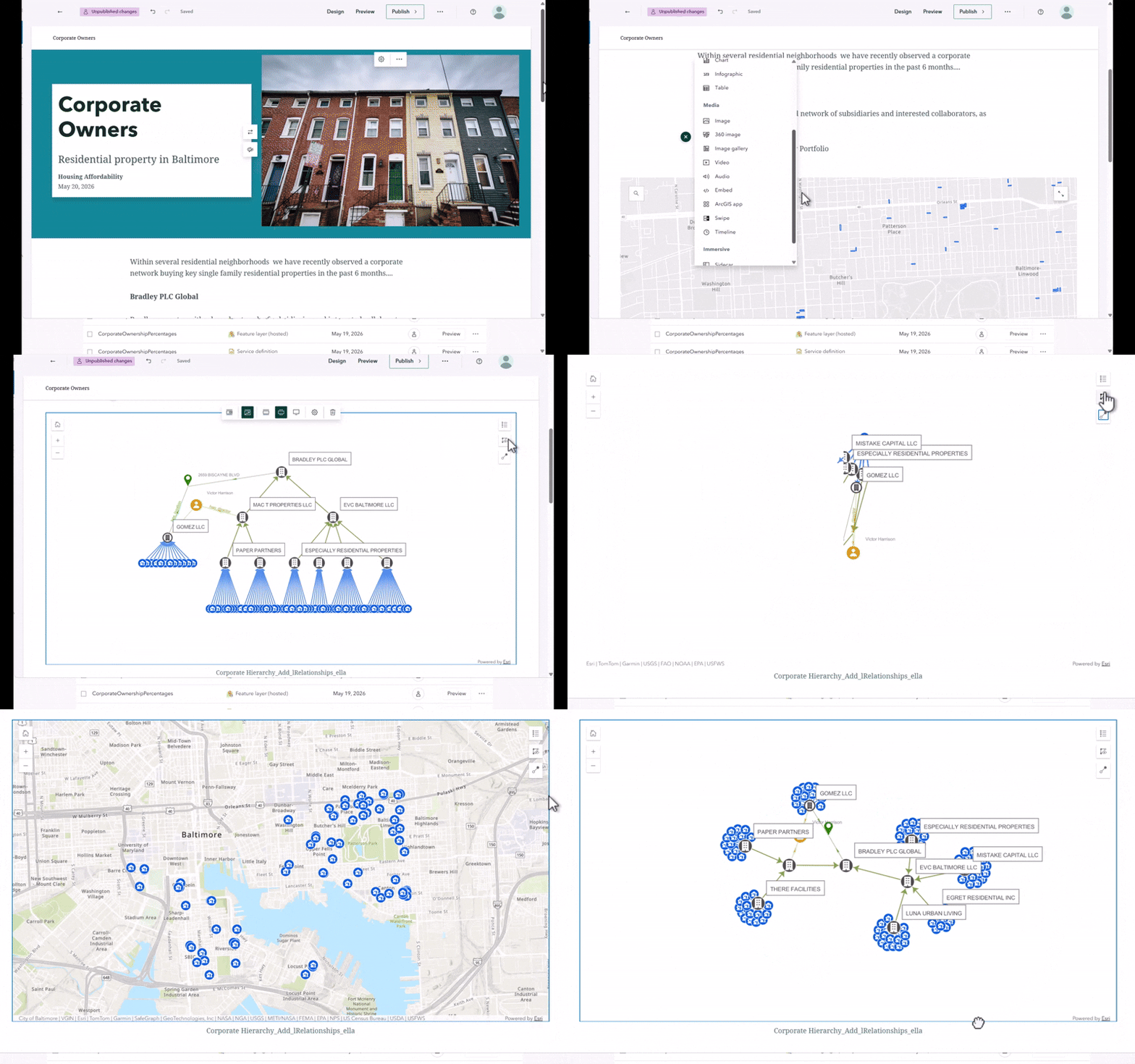
ArcGIS Instant Apps now lets users switch layouts and easily show or hide nonspatial features within the Media and Basic app templates. ArcGIS StoryMaps can now directly include link charts, enabling richer, more connected narratives. For example, an analyst can explore relationships in Knowledge Studio, publish a focused link chart for stakeholders, and immediately embed the same link chart in a StoryMap story to tell a clear, connected story more quickly.
ArcGIS Knowledge Server
Replicate and sync knowledge graphs across teams
Administrators, developers and knowledge graph content owners can now create replicas of knowledge graphs, as well as synchronize the data between two knowledge graphs, using one-way or two-way sync patterns. The new replication services allow organizations to copy and share focused subgraphs and keep sensitive data isolated. Replication is especially valuable in distributed environments where data spans multiple ArcGIS Enterprise deployments and insights depend on maintaining connected relationships across the full graph.
In this initial release, programmatic synchronization between parent graphs and replicas requires developer-built middleware to manage synchronization schedules. This means organizations must create their own scripts, services, or automation workflows to control how and when data is synced between graphs, as built-in scheduling and orchestration are not yet provided. For guidance, check out this blog on best practices for replication and sync. Tooling in ArcGIS applications for managing sync services will continue to be built out in future releases.
Learn more
More information about release versions
ArcGIS Knowledge releases coordinated features across with ArcGIS Enterprise web applications like Knowledge Studio, ensuring that new knowledge graph and analytic features are fully integrated across the platform. While ArcGIS Pro 3.7 and ArcGIS AllSource 1.6 are desktop applications with distinct release schedules and version numbers, these latest application versions are designed to complement the capabilities of ArcGIS Enterprise 12.1. Therefore, some features in 12.1 may not be available without the latest versions of these desktop applications. For the best experience, organizations upgrading to ArcGIS Enterprise 12.1 are encouraged to also update their desktop applications to ArcGIS Pro 3.7 or ArcGIS AllSource 1.6. Importantly, upgrading desktop software does not disrupt ongoing work with knowledge graph services powered by previous versions of ArcGIS Enterprise, allowing users to seamlessly leverage new features across both desktop and web environments.




Article Discussion: