The world’s largest gathering of geospatial professionals and technologists returns to San Diego, July 13-17, for the 2026 Esri User Conference (UC). This year’s conference theme, GIS—Creating a more intelligent world, highlights how geographic information system (GIS) technology is turning the science of “where” into shared understanding and coordinated action for smarter decisions.
Be a part of the Plenary Session on July 13 to hear Esri’s vision for creating a more intelligent world—one that understands itself through geography and acts with purpose. You’ll discover how ArcGIS is being enhanced with AI to accelerate insight, automate workflows, and broaden access for turning complex data into geographic intelligence, measurable impact, and actionable understanding.
If you’re working with BIM and CAD in ArcGIS or collaborating across architecture, engineering, and construction (AEC) project teams, UC 2026 offers a range of sessions to help you expand your knowledge, explore new workflows, and gain practical insights. This article highlights where to go, what to see, and how to maximize your experience this year.

Explore the UC Expo and Esri Showcase
ArcGIS offers robust integration capabilities with BIM and CAD data, enabling professionals to visualize, analyze, and manage design and construction information in geospatial context. If you are attending in person, stop by the AEC industry area in the Esri Showcase to learn more about BIM and CAD workflows, as well as ArcGIS and Autodesk integrations.
The UC Expo offers an excellent opportunity to engage with dozens of exhibitors like Autodesk and discover their GIS-powered products and services. Have a technical question or want to learn what’s new in ArcGIS? The Esri Showcase is where you can connect with hundreds of Esri experts at kiosks across product and industry areas. You can even take self-guided classes in our Learning Lab.
Explore the interactive UC 2026 map made with ArcGIS Indoors
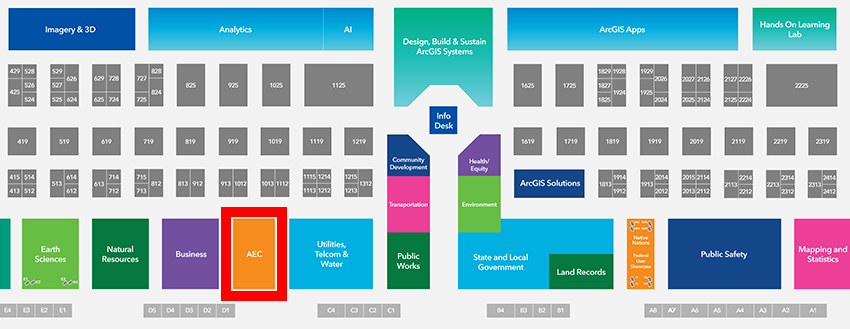
Explore BIM and CAD integrations in the AEC industry area
Join hundreds of other ArcGIS users visiting the AEC area of the Esri Showcase to connect with experts about how ArcGIS supports and enhances BIM and CAD workflows. You can also learn more about our ArcGIS and Autodesk integrations at dedicated product kiosks for ArcGIS GeoBIM, ArcGIS for AutoCAD, and ArcGIS for Autodesk Forma.
Discover the many ways to integrate BIM and CAD in ArcGIS, as well as connecting to other ArcGIS capabilities like field operations and more.
AEC Showcase hours
Tuesday, July 14 | 9:00 AM – 5:30 PM
Wednesday, July 15 | 9:00 AM – 5:30 PM
Thursday, July 16 | 9:00 AM – 4:00 PM
Highlighted sessions on integrating BIM and CAD
Below is a list of spotlighted sessions that were available in the UC 2026 agenda. For a more comprehensive view of all sessions offered, explore the detailed UC agenda or this curated agenda of sessions highlighting BIM and CAD integrations.
ArcGIS for AutoCAD: An Overview
Tuesday, July 14 | 10:00 – 11:00 am PDT
Wednesday, July 15 | 8:30 – 9:30 am PDT
ArcGIS for AutoCAD connects CAD and GIS professionals for information sharing and decision-making. Learn how this extension enables direct editing of GIS data and precise geolocation of drawings within Autodesk AutoCAD. Explore how it informs the design process with rich geospatial context and ensures that drawings are consumable within ArcGIS. Discover workflows that show how edits made in ArcGIS are fed back to AutoCAD, enabling teams using ArcGIS and AutoCAD to work with the same data synchronously.
ArcGIS for Autodesk Forma: Bringing GIS Context to Early Designs
Wednesday, July 15 | 11:30 am – 12:15 pm PDT
Bring real-world geospatial context into early designs. Architects and designers can access and visualize 3D GIS layers—for zoning, flood risk, and infrastructure—directly in ArcGIS for Autodesk Forma (Site Design) to support informed site analysis and design exploration. Using an example from Austin, Texas, learn how spatial context shapes better outcomes and how Esri and Autodesk collaborate on cloud interoperability.
ArcGIS GeoBIM: Optimizing BIM Workflows with 3D GIS
Thursday, July 16 | 4:00 – 5:00 pm PDT
ArcGIS GeoBIM helps design and engineering teams collaborate by bringing geospatial context from ArcGIS together with engineering and design content from Autodesk Forma (formerly Autodesk Construction Cloud). In this technical session, learn how teams can locate engineering documents in geographic context, create schedules that link construction activities to engineering documentation, visualize detailed 3D construction-site logistics, capture on-site observations with ArcGIS Field Maps, and communicate project progress through collaborative web applications.
ArcGIS Field Maps: Supporting Geotechnical Workflows
Wednesday, July 15 | 11:30 am – 12:15 pm PDT
Curious about how ArcGIS Field Maps streamlines data collection and manages workflows and resources? Join us to explore how, with Field Maps, you can transform your geotechnical workflows in linear infrastructure projects. Learn how to apply ArcGIS and its wealth of data for precise planning, from drilling geotechnical borings to setting soil sample locations. This presentation demonstrates enhanced navigation and stationing capabilities that empower teams to communicate effectively between field crews and office experts.
ArcGIS GeoBIM: Streamlining Success from Bid to Handoff
Thursday, July 16 | 11:30 – 12:30 pm PDT
Enhance project efficiency from the initial bid to the final handoff. By integrating geospatial data with BIM, you can improve collaboration, enhance data accuracy, and streamline workflows throughout the project life cycle. This presentation demonstrates how using ArcGIS GeoBIM can lead to significant cost savings, reduced project timelines, and improved stakeholder satisfaction.
ArcGIS Field Maps: Enhancing Design Collaboration from Field to Office
Thursday, July 16 | 2:30 – 3:30 pm PDT
Field and office teams are two sides of the same project story. Explore how GIS and BIM unite engineers, project managers, and field teams, empowering them to work with the same data using familiar tools. Discover new ways to coordinate construction tasks and share design data for AEC projects, and learn how ArcGIS Field Maps, ArcGIS Survey123, and Esri and Autodesk integrations support these workflows, enabling field-informed design, clearer data collection, faster delivery, and cost savings.
ArcGIS Pro: Autodesk Integration with the Esri System Using CAD and BIM Data
Tuesday, July 14 | 8:30 – 9:30 am PDT
Tuesday, July 14 | 4:00 – 5:00 pm PDT
Explore techniques for using Autodesk CAD and BIM data, such as Civil 3D files, to support your GIS workflows in ArcGIS Pro. Learn how to geoposition your data and convert it to a geodatabase for visualization, analysis, and publishing to ArcGIS Online for sharing with your organization.
ArcGIS: GIS-BIM Integration for Industry Foundation Classes
Tuesday, July 14 | 11:30 am – 12:15 pm PDT
Integrating BIM and GIS has become essential to bringing project content into real-world context. Explore how ArcGIS supports the international BIM standard Industry Foundation Classes (IFC). From best practices to live demonstrations, find out how ArcGIS brings spatial intelligence to open BIM exchanges, enabling data-driven decisions, improved collaboration across teams, and more efficient management of infrastructure throughout its life cycle.
ArcGIS Pro: Integrating BIM Data
Wednesday, July 15 | 1:00 – 1:45 pm PDT
ArcGIS Pro empowers architects, engineers, and GIS professionals to collaborate by integrating BIM data into a shared geospatial environment. With native support for Industry Foundation Classes (IFC) and Autodesk Revit files as feature layers, ArcGIS Pro enables seamless 3D visualization and access to rich attribute data. Discover how to create building scene layers, share models through interactive web scenes, and integrate BIM into GIS workflows earlier in design—bridging spatial analysis and design for clearer communication, smarter planning, and better decision-making.
Configuring ArcGIS for High-Accuracy Data Success in the Field and the Office
Thursday, July 16 | 1:00 – 2:00 pm PDT
It is no secret that high-accuracy data can now be collected in GIS, passed between platforms, and made accessible across project teams—but do you ever wonder how well your data’s spatial integrity handles challenges with projecting on the fly and other mysterious transformations? This technical session covers best practices for configuring ArcGIS for use in the office, the field, and across other platforms, such as Autodesk, giving your engineers, project managers, and builders the confidence that they need to make mission-critical decisions.
Join us at UC in-person or virtually
Register to attend UC in-person and experience it in full. Can’t make it to San Diego? Not a problem! Esri also gives you the option to register for digital access from wherever you are. You can also sign up to watch the plenary only at no-cost.




Article Discussion: