2025 saw the introduction of many improvements and new capabilities in ArcGIS Online and related products. Whether you’re making maps to respond to severe weather events, plan cities, increase resilience, fight wildfires, or improve your business, ArcGIS Online continues to evolve to better support your needs and activities.
It’s easy to overlook some of the changes and improvements that have occurred over the course of the past year, especially when you’re busy or don’t have time to explore all of the new capabilities in each update. As a refresher, here’s an overview of what’s been delivered with links to additional details.
The Top picks and Other highlights are subjective, so view the entire What’s New blog articles for each update (links are found in each section) to make your own picks and discover new features that you may have missed. Also be sure to view each update video, which highlights and demonstrates new features and capabilities.
Quick links
Use the links below to jump to sections of interest.
February 2025
Top picks
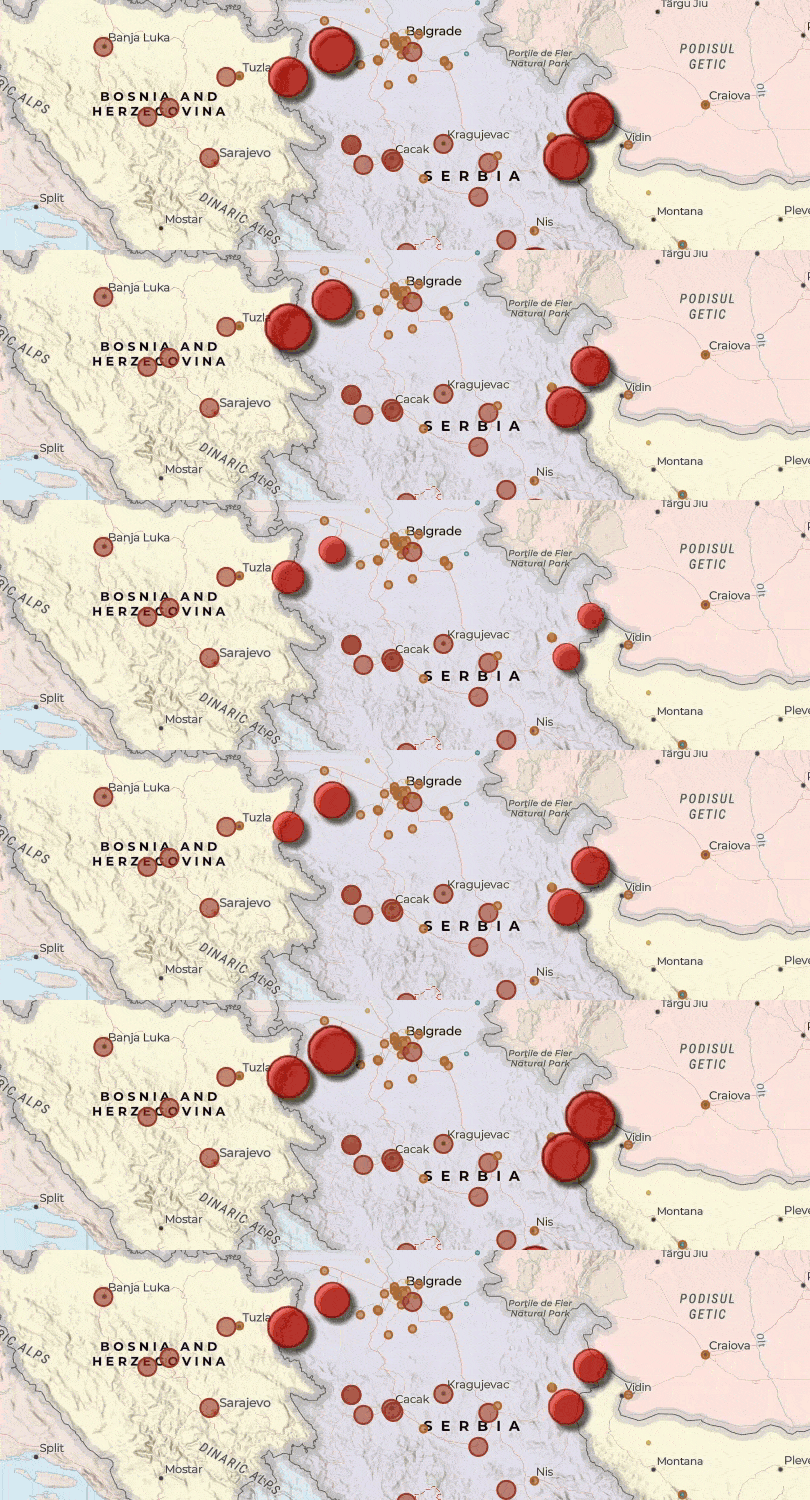
With the February 2025 update, the ability to style animated symbols is introduced. You can configure additional animation properties depending on the symbol type, including color transition, rotation, scale factor, size and transparency. These can be used to apply focus to specific points of interest with animated symbols that move on the map. For example, a map of air quality monitoring stations might use an animated circle symbol to draw the readers’ attention to places with the highest PM2.5 measures.
ModelBuilder is introduced, an interactive canvas for building analysis workflows using the analysis tools available in Map Viewer. Models are created by chaining together data and analysis tools into workflows, where the output of one tool becomes the input for another tool. These workflows can range from routine data management tasks to complex spatial analysis.
Experience Builder adds an Oriented Imagery Viewer widget, enabling users to create web apps that locate and display oriented images, such as non-nadir (oblique) or street view imagery. The capability to integrate non-mapping imagery, such as iPhone photos and 360-degree panoramas, enhances the user experience and increases efficiency, ensuring that all relevant data is accessible within a single web app.
ArcGIS Data Pipelines is introduced as a new native data integration capability in ArcGIS Online, offering a drag-and-drop visual diagramming interface for creating data integration workflows. You can connect to data, either from disk or in the cloud, use common engineering tools to easily clean and transform the data, and then write the processed results out to a hosted feature layer, ready for use across the ArcGIS system.
ArcGIS Dashboards enables users to convey information by presenting location-based analytics using intuitive and interactive data visualizations. Dashboards are used to help make decisions, visualize trends, monitor status in real time, and inform their communities. The February update adds dual-axis charts, element headers, and web analytics.
Content Store for ArcGIS is introduces, a new app for premium commercial satellite imagery that can be obtained from ArcGIS Marketplace. The app provides a single access point to high-quality, ready-to-use satellite imagery from multiple leading providers. Select an area of interest, choose dates, then review results before adding the desired imagery to the cart.
Other highlights
Select ArcGIS Living Atlas of the World imagery layers have been optimized for analysis. With the February 2025 update, Landsat Level-2, Sentinel-1 RTC, Sentinel-2 Level 2A, and NAIP imagery layers are supported. World Imagery is also available for automated information extraction in ArcGIS Pro. This workflow requires the Image Analyst extension and installation of the deep learning frameworks. For more information, see Learn to use AI to extract information from World Imagery.
ArcGIS Web Editor adds support for selecting multiple geographic features within the same feature class or layer and making batch edits to attributes. The update enables users to edit one or more attributes and have those edits applied to all features at once, helping save time and speed up editing workflows.
Sentinel-2 Explorer is the latest addition to the collection of Living Atlas apps, which leverage Living Atlas content in visually stunning apps for visualization and analysis. Sentinel-2 Explorer provides access to the full archive of Sentinel-2 Level-2A imagery, which offers greater spatial resolution and unique spectral capabilities for monitoring global land change associated with climate, urbanization, drought, wildfire, deforestation, and other natural processes, disasters, and human activity.
ArcGIS Instant Apps home page has been refreshed with an improved look and feel. App template cards have been streamlined to provide quick access to viewing samples, the app description, and item details.
All the details
What’s new in ArcGIS Online (February 2025)
What’s new February 2025 introductory video
All February 2025 update blog articles

June 2025
Top picks
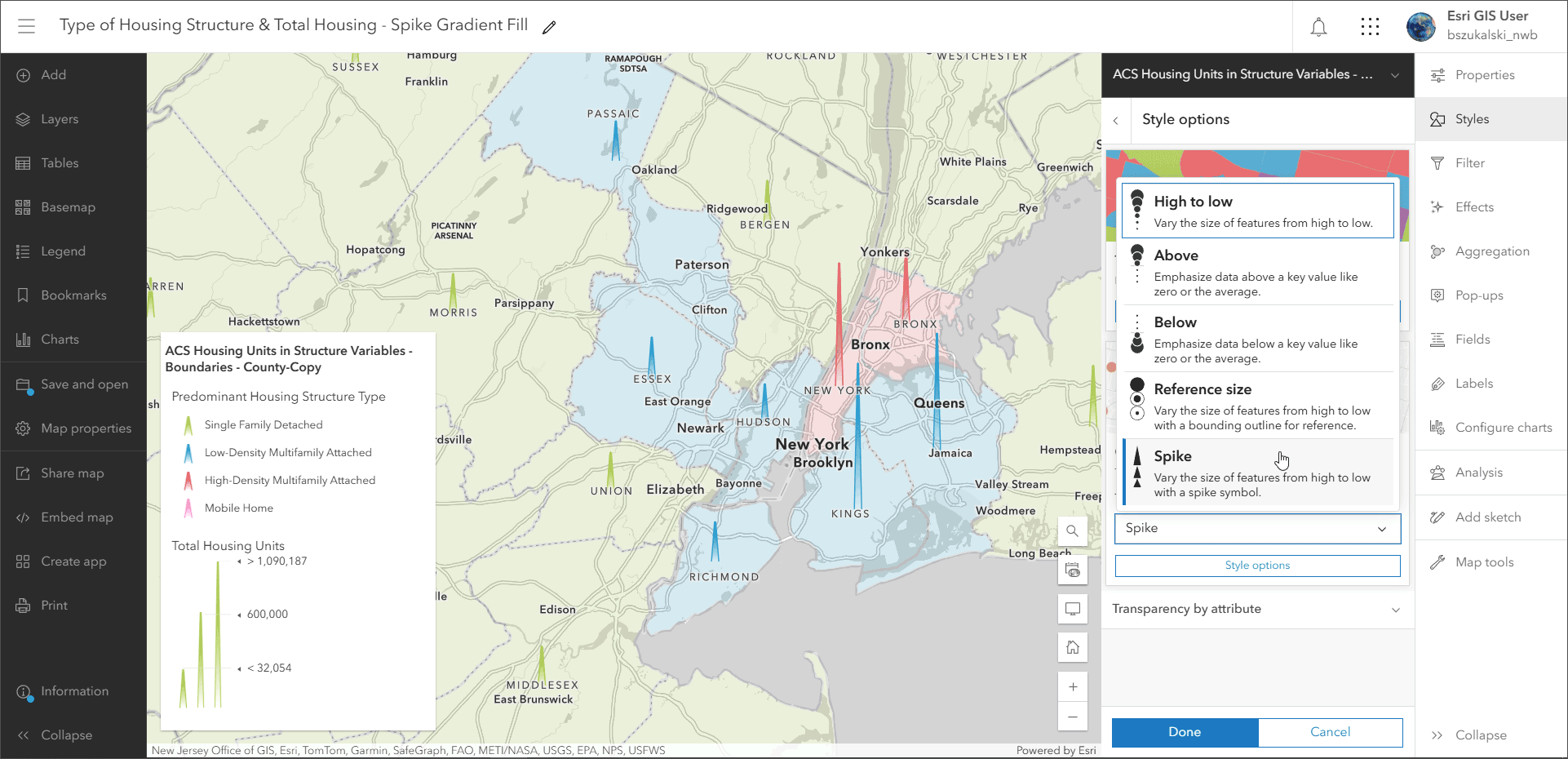
Proportional symbols can be visualized by height using a new smart mapping Spike theme. Upwards protruding spikes symbolize values and can be configured in a variety of ways. Smaller spikes indicate smaller values and taller spikes indicate larger values. You define the spike styling, including the spike shape and symbol style, and the threshold of what is considered high and low within the data range to show values in relation to one another.
Scene Viewer introduces focus areas, adding a new way to highlight your project area. Your project area is masked to emphasize certain details inside, while everything outside fades to the background. This helps to guide your audience’s attention to the right places and puts your work into focus. In addition, new 3D building data has been incorporated into the Scene Viewer basemap gallery for large parts of the world.
An Arcade assistant (beta) is introduced that helps in generating code to perform certain tasks using AI. For example, you can ask a question about your data or describe what you want to do and the assistant will generate the Arcade from your prompts. Other AI Assistants now available include ArcGIS Business Analyst Web App assistant, ArcGIS Survey 123 assistant, and ArcGIS Survey 123 and ArcGIS Instant Apps translation assistant.
ArcGIS Excalibur is web-based imagery and video analysis software for working with maps, images, and video services. Using Excalibur, you can annotate, mark up, and add observations or measurements to imagery with easy-to-use analysis tools and workflows. Previously only available for ArcGIS Enterprise, ArcGIS Excalibur is now in general availability for ArcGIS Online with this update.
ArcGIS StoryMaps introduces more than 30 flexible slide layouts for briefings, a new Infographic block, support for 360-degree images, and map tour enhancements.
Other highlights
Map Viewer supports adding layers using a new file drag-and-drop capability. Drag and drop files directly onto the map to initiate the New item workflow without going to My content or using Add layer.
ModelBuilder is out of beta and includes key enhancements. A new Filter by Attributes tool enables users to filter data and focus on the relevant features in their analysis workflows within the model. Filter by Attributes creates an output data variable of features that meet attribute criteria. A new view-only mode is also introduced, enabling users to understand what the model does and the processes and workflows behind them, without establishing a session and consuming credits.
ArcGIS GeoBIM delivers a connected data environment that seamlessly links architecture, engineering, and construction (AEC) information in Autodesk Construction Cloud with geospatial data and services in ArcGIS. This update streamlines GIS and BIM integration with simplified 3D models, expands flexibility for building custom web apps, and adds support for more file formats.
Metadata improvements include the synchronize option to sync attribute information (field name, display name (alias), field descriptions, field type, field length) to their metadata, streamlining metadata authoring. Dublin Core+ is added as a new metadata style.
When styling an imagery layer, processing template, or variable, you can now register your changes as a preset style, which allows you to switch between different layer visualizations. These visualizations can be configured in Map Viewer or ArcGIS Pro. Once saved, they can be selected and applied by anyone working with the map.
All the details
What’s new in ArcGIS Online (June 2025)
What’s new June 2025 introductory video
All June 2025 update blog articles
October 2025
Top picks
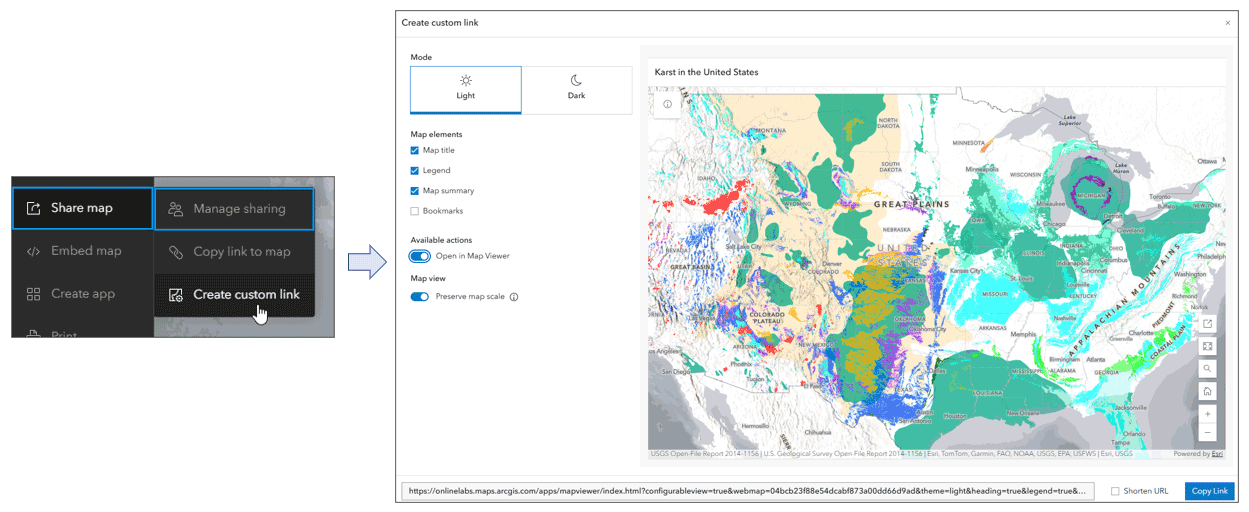
With the October 2025 update, you can easily share any map in Map Viewer using Copy link to map or Create custom link, a new option when sharing maps from the Contents (dark) toolbar. Copy link to map, introduced with the June update, creates a short link that preserves the map at its current extent and makes it easy to share the map with others using Map Viewer.
Create custom link, introduced in the October update, enables you to configure a simple viewing experience by choosing from a variety of options, such as including a legend, summary, bookmarks, preserving map scale, or using light or dark modes. This delivers an alternative to using app builders, providing a quick and easy way to share any map in a customized way. For more information, see Customize a simple view of your map.
Labeling has been enhanced with two new capabilities. Previously, when multiple labels on a map overlapped, Map Viewer would default to label deconfliction so that only one label is visible when they overlap. With this update, you now have more control over maps with the ability to expose all labels on a map by turning off label deconfliction. Also, using drag-and-drop ordering of label classes in a map, you can adjust how they are prioritized when they conflict. Label classes dragged to the top have priority over label classes below them.
You can now narrow search when adding layers in Map Viewer using folders and groups. A new drop-down list lets you select layers to add to your map from a specific folder or group, making it easier to find what you are looking for. When adding layers to your map from My Content, you can choose a folder from a drop-down list to filter for specific content. Similarly, when adding layers from My Groups, you can choose a group from a drop-down list.
Raster tile layer pop-ups are now supported. Pop-ups can be configured to work with tile layers by specifying a feature layer to associate with the tile layer. When you configure pop-ups for a raster tile layer, you will be prompted to choose a feature layer with relevant attributes, from which the pop-ups are derived. The pop-up panel populates using the referenced feature layer, and all feature layer configuration capabilities (including Arcade use and attachments) are enabled.
Scene Viewer introduces a new flow style. You can apply a flow style to imagery and tiled imagery layers that visualizes the flow of raster data that contains magnitude and direction. Visualizing raster dataset flows is useful in fields such as meteorology, climatology, hydrology, and oceanography. For example, you can use this style to display ocean or wind currents as streaming lines, in which the direction indicates the direction of flow; and the length, color, and speed of the flowlines indicate the magnitude, or power, of the current.
Other highlights
You can now add ArcGIS Hub content to maps directly in Map Viewer. Once you favorite one or more Hub sites, the option to search for content from Hub catalogs appears in the Add layer drop-down list. Select any catalog to search for layers to add to your map.
Google Photorealistic 3D basemaps (beta) are available in ArcGIS Pro (3.6) for named users connected to ArcGIS Online as their active portal. ArcGIS Online administrators can enable access to the Google basemaps in the Map and Scene section of the organization settings. The Google Photorealistic 3D basemap provides a three-dimensional mesh textured with high-resolution imagery. It will be available in Scene Viewer and other apps with 3D support in future updates.
ArcGIS Dashboards introduces several new enhancements. Dashboard authors can now use the Data sources panel in the action bar to access and review all data sources including maps, layers, and data expressions used in the dashboard in one centralized location. Authors can also quickly identify, replace, or repair broken data sources by reconnecting them to valid working data sources in the Data sources panel. Dashboard authors can now use a slider display type in the date selector, providing an intuitive interface for users to drag and select a specific date or date range for dashboard elements. The slider stays in sync with your data. Dashboard authors can also now customize the spacing of date axis labels in time series charts using the Compact, Default, and Spacious options.
All the details
What’s new in ArcGIS Online (October 2025)
What’s new October 2025 introductory video
All October 2025 update blog articles
More information
For more information, and to stay on top of announcements and forthcoming releases, see the following:
The year ahead
There are many new capabilities and incremental improvements that will be introduced throughout 2026. You can contribute your ideas and help prioritize what’s delivered by providing feedback via ArcGIS Ideas.

Article Discussion: