ArcGIS Pro 3.6 is here! We are excited to share the latest enhancements and features in ArcGIS Pro, all driven by your valuable feedback. We know how important it is to have reliable tools in your daily work, and the ArcGIS Pro team is committed to ensuring that. That’s why our priority for each release focuses on improving the performance and quality of the tools you know and use. Often, new features are implemented because of great ideas and feedback from our user community.
This release has some great features: Set a single time zone for your whole map, add layers to the legend from the context menu, and use a new tool to compare geodatabase schemas faster and easier. Let’s dive into what’s new and improved.
In a hurry? Watch this video for a quick overview.
Featured Links
Use the links below to jump to the release highlights that matter most to you:
- Map cross-regional data using a universal time zone
- Experience a redesigned ModelBuilder
- Access Calculate Field directly from the Attribute Table
- Get important product notifications in the app
- Right-click a layer and add it to your legend
- Compare geodatabase schemas faster and easier than ever
- Minimize errors in your ArcGIS Arcade expression
- Explore the world in detail with the Google Photorealistic 3D basemap (beta)
- Check out improvements to symbology
- Utilize Gaussian splats
- Export your selections with the click of a button
- Compare outputs from the Suitability Modeler
- Increase the length of database names and usernames

ArcGIS Pro 3.6 Highlights
Map cross-regional data using a universal time zone
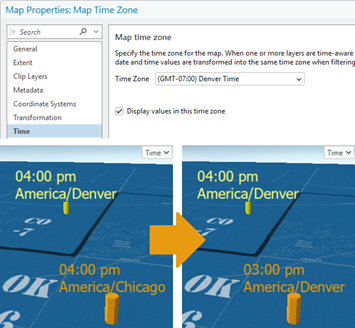
Eliminate the need to do time zone conversions in your head when working with data from different regions. You can now configure a single universal time zone for your whole map. By doing so, the time zone is reflected everywhere that data values are shown, and time is displayed accurately. That’s a big benefit when standardizing displays for temporal data from sources like sensor feeds and incident logs, helping you map with confidence.
Experience a redesigned ModelBuilder
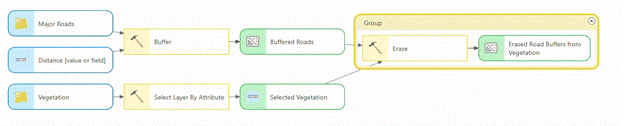
Leverage a redesigned ModelBuilder interface for improved usability, responsiveness, and layout clarity. This update ensures consistent and intuitive experience, whether you are building and managing models in ArcGIS Pro or ArcGIS Online. Learn more in this blog.
Access Calculate Field directly from the Attribute Table
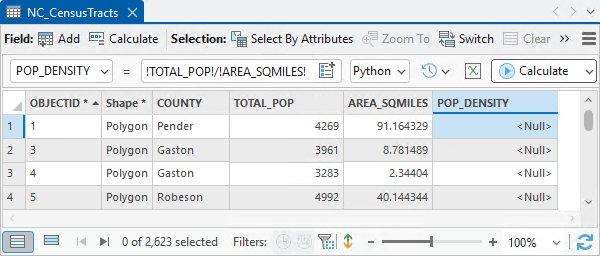
The day is finally here! You can now quickly edit your data without ever opening the Calculate Field geoprocessing tool. This is all thanks to a new Calculate Field toolbar conveniently located in the attribute table, enabling on-the-fly field calculations. Read the blog to learn more.
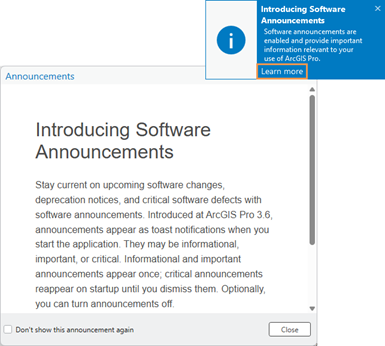
Get important product notifications in the app
We’ve made it easier than ever for you to get timely ArcGIS Pro information without needing to leave the application. Automatically receive updates about software changes, deprecation notices, and critical software defects with software announcements in ArcGIS Pro. Learn more about this change and how you can control software announcements options for your organization.
Right-click a layer and add it to your legend
Save time and customize your legend with a simple right-click. You’ve always been able to drag a layer into your legend. Now you can simply right-click and add it from the context menu without having to travel away from the Contents pane.
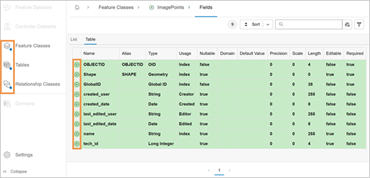
Compare geodatabase schemas faster and easier than ever
Introducing the Compare Schema tool. Instantly generate a dynamic HTML report to explore the differences between the schema of two geodatabases.
Minimize errors in your ArcGIS Arcade expression
Minimize syntax errors and reduce the need to consult documentation when coding with the updated Arcade code editor. New features in the editor such as code completion, in-line warning hints, and automatic formatting enable a significantly smoother Arcade expression writing experience.
Explore the world in detail with the Google Photorealistic 3D basemap (beta)
Access textured buildings and terrain anywhere on Earth with the Google Photorealistic 3D basemap. This beautiful new basemap is available as a beta release if you are connected to ArcGIS Online and your ArcGIS Organization Administrator enables the feature. Learn how to access the basemap.

Check out improvements to symbology
- Quickly search for, find, and select the perfect colors to bring your map to life: A new search function has been integrated into both the color scheme and color picker dialog boxes, allowing you to instantly and easily locate specific schemes or individual colors.
- Select features by clicking on the symbology class: Select features by their symbology class directly from the Contents pane. This enhancement provides a more intuitive and efficient way to interact with your data by enabling quicker and more direct selections.
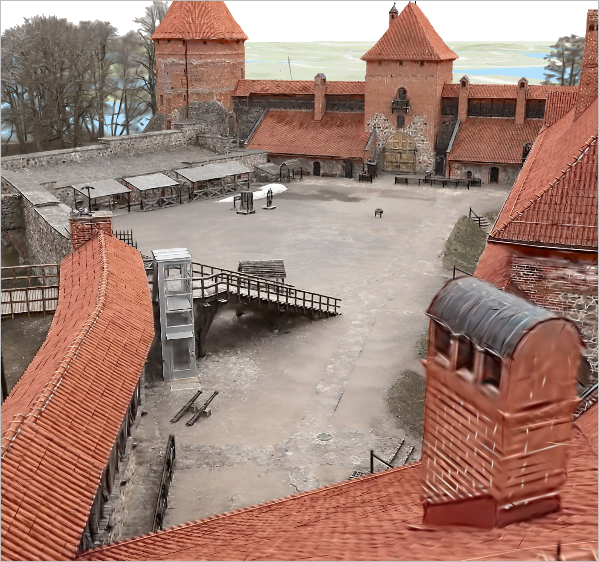
Utilize Gaussian splats
Provide highly realistic visualizations of complex geometry that can’t be achieved with traditional photogrammetric approaches. This new format comes georeferenced and can be clipped, measured, analyzed, and shared just like any other spatial dataset. Because they are analysis ready, the need for data duplication and format conversions is reduced, saving storage space. Learn more in this blog.
Export your selections with the click of a button
Saving your selection as a new dataset just got easier. The Select By Attributes and Select By Location tools, when opened in a floating window, now include an Export Selection button, which you can use to save a selection as a new dataset. This highly anticipated enhancement is designed to save you time and clicks.
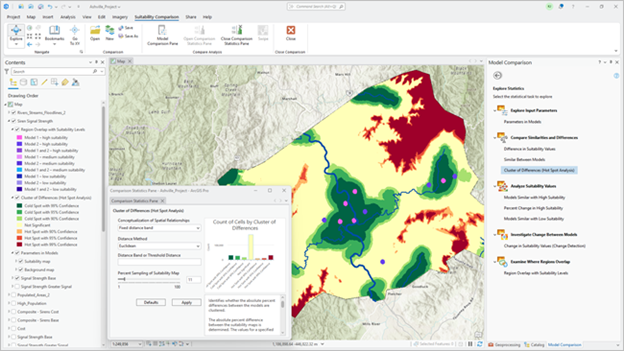
Compare outputs from the Suitability Modeler
Easily determine the best model for your analysis with the new comparison capability of the Suitability Modeler. Models help find the best location to site things or areas to preserve. By comparing models side by side, you can learn the impact on the analysis of choosing one model over another, enabling more informed site decisions.
Increase the length of database names and usernames
Enjoy greater naming flexibility in ArcGIS Pro 3.6. The previous restrictions on database and username lengths have been removed, allowing you to be more descriptive, stay organized, and use names up to the maximum size supported by your database system.
Do More with ArcGIS Pro:
Extensions and related products open new possibilities for workflows in ArcGIS Pro. With this release, many of our extensions and related products also bring exciting updates:
- What’s New in ArcGIS Aviation: The November 2025 release of ArcGIS Aviation Charting and ArcGIS Aviation Airports introduces enhancements to improve performance of efficient management of aeronautical data and visualization. Learn what else is new in this blog.
- What’s New in ArcGIS Bathymetry: The latest release of ArcGIS Bathymetry includes two new tools – Export To S-102 and Add S-102 Fields – in support of the new S-102 bathymetric surface product specification standard established by IHO. Read the blog to learn more.
- What’s New in ArcGIS Business Analyst Pro: Take your analysis and insights deeper with new additions to Business Analyst Pro like the Add Business Analyst Data utility, discover documentation for improved user education, and experience streamlined performance and accessibility improvements. Read the blog to learn more.
- What’s New in ArcGIS CAD/BIM: The November 2025 release of ArcGIS Pro 3.6 adds new capabilities that simplify georeferencing and expand direct-read support for Civil 3D and Revit content. These updates reduce manual steps and provide more complete representations of design data in your maps and scenes. Read the blog to learn more.
- What’s New in ArcGIS Data Reviewer: ArcGIS Data Reviewer introduces enhancements to automated data quality review, updates to error management, and improved support for visual reviews of workflows. It is the final release to support workflows reliant on Data Reviewer’s Reviewer workspace error management capability. Read the blog to learn more.
- What’s New in Imagery: This release brings features designed to enhance your imagery analysis, making even the most intricate tasks more efficient. Key improvements include improved quality of AI training samples, simplified processes for identifying materials or objects in hyperspectral imagery, and the ability to monitor key areas by navigating through a set of oriented imagery. Read the blog the learn more. Read the blog to learn more.
- What’s New in ArcGIS IPS: The Q4 2025 release of ArcGIS IPS includes enhancements to geometry-aided indoor positioning, resulting in reduced blue dot lags and elimination of micro movements when standing still.
- What’s New in ArcGIS Indoors: The Q4 2025 release of ArcGIS Indoors includes the ability to import floor plans from Revit files, and extract floor plan features from PDF as well as extract 360° photos from a 360° video, and more.
- What’s New in ArcGIS Spatial Analyst: Spatial Analyst in ArcGIS Pro 3.6 features a new capability for comparing Suitability models, five new tools, and improved parallelization and GPU support for certain tools. Read the blog to learn more.
- What’s New in ArcGIS Workflow Manager: Workflow Manager users within ArcGIS Pro can now access the job properties while running a job step via a new view that shows both the job card and all property tabs in the Workflow Manager pane.
Where to Go from Here
This is a glimpse of how we’ve improved the tools you trust, while adding many new capabilities to help you get more done in ArcGIS Pro. Visit the ArcGIS Pro help documentation to explore all the new features. Happy mapping!
Shape the Future of ArcGIS Pro
Don’t forget that ArcGIS Pro is built on feedback from users like you. Here are the many ways you can participate.
- Join the ArcGIS Pro Community – Connect with GIS users, ask questions, and get inspired.
- Join our Early Adopter Community (EAC) – Test what’s new for ArcGIS Pro and provide feedback.
- Participate in the ArcGIS Pro AI Assistant EAC – Test the AI-powered ArcGIS Pro assistant in beta, designed to streamline workflows with natural language queries, SQL generation, and tailored help documentation.
Stay Connected
Follow us at ArcGIS Pro on X (formerly Twitter), ArcGIS Pro on Facebook, and join our LinkedIn group for the latest tips and resources. Want updates delivered to your inbox? Subscribe to the ArcGIS Pro newsletter our next edition arrives this December.





Commenting is not enabled for this article.